A checklist is a gift to a tired brain. In the first month of a new business, your head is full of a dozen half-finished jobs, and the scariest feeling is not the work itself. It is the nagging sense that you have forgotten something important.
This new business checklist for the first month groups every early task by area: decisions, legal setup, money, pricing, tools, marketing, customers, records and your own wellbeing. Tick what is done. Circle what is next. Cross out what does not apply. By the end of the month you will see at a glance where you stand, which is a calming thing in a noisy season.
It works for service businesses, product sellers and online shops in the US. Some items depend on your state or industry, so treat them as prompts to check, not legal advice.
Quick picks to keep the checklist moving
| Product | Best for | Price | Link |
|---|---|---|---|
| Business HQ Undated Small Business Planner | Daily and weekly pages for the first month | $3.95 | View |
| Orchid Business Hub | One-page business plan, goals and budget | $6.99 | View |
| Keystone Business Hub | Clients, quotes, invoices and bookkeeping | $6.99 | View |
How to use this checklist
Do not try to tick everything in week one. Read the whole list once, then mark each item with a week number from 1 to 4. Heavy items like registration go early because they take time to come back. Light items like ordering business cards can wait.
Print it, or copy it into your planner. Keep it somewhere you see daily. A list on the fridge next to the coffee gets more attention than a file buried on a laptop. And give yourself a small reward every time a whole section is ticked. A slice of cake for “Legal setup” done is entirely reasonable.
Section 1: Core decisions
These shape everything else. If any of them are fuzzy, sort them first.
- Write one sentence describing exactly what you sell.
- Name your main type of customer.
- Choose your business name and check it is available.
- Decide your working hours for this month.
- Set one money goal for the month, even a small one.
- Write a one-page plan: offer, customer, price, channels, costs, goal.
A florist starting from her garage might write: “Weekly flower subscriptions for offices and cafes within five miles, delivered Monday mornings.” That single line answers a lot of later questions, from what to post online to which cooler to buy.
A spreadsheet that holds your one-page plan next to your goals and budget makes this section quick to finish and easy to revisit.
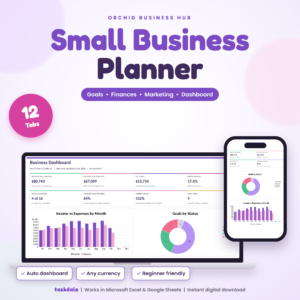
Orchid Business Hub
Price: $6.99 | Best for: owners who like plans and numbers together
A 12-tab Excel and Google Sheets planner with a one-page business plan, goals and tasks, a budget, income and expense logs, a monthly profit and loss and a marketing tracker, all feeding a dashboard with live numbers and charts. It arrives blank, ready for your business. Fill in the one-page plan and your first month’s goal, then enter your expected monthly costs on the budget tab.
Section 2: Legal and registration
These items have waiting times, so start them in week one even if they finish in week three.
- Choose a structure: sole proprietor, LLC or another option. Ask an accountant if unsure.
- Register your business or file a DBA if trading under a different name.
- Get an EIN from the IRS if your structure or plans need one.
- Check for a local business license or home business permit.
- Apply for a sales tax permit if you sell taxable goods.
- Check industry rules: food handling, cosmetics, childcare, trades licensing.
- Get quotes for liability insurance and choose a policy.
- Draft simple terms: deposits, cancellations, payment due dates.
Write the date you applied for each one and the expected answer date. When the mail arrives, you will know exactly which box to tick.
If a form asks a question you cannot answer, do not guess and do not stall for a week. Call the office that issues it. Clerks at city and county offices answer the same questions every day, and a five-minute call often clears up what an hour of reading could not.
Section 3: Money and banking
Getting money right from day one is far easier than untangling it in April.
- Open a separate business bank account.
- Set up a way to take payments: card reader, payment links or invoices.
- Open a savings pot for tax and decide what share of each payment goes in.
- List every startup cost so far and keep the receipts.
- List your monthly running costs: phone, software, insurance, fuel, rent.
- Work out your monthly break-even: the sales needed to cover running costs.
Say your running costs are $650 a month and your average job leaves $65 after materials. You need ten jobs a month just to break even. That number is worth writing in big letters on the checklist.
Section 4: Pricing and quotes
- Work out the true cost of your main product or service, including your time.
- Check five similar sellers to see where your price sits.
- Write a simple price list with two or three options.
- Create a quote template and an invoice template.
- Decide your payment terms, such as due in 14 days, or a 30% deposit.
A clear quote wins more jobs than a vague one. Our guide on how to write a price quote shows what to include, with an example.
Three options work well for most new businesses: a basic, a standard and a premium. Many buyers pick the middle one, and the premium option makes it look like good value. A pet sitter might offer a 20-minute drop-in, a 45-minute visit with a walk, and an overnight stay.
Section 5: Tools and systems
Keep this small. Every tool you add is one more thing to learn and pay for.
- Choose one place to log income and expenses.
- Choose one place to track clients and leads.
- Set up a business email address.
- Create a folder system: receipts, contracts, invoices, photos.
- Back up your files somewhere other than your laptop.
- Pick one planner, paper or digital, for daily tasks.
Before you sign up for any monthly software, ask whether a spreadsheet would do the job for now. Five small subscriptions at $15 each are $900 a year, which is a lot of money for a business still finding its first customers.
Linking the client list, quotes and invoices in one place stops you typing the same details three times.
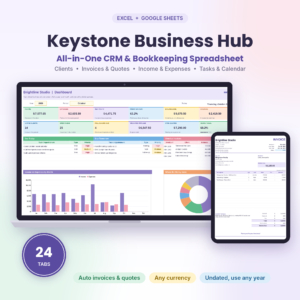
Keystone Business Hub
Price: $6.99 | Best for: new service businesses
A 24-tab Excel and Google Sheets workbook with a client CRM, leads pipeline, quotes and invoices built from your own price list, income and expense logs, tasks, a month calendar and reports. Recording a payment marks the invoice paid and updates the client balance. A quarterly tax set-aside planner is included. Enter your price list first, then your first five contacts.
Section 6: Marketing basics
- Create a free business profile on search and maps if you serve a local area.
- Set up one or two social profiles with the same name and photo.
- Write a short bio: what you do, who for, where, how to book.
- Take ten good photos of your work, product or workspace.
- Make a simple one-page website or link page.
- Order a small batch of business cards or flyers, if useful for your trade.
- Plan your first two weeks of posts.
Do not wait for a perfect logo before you start posting. A clean photo and a clear sentence get more inquiries than a fancy design no one sees.
Section 7: First customers
- List 30 people you know and tell them what you now offer.
- Ask five of them for an introduction to someone who might need it.
- Post your launch in one or two local or niche groups.
- Choose a small launch offer with an end date.
- Follow up every inquiry within 24 hours.
- Ask your first customers for a review and a referral.
Your first customer is a big moment. Write their name down somewhere. Many owners still remember theirs years later, and the memory helps on the slow days.
Section 8: Records and tax habits
- Snap a photo of every receipt the day you get it.
- Update your money log twice a week.
- Mark invoices as paid when the money lands.
- Move the tax share to savings each time you are paid.
- Note your mileage if you drive for work.
- Find out your estimated tax payment dates for the year.
Ten minutes on Tuesday and Friday is enough. The owners who dread tax season are usually the ones who left everything for a single weekend in March.
Section 9: Look after yourself
This section gets skipped, and it should not. Burning out in month one helps nobody.
- Set a finish time for most working days.
- Keep one day a week mostly free from business tasks.
- Tell family or housemates your working hours.
- Find one other business owner to swap notes with.
- Write down one small win each week.
A short daily planning page helps protect your time. It shows you what really needs doing today and lets the rest wait without guilt.
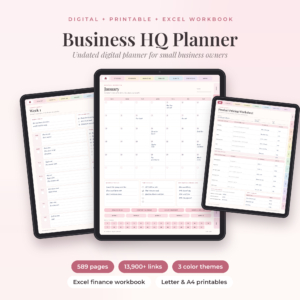
Business HQ Undated Small Business Planner
Price: $3.95 | Best for: owners juggling many small tasks
An undated hyperlinked digital planner for GoodNotes and similar apps, plus printable US Letter and A4 pages and an Excel finance and pricing workbook. It has sections for strategy, products, pricing, marketing, money and clients, monthly and weekly pages and daily to-do pages, with a short prompt under every box. Copy this checklist onto your first monthly page, then use the daily pages to pick three jobs each day.
The whole month on one page
If you prefer a week-by-week view, here is how the sections usually fall.
| Week | Main focus | Sections |
|---|---|---|
| 1 | Decide and apply | Core decisions, start legal and registration |
| 2 | Money and prices | Bank account, payments, pricing, quote and invoice templates |
| 3 | Systems and visibility | Tools, business profiles, photos, first posts |
| 4 | Customers and habits | Outreach, launch offer, records routine, review |
If you are building around a day job, stretch each week to two. The order still works. For a fuller walk-through of the same month, our guide to starting a business in your first 30 days explains the reasoning behind each step.
First-month slip-ups to watch for
Even with a list, a few traps catch most new owners. Knowing them in advance makes them easier to dodge.
- Doing the fun jobs first. Logo sketches and Instagram grids feel productive while the bank account still is not open. Tackle one dull item before each fun one.
- Saying yes to every inquiry. A job outside your offer, at a price you did not plan, can eat a whole week. It is fine to say “that is not something I do yet”.
- Not following up. Plenty of first-month sales are lost simply because a quote went out and nobody checked back three days later.
- Letting receipts pile up. A shoebox of crumpled paper in month one becomes a lost weekend in month twelve.
Section 10: End-of-month review
On the last day of the month, block an hour. Go through the checklist and answer these questions in writing.
- Which sections are fully ticked?
- Which items are still waiting on someone else?
- How much money came in, and how much went out?
- How many customers paid, and how did they find you?
- What will you carry into month two?
Then make a fresh, shorter list for next month. Month two’s list is always lighter, because so many one-off jobs are behind you. That alone feels like progress.
Frequently asked questions
What should I do in the first month of starting a business?
Make the core decisions, start registrations, open a business bank account, set your prices, set up simple records and find your first customers. The checklist above groups these into sections.
Do I need an EIN for a new small business?
It depends on your structure and plans, such as forming an LLC or hiring staff. Many owners get one anyway to keep their Social Security number off forms. Check the IRS guidance for your situation.
What business licenses do I need?
It varies by state, city and industry. Check your state and city websites, and ask about permits for home businesses, food, trades and sales tax.
How much should I set aside for taxes as a new business?
Many owners set aside a fixed share of every payment. The right amount depends on your income and location, so a quick chat with an accountant is worth it.
What can wait until after the first month?
A custom website, paid ads, large stock orders, premium software and expensive branding can usually wait until you have paying customers.
Is it normal to feel overwhelmed in the first month?
Very. Breaking the work into sections and ticking items off one by one is one of the best ways to calm that feeling.
Your next step
Copy the ten sections onto paper or into your planner and give each item a week number. Then tick off one quick item today, so the list starts moving. If you want a planner with daily and weekly pages to hold it all, try the Business HQ Undated Small Business Planner.