

Brightmind Life OS: The All-in-One ADHD Life Planner App
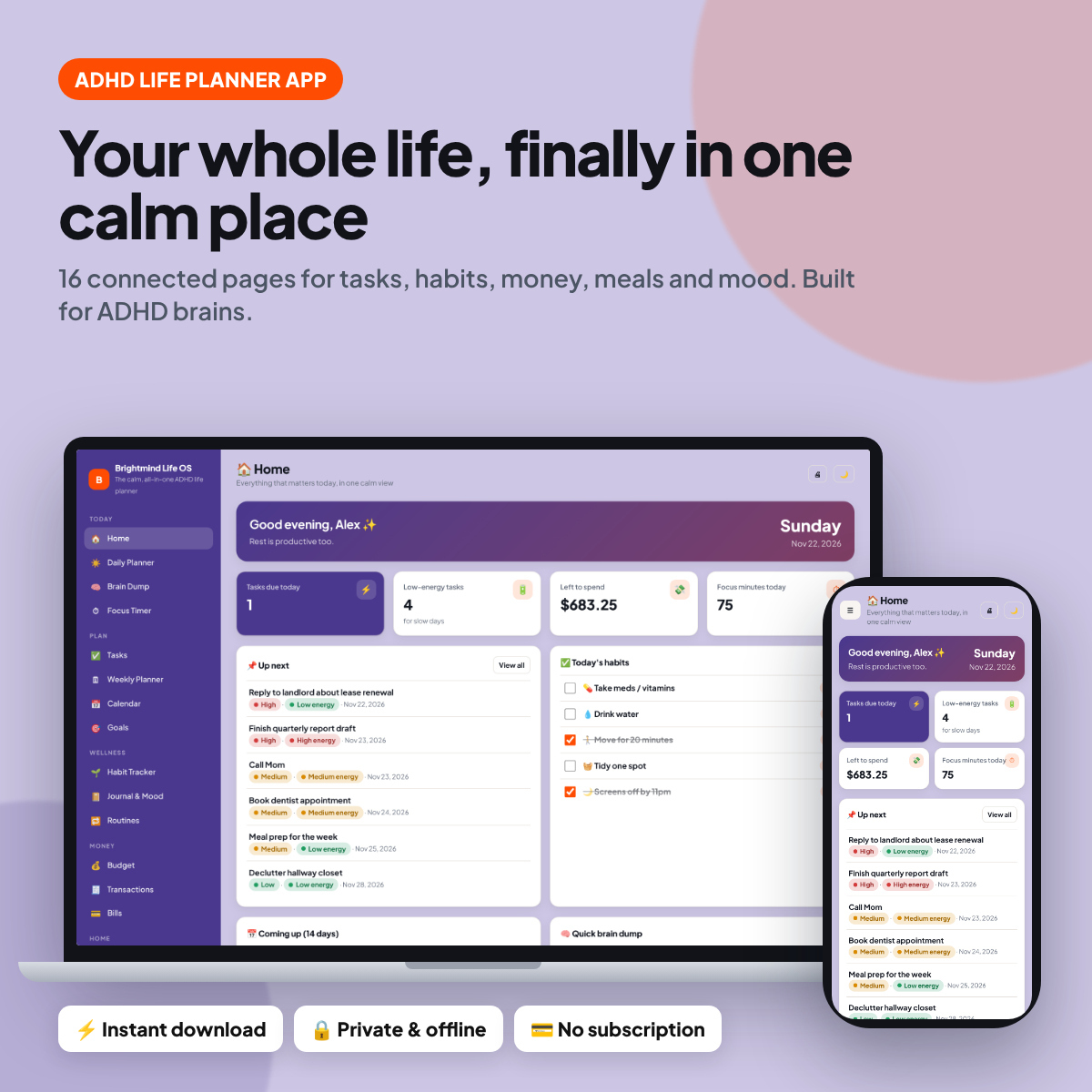
Most planners assume you have the same energy, focus and memory every day. Brightmind Life OS is an ADHD life planner app built for real ADHD days: the hyperfocused ones, the scattered ones and the “I can only do one small thing” ones. It brings your tasks, calendar, habits, budget, bills, meals, journal and routines into one calm, connected digital planner that opens right in your browser.
Start on the Home dashboard to see what’s due today, your habits, what’s left to spend and what’s coming up in the next two weeks. When your head is full, use the Brain Dump to capture everything, then turn any note into a task in one click. Tag every task with an energy level, so on low days you can filter to the easy wins and still move forward.
Unlike printable or spreadsheet planners, every number in this all-in-one ADHD planner updates by itself: budget totals, safe-to-spend per day, habit scores, focus minutes and goal progress. There’s nothing to set up and no formulas to break.
Who this ADHD life planner app is for
- Adults with ADHD or AuDHD who need structure without rigid schedules
- Anyone who has bounced between apps, notebooks and sticky notes
- Busy parents juggling home, work and money
- Students and freelancers who struggle with time blindness
- People who want a private, offline digital planner with no subscription
Main benefits
- Less overwhelm, more done
- Tasks matched to your energy
- Money stress made visible
- Works offline and private
- No account or subscription
- Phone, tablet & desktop layouts
- Dark mode for late nights
- Sample data to learn fast
Features of the ADHD life planner app
- Home: Your overview: today's tasks, habits, money and what's coming up.
- Daily Planner: Plan one day at a time with a top-3 focus, schedule, to-dos, water and mood.
- Brain Dump: Capture every thought as a sticky note, then turn any note into a task.
- Focus Timer: Work in short focus sprints with breaks, and see your focused minutes add up.
- Tasks: Every task with priority, energy level, due date and subtasks. Board, table and calendar views.
- Weekly Planner: A seven-day spread with a weekly focus, wins and notes.
- Calendar: A monthly calendar that pulls in tasks, bills, birthdays and goal dates.
- Goals: Set goals by life area, add milestones and watch progress fill up.
- Habit Tracker: Track daily habits on a monthly grid with streaks and monthly scores.
- Journal & Mood: Daily journal entries with mood, energy and gratitude, plus a mood chart.
- Routines: Reusable routine checklists you can reset each day.
- Budget: Monthly spending plan with planned vs. actual, left to spend and safe-to-spend per day.
- Transactions: Log spending and income. Categories link to your budget automatically.
- Bills: Recurring bills with due dates and autopay. Marking a bill paid schedules the next one.
- Meals & Groceries: A weekly meal grid and a grocery list sorted by aisle.
- People & Birthdays: Birthdays, gift ideas and a gentle "days since we talked" counter.
Built-in extras
- Dark mode: Switch between light and dark themes.
- Any currency: One currency setting that every money value reads from ($ by default).
- Backup and restore: Export all your data to a file and restore it on any device.
- CSV export and import: Open your tables in Excel or Google Sheets, or bring data in.
- Print-ready pages: Print any page or save it as a PDF.
- Sample data: explore a fully filled-in example, then clear it with one click.
Why an app instead of a spreadsheet or PDF?
- Nothing to break: there are no formulas to copy or cells to protect. Totals, charts and progress bars calculate themselves.
- Faster to use: add an entry with a simple form, search and filter in one click, and switch between table, board and calendar views.
- Private by design: Brightmind Life OS runs in your own browser and never uploads your data.
What’s included
- Brightmind Life OS web app (one .html file, 16 pages)
- Brightmind Life OS User Guide (.docx) with setup steps, feature walkthroughs, tips, troubleshooting and FAQ
- Built-in sample data and quick start page
How it works
- Download the ZIP file after purchase and unzip it.
- Double-click the .html file. It opens in your web browser like an app, with no install.
- Click Explore sample data to see it filled in, or start adding your own entries.
- Set your name and currency in Settings, and export a backup now and then.
File format and software requirements
- Format: one HTML web app file (.html) plus a Word user guide (.docx), delivered in a ZIP.
- Tested in Google Chrome on desktop and on phone-sized screens. It uses standard HTML, CSS and JavaScript with no plugins.
- No internet connection, account or subscription needed after download.
- Your data is stored locally in your browser. It does not sync between devices automatically; use the backup file to move it.
Customization
- Rename task categories, budget categories and routine checklists
- Add your own habits with any emoji
- Choose your currency symbol and add your name for a personal greeting
- Set your own focus and break lengths
- Switch between light and dark mode
Digital download
This is a digital product. No physical item will be shipped. Your files are available to download right after checkout.
Use cases
- Monday morning: plan the week in the Weekly Planner and pick three priorities for each day.
- Low-energy afternoon: filter tasks by “Low energy” and knock out two quick wins.
- Payday: set your monthly spending plan and see your safe-to-spend amount update as you log purchases.
- Sunday reset: plan meals, build the grocery list by aisle and reset your routine checklists.
- Evening wind-down: tick off habits, write a short journal entry and log your mood.
FAQ
Is this a good planner for ADHD?
Yes. It was designed around common ADHD challenges: energy-based task lists, a brain dump, a focus timer, gentle habit tracking without streak guilt, and a single home screen so nothing gets lost.
What is the difference from a PDF or spreadsheet planner?
Everything is interactive and calculates itself: totals, progress, charts and safe-to-spend. You just click and type.
Do I need internet or an account?
No. The app is a single file that runs in your web browser. After download it works offline, with no sign-up and no subscription.
Where is my data saved?
Privately in your browser on your device. Nothing is uploaded anywhere. Use Settings → Export backup to keep a copy or move your data to another device.
Can I use it on my phone or tablet?
The layout adapts to phone and tablet screens. We test it in Google Chrome on desktop and on phone-sized screens. Data is stored per device and browser, so use the backup file to move it between devices.
Licence: personal use only. You may not resell, share or redistribute the files. © Taskdale.
Reviews
There are no reviews yet.