


The Brightyear 2027 printable calendar gives you a full year of clean, easy-to-read monthly pages with every US federal holiday already printed in. Print it for the wall, keep it in a binder, or type straight into the day boxes on your tablet or computer. One download holds eight versions, so you get the paper size, layout and week start that suit you.
A 2027 Monthly Calendar That Does More Than Show Dates
Most printable calendars give you twelve plain grids. Brightyear adds the things you end up writing in by hand anyway. Holidays and observed days off are marked. Last month and next month sit in the corner of every page. There is a notes area beside the grid and a list of the month’s key dates, so nothing gets missed.
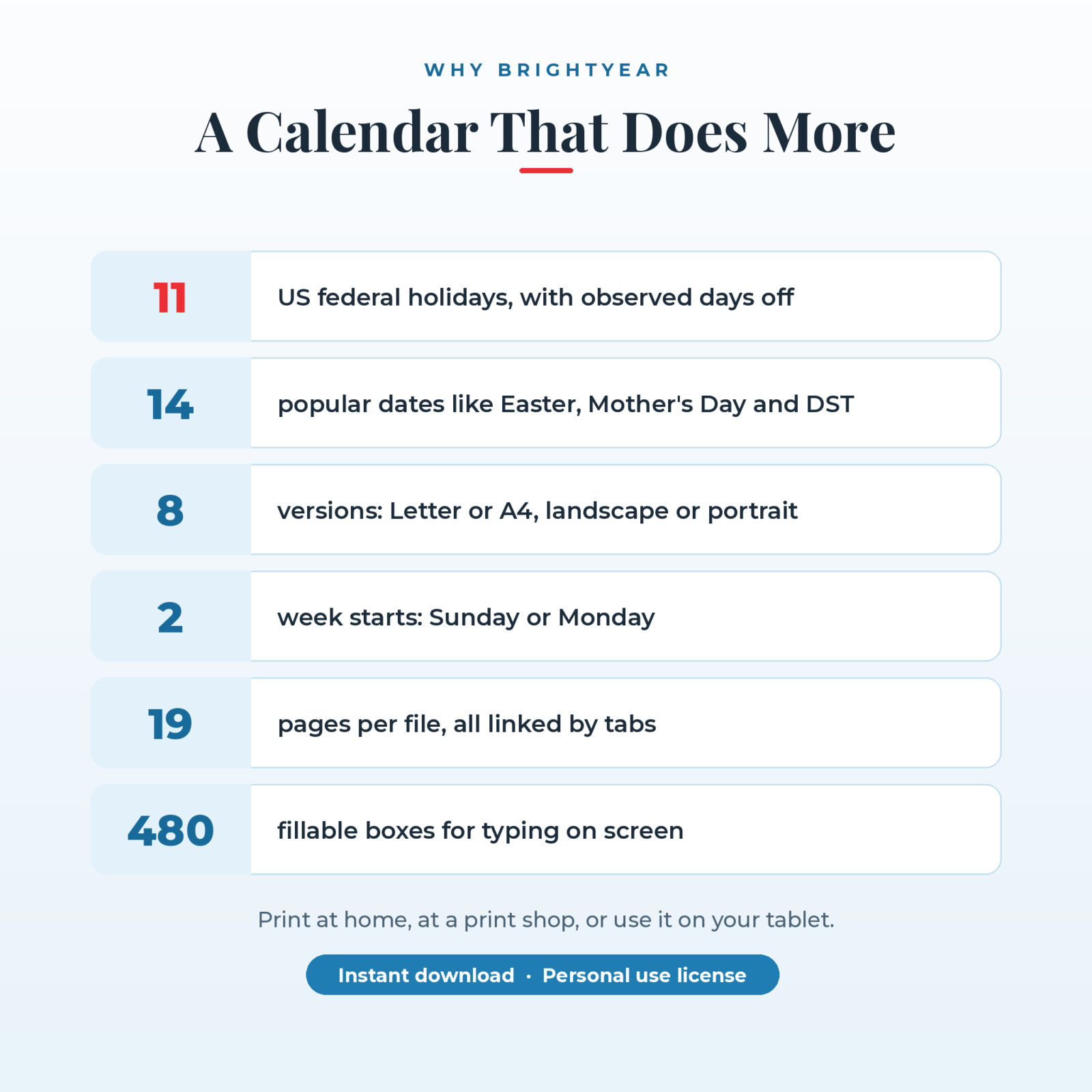
Every file has 19 pages, all linked together with side tabs. Tap a month on screen and you are there.
What You Get
Eight calendar files (PDF)
- US Letter, landscape, Sunday start
- US Letter, landscape, Monday start
- US Letter, portrait, Sunday start
- US Letter, portrait, Monday start
- A4, landscape, Sunday start
- A4, landscape, Monday start
- A4, portrait, Sunday start
- A4, portrait, Monday start
19 pages in every file
- Cover with a clickable contents page
- 2027 year at a glance, with holidays marked and every month linked
- US federal holidays and key dates page, with a box for your own days off
- 12 monthly pages, January to December 2027
- Birthdays and important dates page, one box per month
- 2028 year at a glance for planning ahead
- Blank undated month (bonus), so you can make any month you like
- Lined notes page
You also get a printable user guide (DOCX) with print settings, tips and a full holiday reference.
Features of the Monthly Pages
- Big day boxes. Landscape boxes are about 1 inch wide. Portrait boxes are taller, from about 1.1 inches.
- US federal holidays printed in. All 11 holidays appear in red with a red bar across the top of the box.
- Observed days off. When a holiday lands on a weekend, the weekday off is marked too. In 2027 that covers Juneteenth (Friday, June 18), Independence Day (Monday, July 5), Christmas Day (Friday, December 24) and New Year’s Day 2028 (Friday, December 31).
- 14 popular dates. Easter, Mother’s Day, Father’s Day, Halloween, Tax Day, both Daylight Saving Time changes and more, printed in blue.
- Mini months. Last month and next month in the header, so you can plan across month ends.
- Holidays and notes panel. A list of the month’s marked dates plus a lined notes area.
- Week numbers. Monday-start files show ISO week numbers down the side.
- Weekend tint. Saturdays and Sundays have a soft blue fill so each week reads at a glance.
Fillable and Clickable PDF
Every day box, notes area, birthday box and the blank month are fillable form fields, about 480 per file. Open the PDF in an app that supports fillable forms, click a box and type. The fields are invisible when empty, so the calendar still prints clean.
The digital version is easy to move around. The contents page links to every page. The year at a glance links to each month. Fourteen side tabs (Year, January to December, and Plus for the bonus pages) sit on every page, and the file has bookmarks too.
Who It Is For
- Families who want one shared wall calendar for school, sports and appointments
- Teachers and students who plan by the month
- Home offices and small teams tracking deadlines and days off
- Anyone who likes paper planning but wants the option to type on screen
How It Works
- Buy and download the files right away from your Taskdale account.
- Pick the file that matches your paper (Letter or A4), layout and week start.
- Print at home at Actual size, or send the PDF to a print shop.
- Write in it by hand, or type in a PDF app and save.
Real-Life Ways to Use It
- A family command center on the fridge, with each person in a different highlighter color
- A desk calendar in portrait next to your monitor
- A binder with the year at a glance up front and the birthdays page for gift reminders
- A classroom wall calendar with school breaks added to “My extra days off”
- Blank undated pages for a school term, a training plan or a project timeline
File Formats and Requirements
- 8 PDF files, 19 pages each, plus a DOCX user guide
- Sizes: US Letter (8.5 x 11 in) and A4 (210 x 297 mm)
- Fonts are embedded, and content sits at least 0.4 inch from the page edge for home printers
- Open with any PDF reader. Typing needs a PDF app with fillable form support
- The user guide opens in Microsoft Word or any app that reads DOCX
Customization
The layout is fixed so dates and holidays always line up. You make it yours with what you add: typed or handwritten entries, your own days off on the holidays page, birthdays and bills on the dates page, and as many blank month pages as you need. Print in grayscale to save ink; holidays stay clear because they use bars and circles as well as color.
Digital Download
This is a digital product. Nothing is shipped. Your files are ready to download as soon as payment is confirmed. The license is for personal, non-commercial use: print as many copies as you need for yourself and your household, but please do not resell, share or redistribute the files.
FAQ
Are the 2027 holiday dates correct?
Yes. Every date was calculated and then checked against the published 2027 federal holiday schedule, including the observed days off.
Does it start on Sunday or Monday?
Both. You get Sunday-start and Monday-start versions of every size and layout.
Can I print it at home?
Yes. It is made for standard home printers on Letter or A4 paper. Choose Actual size or 100% in your print settings.
Can I type on it?
Yes. The day boxes, notes and lists are fillable fields. Use a PDF app that supports forms and save after typing.
Is it a wall calendar or a planner?
Both. Landscape works well as a wall calendar. Portrait suits a binder, a desk or a clipboard.
Does it include 2028?
It includes a 2028 year at a glance page with the 2028 federal holidays marked, plus a blank undated month you can use for any month.
How many times can I print it?
As many times as you need for your own personal use.
Reviews
There are no reviews yet.