


Crumb & Count: the bakery business planner that prices your cakes for you
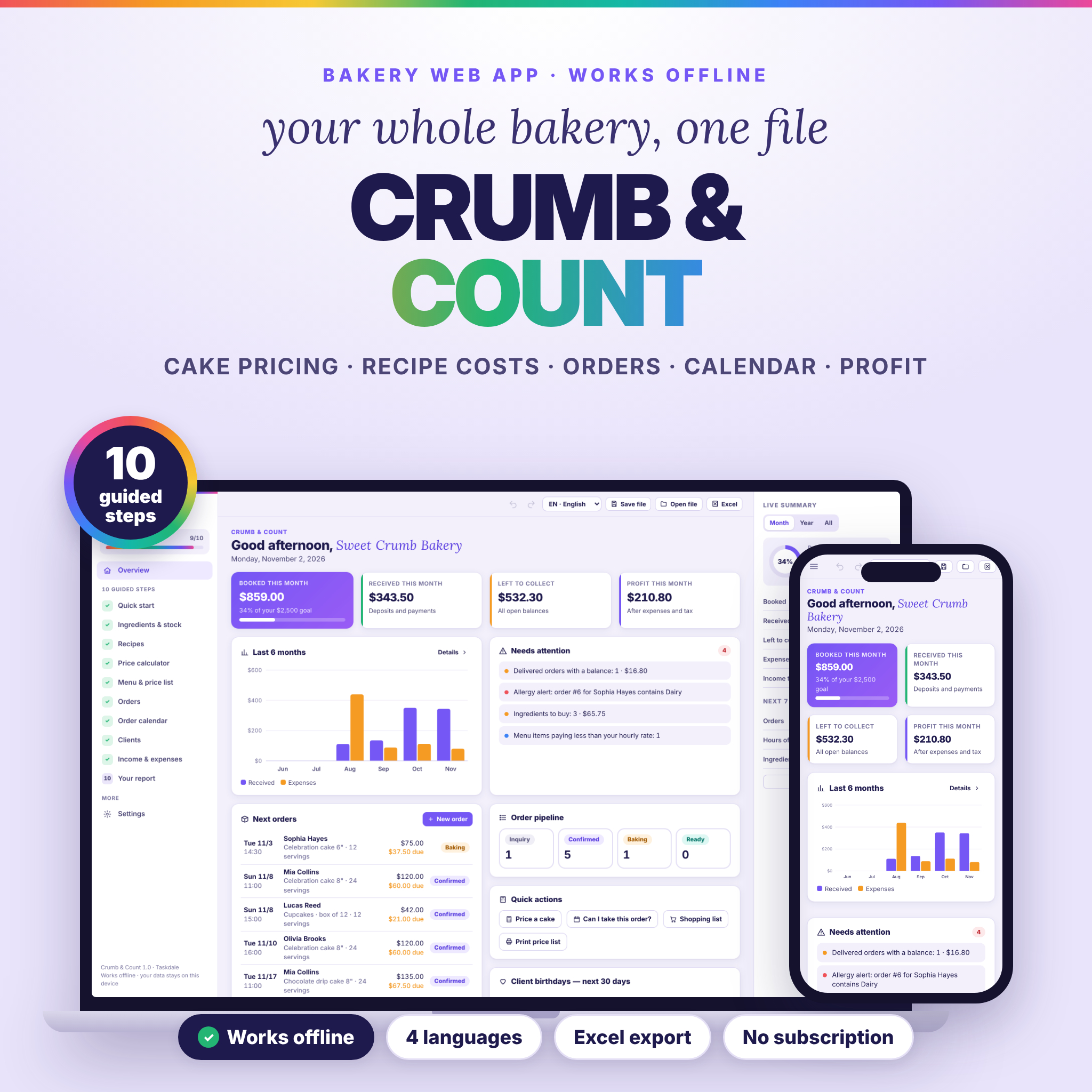
Crumb & Count is a complete bakery business planner for home bakers and cake makers. It works out what every cake really costs, tells you the price to ask, keeps your orders and deposits in one place, warns you before you overbook a day and shows your real profit after expenses and tax. It is one file that opens in your browser and works offline. There is no account, no subscription and nothing to install.
Ten guided steps take you from your bakery name to a one-page business report, and every number recalculates the moment you type.
Who it is for
- Home bakers and cake decorators who take custom orders
- Cookie, cupcake, bread and pastry sellers, from hobby to full business
- Anyone who is tired of guessing prices and wants to know what each cake pays per hour
What the bakery planner does
1. Quick start in under a minute
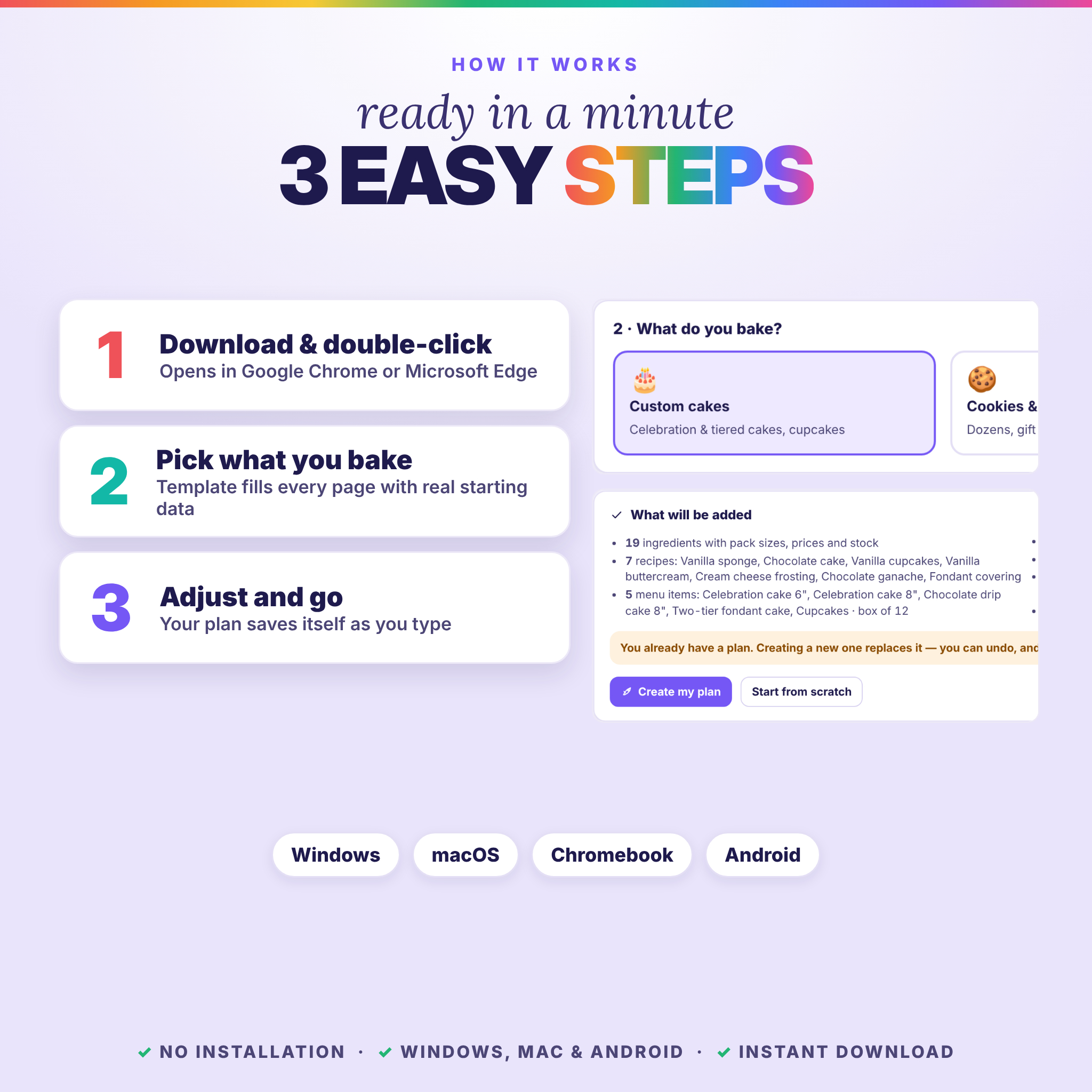
Type your bakery name and city, then choose what you bake (custom cakes, cookies & cupcakes, or bread & pastry) and how big you are (hobby, side business or full business). The template fills every page with realistic starting data: ingredients with pack prices, recipes with costs, a price list, your daily capacity and starting expenses.
2. Ingredients & stock
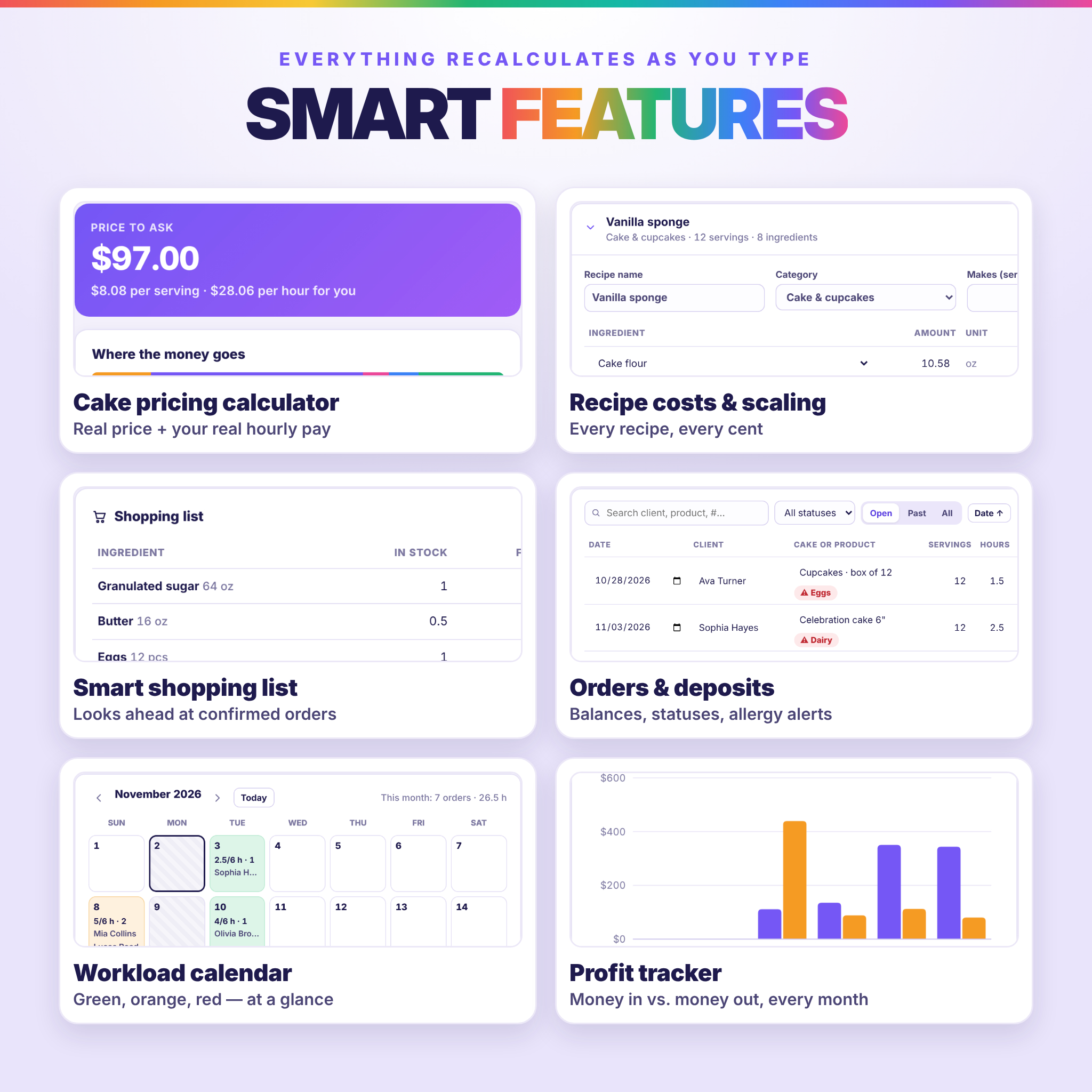
Enter one line per ingredient with the pack size and pack price, and the unit price is calculated for you. Stock is tracked in packs with a reorder point and allergen tags. The smart shopping list also looks ahead at your confirmed orders for the next 14 days. Press “Bought” and the stock is refilled and the expense is recorded. When an order moves to Baking, its ingredients come out of stock automatically.
3. Recipes
Pick ingredients and type the amounts to see the recipe cost and cost per serving from your real prices. “Scale to” recalculates every amount for any number of servings.
4. Cake pricing calculator
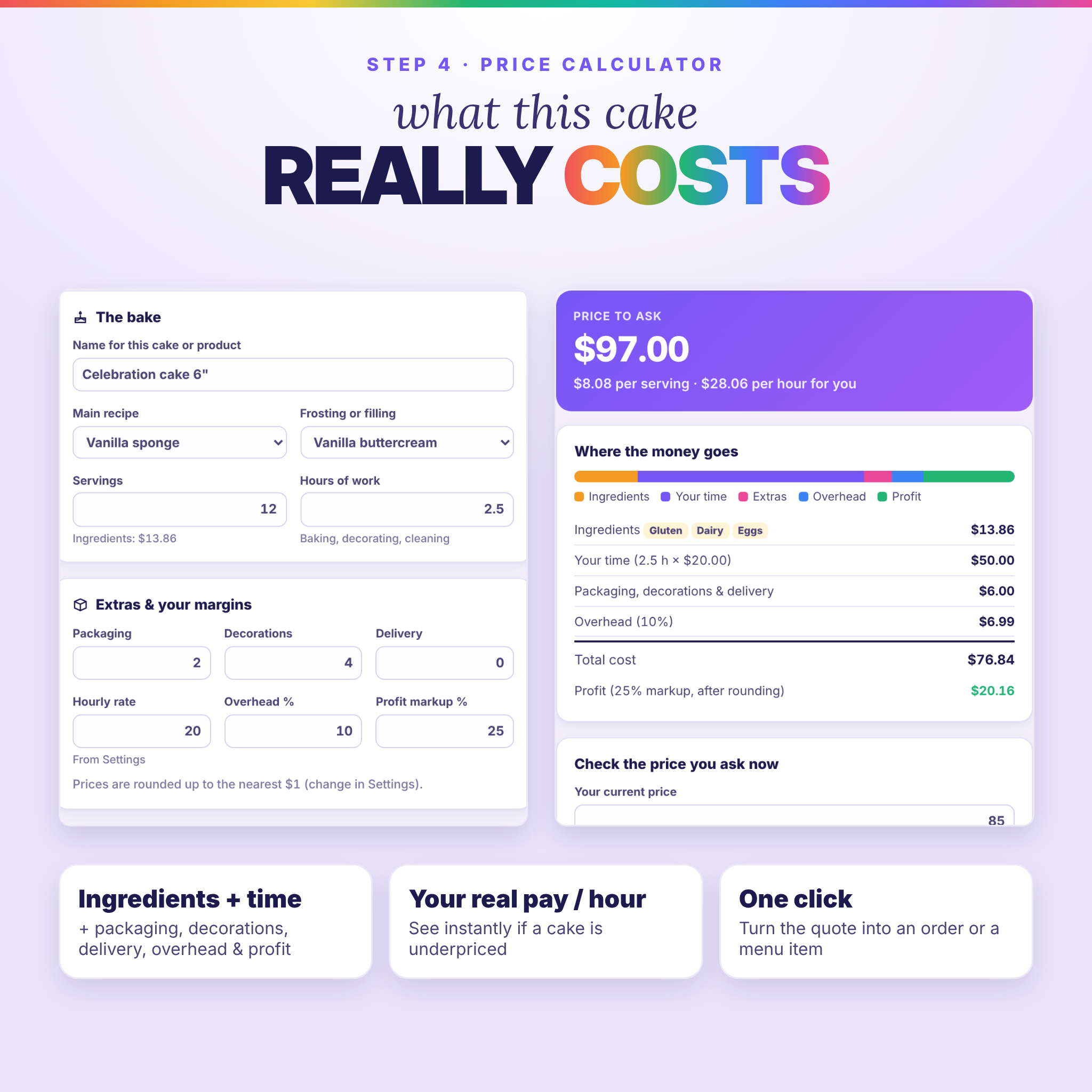
Combine a main recipe with a frosting or filling. Add your hours, packaging, decorations, delivery, overhead and profit markup, and you get the total cost, the price to ask, the price per serving and your real pay per hour. Type the price you charge today to see right away whether you are losing money. One click turns the result into an order or a menu item.
5. Menu & price list
Products, sizes, servings and prices are linked to your recipes, so you see the real cost of each item. A green or red “pay per hour” shows which items are underpriced. You can print a clean price list with your bakery name, allergens and notes, or save it as a PDF.
6. Orders & deposits
Each order sits on one line: date, client, product, servings, hours, price, deposit, balance and status (Inquiry, Confirmed, Baking, Ready, Delivered or Cancelled). One click marks an order as paid. Each order can hold a reference photo, a pickup or delivery time, a cost and profit estimate and a printable invoice or quote. If a client is allergic to something in the cake, a red allergy alert appears.
7. Workload calendar
The month view shows hours and orders per day: green has room left, orange is busy and red is too much. Set your baking hours, orders per day and days off. “Can I take this order?” answers before you say yes and suggests the next day with room.
8. Clients
Store contacts, favorite flavors, allergies, birthdays and notes. Orders, spending and last order are counted for you, and repeat clients are marked.
9. Income & expenses
Money received comes straight from your deposits and payments. Expenses are grouped by category. The month-by-month table shows booked, received, expenses, taxes and profit, with an estimate for sales tax or VAT and an income-tax set-aside.
10. Your report
One page covers money, what needs attention, next orders, the 14-day workload, balances left to collect, the shopping list, best sellers, top clients and recipe costs. Print it, save it as a PDF, or export everything to Excel: 9 formatted sheets with working formulas.
Why bakers choose Crumb & Count
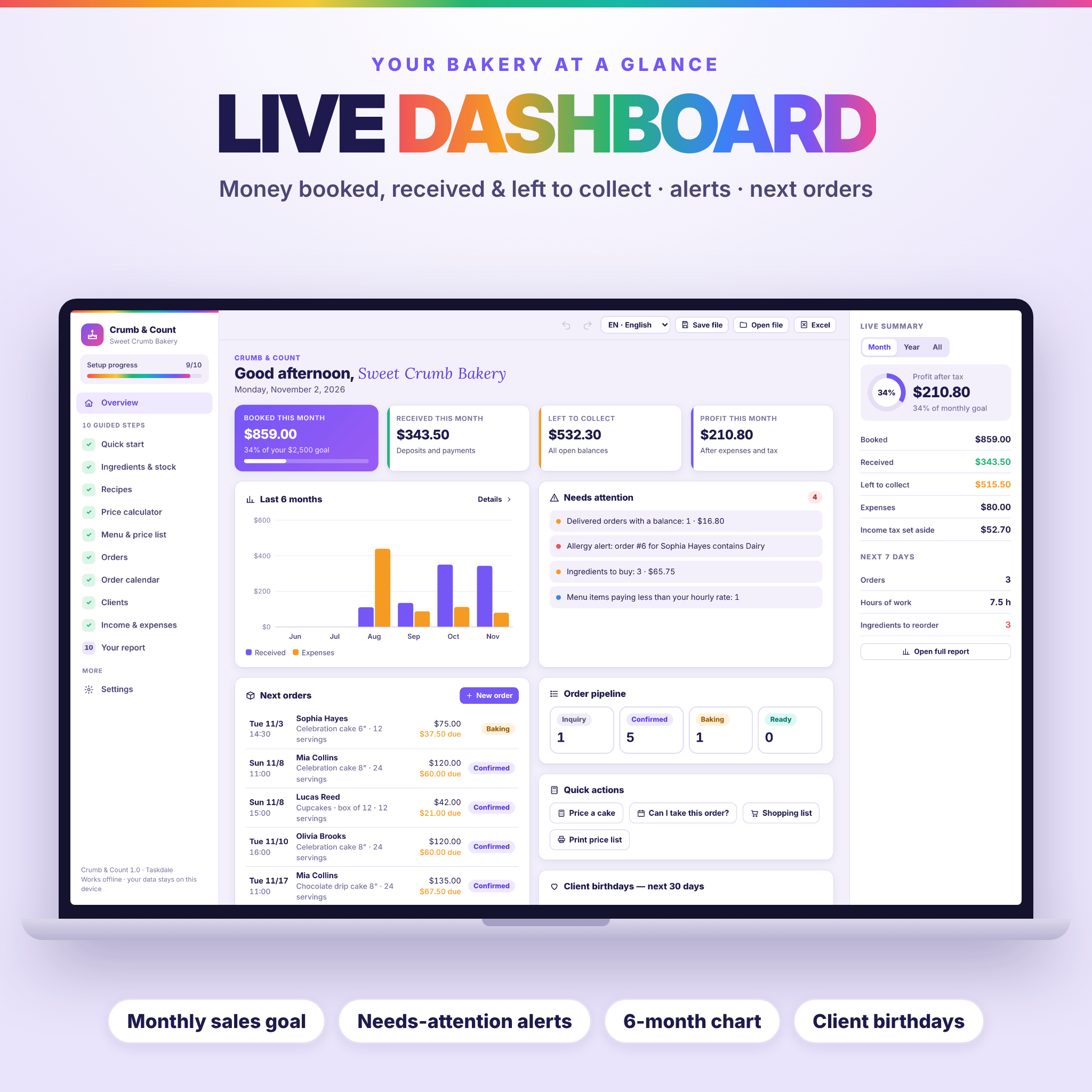
- A dashboard that thinks ahead: sales goal progress, a 6-month chart and alerts for overbooked days, missing deposits, unpaid balances, allergy conflicts and underpriced items
- No formulas to break: you type numbers and everything else updates live
- Undo, redo, autosave and 3 automatic safety copies, plus Save file and Open file to move your plan between devices
- 4 languages: English, Deutsch, Français and Español, switchable at any time
- Any currency, US or metric units (every amount is converted), your choice of date format, and no tax, sales tax or VAT
- Private: your recipes, orders and client details stay on your device and nothing is sent anywhere
What’s included
- Crumb & Count web app: one HTML file with all 10 steps in 4 languages
- Illustrated user guide (Word .docx) covering every feature, with tips, troubleshooting and an FAQ
- Quick start guide (PDF in US Letter and A4)
- Sample bakery plan to explore before you start
- Read-me file and licence
How it works
- Buy and download the ZIP file instantly.
- Unzip it and double-click the HTML file. It opens in Google Chrome or Microsoft Edge.
- Type your bakery name, pick what you bake and how big you are, then press “Create my plan”.
- Go step by step. Your plan saves itself as you type.
File formats and software
- App: HTML (one file, works offline). Tested in Google Chrome and Microsoft Edge on Windows, macOS, Chromebook and Android. Other modern browsers use the same web standards but are not part of our testing.
- Exports: Excel .xlsx (opens in Excel, Google Sheets, Numbers and LibreOffice) and print or PDF from your browser
- Guide: Word .docx; Quick start: PDF
- No other software, internet connection or account needed
Customize it
Everything is editable, from prices, recipes and categories to your hourly rate, markup, capacity, days off, sales goal, invoice note, currency, units and language.
FAQ
Is it a spreadsheet?
No. It is a web app in one file, with buttons, live calculations, a calendar, photo upload and undo. It can also export a formatted Excel file.
Do I need internet or an account?
No. It works fully offline after you download it, with no sign-up and no subscription.
Does it work on my phone?
Yes, on Android with Chrome. The pages adapt to the screen.
I use cups and ounces. Does it work?
Choose US units (oz and fl oz) in Settings. For cups, weigh once and enter the weight to get more accurate costs.
Does it calculate my exact taxes?
No. It estimates sales tax or VAT and an income-tax set-aside from your rates. It is not tax advice.
Is it a one-time purchase?
Yes. There is no renewal and no expiry.
Download and licence
This is a digital product. Nothing will be shipped, and your files are ready to download right after purchase. The licence is for personal use in your own bakery business. You may not resell or share the files.

Reviews
There are no reviews yet.