


Daycare Center Management Spreadsheet for Small Centers and Preschools
Wiggleroll is a daycare center management spreadsheet for directors who juggle rooms, staff, families and money every single day. You set up your rooms once. Then you log the day: who came in, who paid, what you spent. The workbook does the rest. It works out tuition, sibling discounts, what the parent owes versus what the subsidy agency owes, staffing needs per room, renewals that are coming due, attendance rates and your monthly profit.
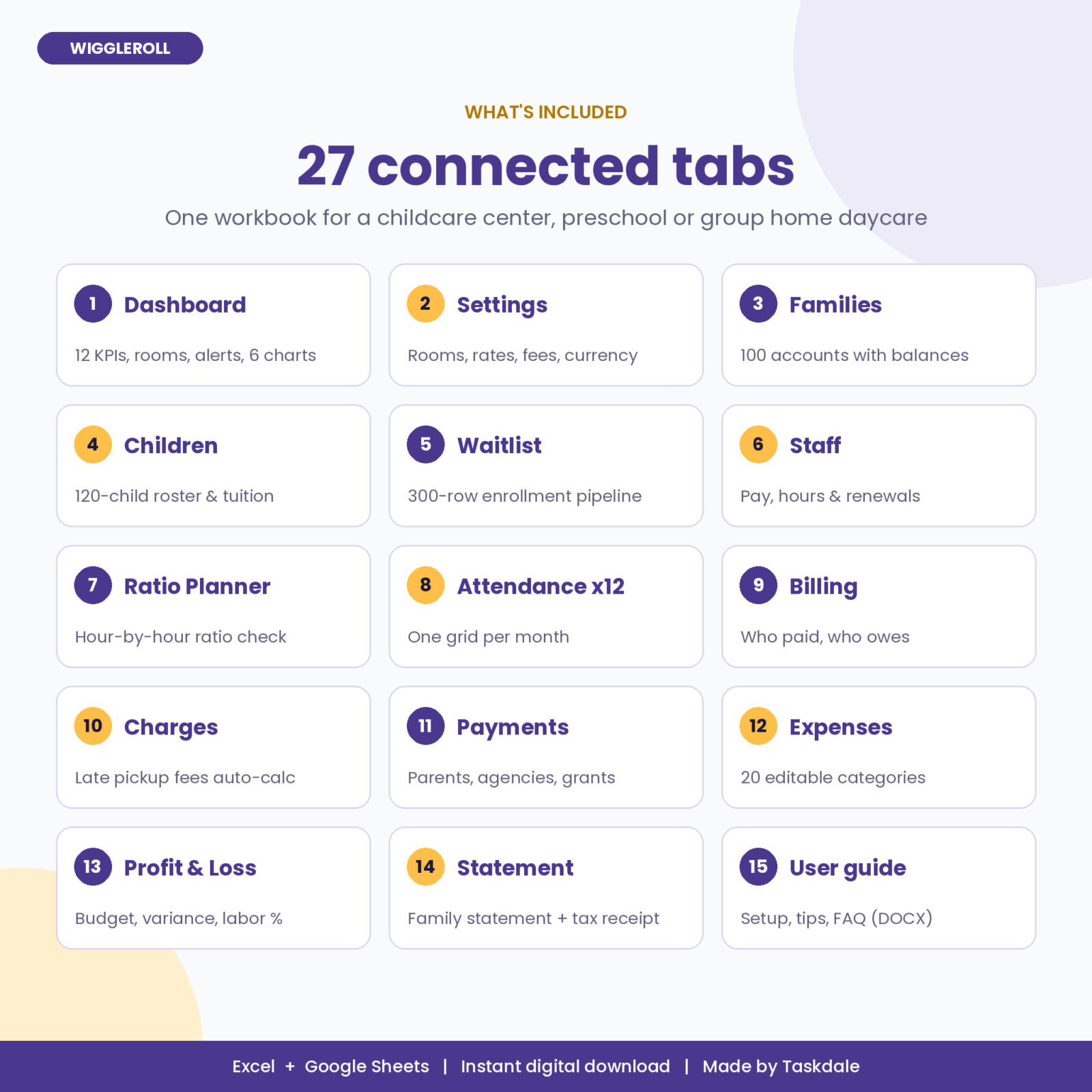
It is one .xlsx file with 27 connected tabs. No subscription, no logins, no per-child fees. Your data stays in your own file.
Who it is for
- Small childcare centers and preschools with 2 to 8 rooms and up to 120 children
- Group home daycares and family child care homes that employ assistants
- Before and after school programs that bill monthly
What it does for you
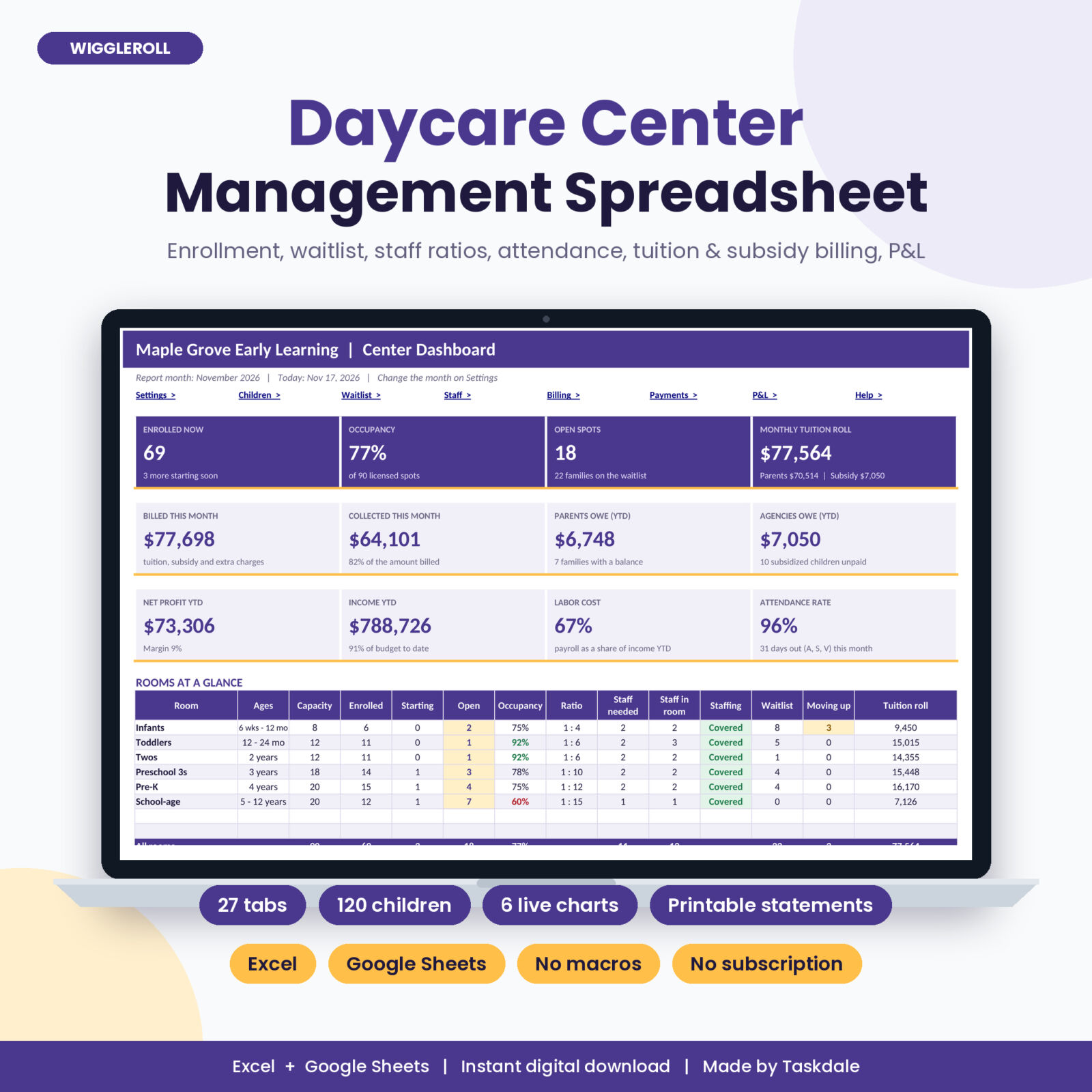
- Know where you stand in ten seconds. The dashboard shows enrolled children, occupancy, open spots, tuition roll, billed and collected this month, what parents and agencies owe, net profit, labor cost and attendance rate.
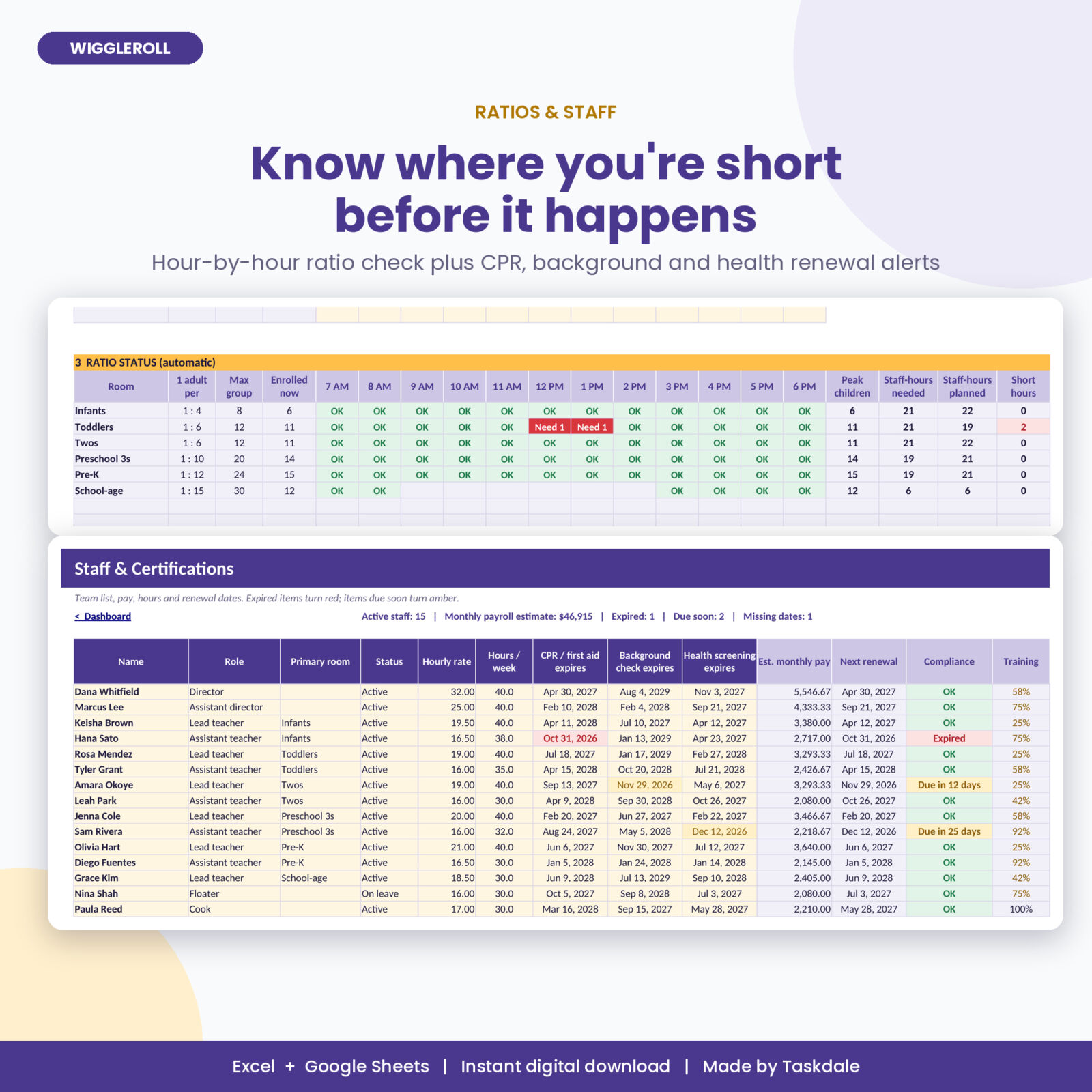
- Stay in ratio. The Ratio Planner checks every room for every hour of your day and tells you exactly where you need one more adult.
- Never miss a renewal. CPR and first aid, background checks and health screenings turn amber before they are due and red when they expire.
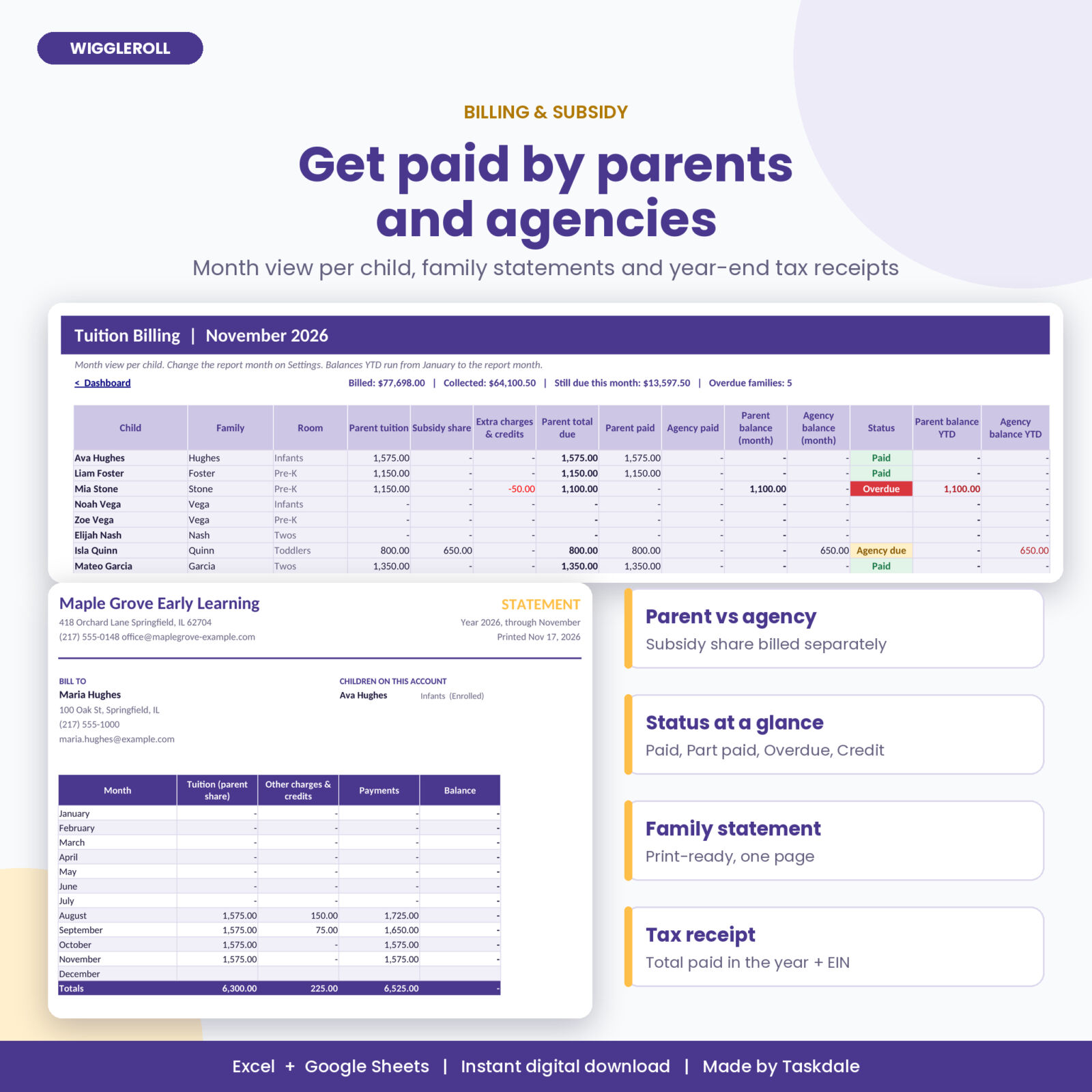
- Get paid by parents and agencies. Each child’s tuition splits into the parent share and the subsidy share, so you can chase the right party.
- Fill spots faster. The waitlist tracks every inquiry from first call to deposit, shows each family’s place in line and flags overdue follow-ups.
Features of the daycare center spreadsheet
Live dashboard
- 12 KPI tiles that update as you type
- Rooms at a Glance: capacity, enrolled, starting, open spots, occupancy, ratio, staff needed versus staff in the room, waitlist count and children moving up
- Needs Attention list with links: expired renewals, rooms short on staff, children past room age, overdue tuition, waitlist follow-ups, allergies and rows to fix
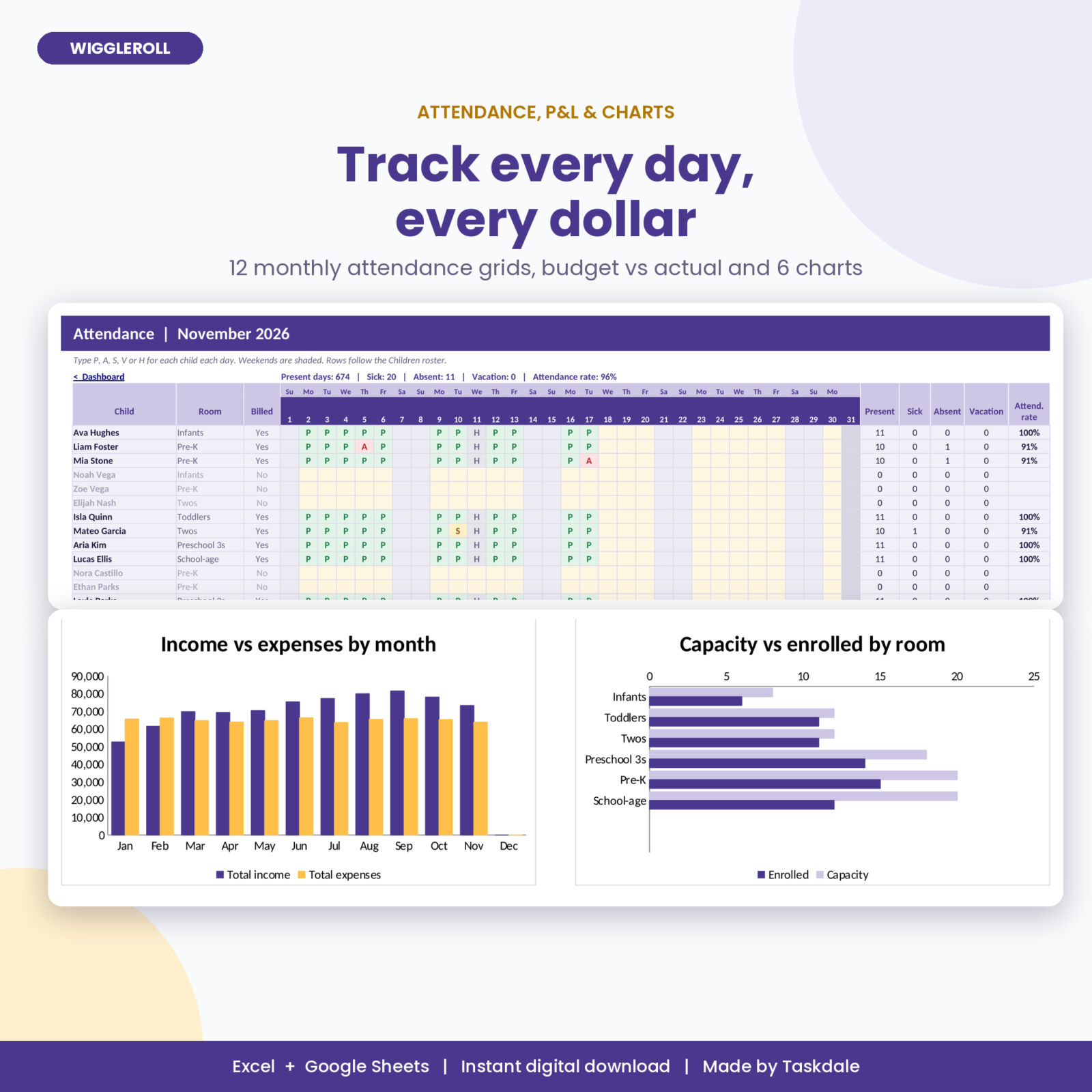
- Year at a Glance table and 6 charts: income vs expenses, capacity vs enrolled by room, expenses by category, children enrolled by month, enrollment pipeline, billed vs collected
Enrollment, families and waitlist
- 120-child roster with age, room, schedule (full-time or part-time), status and start and end dates
- Base tuition pulled from your room rates, automatic sibling discount, optional tuition override, subsidy amount and parent share
- Move-up date for each child based on the room’s age range, with alerts before it arrives
- Allergy and medical notes highlighted in red
- 100 family accounts with guardians, authorized pickup, subsidy case number and a live balance
- 300-row waitlist with stage, lead source, age at start, room fit check, place in line and follow-up alerts
Rooms, ratios and staff
- Up to 8 rooms with your own capacity, children per adult, max group size and tuition
- Hour-by-hour Ratio Planner with OK, Need 1 and Over group flags, staff-hours needed versus planned and the labor cost of your plan
- 60-person staff list with pay, hours, primary room, renewal dates, training hours and an estimated monthly payroll
Attendance
- 12 monthly attendance grids that list your children automatically
- Simple codes: P, A, S, V and H, color coded, with weekends shaded
- Present, sick, absent and vacation counts per child plus daily totals and an attendance rate
Billing, payments and statements
- Month view per child: parent tuition, subsidy share, extra charges, payments, balances and status (Paid, Part paid, Due, Overdue, Agency due, Credit)
- Balances year to date for parents and for agencies
- Charges log for registration, supplies, field trips and more, with late pickup fees worked out from your grace period and per-minute rate
- Payments log for parents, subsidy agencies, food program reimbursements, grants and other income
- Printable family statement and a year-end child care payment receipt with your Tax ID
Expenses and profit
- 2,000-row expense log with 20 editable categories and a receipt-kept check
- Monthly profit and loss with annual budget, budget to date, variance, profit margin and labor cost percentage
- Billing check that compares what you billed with what you collected for each month
What’s included
- Wiggleroll Childcare Center Manager (.xlsx, 27 tabs, clean and ready for your data)
- User Guide (.docx): setup steps, every tab explained, customizing, tips, troubleshooting and FAQ
How it works
- Open Settings. Add your center details, currency symbol, tracking year and fee rules. Fill in your rooms with capacity, ratio and tuition.
- Add families, then children. Tuition and parent shares fill in by themselves.
- Add your staff with renewal dates.
- Each day, mark attendance. Log payments, fees and expenses as they happen.
- Pick the report month and read the dashboard, billing view and statements.
File format and software
- Format: .xlsx workbook, no macros, no add-ons
- Microsoft Excel for Windows or Mac (Excel 2016 or newer, including Microsoft 365)
- Google Sheets: upload the file to Google Drive and open it with Google Sheets
- Formula cells are locked without a password, so you can’t break them by accident. Input cells are pale yellow.
Customizing
Change the currency symbol in one cell and every money header and tile follows. Rename rooms, edit dropdown lists and expense categories, and set your own ratios, fees and alert windows.
Instant digital download
This is a digital product. No physical item ships. After checkout you can download the workbook and the user guide right away from your order page and your email.
Real situations where it helps
- A parent asks for last year’s payments for their taxes. Pick their family on the Statement tab and print the receipt.
- Your toddler room is short over lunch breaks. The Ratio Planner shows the gap at 12 PM and 1 PM before licensing does.
- The subsidy agency is two months behind. Billing shows exactly which children and months are still unpaid.
- Three infants turn one this spring. The move-up alerts tell you which toddler spots you need to free up and when.
FAQ
Is this a daycare spreadsheet for home daycares too?
Yes, if you employ assistants or run more than one room. Solo in-home providers will find it works, but it is built around rooms, staff and ratios.
Does it work in Google Sheets?
Yes. Upload the .xlsx to Google Drive and open it with Google Sheets. It uses standard formulas and no macros.
Can it track subsidy or voucher payments?
Yes. Type the monthly subsidy amount for a child. The workbook bills the parent the rest and tracks agency payments separately.
Does it check staff to child ratios for my state?
It checks ratios and group sizes using the numbers you type for each room, so you can match your state rules.
How many children and staff can I track?
Up to 120 children, 100 families, 60 staff, 8 rooms and 300 waitlist entries, plus 2,000 payments and 2,000 expenses.
Can I print parent statements and receipts?
Yes. The Statement tab prints a one-page family statement and a year-end child care payment receipt with your Tax ID.
License
Personal use license for one childcare business. Please do not resell, share or upload the files for others to download. Ratios and fees are your own settings; always follow your state licensing rules.
Reviews
There are no reviews yet.