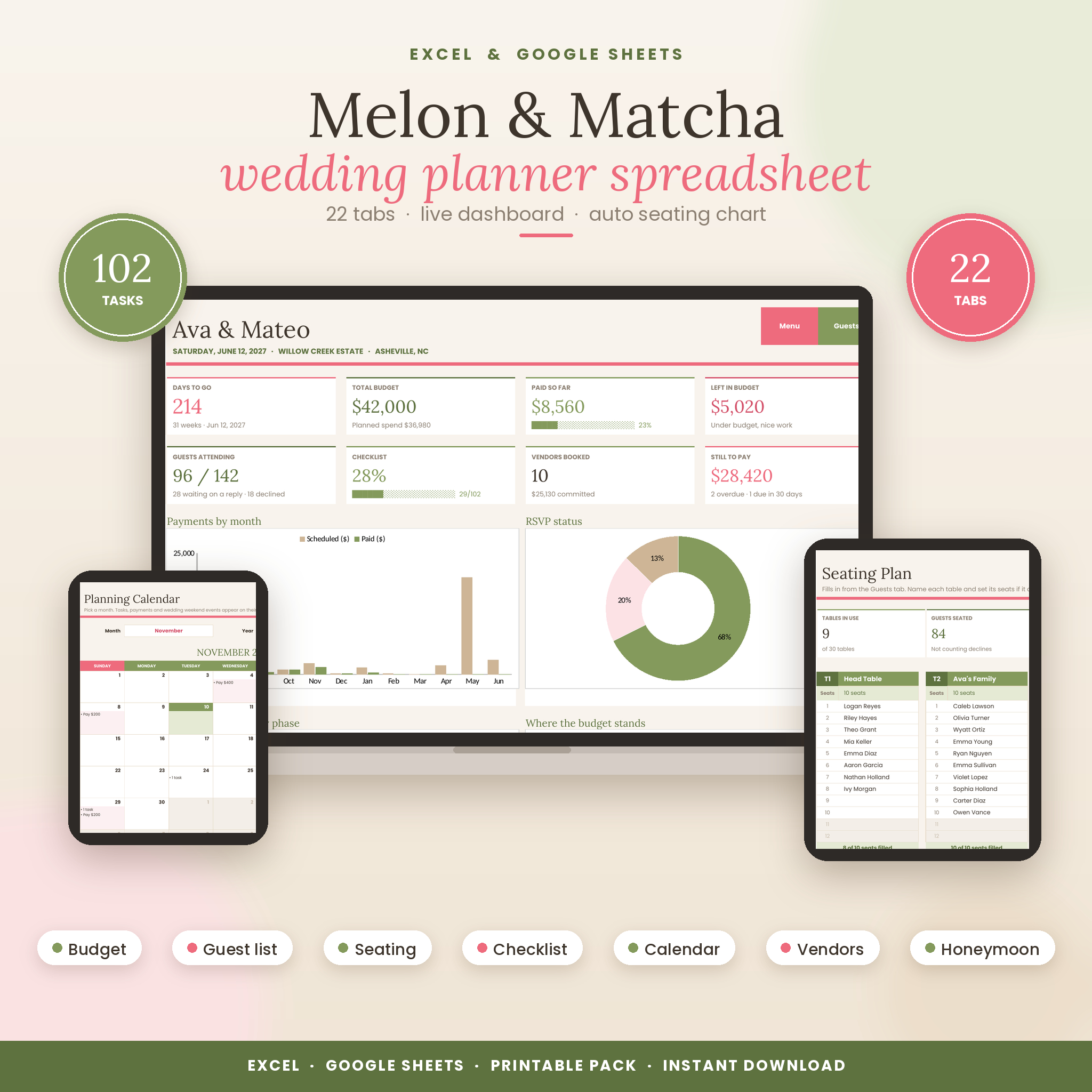


Planning a wedding means keeping a lot of moving parts in your head. The Melon & Matcha wedding planner spreadsheet takes them out of your head and puts them in one calm, good-looking file. It works in Microsoft Excel and Google Sheets. You add your names, date and budget on the first tab, and the other 21 tabs pick it up from there.
The colors are soft sand, matcha green and watermelon pink. Sweet enough to enjoy opening every week, clear enough to read at a glance.
What this wedding planner spreadsheet does for you
Most templates give you empty tables and leave the adding up to you. This one does the work. Log a cost and your budget, cash flow and dashboard all update. Give a guest a table number and they appear on the seating plan. Change your wedding date and all 102 checklist tasks move to new due dates.
- See the whole wedding on one page. The dashboard shows days to go, total budget, money paid, what’s left, RSVPs, checklist progress, vendors booked and payments coming up.
- Stop missing payments. Each cost has a deposit, a balance and due dates. Its status turns pink when a payment is overdue.
- Seat 300 guests without the headache. 30 tables fill in on their own and flag any table with too many people.
- Know what to do next. The dashboard lists your next eight tasks and the calendar shows them on their dates.
What’s included
- Wedding planner spreadsheet (.xlsx) with 22 tabs plus a Lists tab for your dropdown options
- Printable pack in US Letter (18-page PDF)
- Printable pack in A4 (18-page PDF)
- User guide (Word document) with setup steps, tab-by-tab help, tips, troubleshooting and FAQ
The 22 tabs
- Start Here: your names, date, ceremony time, venue, currency, budget, guest count and a button for every tab
- Dashboard: 8 summary cards, 4 charts, upcoming payments, next tasks, alerts and meal counts
- Budget: 19 categories with suggested shares, status flags, a 12-month cash flow plan and a guest count what-if
- Expenses: 150 rows with estimate, actual, deposit, balance, due dates and automatic status
- Calendar: pick any month to see tasks, payments and weekend events on their dates
- Checklist: 102 tasks from 12+ months out to after the wedding, with owners, priority and progress by phase
- Guests: RSVPs, meal choices, allergies, save-the-dates, invitations, addresses and table numbers
- Seating: 30 tables of up to 12 seats with a “still to seat” list
- Wedding Party: roles, outfits, sizes, fitting dates, gifts and duties
- Vendors: quotes, star ratings, status and the best quote per category
- Venues: compare four venues with the real cost per guest and a score out of 100
- Food & Drinks: meal counts, a caterer comparison, a bar calculator and a cake servings calculator
- Day-Of Timeline: 23 events that shift when you change the ceremony time
- Weekend Itinerary, Honeymoon, Gifts, Packing, Music, Photo Shots, Theme, Contacts and Notes
Features you won’t find in most wedding templates
- Guest count what-if. Type 80, 120 or 170 guests and see the projected total next to your budget.
- Monthly cash flow. See exactly what is due in each of the 12 months before the wedding.
- Bar calculator. Bottles of wine, beer and spirits worked out from your guest count, hours and drink mix.
- Venue scoring. Fees, per-guest prices and included extras turned into one fair score.
- Exchange rate on the honeymoon tab. Every booking shown in the local currency too.
- Any currency. Dollars by default. Pick another symbol once and every total follows.
- Protected formulas. Locked so they can’t be wiped by accident, with no password, so you can still change anything.
How it works
- Download the files and open the spreadsheet in Excel, or upload it to Google Drive and open it with Google Sheets.
- Fill in the white boxes on the Start Here tab.
- Add costs, guests, vendors and tasks as you plan. The sand-colored cells calculate on their own.
- Check the dashboard whenever you want a quick update.
File formats and software
- Spreadsheet: .xlsx for Excel 2019, Excel 2021 and Microsoft 365 (Windows, Mac, web and mobile)
- Google Sheets: free Google account needed. Upload the .xlsx and open it with Google Sheets.
- Printables: PDF in US Letter (8.5 x 11 in) and A4
- User guide: .docx for Word, Google Docs or Pages
- Not made for Apple Numbers
Customize it
Rename budget categories, meal options, guest groups and other dropdowns on the Lists tab. Change any suggested budget share, the seats at each table or a task’s due date. Paste inspiration photos into the mood board boxes on the Theme tab. Headings use Lora and body text uses Poppins, both free Google Fonts that are built into Google Sheets.
Who it’s for
- Couples planning their own wedding
- A bride or groom who wants one file to share with a partner or parents
- Maids of honor and family members helping with the details
- Wedding planners who want a tidy workbook for a client wedding
- Anyone looking for a thoughtful engagement gift for a newly engaged friend
Real situations it helps with
Your venue wants a deposit by the 15th and the florist wants one by the 20th. Both show on the calendar and at the top of the dashboard. Your mom adds six names to the guest list and you need to know the new food cost. The what-if box answers that in seconds. Three cousins RSVP no a week before the wedding. They drop off the seating plan by themselves and the open seats count goes up.
Instant digital download
This is a digital product. Nothing is shipped. Your files are ready to download straight after checkout. The spreadsheet arrives blank and ready for your details. The checklist, timeline, packing lists, music moments and photo shot list come pre-filled with suggestions you can edit. Listing images show sample details for illustration only.
FAQ
Do I need Microsoft Excel?
No. Google Sheets is free and the planner works there. If you have Excel 2019, 2021 or Microsoft 365, it works there too.
Can my partner and I edit it together?
Yes. Upload it to Google Sheets and share it with editor access, or share it from OneDrive in Excel.
Can I change the currency?
Yes. Pick your symbol on the Start Here tab and every money value in the planner uses it.
How many guests can I add?
Up to 300 guests, seated across 30 tables of up to 12 seats each.
Does it work on iPhone, iPad or Android?
Yes, in the Excel or Google Sheets apps. Setup is easiest on a computer, then you can check and update it from your phone.
Is there a seating chart I can print?
Yes. The printable pack has a seating chart page, and you can print the Seating tab straight from the spreadsheet.
Can I use it for my wedding planning clients?
Yes, for one client wedding per purchase. Please don’t resell or share the files.
License
Personal use only. Use it for your own wedding, or one client wedding if you are a professional planner. Please don’t resell, share or redistribute the files, in full or in part. © Taskdale.
Reviews
There are no reviews yet.