


Paralegal Resume Template for Word, Built for Law Firm Applications
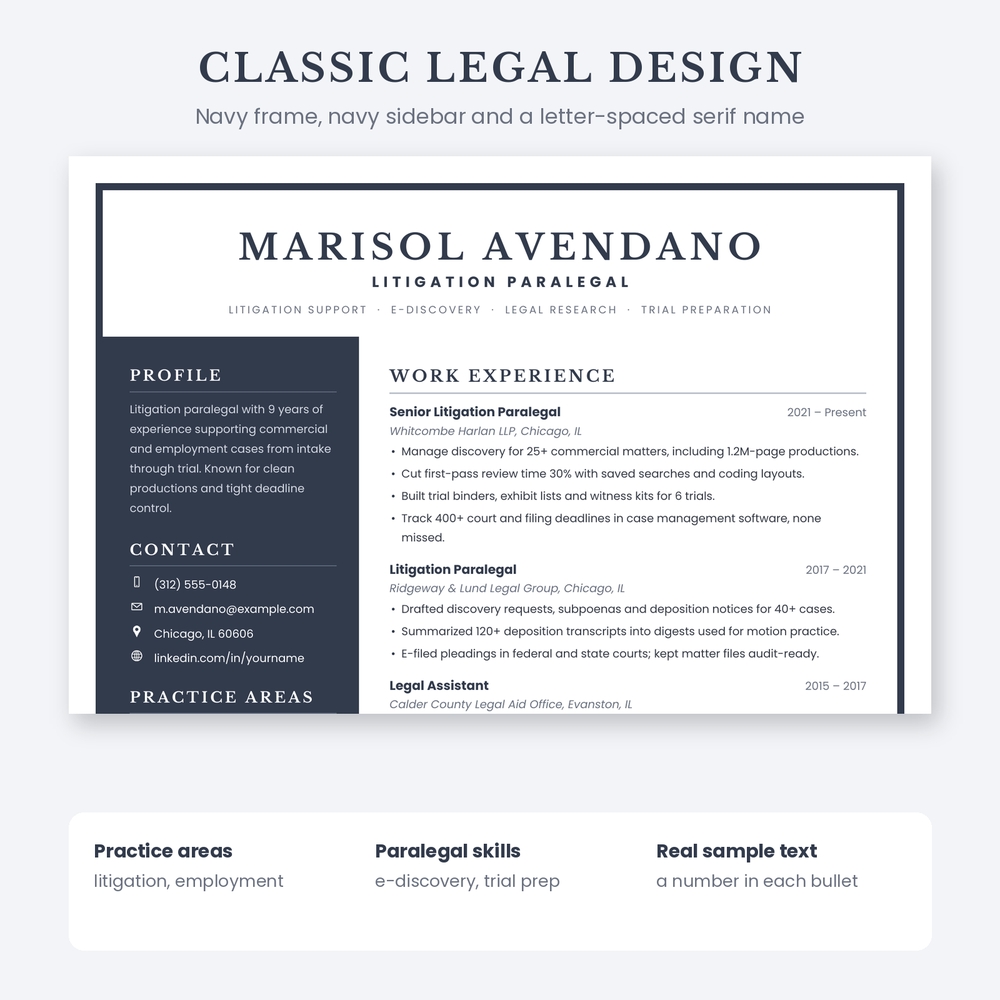
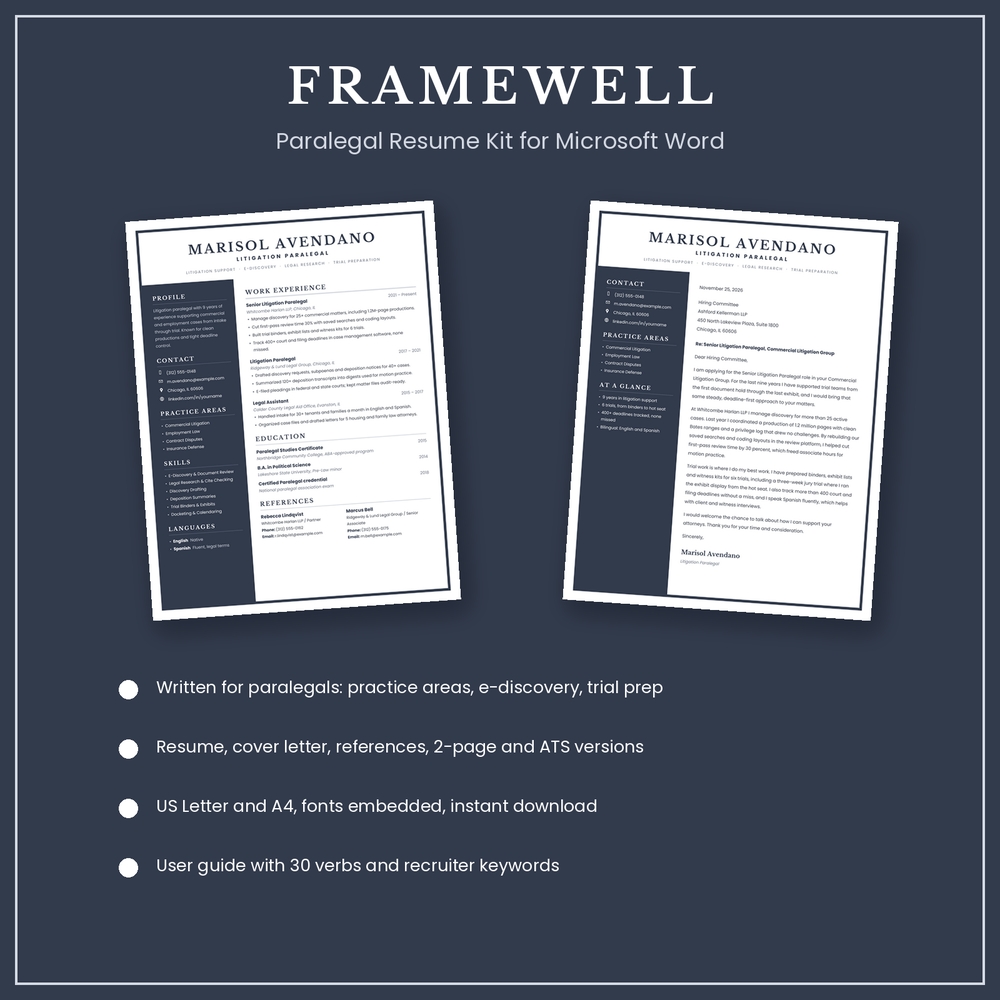
Framewell is a paralegal resume template for Word with the calm, structured look that law firms and legal departments trust. A navy frame wraps the page, a navy sidebar holds your profile, contact details, practice areas and skills, and your name sits centered at the top in a letter-spaced serif. Every file opens in Microsoft Word as a normal .docx, so you edit it like any other document.
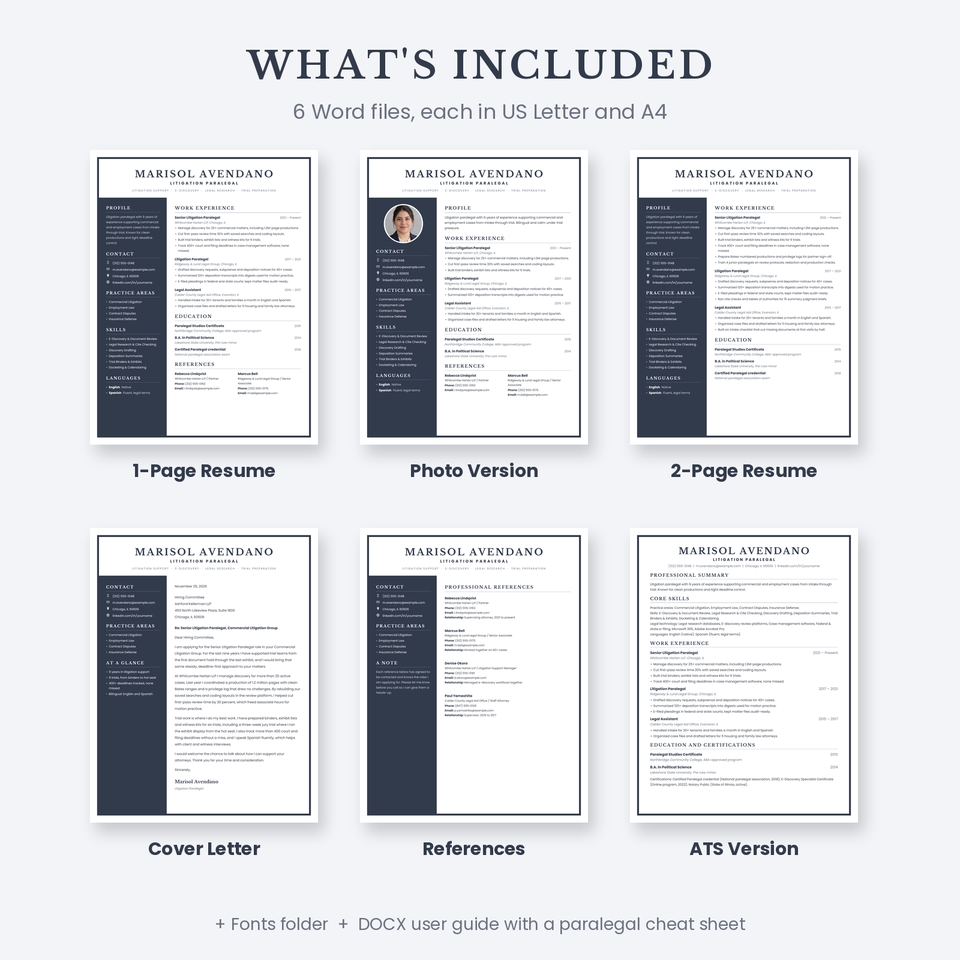
The kit is more than one page. You get a 1-page resume, a 1-page photo version, a 2-page resume, a matching cover letter, a references page and an ATS-friendly plain resume. Each one comes in US Letter and A4, which makes 12 Word files in one download.
Who This Legal Assistant Resume Template Is For
- Litigation paralegals moving to a new firm or a bigger practice group
- Corporate, real estate, family law or immigration paralegals
- Legal assistants stepping up to a paralegal title
- New graduates with a paralegal certificate and an internship or two
- Litigation support and e-discovery specialists
The sample person is a litigation paralegal with nine years of experience, so every section shows what a strong paralegal entry looks like. Bullets carry real numbers, such as 400+ court deadlines tracked or 120+ deposition transcripts summarized, so you can see the pattern before you write your own.
What Is Included
- Paralegal resume, 1 page in the main photo-free design
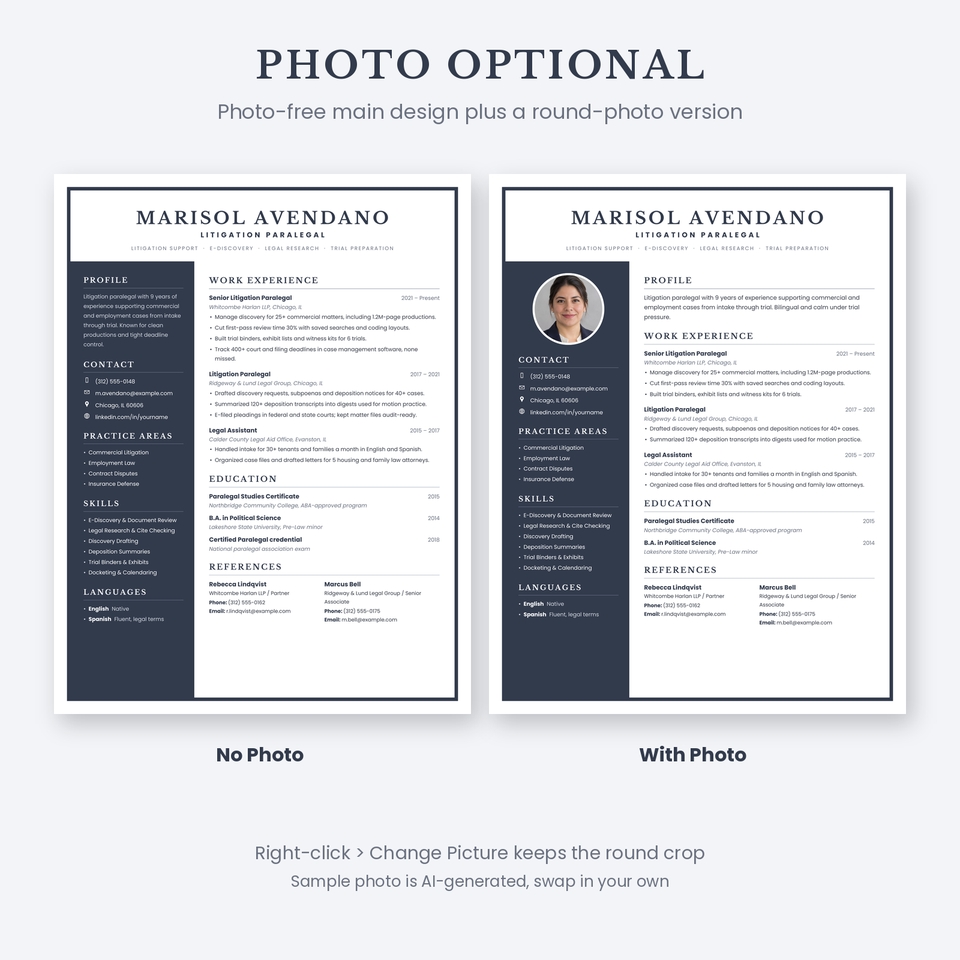
- Paralegal resume, 1 page with photo, with a round photo at the top of the sidebar (the sample photo is AI-generated)
- Paralegal resume, 2 pages with room for selected matters, certifications, legal technology, memberships, pro bono work and four references
- Cover letter on matching letterhead, with a sample letter for a senior litigation paralegal role
- References page for four references, each with phone, email and relationship
- ATS plain resume in one column with no tables and no photo, for online application portals
- Fonts folder with Libre Baskerville and Poppins and their open font licenses
- User guide (DOCX) with step-by-step editing help and a paralegal resume cheat sheet
Features That Make Editing Easy
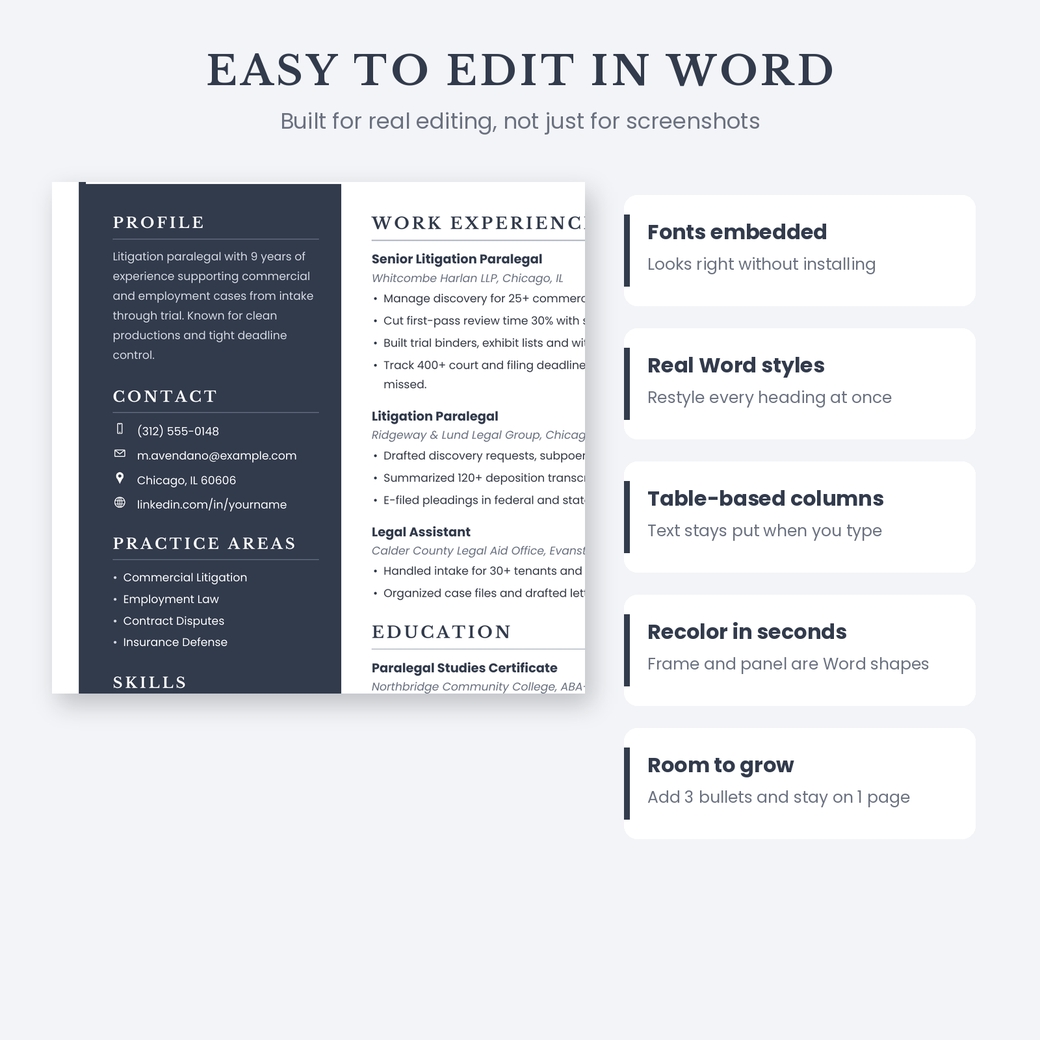
Fonts embedded in every file
A common problem with Word resume templates is missing fonts. Word swaps them and the layout shifts. Here both fonts are embedded inside each .docx, so the design shows correctly on a computer that has never seen them.
Columns that stay put
The sidebar and main column are a Word table with invisible borders, not floating text boxes. You can add a bullet or a whole job and nothing jumps across the page. ATS software can read every word, because no text is locked inside a box.
Room to grow on one page
Each 1-page file was tested with three extra bullets and a long job title added, and it still fits on one page in both paper sizes. Need more space? Move to the 2-page file, which uses the same design.
Real Word styles
Your name, job title, headings, job lines and bullets each use a named style. Change a style once in the Styles pane and every matching line updates.
Recolor the frame and sidebar
The navy frame and sidebar panel are Word shapes behind the text. Click one in the header and pick a new color with Shape Fill or Shape Outline.
Simple photo swap
In the photo version, right-click the photo and choose Change Picture. The round crop and white ring stay in place.
Paralegal-Specific Sections
Generic templates leave you guessing what a paralegal should list. This paralegal resume template gives you sections hiring attorneys look for:
- Practice areas, such as commercial litigation, employment law and insurance defense
- Skills like e-discovery and document review, cite checking, discovery drafting and docketing
- Legal technology written in generic terms (legal research databases, e-discovery review platforms, case management software, federal and state e-filing), so you can name the tools you know
- Paralegal certificate, certifications and notary commission
- Selected matters on the 2-page version, to show the size and type of cases you supported
- References built into the 1-page resume, plus a separate references page
How It Works
- Buy and download the kit zip and the user guide.
- Unzip the kit and open the US-Letter or A4 folder.
- Open the file you want in Microsoft Word and save a copy with your name.
- Type over the sample text. The styles keep the design consistent.
- Export a PDF with File > Save As > PDF and send it.
File Formats and Software
- Format: Microsoft Word .docx, 12 files (6 designs in US Letter 8.5 x 11 in and A4 210 x 297 mm)
- Software: Microsoft Word 2016 or newer on Windows or Mac, or Word for Microsoft 365, including Word for the web
- Google Docs and Apple Pages can open the files with minor layout differences. For the cleanest result, export your final PDF from Word.
- Download size: about 1.7 MB for the kit, plus the guide
Customization
Every word is editable. You can rename, delete or reorder sections, change the navy to another color, swap or remove the photo, and adjust fonts and sizes through the styles. The guide shows each step, including the one setting to change if your name is extra long.
Digital Download
This is a digital product. Nothing is shipped. You get instant access to the files after checkout, and you can download them again from your account at any time. Personal use only; please do not resell or share the files.
Use Cases
- Applying to a litigation paralegal role at a mid-size firm and sending the matching cover letter
- Moving from legal assistant to paralegal and showing new certificate training
- Uploading the ATS version to a corporate legal department’s job portal
- Bringing a printed copy and the references page to an in-person interview
- Applying overseas with the A4 photo version
Paralegal Resume Template FAQ
Is this paralegal resume template ATS friendly?
Yes. All text sits in the normal flow with no text boxes. For online portals, use the included ATS plain version.
Can I use it as a legal assistant resume template?
Yes. Change the job title and bullets. The guide lists action verbs and keywords for legal support roles.
Do I need to install the fonts?
No. They are embedded in every file. The Fonts folder is there as a backup.
Is there a version without a photo?
Yes. The main design is photo-free. The photo version is an extra option.
Will it work in Google Docs?
It opens there, but the layout may shift slightly. Microsoft Word gives the exact design.
What paper sizes are included?
US Letter and A4 for every file.
Can I make it two pages?
Yes. A matching 2-page paralegal resume is included.
Reviews
There are no reviews yet.