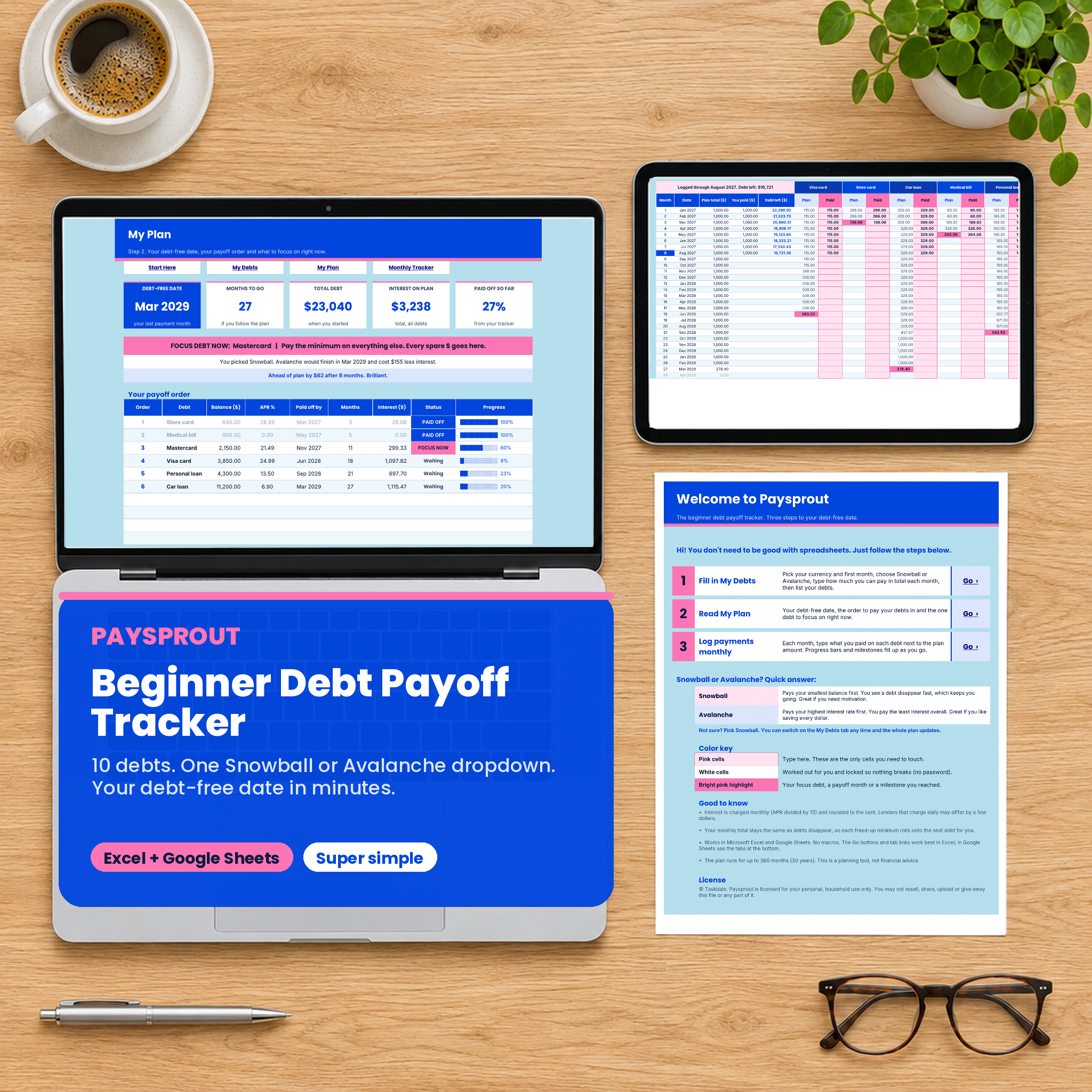


The Paysprout beginner debt payoff tracker spreadsheet is for anyone who has opened a debt calculator, seen 12 tabs and 40 settings, and closed it again. Paysprout keeps it small on purpose. Four tabs. Pink cells for you to type in. One dropdown for Snowball or Avalanche. In about ten minutes you know your debt-free date, which debt to pay first and how much interest the plan will cost.
Then, each month, you log what you paid and watch the progress bars fill up.
What this debt payoff tracker does
- Works out your debt-free date from your balances, APRs, minimums and the total you can pay each month.
- Puts your debts in order automatically. Snowball (smallest balance first) or Avalanche (highest interest first). Switch with one click and the whole plan updates.
- Names your focus debt. A bright banner tells you which debt gets every spare dollar right now. When the tracker shows it is paid off, the banner moves to the next one.
- Tracks real payments. The Monthly Tracker shows what to pay on each debt next to a pink cell for what you actually paid.
- Keeps you motivated with progress bars for every debt, an overall progress bar, five milestones and an “ahead of plan” message.
Who it is for
- Beginners paying off debt for the first time who want a plan, not a finance course.
- People with a few credit cards, a store card, a car loan, a medical bill or a personal loan.
- Couples who want one simple debt-free date to work toward together.
- Anyone who tried a big debt snowball spreadsheet and found it too much.
Inside the beginner debt tracker
Start Here
A big, friendly welcome tab with three numbered steps and a Go button for each. It also explains Snowball and Avalanche in two sentences each, so you can pick in seconds. Not sure? The tab tells you to start with Snowball, because you can switch later.
My Debts
Four settings at the top: currency symbol, first month of your plan, payoff method and the total you can pay toward debt each month. Paysprout adds up your minimums and shows the extra that goes to your focus debt. Below that, list up to 10 debts with balance, APR, minimum payment and an optional due day. Each row shows its payoff order, the month it will be paid off and the interest it will cost. A minimum check flags any minimum payment that does not even cover the monthly interest.
My Plan
Your dashboard. Five tiles: debt-free date, months to go, total debt, interest on the plan and percent paid off. Under the tiles you get the focus debt banner, a line that compares your method with the other one (“Avalanche would finish in Mar 2029 and cost $155 less interest”), and an on-track message once you start logging. The payoff order table lists every debt with its status (FOCUS NOW, Waiting or PAID OFF) and a progress bar. Two charts show your total debt against the plan and how many months each debt has left.
Monthly Tracker
One row per month for up to 360 months. Every debt has a Plan column and a pink Paid column. The month each debt is paid off in the plan lights up in pink, and the last month you logged is highlighted in blue. Debt left updates as soon as you type a payment.
How it works
- Open My Debts. Pick your currency and first month, choose Snowball or Avalanche and type your monthly total.
- List your debts. Your debt-free date appears straight away on My Plan.
- Pay the minimum on every debt and send the rest to your focus debt.
- Each month, type what you paid in the Monthly Tracker.
Behind the scenes, Paysprout charges interest at APR divided by 12, pays every minimum, then sends the rest of your monthly total to the focus debt. When a debt is paid off, its minimum rolls onto the next one, so your payments snowball without you doing any math. We checked the workbook against a separate calculation written from scratch: a 10,000 loan at 6% APR with a 193.33 payment clears in month 60 with 1,599.68 of interest, and plans with 10 debts matched month by month to the cent.
What is included
- Paysprout-Beginner-Debt-Payoff-Tracker.xlsx: Start Here, My Debts, My Plan and Monthly Tracker, plus three hidden calculation tabs you never need to touch.
- Paysprout User Guide (DOCX): setup for Excel and Google Sheets, every feature explained, troubleshooting and FAQ.
File formats and software
- Microsoft Excel (Windows, Mac or Excel on the web).
- Google Sheets: upload the file to Google Drive and save it as a Google Sheet. The formulas use only functions Google Sheets supports.
- No macros, no add-ins, no app to install. The Go buttons work best in Excel; in Google Sheets use the tabs along the bottom.
Customizing
Pick any currency symbol, or type your own. Rename debts any time. Formulas are locked with no password, so nothing breaks while you type, and you can unprotect a sheet if you want to change the design. Every tab is set up to print on one page wide.
Digital download
This is a digital product. Nothing is shipped. After checkout you can download the spreadsheet and the user guide straight away from your order page and your email receipt. For personal use only; please don’t share or resell the files.
Real ways people use it
- Sitting down on payday to see exactly how much goes to each card.
- Choosing between Snowball and Avalanche by looking at the real interest difference.
- Putting a tax refund on the focus debt and watching the “ahead of plan” message appear.
- Printing the My Plan page and sticking it on the fridge as a reminder of the date you are aiming for.
FAQ
Is this debt payoff tracker good for beginners?
Yes. That is the whole idea. You type in pink cells only, and the Start Here tab walks you through three steps.
Snowball or Avalanche: which should I choose?
Snowball gives you quick wins. Avalanche costs less interest. Paysprout shows you the difference in months and money, and you can switch any time.
Does it work in Google Sheets?
Yes. Upload the .xlsx to Google Drive and save it as a Google Sheet. No macros are used.
How many debts can I track?
Up to 10, which covers most households.
Can I use my own currency?
Yes. Pick $, €, £, R, ₹ and more from the list, or type any symbol.
What if my minimum payment is too low?
The minimum check flags it, so you know that debt needs more than the minimum to shrink.
Is this financial advice?
No. Paysprout is a planning tool. Results are estimates; lenders that charge interest daily may differ by a few dollars.

Reviews
There are no reviews yet.