




The Petal & Penny Expense Tracker is a Google Sheets expense tracker and monthly spending tracker that shows you exactly where your money goes, without the stress of a complicated budget. Log each purchase once and a soft blush dashboard works out your totals, charts, budgets and savings rate for this month, any month, a quarter, the whole year or your own paycheck dates.
It keeps the simple, beautiful look people love in a basic expense log, then adds what most simple trackers leave out. You get income tracking, optional budgets, a 50/30/20 check, an annual overview, a bills and subscriptions tracker and savings goals. Everything is connected, automatic and easy to use.
Why this expense tracker spreadsheet is different
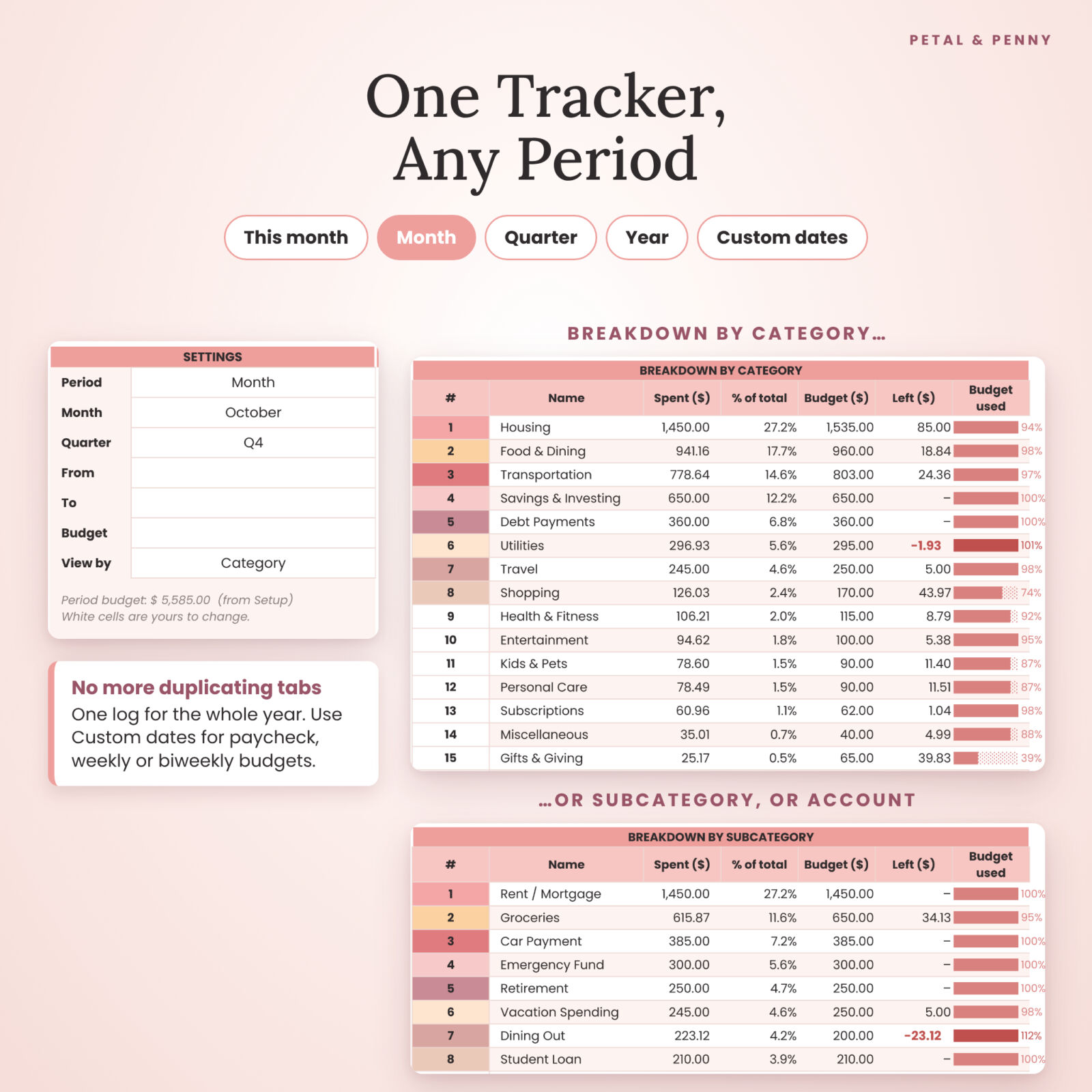
- One log for the whole year. No duplicating tabs every month. Pick a period on the dashboard and everything filters itself.
- Any period, any pay schedule. Choose This month, Month, Quarter or Year, or set custom dates for paycheck, weekly or biweekly budgeting.
- Budgets are optional. Add a monthly budget to any subcategory and see budget-used bars, or leave budgets blank and simply track.
- Any currency. Change one setting and every heading, card and total uses your symbol: $, €, £, R, ₹ and more.
- Built-in mistake checks. Missing dates, missing amounts and unknown subcategories are flagged, so your totals stay right.
What’s included in the budget spreadsheet
8 connected tabs
- Start Here – a 3-step quick start, a color key, links to every tab and your license.
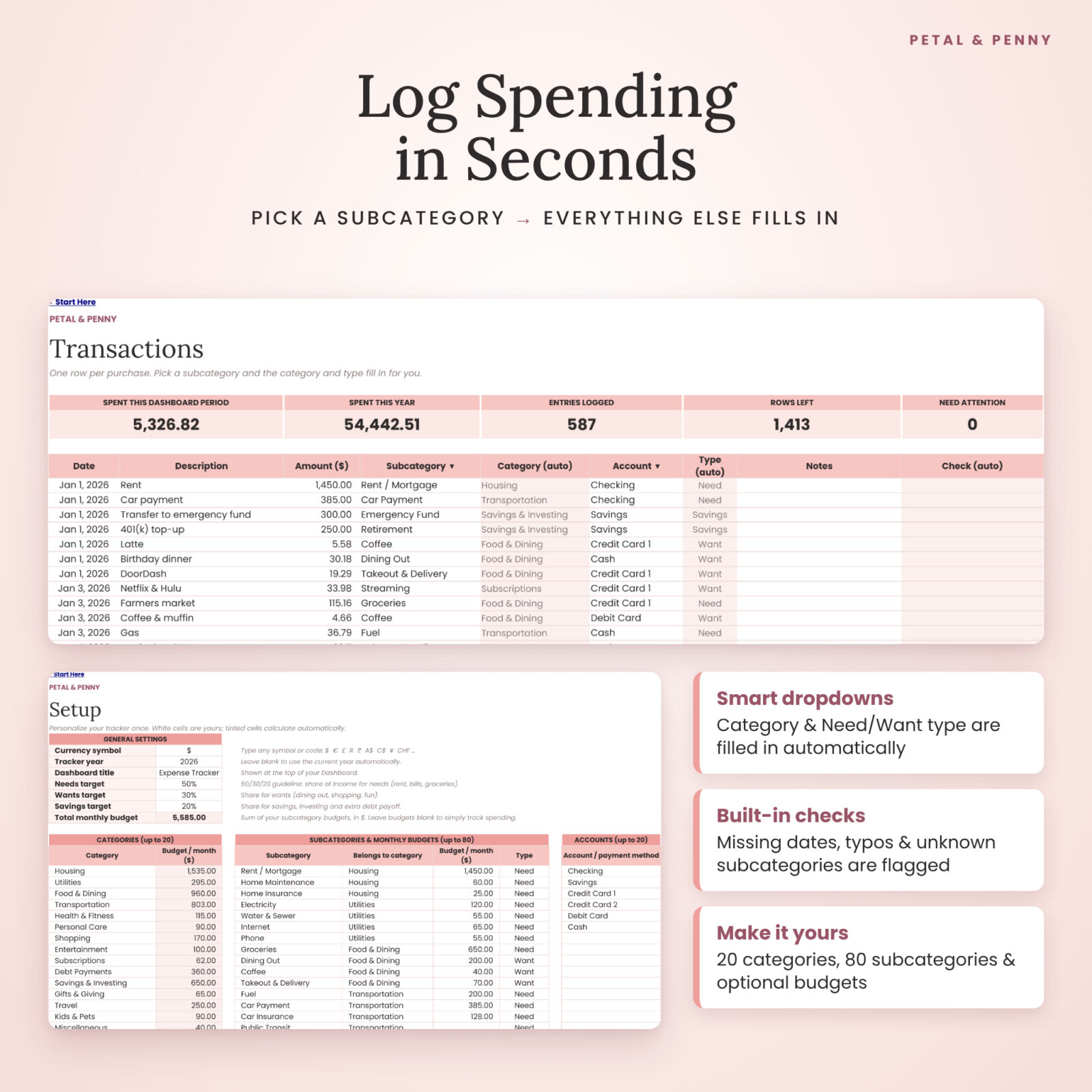
- Setup – currency, tracker year, dashboard title and 50/30/20 targets. Up to 20 categories, 80 subcategories with optional monthly budgets and a Need, Want or Savings type, 20 accounts and 15 income sources. Starter lists are included.
- Dashboard – 8 summary cards (budget, spent, left to spend, daily average, income, net saved, savings rate and projected spend). It also has a spending-over-time chart, a breakdown doughnut chart, a sorted breakdown table with budget-used bars, a 50/30/20 check, your top 5 expenses, bills and goals totals, and your spending pace with a safe-to-spend-per-day figure.
- Transactions – a 2,000-row expense log with date, description, amount, subcategory and account dropdowns, an automatic category and type, notes, and a check column.
- Income – a 500-row log for paychecks, side hustle income, bonuses and other money in.
- Annual Overview – every month at a glance, with a category-by-month heat-map, an income vs spending chart, a top categories chart, your biggest spending month, and monthly and yearly budget comparisons.
- Subscriptions – up to 50 bills and subscriptions, with the next payment date, days until due, a due-within-7-days highlight, and true monthly and yearly cost.
- Savings Goals – up to 12 goals, with progress bars, the amount remaining, how much to save per month and a status for each.
Your download
- A Template Access PDF with your make-a-copy link for Google Sheets
- An offline .xlsx copy of the tracker
- An illustrated user guide in DOCX and PDF (14 pages), with setup steps, tips, troubleshooting and FAQs
How the monthly spending tracker works
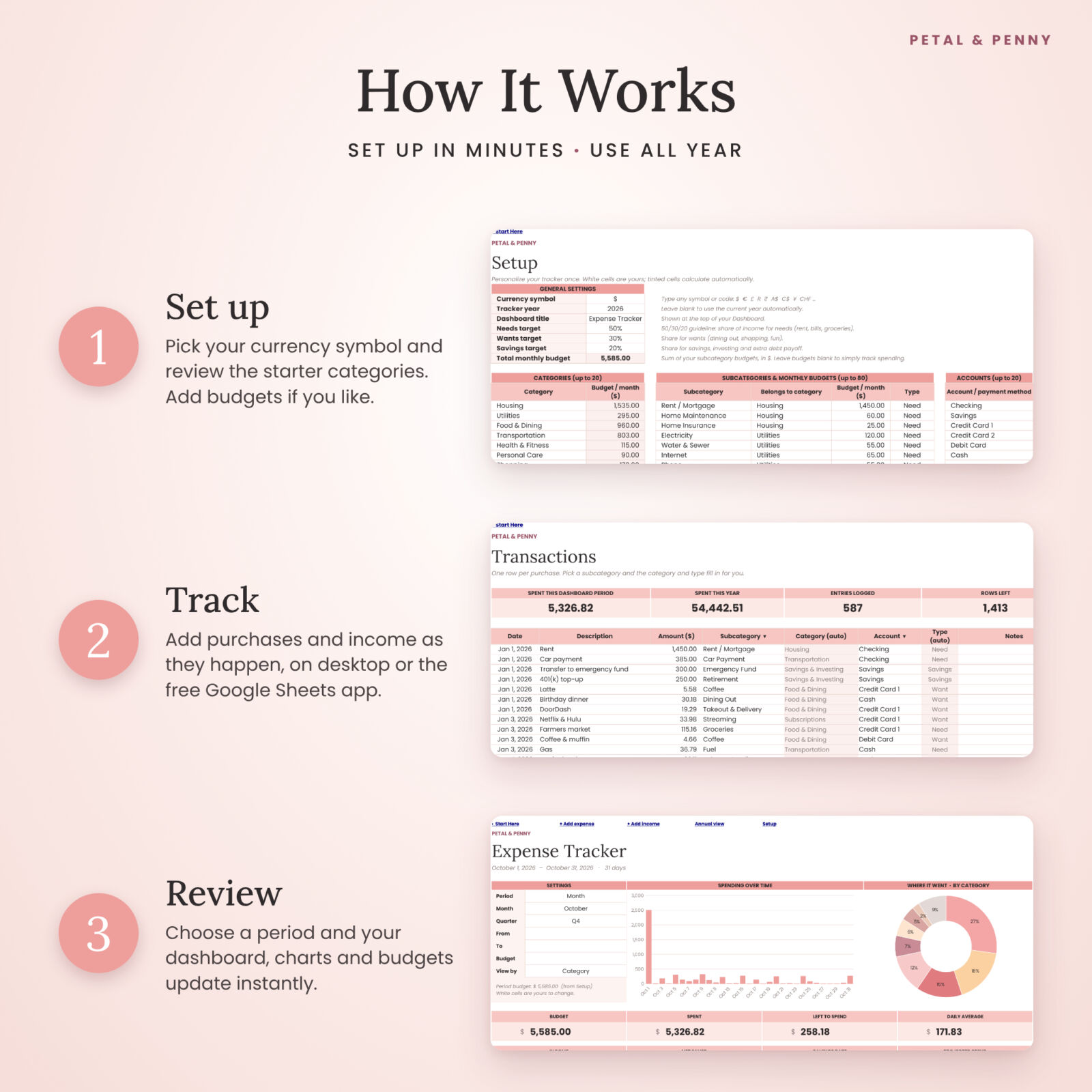
- Set up in minutes. Make your copy, type your currency symbol and review the starter categories. Add budgets only if you want them.
- Track as you go. Add purchases on Transactions and money in on Income. Pick a subcategory and the category and type fill in for you. Enter a refund as a negative amount.
- Review and adjust. Open the Dashboard, choose your period and see where your money went, what is left, and whether you are on track with 50/30/20.
Who it’s for
This personal finance planner suits anyone who wants clear, calm money tracking. That includes beginners starting their first budget, couples sharing household expenses, and people paid weekly or biweekly. It also works well for people who want a yearly picture without juggling twelve separate tabs. You don’t need any spreadsheet experience.
Real-life ways to use it
- Track spending for a month to find out where your money really goes before you set a budget.
- Budget paycheck to paycheck with custom dates from one payday to the next.
- Run a no-spend or low-spend month and watch the safe-to-spend-per-day number.
- Find forgotten subscriptions and see what they cost you each year.
- Save for a vacation, an emergency fund or a car down payment with a monthly target.
- Review the year in December using the Annual Overview heat-map.
File formats and software requirements
- Google Sheets (main version) – you need a free Google account. Use it in a browser on Mac or PC, or in the free Google Sheets app on iPhone, iPad and Android. Setup is easiest on a computer.
- .xlsx file – an offline copy that we tested in LibreOffice Calc. Google Sheets is the fully supported version; chart styling can look slightly different in other apps.
- User guide – DOCX and PDF.
Customization
Rename or add categories, subcategories, accounts and income sources on the Setup tab. Change your currency symbol, dashboard title and 50/30/20 targets. Formulas are protected with a gentle warning, not a password, so you can’t break them by accident but you can still change colors and add notes. Every tab is set up to print neatly.
Digital download
This is a digital product and nothing will be shipped. After purchase, download your files and open the Template Access PDF to make your own copy in Google Sheets. Your copy lives in your Google Drive, and only you and the people you choose can see it.
FAQ
Does this expense tracker work in any currency?
Yes. Type your currency symbol once on the Setup tab and it appears on every heading, card and total.
Can I use it for biweekly or weekly paychecks?
Yes. Set the Dashboard period to Custom dates and enter your pay period. Weekly, biweekly and semi-monthly all work.
Do I have to set a budget?
No. Budgets are optional. Without them you still get totals, charts, breakdowns, income and savings rate, and the annual overview.
Does it work on my phone?
Yes, through the free Google Sheets app on iPhone, iPad and Android. We recommend doing the first setup on a computer.
Does it work in Excel?
Google Sheets is the main, fully supported version. An offline .xlsx copy is included, which we tested in LibreOffice Calc.
Do I need to duplicate tabs every month?
No. You log everything in one place for the whole year and choose the period on the Dashboard.
How many transactions can I add?
Up to 2,000 expenses and 500 income entries per tracker. That is plenty for most households for a full year.
License
For personal and household use only. Please do not resell, share or distribute the files, the template link or any part of the template. This tracker is a planning tool and not financial advice. © 2026 Taskdale.
Reviews
There are no reviews yet.