

Photographer Resume Template for Word, Ready to Edit
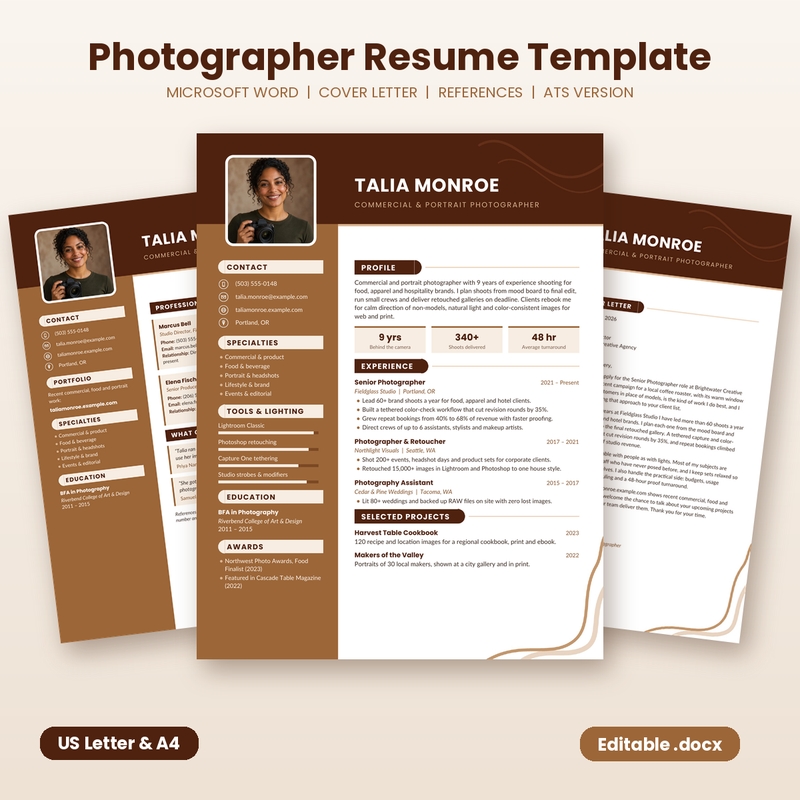
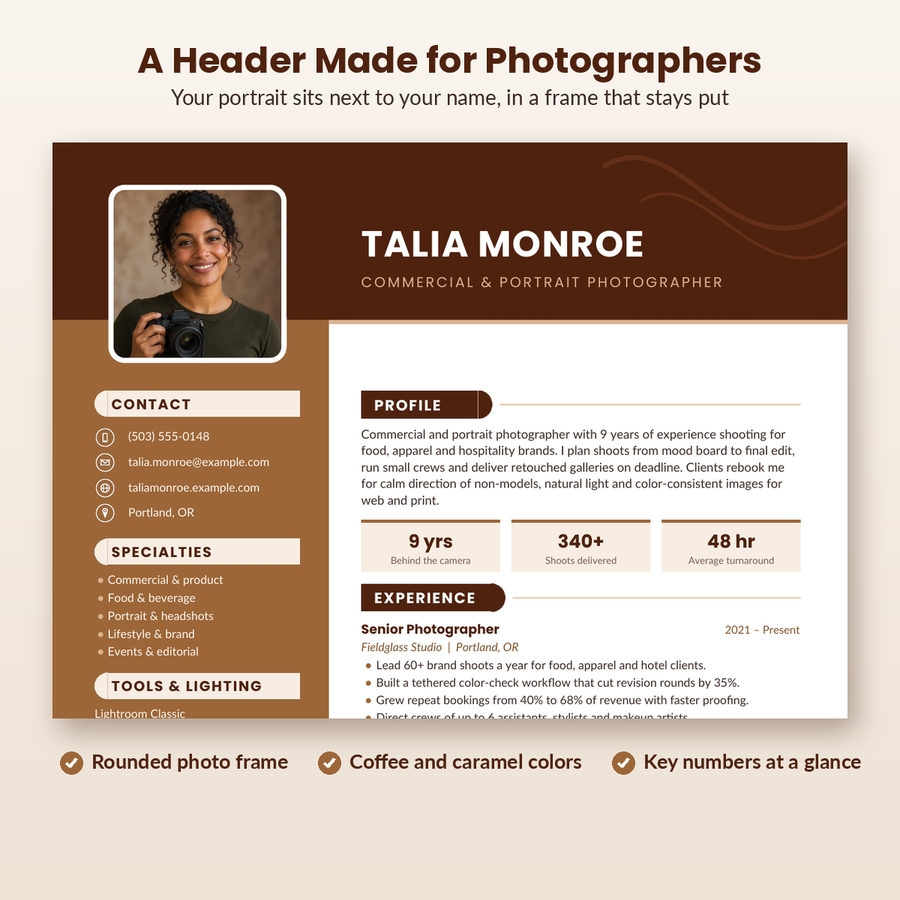
Mochaframe is a photographer resume template for Word that opens with your portrait right next to your name. A deep coffee brown header band, a warm caramel sidebar and a rounded-square photo frame give it the look of a printed portfolio card, while the layout stays simple to edit in Microsoft Word. You get a 1-page resume, a 2-page resume, a matching cover letter, a references page and an ATS-friendly plain version, each in US Letter and A4.
Every file is filled with real sample wording for a photographer, not lorem ipsum. You can see how a strong profile reads, how to turn shoots into achievement bullets with numbers, and where to put your portfolio link, awards and projects.
Who This Photographer Resume Is For
- Commercial, product and food photographers applying to studios, agencies and in-house brand teams
- Portrait, wedding and event photographers moving from freelance work into a staff role
- Photo assistants, second shooters and retouchers going after their first lead position
- Photography graduates who need a polished resume and cover letter set for internships
What’s Included in the Kit
- 1-page photo resume with profile, three key-number tiles, experience, selected projects and a sidebar for contact details, specialties, tools, education and awards
- 2-page resume that adds room for more jobs, projects, exhibitions and publications, workshops you have taught, certifications, selected clients and a client feedback section
- Matching cover letter with a sample letter written for a senior photographer role
- Matching references page with four reference cards and space for two short client quotes
- ATS-friendly plain resume: one column, no photo, no tables, for online job portals
- All five documents in US Letter and A4 (10 .docx files)
- Fonts folder with Poppins and Lato (free, SIL Open Font License)
- 8-page DOCX user guide with a photographer resume cheat sheet
Features That Make This Word Resume Template Easier
No floating text boxes
Many Word resume templates are built from text boxes that slide around or overlap as soon as you type. Mochaframe uses table cells for the sidebar, tabs and cards, so text stays in the normal flow. The brown band and caramel sidebar are one background picture locked behind the text, so they never move. This also helps applicant tracking software read your resume in a sensible order.
Fonts embedded in every file
A common complaint about resume templates is that Word swaps in a different font and the layout shifts. Poppins and Lato are embedded in each document, so the design shows correctly on any computer with Word. The font files are also in the zip if you want to install them.
Photo swap that keeps the frame
Right-click the sample photo, choose Change Picture and pick your own. Word keeps the rounded-square crop, the white border and the size. A square headshot works best.
Real Word styles
Your name uses the Title style, the section tabs use Heading 1, job titles use Heading 2 and bullets use List Bullet. Change a style once in the Styles pane and the whole document updates, including the color of every heading.
Room to grow on one page
We tested the 1-page photographer resume with a two-line job title and three extra bullets, and it stayed on one page in both paper sizes. Long names wrap neatly onto two lines inside the brown band.
How It Works
- Download the zip and the user guide from your Taskdale account after checkout.
- Unzip the kit and open the US-Letter or A4 folder.
- Open the 1-page resume in Microsoft Word and type over the sample text.
- Right-click the photo and choose Change Picture to add your headshot.
- Copy your header details into the cover letter and references page.
- Save as PDF and send it, or use the ATS version for online application forms.
File Formats and Software
- Format: Microsoft Word .docx (10 files) plus a .docx user guide
- Software: Microsoft Word 2016 or newer, Word for Mac or Microsoft 365
- The files open in Google Docs and Apple Pages with minor layout differences. For the cleanest result, make final edits and export your PDF in Word.
- Paper sizes: US Letter (8.5 x 11 in) and A4 (210 x 297 mm)
Customization
Edit every word, rename or remove sections, add jobs by copying an existing block, and adjust the skill bars to match your level. Text colors live in the styles, so you can change them in a few clicks. The guide lists the hex codes for espresso brown, caramel, tan and cream if you want to match your portfolio site or business cards.
Real Situations to Use It
- Applying for a studio photographer job after years of freelance weddings
- Pitching an in-house role at a restaurant group or hotel brand with a cookbook or campaign project to show
- Sending a resume and cover letter with your portfolio link to a creative agency
- Applying through a job portal that asks for a plain resume with no photo
Digital Download
This is an instant digital download. No physical item ships. You get the resume kit zip and the DOCX user guide, and you can download them as often as you need from your account.
Photographer Resume Template FAQ
Can I edit this photographer resume in Microsoft Word?
Yes. Every file is an editable Word .docx. Click any text and type over it.
Does it work in Google Docs?
It opens in Google Docs with minor layout differences, such as spacing. Word gives the best result.
Do I need to install the fonts?
No. The fonts are embedded. They are also included in a Fonts folder if you want them on your computer.
Can I use it without a photo?
Yes. Use the ATS-friendly plain version, or click the photo and press Delete.
Is there a cover letter template?
Yes, a matching cover letter and a matching references page are included in both paper sizes.
Is the sample person real?
No. The names, companies, schools and the sample headshot are fictional and only show how the layout works.
Can I share or resell the template?
No. The license is for personal use: edit and use it for your own job applications only.
Reviews
There are no reviews yet.