

A rental property analyzer spreadsheet that plans your whole portfolio
Most rental calculators stop at one deal. Doorstack is a rental property analyzer spreadsheet that starts there and keeps going. Type in a property and you get cash flow, cap rate, cash-on-cash return, DSCR and seven rule-of-thumb checks on one page. Mark the properties you own and the ones you plan to buy, and the same workbook builds a 30-year plan that tells you the year your rentals cover your monthly goal.
It is built for real strategies, not a single happy-path example. BRRRR deals show the cash you get back at refinance and what stays in the deal. House hacks show your net housing cost while you live there and the cash flow after you move out.
What you can do with it
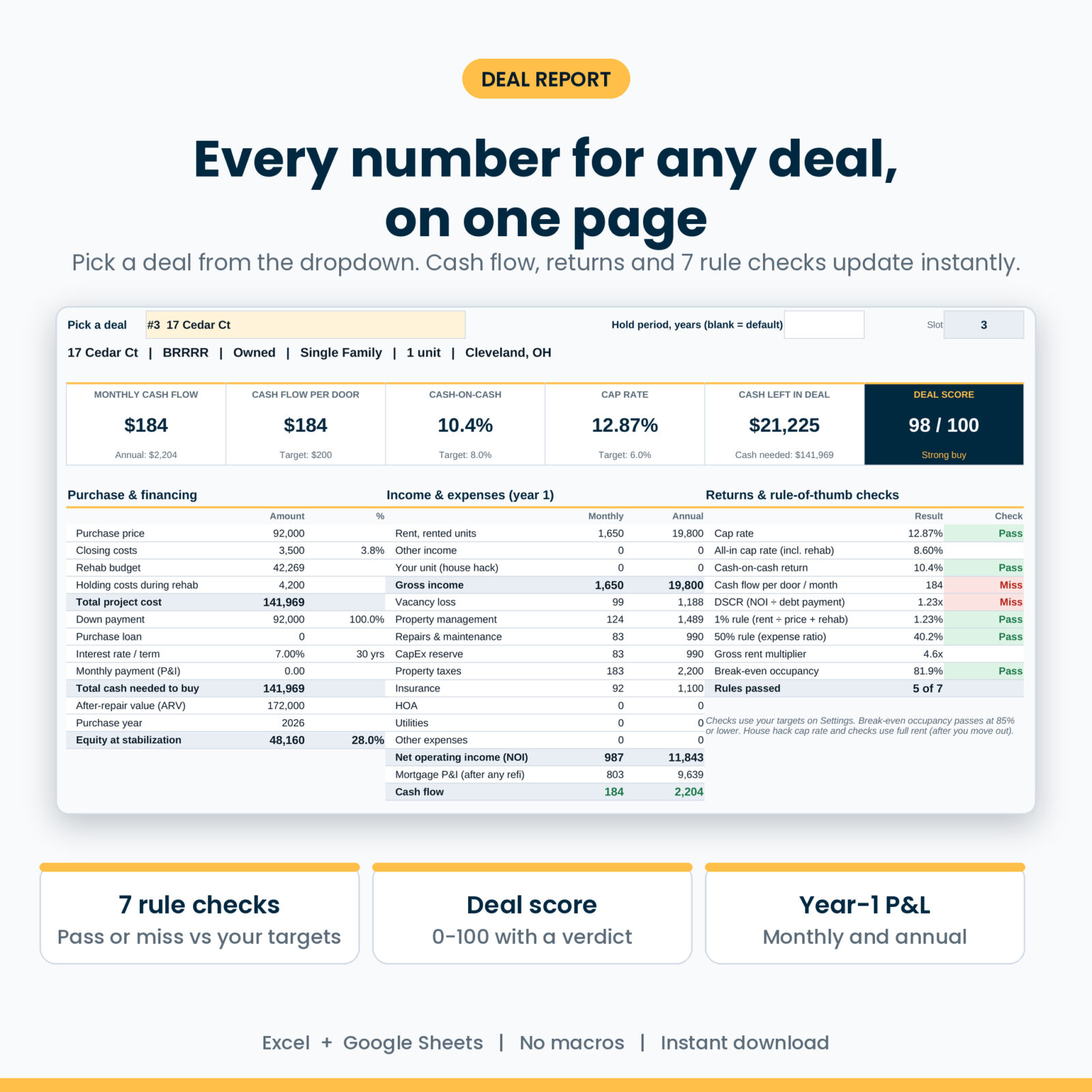
- Analyze a deal in minutes. Pick it from a dropdown on the Deal Report. Six headline tiles, a year-1 income statement, purchase and loan details and a 0 to 100 deal score update at once.
- Check it against your rules. Cap rate, cash-on-cash, cash flow per door, DSCR, the 1% rule, the 50% rule and break-even occupancy, each marked Pass or Miss against targets you set.
- Know your max offer. Four methods: target cap rate, target cash flow per door, target cash-on-cash and the ARV rule (70% by default). The lowest becomes your suggested max, compared with the price you entered.
- Run the BRRRR math. New loan from ARV and LTV, refinance costs, payoff of the purchase or hard money loan, cash back, cash left in the deal, capital recovered and post-refi cash flow.
- Size up a house hack. Rent from the other units, your unit’s market rent, years you live there, net housing cost and move-out cash flow.
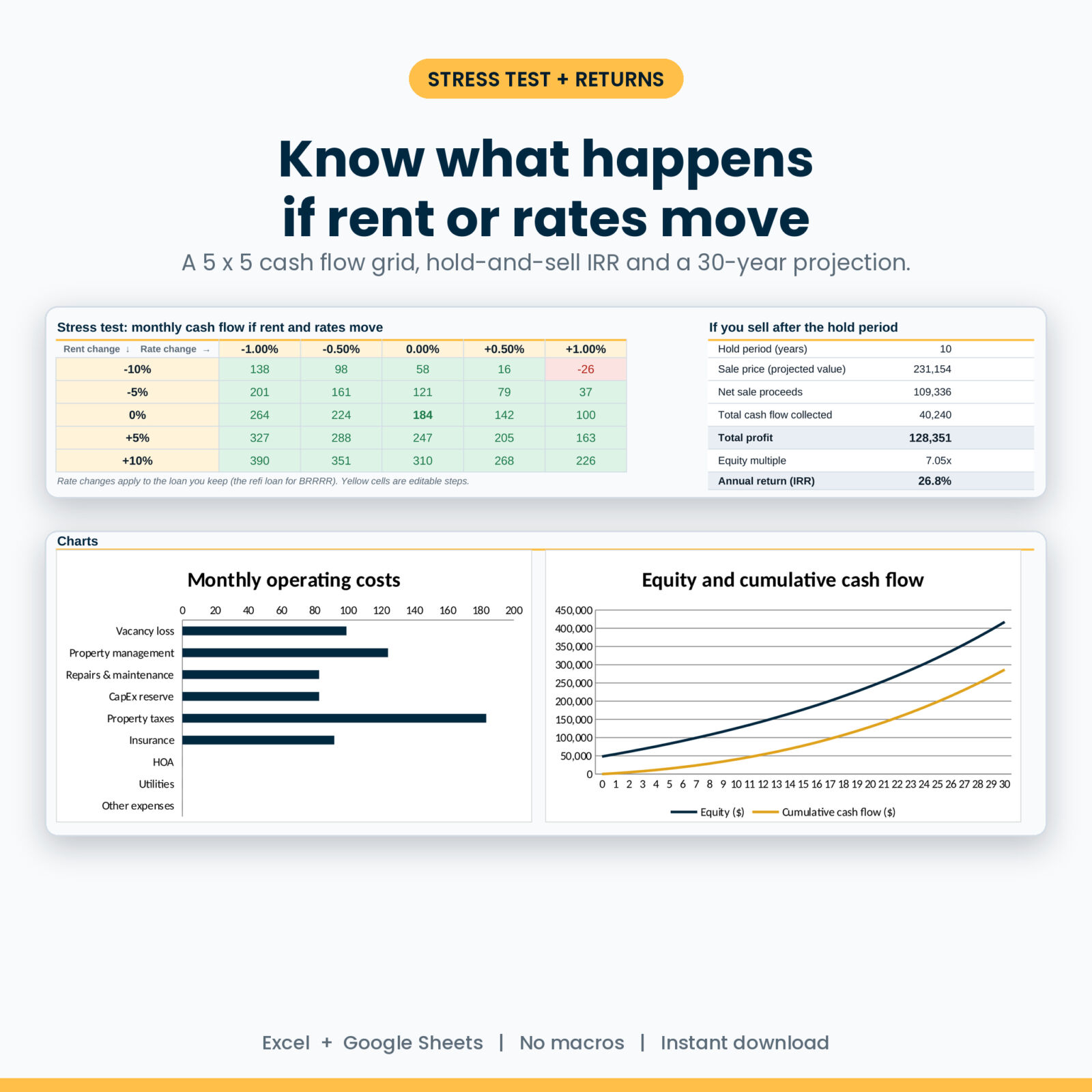
- Stress test it. A 5 x 5 grid shows monthly cash flow if rent moves 10% either way and rates move up to 1%. The steps are editable.
- See the long game. A 30-year projection of rent, NOI, debt, cash flow, loan balance, value and equity, plus hold-and-sell results: net sale proceeds, total profit, equity multiple and IRR.
- Compare and rank 30 deals. One table with cash needed, cash left, NOI, cash flow, returns, DSCR, score, verdict and rank.
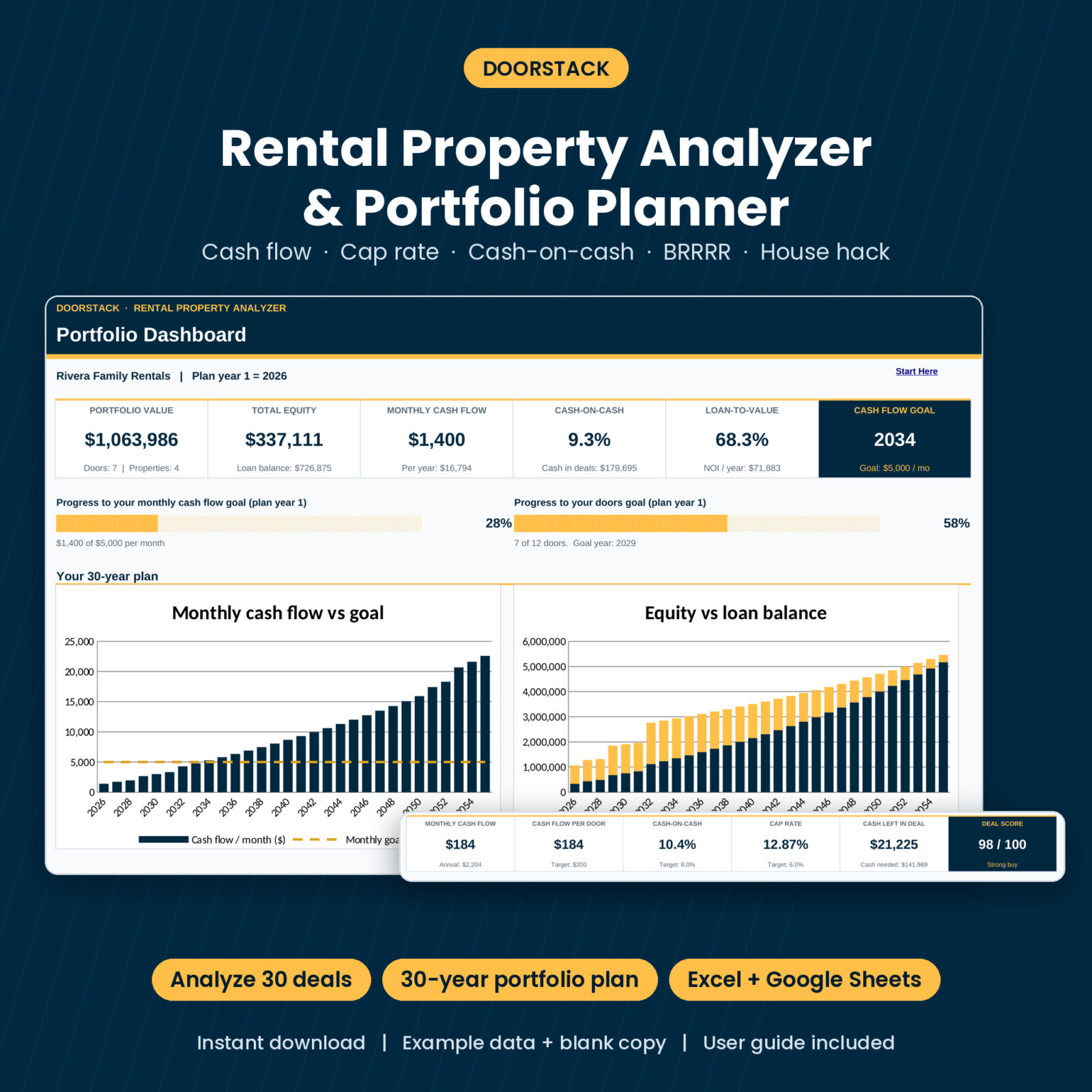
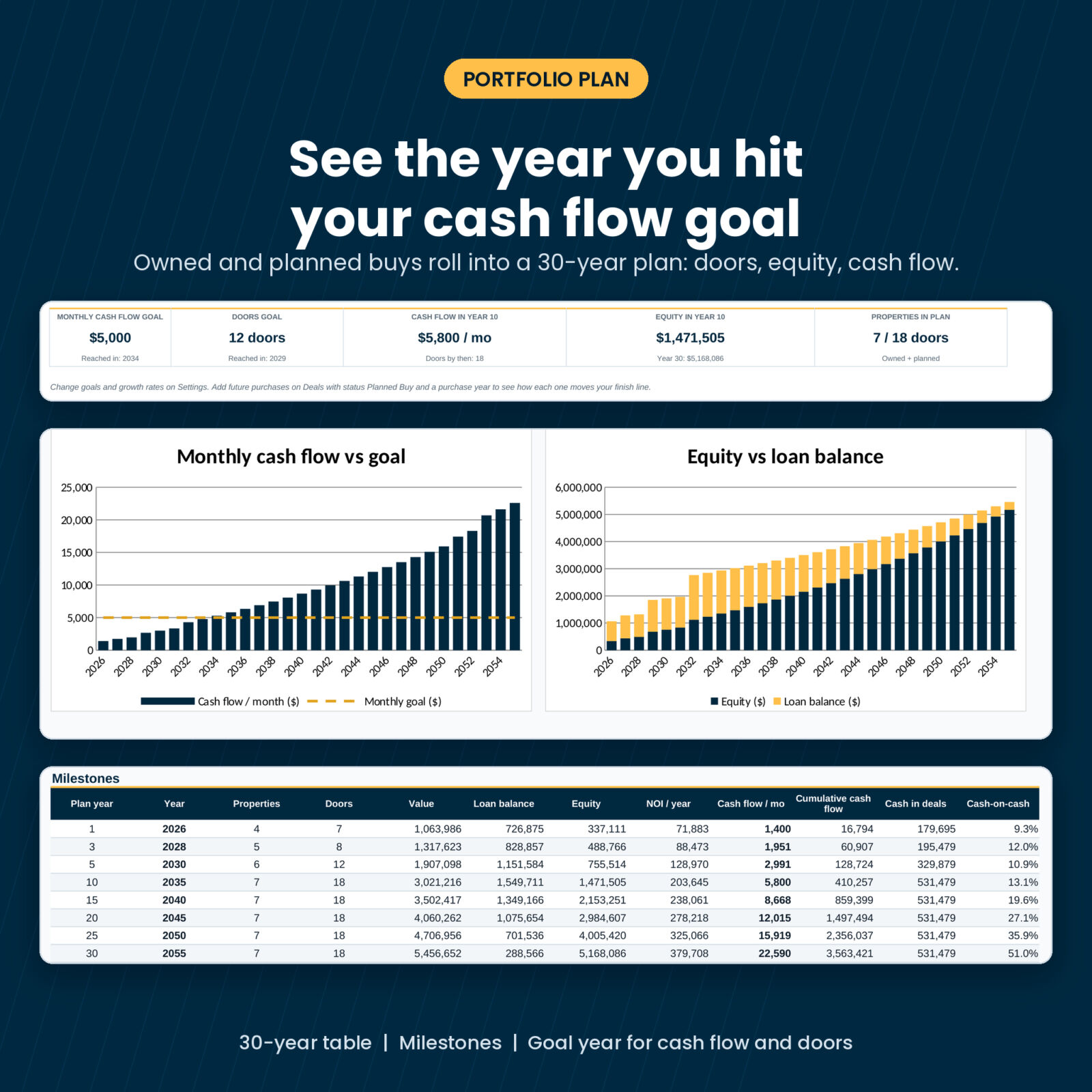
- Plan the portfolio. Owned and Planned Buy properties roll up year by year: doors, value, loan balance, equity, LTV, NOI, cash flow and cash-on-cash. The plan marks the year you reach your cash flow goal and your doors goal.
Who it is for
- New investors checking a first single family home or duplex before writing an offer
- House hackers comparing FHA or low down payment owner-occupied deals
- BRRRR investors who want to know exactly how much cash stays in each deal
- Landlords with a few doors who want a clear plan for the next five, ten or twenty years
What is included
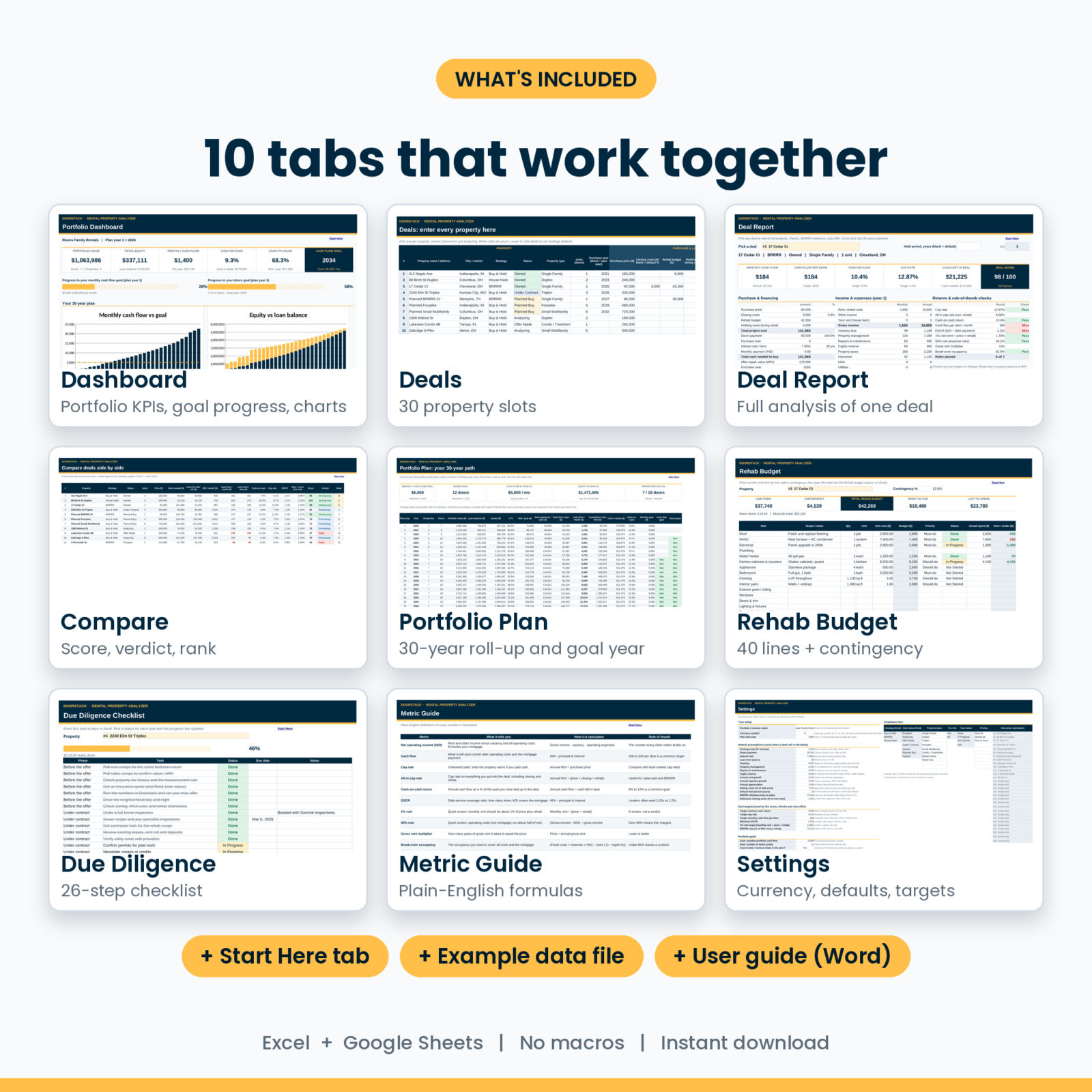
- Doorstack workbook (blank) with 10 tabs: Start Here, Dashboard, Deals, Deal Report, Compare, Portfolio Plan, Rehab Budget, Due Diligence, Metric Guide and Settings
- Example data workbook with 13 sample deals (owned, planned, prospects, a BRRRR, two house hacks and a few that fail) so you can explore before you type
- User guide (Word) covering every tab, the scoring, BRRRR and house hack setup, troubleshooting and FAQs
The Dashboard
Portfolio value, equity, monthly cash flow, cash-on-cash, LTV and your goal year as tiles. Two progress bars toward your cash flow and door goals. Charts of monthly cash flow against your goal and equity against debt for 30 years. Your deal pipeline by status, the top 5 deals by score and a milestones table for years 1, 3, 5, 10, 15, 20, 25 and 30.
Rehab Budget and Due Diligence
A 40-line rehab estimator with contingency, priorities, status and actual spend, plus a 26-task checklist from rent comps to changing the locks, with a progress bar.
How it works
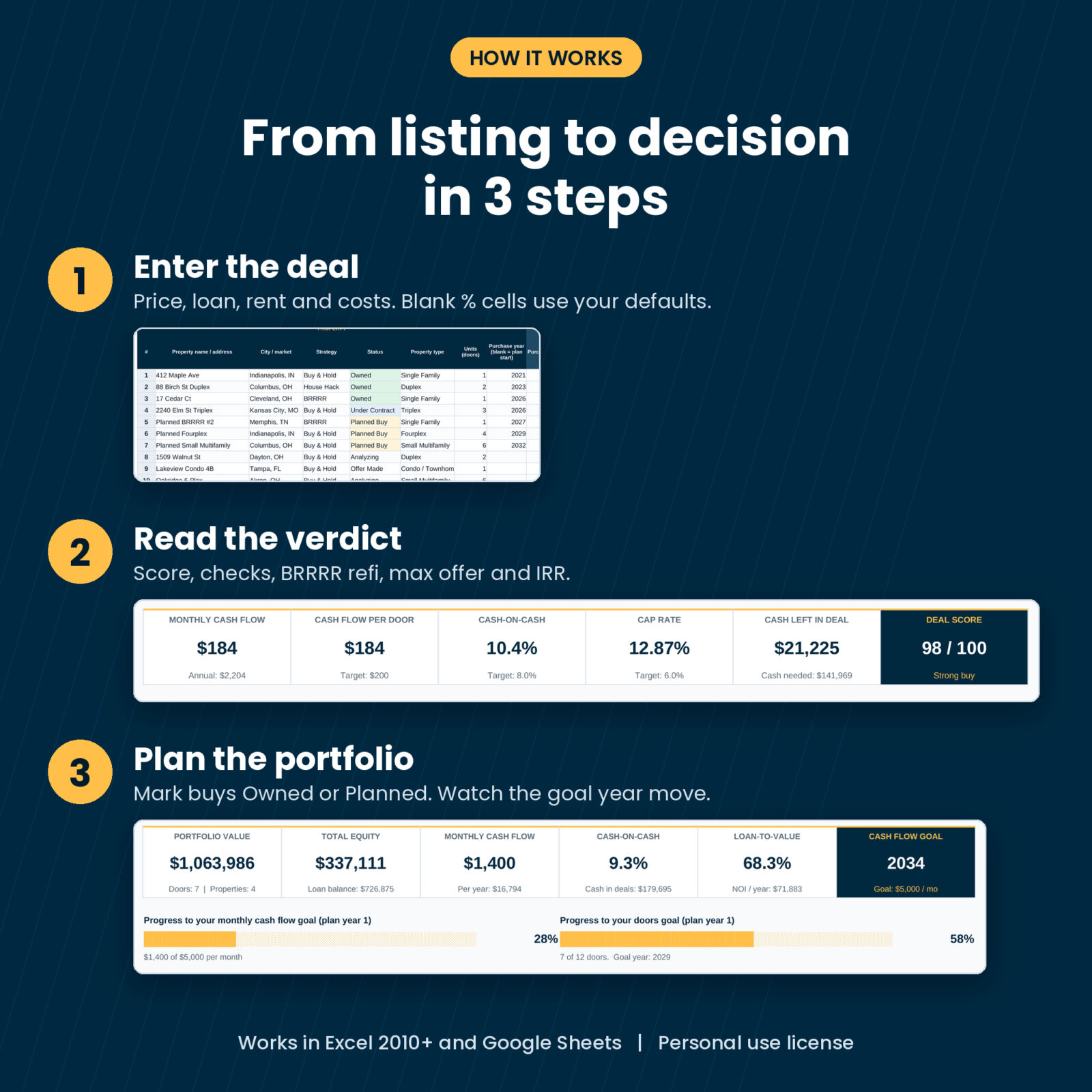
- Set your currency, default assumptions, deal targets and goals on Settings.
- Add each property on Deals. Leave the percentage cells blank to use your defaults.
- Pick a deal on the Deal Report and read the verdict.
- Rank everything on Compare, then set owned and future buys to Owned or Planned Buy and watch the Dashboard and Portfolio Plan update.
File formats and requirements
- .xlsx workbook for Microsoft Excel 2010 or newer (Windows and Mac) and Microsoft 365
- Google Sheets: upload the file to Google Drive, then open it with Google Sheets
- No macros, add-ins or scripts. Formula cells are locked with no password, so they are hard to break by accident
- One currency setting: type $, €, £ or any symbol and every money label follows
- User guide in .docx (opens in Word, Google Docs or Pages)
Customization
Change vacancy, management, repairs, CapEx, rent growth, expense growth, appreciation, selling costs, refinance LTV and closing costs on Settings, or override them on any single deal. Set your own targets for cash-on-cash, cap rate, cash flow per door, DSCR and the 1% rule, and the score adjusts. Rename property types and rehab priorities to suit your market.
Real situations where it helps
- A duplex lists on a Tuesday. You enter it at lunch and know your max offer before the showing.
- Your lender quotes a higher rate. The stress test shows whether the deal still cash flows.
- You finished a BRRRR rehab. You plug in the appraisal and see how much cash comes back and what the property now earns.
- You are deciding between a fourplex now or two single family homes over three years. Add both as Planned Buys and compare the goal year.
Digital download
This is a digital product. Nothing ships. You get the files right after checkout and can download them from your account. Personal use license: use it for your own properties and business, but please do not resell or share the files.
FAQ
Does this rental property analyzer work in Google Sheets?
Yes. It uses only functions that Excel and Google Sheets both support. Upload the .xlsx to Google Drive and open it with Google Sheets.
Is there a BRRRR calculator inside?
Yes. Choose BRRRR as the strategy, add ARV and refinance terms, and the Deal Report shows cash back, cash left in the deal, capital recovered and post-refi returns.
Can it analyze house hacking?
Yes. It handles the years you live in one unit and switches to full rent after you move out.
How many properties can I track?
30 deals in total, mixing owned, planned and prospects.
What is the deal score?
A 0 to 100 rating built from cash-on-cash, cash flow per door, cap rate, DSCR and the 1% rule, measured against your targets.
Can I use it outside the US?
Yes. Set your currency symbol once. The math works for any market.
Is it financial advice?
No. It is a calculator that works from your numbers. Confirm rents, taxes, insurance and loan terms with local pros before you buy.

Reviews
There are no reviews yet.