

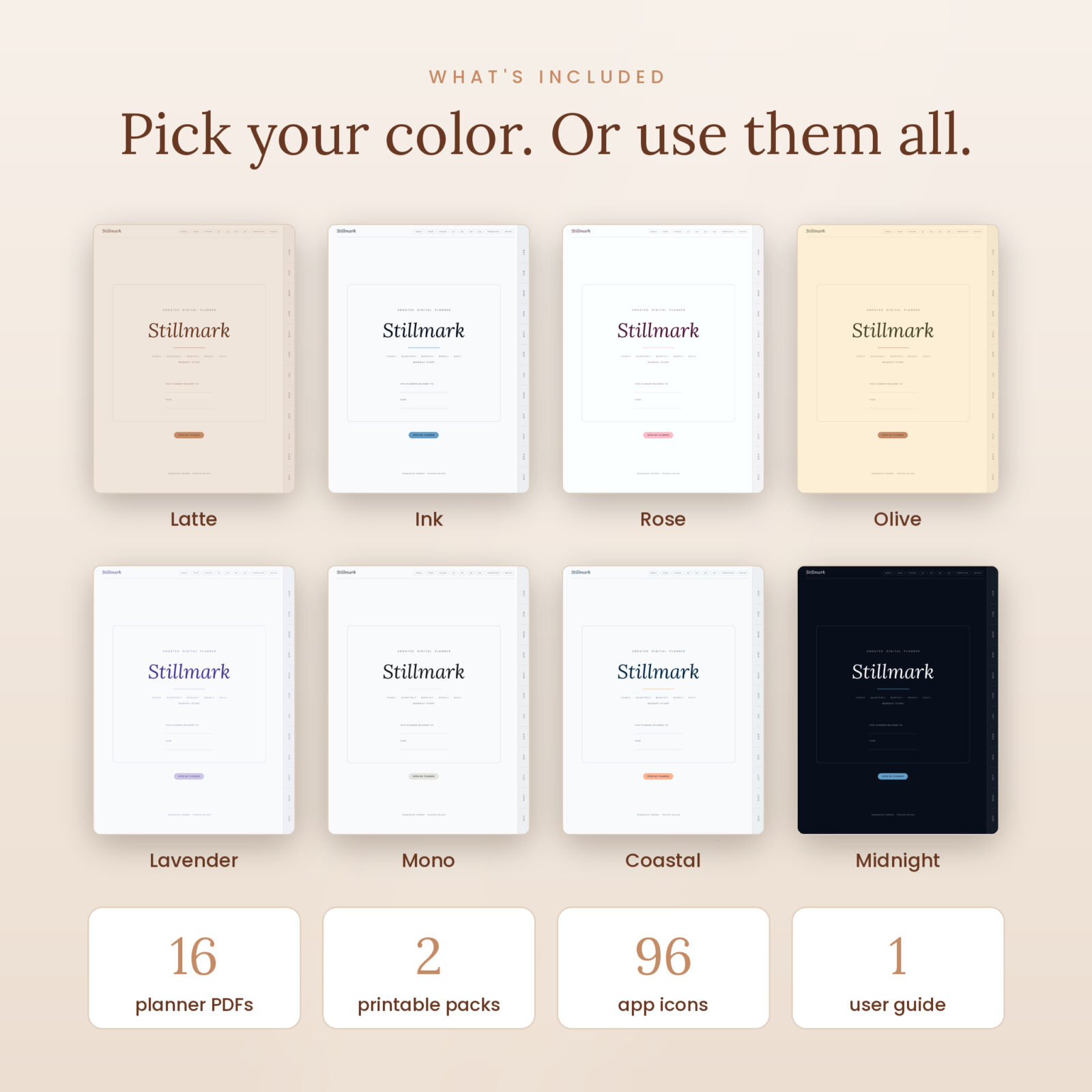


Stillmark is an undated digital planner for people who want a calm, clean place to plan their days. It has 795 hyperlinked pages, no printed dates, and a soft minimalist design that stays out of your way. Start it today, next month or halfway through the year. Nothing goes to waste.
Every page links to the next thing you need. Tap a month tab, then a week, then a day. Three taps and you’re writing. It’s built for GoodNotes, Notability, Xodo, Samsung Notes and other PDF note apps on iPad, Android and Windows tablets.
What makes this undated digital planner different
Most digital planners give you a calendar and a pile of daily pages. Stillmark gives you a full planning system that still feels light. Each month comes with five pages: a calendar, a plan, a habit tracker, a budget and a review. You also get two weekly layouts, a true dark mode, and printable inserts for the days you’d rather use paper.
- 795 hyperlinked pages with month tabs, a top menu, clickable breadcrumbs and prev/next buttons
- Fully undated, so you can start any day and use it again next year
- 8 colors: Latte, Ink, Rose, Olive, Lavender, Mono, Coastal and Midnight (dark mode)
- Monday start and Sunday start versions in every color
- 2 weekly layouts: Classic boxes and an Hourly grid from 6 AM to 10 PM
- 504 daily pages with schedule, focus, top 3, to do list, water, mood, meals and gratitude
- Calendar buttons that open Apple Calendar, a new Google Calendar event or Apple Reminders
- 12 templates, 10 notes pages and 12 custom sections you name yourself
- Printable inserts in US Letter and A4, plus 96 matching home screen icons
Who this minimalist planner is for
Stillmark suits anyone who has bought a dated planner, missed three weeks, and felt guilty looking at the empty pages. It works well for:
- Busy parents juggling school runs, work and appointments
- Students who want one place for classes, deadlines and study notes
- Freelancers and small business owners tracking clients, projects and money
- Anyone building better habits one month at a time
- Night planners who prefer a dark screen after sunset
What’s inside the planner
Year and quarter pages
Start with Vision & Goals: a word of the year, a short vision and goals across 8 life areas like health, money and relationships. Then use Key Dates for birthdays and trips, Year in Pixels to color in one square per day, and a Year Reflection when you look back. Each quarter has its own plan page with 3 goals and steps, plus a review page with a 10 step progress bar for every goal.
Monthly pages
The undated monthly calendar has six week rows. Write your dates into the small circles and tap W1 to W6 to open each week. The Plan page holds goals, priorities, events and a to do list. The Habit Tracker covers 12 habits over 31 days, plus mood and energy rows. The Budget page tracks income, bills, everyday spending and savings. The Review page lets you rate 8 areas of your life and set an intention for next month.
Weekly pages
Every week has two layouts and you can switch with one tap. Classic gives each day its own lined box, a weekly focus and a weekly to do list. Hourly shows all seven days on a time grid, which helps when your week is packed with meetings and pickups. Tap any day name to jump to that day.
Daily pages
Each daily page has an hour by hour schedule from 6 AM to 10 PM on the left. On the right you’ll find today’s focus, your top 3 priorities, a to do list, 8 water glasses, a 1 to 5 mood scale, meals and a space for gratitude or notes. Above the schedule, three small buttons open Apple Calendar, Google Calendar or Reminders so you can add an event to your phone fast.
Templates, notes and custom sections
The Templates page links to 12 page styles: lined, dot grid, square grid, blank, Cornell notes, checklist, meeting notes, project planner, meal planner with grocery list, reading log, brain dump and vision board. There are 10 notes pages and 12 custom sections. Write a name on the Index line, like Workouts or Recipes, and that section is yours.
How it works
- Download your files right after checkout. Each color comes in its own ZIP.
- Unzip and import the PDF into GoodNotes, Notability, Xodo, Samsung Notes or another PDF app.
- Tap the cover, write today’s date and start planning.
The included user guide walks you through setup in each app, every section of the planner, home screen icons and fixes for common problems.
What you’ll receive
- 8 ZIP files, one per color, each with a Monday start and a Sunday start planner PDF (16 PDFs in total)
- 1 ZIP of printable inserts: 27 pages in US Letter and 27 pages in A4
- 1 ZIP of 96 iPad home screen icons (12 icons in 8 colors, 512 x 512 PNG)
- 1 user guide in Word format (DOCX)
File formats and requirements
- Format: hyperlinked PDF, portrait, 4:3 ratio to fit every iPad
- Apps: GoodNotes, Notability, Xodo, Samsung Notes, Noteshelf and other PDF annotation apps that keep links
- Devices: iPad, Android tablets and Windows tablets. A stylus is recommended.
- Not suitable for: OneNote, which removes PDF links
- File size: about 2.7 MB per planner, so it opens quickly
Customization
Pick the color that suits your mood, or use different colors for home and work. Add your own stickers, duplicate any template page as many times as you need, and name the 12 custom sections however you like. The budget page uses neutral Amount, Budget and Actual columns with a blank currency line, so it works in any currency.
Digital download information
This is a digital product. No physical item will be shipped. Your files are ready to download as soon as payment is confirmed, and you’ll find them in the Downloads area of your Taskdale account. For personal use only. Please don’t share or resell the files.
FAQ
Is this planner dated?
No. It is completely undated, so you can start on any day and reuse it every year.
Does it work with GoodNotes?
Yes. Import the PDF into GoodNotes and the tabs and links work as you tap them. The guide shows you how, step by step.
Can I use it on an Android tablet?
Yes. Use Samsung Notes, Xodo, Noteshelf or any PDF app that keeps hyperlinks.
Is there a dark mode?
Yes. The Midnight color is a full dark mode planner with light lines on a deep navy background.
Why does every month have six weeks?
Some months stretch across six calendar rows. Six weeks means you never run out of pages. Just skip any you don’t need.
Can I print it?
The digital planner is designed for tablets. For paper, use the included printable inserts in US Letter and A4.
Does it sync with my calendar?
No. The calendar buttons are one way shortcuts that open your calendar or reminders app. Nothing in the planner syncs or is shared.
Reviews
There are no reviews yet.