


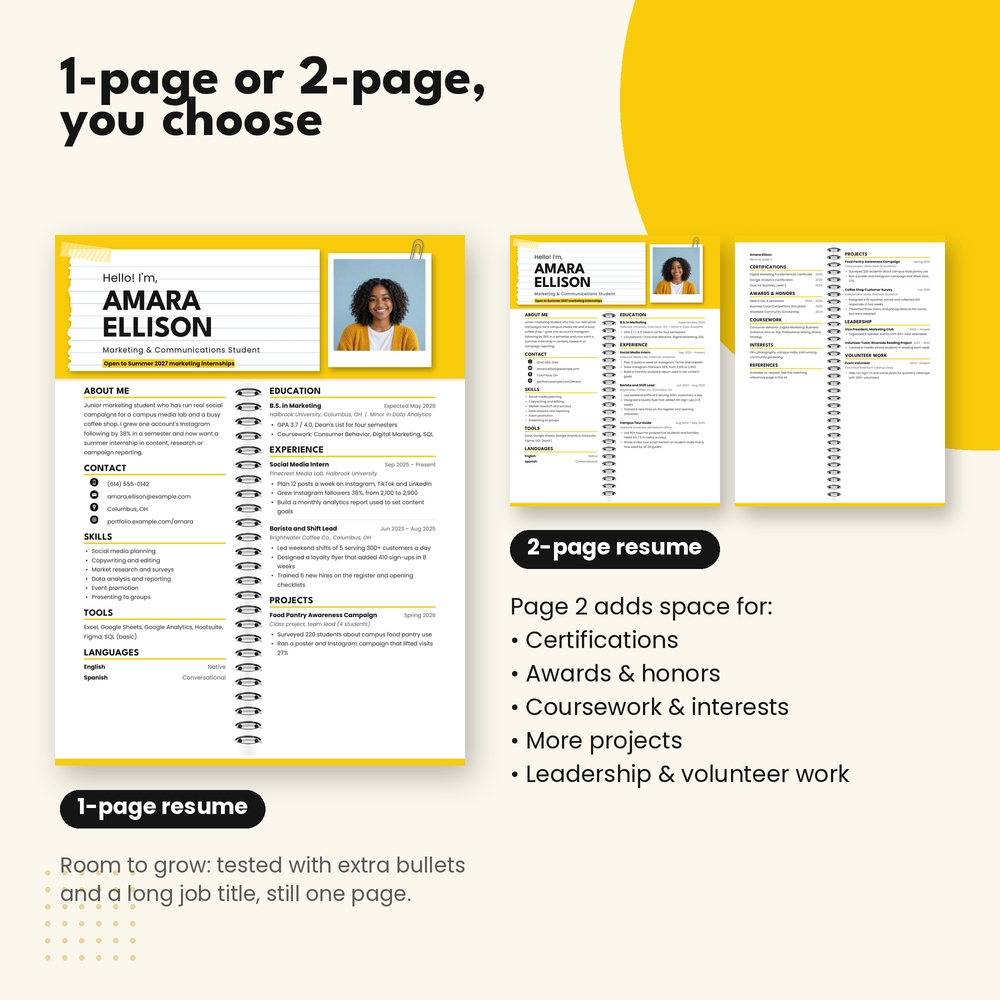


This student resume template for Word looks like a page torn from a bright yellow spiral notebook, with your photo clipped to the top right. It is built for students and recent graduates applying for internships, co-ops, campus jobs and first roles. You get a 1-page and a 2-page resume, a matching cover letter, a references page and a plain ATS version, all as editable Microsoft Word (.docx) files in US Letter and A4.
The design is friendly enough to stand out in a stack of plain resumes, yet the layout stays clean: bold condensed headings, a yellow highlighter line under each section and plenty of white space. Recruiters can scan it in the six or seven seconds they usually give a first look.
Why this student resume template for Word is easier to use
Most Word resume templates break the moment you start typing. Fonts go missing, text boxes slide around and one extra line pushes everything onto page two. Spiralnote was built to avoid all three problems.
- Fonts embedded in every file. League Spartan and Poppins travel inside each .docx, so the design shows correctly in Word on Windows and Mac without installing anything. The font files are in the download too, as a backup.
- No floating text boxes. Columns are built from table cells and the notebook art sits behind the text in the page header. Your words stay where you type them, and applicant tracking systems can read them.
- Room to grow. We tested the 1-page resume with three extra bullets and a long job title. It still fits on one page.
- Photo swap in two clicks. Right-click the sample photo, choose Change Picture, and your photo drops into the same polaroid frame.
- Real Word styles. Title, Heading 1, Heading 2, List Bullet and more, so you can restyle the whole resume from the Styles pane.
What is included in the internship resume template kit
- Resume, 1 page: About Me, Contact, Skills, Tools, Languages, Education, Experience and Projects
- Resume, 2 page: adds Certifications, Awards, Coursework, Interests, extra Projects, Leadership and Volunteer Work
- Matching cover letter with a complete sample letter written for a summer internship
- Matching references page with room for four references
- ATS-friendly version: single column, no photo, no tables, same wording and fonts
- Every file in US Letter (8.5 x 11 in) and A4 (210 x 297 mm): 10 Word files in total
- Backgrounds folder with three extra colorways (Sky Blue, Mint and Blush Pink) plus a no-photo header in Sunny Yellow
- Fonts folder with League Spartan and Poppins and their open font licenses
- A 12-page illustrated user guide (DOCX), sent as a separate download
The student resume cheat sheet
The user guide is more than setup steps. Its cheat sheet gives you a simple bullet formula (action verb, what you did, the result with a number), 30 action verbs, about 30 keywords recruiters search for in student and internship resumes, and a table that tells you what to put in each section. If you have never written a resume before, start there.
Who this student resume template is for
- College students applying for summer internships, co-ops or research assistant roles
- High school seniors applying for part-time jobs, scholarships or programs
- Recent graduates writing a first professional resume
- Anyone applying for an entry-level role who wants a design with some personality
How it works
- Download and unzip the kit. Pick the US-Letter or A4 folder.
- Open the 1-page resume in Microsoft Word and save a copy with your own name.
- Type over the sample text. It is written for a fictional marketing student, so you can see what a strong student summary and achievement bullets look like.
- Swap in your photo, or use the no-photo header or the ATS version if your target employers prefer resumes without photos.
- Save as PDF and send it. Use the ATS version for online portals such as Workday, Greenhouse or Handshake.
Sample content that shows you what to write
Instead of lorem ipsum, every file is filled with realistic wording for a marketing student named Amara Ellison: a three-sentence About Me, an internship with numbers (“Grew Instagram followers 38%, from 2,100 to 2,900”), a part-time barista job framed as leadership, a class project and campus activities. Swap in your own details and keep the structure.
Customization
Change the photo, colors, fonts and sections without breaking the layout. Swap the yellow for Sky Blue, Mint or Blush Pink by replacing the header picture with one from the Backgrounds folder, then update the Heading 1 border color. The guide walks through each step with the hex codes. Add a new job or project by copying an existing one, and delete any section you do not need.
File formats and software
- Microsoft Word .docx files, tested for Word 2016 and newer, Microsoft 365 and Word for Mac
- Opens in Google Docs and Apple Pages with minor layout differences. For the cleanest result, export your final PDF from Word
- Not a Canva template
Digital download
This is an instant digital download. Nothing is shipped. After checkout you get two files: the resume kit zip (about 11 MB) and the user guide. Downloads do not expire. The license is for personal use: you may edit the files and send the documents you make, but you may not resell or share the template files.
Use cases
- Applying to a summer internship before the spring deadline rush
- Bringing printed copies to a campus career fair
- Updating your resume for an on-campus job or research position
- Sending a matching resume, cover letter and references to a small business that asked for all three
FAQ
Is this student resume template ATS-friendly?
The designed resume uses real text in table cells, not text boxes, so most systems can read it. For online application portals, the kit includes a single-column ATS version with the same content.
Can I use this internship resume template without a photo?
Yes. Use the ATS version, or swap the header for the no-photo background in the Backgrounds folder. Many US employers prefer resumes without photos.
Do I need to install the fonts?
No. The fonts are embedded in every Word file. If you ever see a different font, install the two fonts included in the Fonts folder.
Does it work in Google Docs?
You can open the files in Google Docs, but the layout may shift a little. The kit is designed and tested for Microsoft Word.
What if I have no work experience?
Lead with Education and Projects. The guide shows how to turn class projects, clubs, sports and volunteering into strong bullets.
Which paper size should I use?
US Letter for the US and Canada, A4 for most other countries. Both are included.
Can I change the colors?
Yes. Three extra colorways are included, and the guide explains how to switch in a couple of minutes.
Reviews
There are no reviews yet.