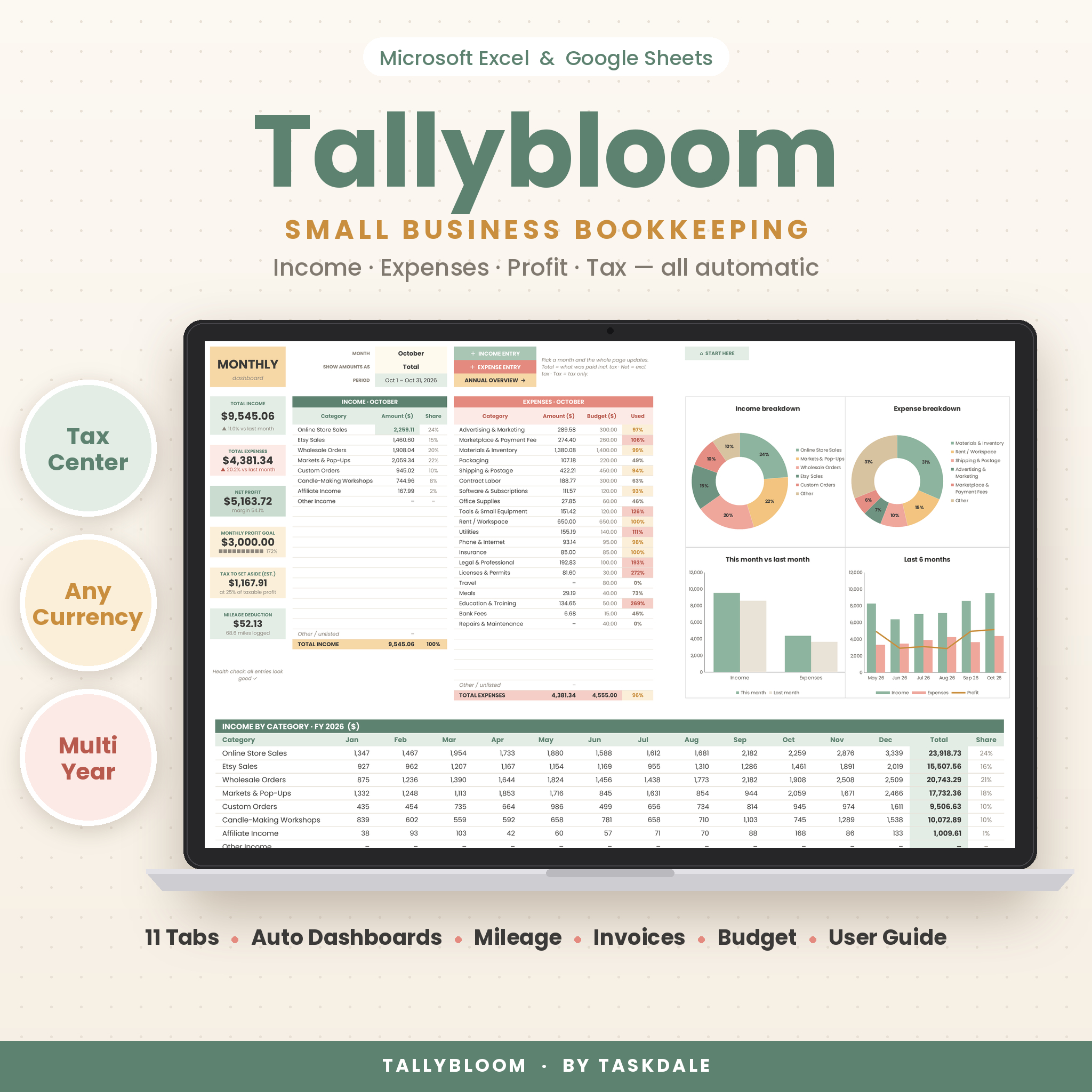


Tallybloom is a small business bookkeeping spreadsheet for Microsoft Excel and Google Sheets that turns everyday income and expense entries into clear monthly and yearly reports. Type a date, pick a category, enter the amount — Tallybloom splits out tax, tracks your profit goal, follows every bank and payment-app balance and tells you how much to set aside for taxes each quarter. No accounting experience, no subscription.
What this small business bookkeeping spreadsheet does
Tallybloom replaces scattered notes, bank downloads and guesswork with one organized workbook. Eleven connected tabs share the same categories and settings, so everything you log flows into the dashboards, budget, account balances and Tax Center automatically. Change one setting — the year, your currency, your fiscal start month — and every page updates.
Who it is for
- Etsy, Shopify, Amazon and craft-market sellers
- Freelancers, consultants, coaches and service providers
- Side hustlers and new business owners setting up their first books
- Anyone who wants tidy records to hand to a bookkeeper or tax preparer
Key features
Income and expense tracker
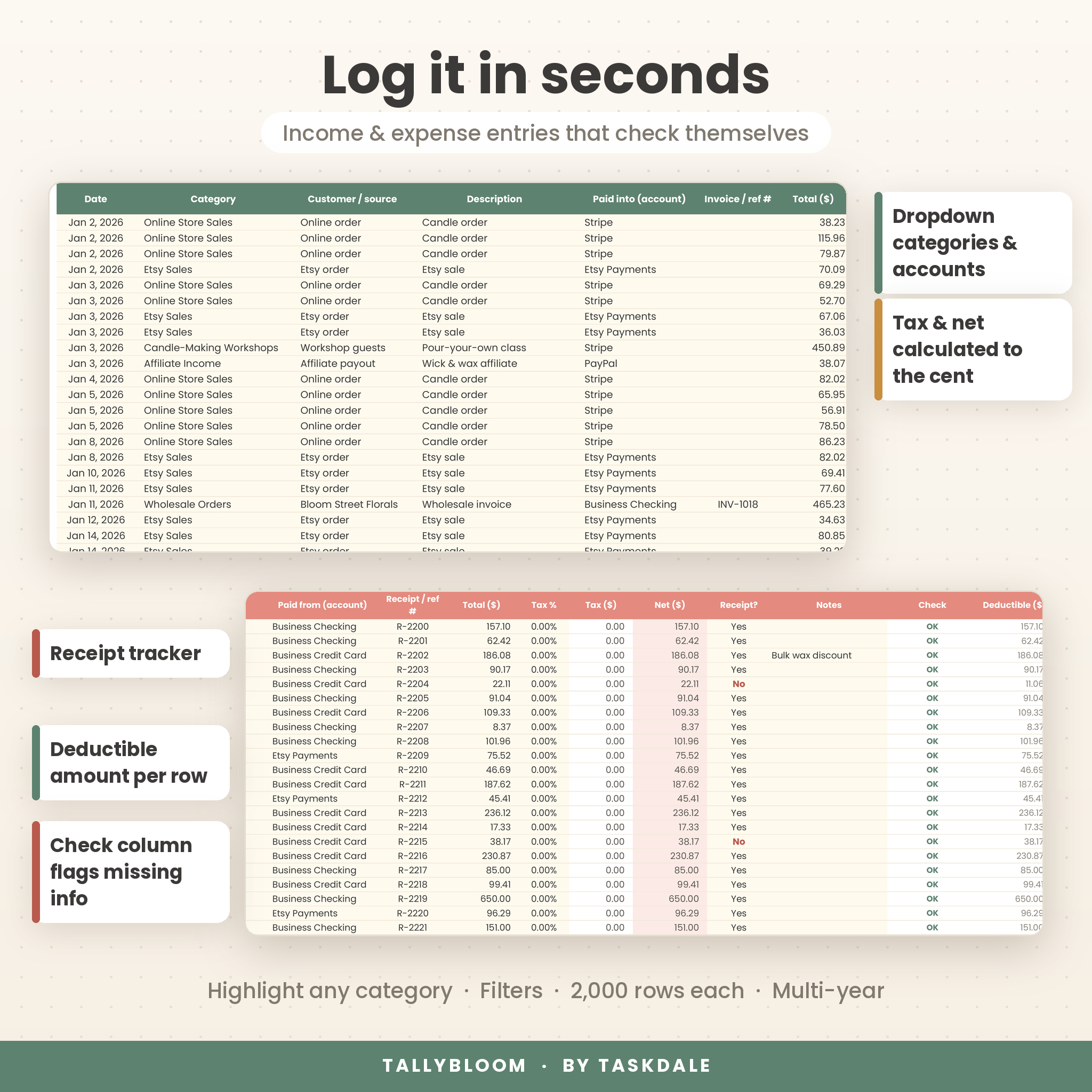
- Dropdown categories and accounts on every row (20 income and 25 expense categories, 12 accounts)
- Enter the total and Tax and Net calculate to the cent, with a default rate or a different rate per entry
- A Check column flags missing dates, missing amounts and renamed categories so nothing slips through
- Receipt tracker, highlight-a-category tool, filters and room for 2,000 income and 2,000 expense rows
Monthly dashboard
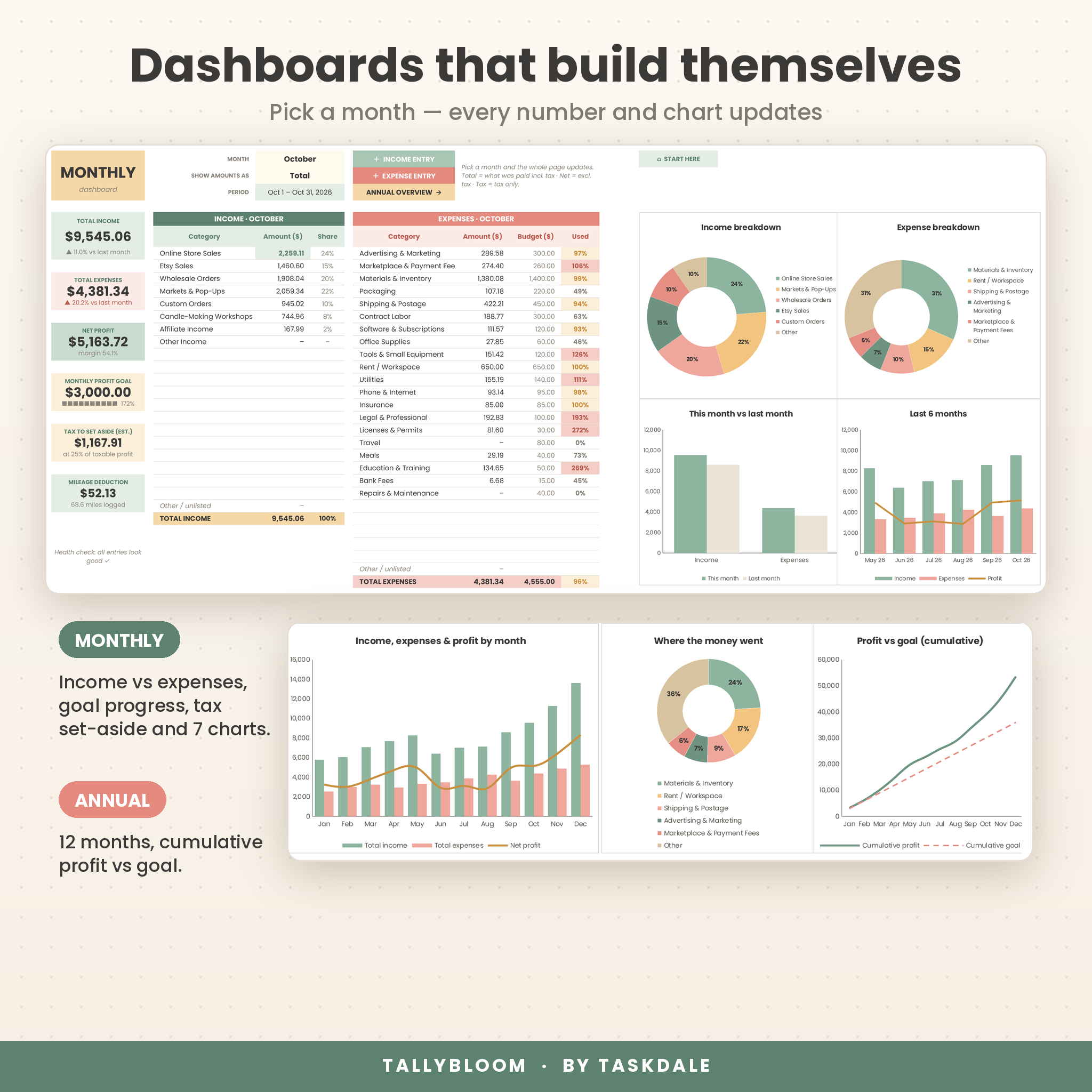
- Pick any month to see income, expenses and net profit with change vs last month
- Profit goal progress bar, estimated tax set-aside and mileage deduction
- Show amounts as Total, Net or Tax
- Four charts: income breakdown, expense breakdown, this month vs last month and the last 6 months
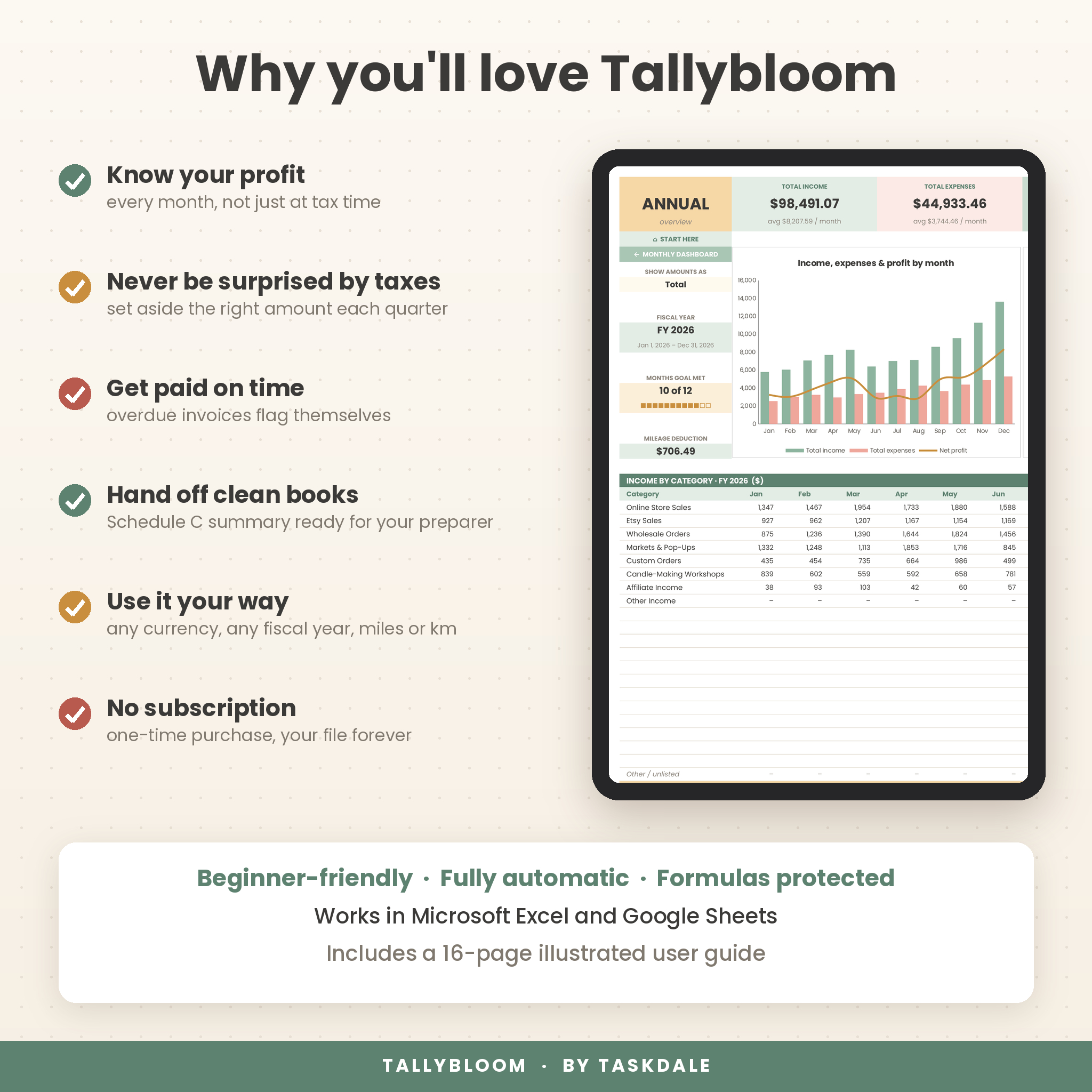
Annual overview
- Income and expenses by category for all 12 months, with totals and share of total
- Cash flow and goals table: net profit, goal met ✓/✗, cumulative profit, taxable profit and tax collected
- Charts for monthly income, expenses and profit, where the money went, and cumulative profit vs goal
Tax Center
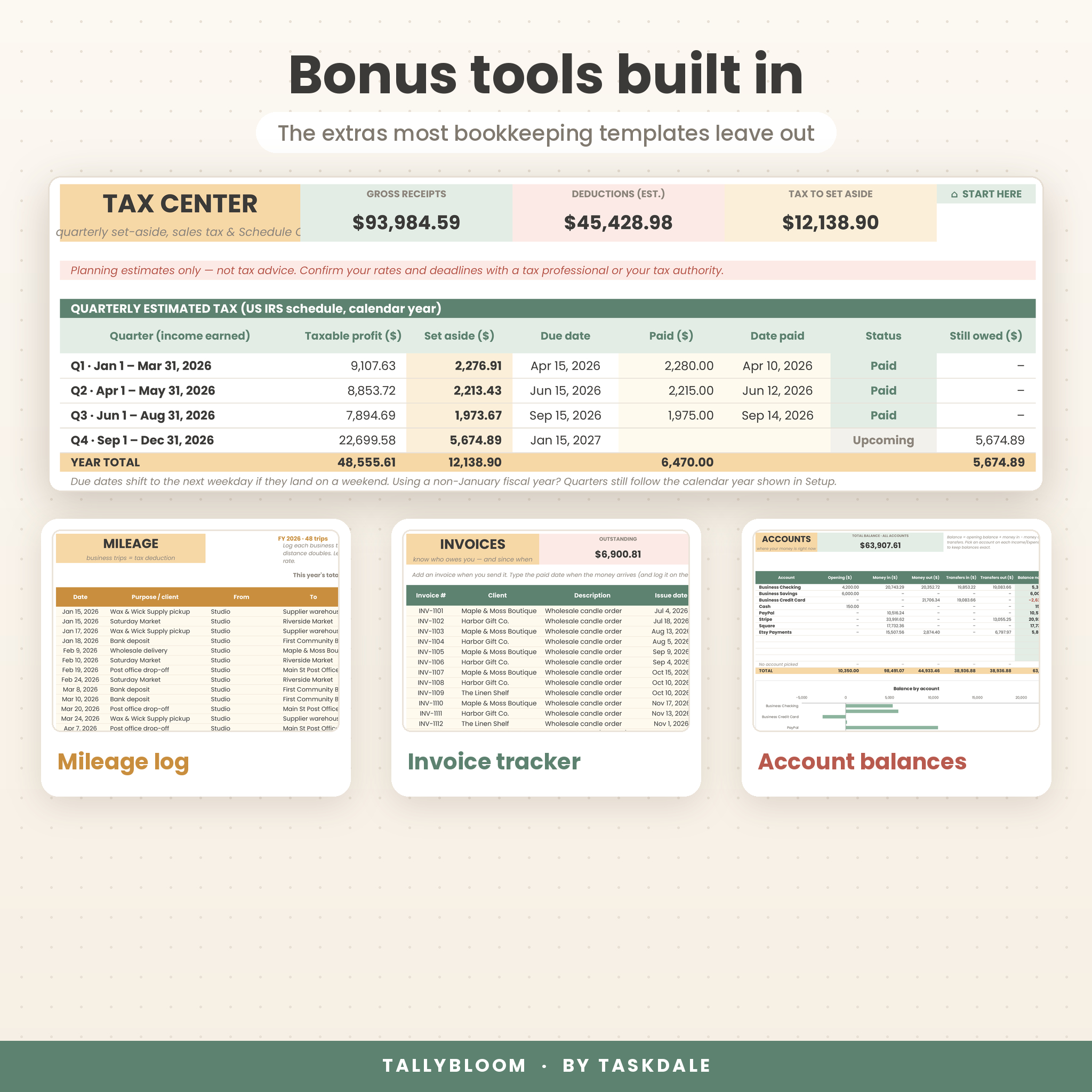
- Quarterly estimated tax set-aside with IRS due dates, amounts paid and automatic status (Upcoming, Due soon, Overdue, Paid)
- Sales tax / VAT / GST summary: collected, paid on purchases and amount owed
- Schedule C summary that totals each expense line, adds your mileage to line 9 and applies the 50% meals limit
More built-in tools
- Mileage log – round trips double automatically; deduction uses your rate (miles or km)
- Invoice tracker – due dates from your payment terms, overdue alerts and days late
- Accounts – live balance for each bank account, card, cash and payment app, plus a transfers log
- Budget vs actual – monthly and yearly budgets with progress bars that warn at 85% and when you go over
- Start Here – quick-start steps, one-click navigation, year at a glance and a data health check
Why buyers choose Tallybloom
- Know your real profit every month, not just at tax time
- Put aside the right amount for taxes before each quarterly deadline
- Spot overdue invoices and overspending early
- Hand off clean, categorized totals at year end
- Formulas are locked (no password) so they can’t be erased by accident, while your entry cells stay open
What is included
- Tallybloom Bookkeeping Spreadsheet (.xlsx) with 11 tabs: Start Here, Setup, Income, Expenses, Mileage, Invoices, Accounts, Monthly, Annual, Budget and Tax Center
- Tallybloom User Guide (.docx, 16 illustrated pages) covering setup, every feature, customizing, tips, troubleshooting and FAQ
- Both files are also bundled in one ZIP for a single download
How it works
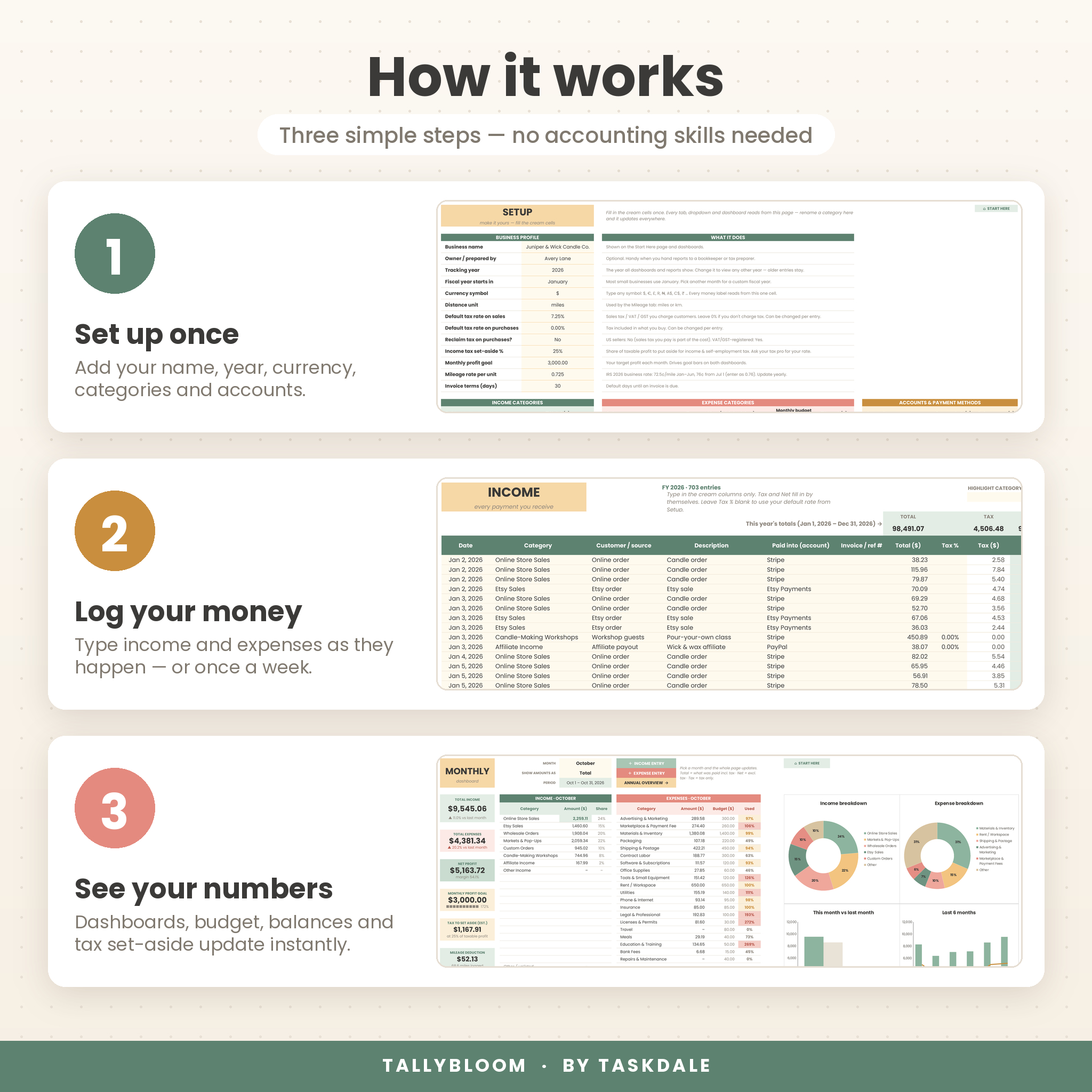
- Set up once: add your business name, tracking year, currency symbol, categories and accounts.
- Log your money: enter income and expenses as they happen, or in one sitting each week.
- See your numbers: dashboards, budget, balances and the Tax Center update instantly.
File format and software requirements
- Format: Excel workbook (.xlsx) plus Word user guide (.docx)
- Works in Microsoft Excel (Microsoft 365, Excel 2016 or newer, Excel for Mac) and Google Sheets (free Google account)
- Built with standard functions only — no macros, no add-ins and no newer dynamic-array functions
- Best on a computer for data entry; dashboards can be viewed in the Excel or Google Sheets apps on a tablet
- Uses the free Google font Poppins (built into Google Sheets); Excel shows a similar font if Poppins isn’t installed
Customization
Rename categories and accounts, pick your currency symbol ($, €, £, R, ₦, A$ and more), choose miles or km, set any fiscal year start month, and add your own tax rates, profit goal and monthly budgets. Keep logging in the same file across years and switch the tracking year to view any year’s reports.
Digital download
This is an instant digital download — no physical item will be shipped. After checkout you’ll get download links on the confirmation page and by email.
Real ways to use it
- An Etsy candle maker logging sales, marketplace fees and supply runs, then checking the Monthly dashboard each Friday
- A freelance designer tracking invoices, chasing an overdue client and moving 25% of profit into a tax savings account
- A market vendor recording cash and Square sales, mileage to weekend fairs and a yearly booth-fee budget
- A side hustler handing the Schedule C summary to a tax preparer in January
FAQ
Do I need bookkeeping experience?
No. Every input is a cream cell with a dropdown or a simple number, and the user guide walks you through each step.
Does it work in Google Sheets?
Yes. Upload the .xlsx to Google Drive, open it with Google Sheets and save it as a Google Sheet. All formulas, dropdowns, charts and tab links work.
Can I use my own currency?
Yes. Type your currency symbol once on the Setup tab and every money label updates. Dollars ($) are the default.
Can I use it for more than one year?
Yes. Keep adding entries in the same file and change the tracking year to see any year’s dashboards and tax reports.
Does it calculate my taxes?
It estimates how much to set aside and summarizes your totals by Schedule C line. It is a planning tool, not tax advice — please confirm with a tax professional.
Is it a subscription?
No. It’s a one-time purchase and the file is yours to keep.
Can I share or resell it?
No. Your license covers personal use in your own business. Reselling, sharing or redistributing the files is not permitted.
© Taskdale. Licensed for personal use only — no resale, sharing or redistribution. Sample data shown in the images is fictional and for illustration only.
Reviews
There are no reviews yet.