

A UX designer resume template for Word that looks as considered as your portfolio
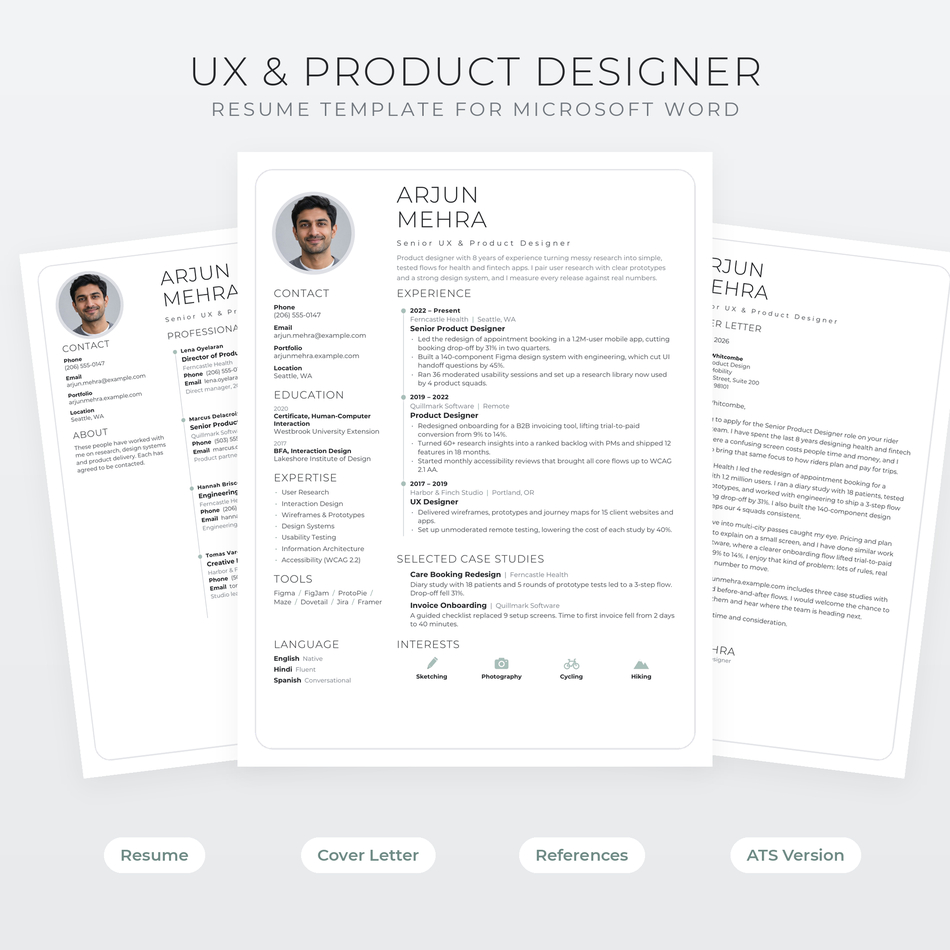
Linenpage is a UX designer resume template for Microsoft Word built for UX designers, UI designers and product designers who want a page that feels calm and organized. The look is white with soft grey and muted sage: a round photo, your name in large light capitals, a thin vertical timeline with a small dot for each job, and an interests row with simple icons at the bottom. It is also a complete product designer resume template set, so your resume, cover letter and references page match.
Recruiters for design roles often spend under a minute on a first read. This layout puts your portfolio link in the sidebar, a 3-line profile beside your photo, and a Selected Case Studies section right under your experience, so the proof they look for is easy to find.
What is included
- Resume, 1 page: photo, profile, experience timeline, 2 case studies, contact, education, expertise, tools, languages and interests.
- Resume, 2 pages: more bullets on page 1, then earlier roles, 3 case studies, certifications, awards and talks, and volunteering on page 2.
- Cover letter: the same header and sidebar, with a sample letter written for a senior product design role.
- References page: 4 references on the same timeline, each with title, company, phone, email and how you worked together.
- ATS plain resume: one column, no photo and no tables, with the same fonts and sage accent.
- US Letter and A4: all 5 documents in both sizes, 10 .docx files in total.
- Fonts folder: Montserrat with its SIL Open Font License, as a backup install.
- User guide (DOCX): 6 pages of editing help plus a UX resume cheat sheet.
Why this product designer resume template is easier to edit
Most Word resume templates break in the same places. Fonts go missing and Word swaps them. Text sits in floating boxes that jump around. The photo turns square when you replace it. One extra line pushes everything onto page two. Linenpage was built to avoid each of those problems.
Embedded fonts
Montserrat and Montserrat Light are embedded in every file, so the resume looks the same on your computer as it does in the listing photos, with nothing to install.
No floating text boxes
The columns, the timeline rule and the sidebar are all made from table cells. Your text stays in the normal flow of the page, so it does not slide around while you type, and applicant tracking systems can read it.
A photo that stays round
Right-click the photo, choose Change Picture, and pick your own. The circle crop and the soft grey ring stay in place. The sample headshot is an AI-generated image of a fictional person.
Real Word styles
Your name, section headings, job titles, dates and bullets each use a named style, such as Heading 1 or List Bullet. Change one style in the Styles pane and every matching line updates.
Tested to stay on one page
We added 3 extra bullets and a two-line job title to the 1-page resume in both sizes and it still fit on one page. A very long name also fits.
Written for UX and product design roles
There is no lorem ipsum here. The sample shows a senior product designer with bullets like “cut booking drop-off by 31%” and “built a 140-component design system”, so you can see how to write about research, prototypes and shipped results. The user guide adds a cheat sheet for designers: a bullet formula, 30 action verbs, 28 keywords recruiters search for (user research, usability testing, design systems, WCAG, Figma and more) and tips for each section.
How it works
- Download the zip and the user guide right after checkout.
- Open the US-Letter or A4 folder and open the resume in Microsoft Word.
- Type over the sample text, swap in your photo, and remove any section you do not need.
- Save as PDF and apply. Use the ATS version for strict online job portals.
File formats and software
- Microsoft Word .docx files, for Word 2016 or newer on Windows or Mac, including Microsoft 365.
- Opens in Google Docs and Apple Pages with minor layout differences. For the cleanest result, export your final PDF from Word.
- US Letter (8.5 x 11 in) and A4 (210 x 297 mm).
- Digital download: one zip of Word files and fonts, plus the DOCX user guide. Nothing is shipped.
Customize it your way
Change colors through the Styles pane, recolor the sage icons with Picture Format, add jobs by copying two table rows, or delete the photo for a no-photo resume. Section headings are plain text, so “Selected Case Studies” can become “Projects” or “Publications” in a few seconds.
Who uses this UX designer resume template
- A product designer moving from an agency to an in-house product team.
- A bootcamp graduate or career changer who needs to show projects, not years.
- A UX researcher or interaction designer applying for senior roles who needs the 2-page version.
- A UI designer who wants a clean design that does not compete with the portfolio.
FAQ
Is this a Word resume template or a Canva template?
It is a Microsoft Word (.docx) resume template. There is no Canva link.
Can I use the UX designer resume template without a photo?
Yes. Delete the photo from the designed version, or use the ATS plain resume, which has no photo.
Will applicant tracking systems read it?
All text is in normal paragraphs and table cells, with no text boxes. For strict portals, the included ATS version is one plain column.
Do I need to install fonts?
No. Montserrat is embedded in every file. The font files are included in case you want them on your computer.
Does it work in Google Docs or Pages?
The files open in both with minor layout differences. Edit in Word and save your final PDF there if you can.
Can I add more jobs?
Yes. Copy the two table rows of a job and paste them, or switch to the 2-page resume. The guide shows each step.
What can I do with the files?
Personal use for your own job search. Please do not resell or share the files.
Reviews
There are no reviews yet.