Best Profit Margin Calculator: Spreadsheets and Apps
A profit margin calculator is a tool that turns your costs into a selling price and shows what percentage of each sale you keep. For most bakers and makers, the best choice is a spreadsheet that includes materials, labour, packaging, overheads and selling fees. Pick one that matches the way you sell.
- Profit margin is profit divided by the selling price, while markup is profit divided by cost, so the two percentages are never the same for one item.
- A 50% markup on cost gives a margin of only about 33%, and a 100% markup gives a margin of 50%.
- Four of the calculators here work in both Excel and Google Sheets, while Crumbcount is Excel, Sprig & Sum is Google Sheets, and Craft Profit Compass runs offline in your browser.
- Craft Profit Compass is the one option here with no subscription, and it keeps your data on your own device.
- The calculators here cover between 25 and 7 products on their dashboards or price lists, so check the limit against your range.
Working out what to charge can feel more complicated than the making itself, with fees, taxes, discounts and your own time all pulling the figure in different directions. We'll take it one factor at a time, so you can choose with confidence and stop guessing.
Table of Contents
Toggle
- What should you look for in a profit margin calculator?
- How do the profit margin calculators compare?
- Which profit margin calculator suits which seller?
- How do you use a profit margin calculator step by step?
- What mistakes make a profit margin calculator give the wrong answer?
- What affects the cost of a profit margin calculator?
- Which is the best profit margin calculator for you?
- Common questions
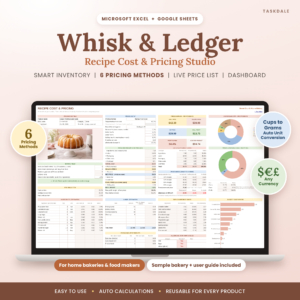 Recipe Cost Calculator Spreadsheet for Bakeries | Whisk & Ledger Excel & Google Sheets Pricing Template with Ingredient Inventory & Profit Dashboard
 Craft Profit Compass | Handmade Pricing Calculator for Retail & Wholesale Prices, Cost Per Item & Profit Margin, Offline App
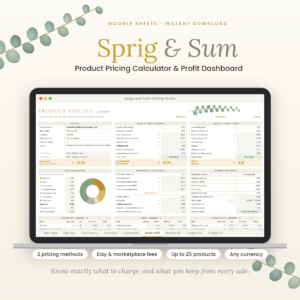 Product Pricing Calculator Spreadsheet for Google Sheets | Sprig & Sum Handmade Pricing Template with Etsy Fee Calculator & Profit Dashboard
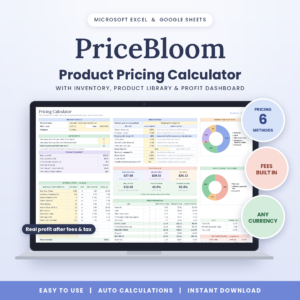 PriceBloom Product Pricing Calculator Spreadsheet – Excel & Google Sheets | Profit Margin, Etsy Fee & Handmade Cost Calculator with Inventory Tracker
What should you look for in a profit margin calculator?
The best profit margin calculator for a small seller counts every cost that sits between a sale and your pocket, then works backwards to a price. Six features separate a useful one from a basic one, and each is explained below.
Does it separate margin from markup?
Margin is the share of the selling price you keep as profit, and markup is the profit as a share of what the item cost you. Many sellers set a "50% markup" believing they have a 50% margin, when the real margin is about 33%. Look for a calculator that shows both figures side by side. Hue & Margin shows profit, margin and markup together, and PriceBloom runs automatic margin checks on every product.
Does it build in selling fees, taxes and discounts?
Marketplace fees, payment fees and tax come off the sale before you see any money, so a calculator that ignores them overstates your profit. Sprig & Sum has 12 editable sales channels, so you can set fees for each place you sell. PriceBloom's target margin method accounts for fees, which means the margin you ask for is the margin you actually get. Whisk & Ledger handles two taxes, discounts, selling fees and price rounding.
Does it count your time, packaging and overheads?
Labour, packaging and overheads are the costs most often left out, and leaving them out is how a busy business ends up with no profit. Crumbcount builds labour, packaging and overheads into each of its recipe cards. Craft Profit Compass asks for your time and hourly rate as part of its guided 5-step process.
How many products and materials can it hold?
Check the product limit against your range now, and against where you expect to be next year. Sprig & Sum's dashboard covers up to 7 products. Crumbcount holds 40 recipe cards. PriceBloom and Hue & Margin each price up to 7 products, and Hue & Margin links them to 150 materials.
Does it update when ingredient or material costs change?
A price list that reprices itself saves you from rechecking every item when a supplier raises a cost. Hue & Margin's live price list does this, and Whisk & Ledger keeps a price history so you can see how costs have moved. Crumbcount adds a price-rise impact check, which shows what a cost increase does to your profit before you change anything.
Does it match the way you work with units and platforms?
Unit conversion matters most to bakers who buy in pounds and bake in cups. Crumbcount converts 16 units automatically, and Whisk & Ledger converts from pounds to cups and grams to gallons. On platforms, decide whether you want Excel, Google Sheets or neither. Craft Profit Compass runs offline in your browser.
How do the profit margin calculators compare?
The calculators here differ mainly in platform, number of pricing methods and how much they track beyond price. The table sets out the differences using the details supplied for each product.
| Product | Works in | Pricing approach | Capacity and extras |
|---|---|---|---|
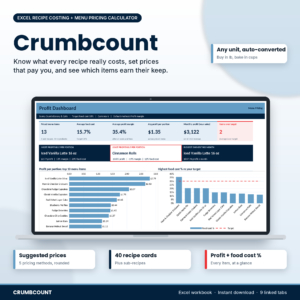 Recipe Cost Calculator Spreadsheet for Excel | Bakery & Menu Pricing | Crumbcount | Excel | Suggested prices, profit, margin and food cost % per item | 40 recipe cards with sub-recipes, 16 unit conversions, order quotes, price-rise check |
| Recipe Cost Calculator Spreadsheet for Bakeries | Whisk & Ledger Excel & Google Sheets Pricing Template with Ingredient Inventory & Profit Dashboard | Excel and Google Sheets | 6 pricing methods, two taxes, fees, discounts, rounding | Ingredient inventory, price history, profit dashboard, sample bakery |
| Craft Profit Compass | Handmade Pricing Calculator for Retail & Wholesale Prices, Cost Per Item & Profit Margin, Offline App | Offline in your browser | Guided 5-step calculator for retail and wholesale prices | Profit checker, sale tester, goal planner, line sheets, CSV export, no subscription |
| Product Pricing Calculator Spreadsheet for Google Sheets | Sprig & Sum Handmade Pricing Template with Etsy Fee Calculator & Profit Dashboard | Google Sheets | Two methods: by profit margin or by your own target price | 12 sales channels, competitor check, dashboard for up to 7 products |
| PriceBloom Product Pricing Calculator Spreadsheet – Excel & Google Sheets | Profit Margin, Etsy Fee & Handmade Cost Calculator with Inventory Tracker | Excel and Google Sheets | 6 methods, including a target margin that accounts for fees | Up to 7 products, materials inventory, stock alerts, any currency |
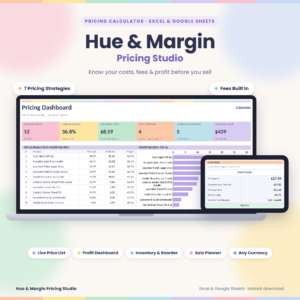 Pricing Calculator Spreadsheet for Excel & Google Sheets | Hue & Margin Product Pricing, Profit Margin & Fee Calculator with Live Price List, Inventory & Dashboard | Excel and Google Sheets | 7 pricing strategies with marketplace and payment fees | 7 products linked to 150 materials, up to 2 taxes, reorder alerts, 21-page guide |
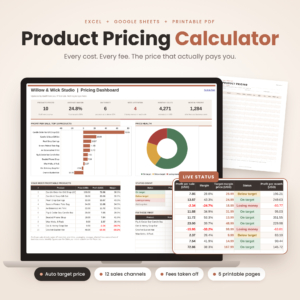 Product Pricing Calculator Spreadsheet for Small Business, Excel & Google Sheets Pricing Template with Etsy Fee Calculator and Printable Pricing Sheets | Excel and Google Sheets | Materials, time and selling fees to a recommended price | Six printable pricing pages in A4, US Letter, A5 and Half Letter |
You can browse all 7 options in the grid for current prices and images.
Which profit margin calculator suits which seller?
Each calculator suits a different seller, depending on what you make, where you sell and how much you want to track.
Bakers and cafés get the most from the two recipe-based options. Crumbcount suits a menu with sub-recipes, such as a sponge used across several cakes, and its order quotes help with custom work. Whisk & Ledger adds Google Sheets support and an ingredient inventory.
Handmade sellers on Etsy and marketplaces will find Sprig & Sum the most direct, because it builds channel fees into the price. PriceBloom suits someone with a growing range, since it handles up to 7 products and warns you about stock.
Makers selling both retail and wholesale should look at Craft Profit Compass, which gives both prices from the same inputs and prints line sheets for trade buyers.
Sellers with a large range and changing costs will find Hue & Margin the strongest fit, as its price list reprices itself when a material cost moves.
Anyone who prefers paper will like the Product Pricing Calculator Spreadsheet for Small Business, which comes with six printable pricing pages in four paper sizes. It is the simplest of the group, with no dashboard listed.
How do you use a profit margin calculator step by step?
You use a profit margin calculator by entering your costs once, choosing a target margin and reading off the price. The same six steps apply to every tool here.
- List your materials with the pack size and what you paid, so the calculator works out the cost per unit.
- Add your time at an hourly rate you would accept from an employer, even if you are the only worker.
- Include packaging for every item, from boxes to labels and ribbon.
- Spread your overheads across your products, covering costs such as equipment, software and workspace.
- Set where you sell, so selling fees, payment fees and tax are counted.
- Choose a target margin and compare the suggested price with what similar items sell for.
If the price looks too high, change the recipe, the pack size or the sales channel before you cut your margin.
What mistakes make a profit margin calculator give the wrong answer?
A profit margin calculator gives the wrong answer when the inputs are incomplete, and the result then looks healthier than it is. Four mistakes come up most often.
- Pricing by markup and calling it margin. The two numbers diverge more as the percentage rises, so check which one the tool shows.
- Leaving out your own time. If you pay yourself nothing, the margin looks good until you count the hours.
- Forgetting fees on discounted sales. A sale price cuts your profit, but fees and tax still apply. Tools with a sale tester, such as Craft Profit Compass, show the effect before you run an offer.
- Never updating ingredient or material costs. An old cost makes the price stale. Use a price history or live price list, and review your costs whenever a supplier changes theirs.
What affects the cost of a profit margin calculator?
The cost of a profit margin calculator depends mainly on how many products it holds, how many features it adds and whether you pay once or by subscription. Tools with a larger product limit, an inventory tracker, stock alerts and a dashboard generally cost more than a simple template with printable sheets.
Platform matters too. A spreadsheet that works in both Excel and Google Sheets can cost more than one for a single program. Craft Profit Compass has no subscription, which can suit you if you dislike ongoing charges. The live product cards show current prices, so compare those against the features you will use.
Which is the best profit margin calculator for you?
The best profit margin calculator is the one that counts every cost you actually have and fits the way you already work. Use these rules to decide.
- If you bake and sell from a menu, choose Crumbcount or Whisk & Ledger.
- If you sell on several marketplaces, choose Sprig & Sum or PriceBloom.
- If you sell wholesale as well as retail, choose Craft Profit Compass.
- If your range is large and your costs change often, choose Hue & Margin.
- If you want the simplest route with printed sheets, choose the Product Pricing Calculator Spreadsheet for Small Business.
Before you buy, check the product limit and platform. Then price three of your items, and see whether the margins look realistic.
Common questions
What is a good profit margin for a small business?
A good profit margin depends on what you sell, the fees you pay and the hours you work. Many sellers set a target margin first, then test it against competitor prices. If the margin leaves nothing for your own pay, it is too low.
Is it better to use margin or markup?
Margin is usually the better figure, because it shows what share of each sale you keep. Markup is easier to calculate but can mislead you. A 50% markup is only about a 33% margin, so use margin when you compare your results.
Can a spreadsheet handle marketplace fees?
Yes, if it has fee fields. Sprig & Sum offers 12 editable sales channels, and Hue & Margin builds in marketplace and payment fees. PriceBloom has a target margin method that accounts for fees. Enter the current fee rates from each marketplace yourself.
Do I need Excel, or will Google Sheets do?
Google Sheets works well if you want to use the calculator on different devices or share it. Excel suits you if you prefer a desktop program. Most of these calculators support both, while Crumbcount is for Excel and Sprig & Sum is for Google Sheets.
How often should I check my prices?
Check your prices whenever a supplier changes a cost, and review the whole range at least a couple of times a year. Calculators with a price history, a live price list or a price-rise impact check make this quicker.