Best Second Brain: Notion and Spreadsheet Systems Compared
The best second brain is the one you will open every day, and for most people that means a ready-made template with linked hubs rather than a blank notes app. For ADHD, Brainloft is the calmest fit. For a yearly plan, Hearth & Horizon suits best. Everkept suits a daily check-in routine, and Linen Life OS suits anyone avoiding Notion.
A second brain can feel like one more system to maintain, which is the opposite of the point. We'll keep this simple: what to check, how the four options differ, and how to choose without rebuilding anything from scratch.
Key facts at a glance
- A second brain is an external system that holds your tasks, notes, money, habits and plans so you don't have to remember them.
- Three of the options here are Notion templates, and Linen Life OS is a spreadsheet for Excel and Google Sheets with no Notion account needed.
- Brainloft and Hearth & Horizon are stated to work on the free Notion plan.
- Linen Life OS has no app and no subscription, and comes as an example-filled version plus a blank one.
- Every option here is a digital download with a user guide, so you can start the same day.
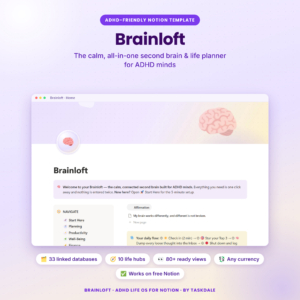 ADHD Notion Template | Brainloft Second Brain Life Planner with Budget, Habit & Study Tracker
Table of Contents
Toggle
- What is a second brain, and why use a template?
- What should you look for in the best second brain?
- How do the best second brain templates compare?
- Which second brain suits which person?
- How do you set up and use a second brain?
- What mistakes should you avoid with a second brain?
- What affects the price of a second brain template?
- Which second brain should you choose?
- Common questions
What is a second brain, and why use a template?
A second brain is a single, organised place outside your head where you record tasks, ideas, money, health and plans, so each one has a home and a reminder. A template gives you that structure ready-made, which saves the weeks most people lose designing a system they then abandon.
The idea became popular through productivity writers such as Tiago Forte, who wrote Building a Second Brain. We mention it as background only. You don't need to read it to use any option on this page.
The practical difference between a template and a blank workspace is decisions. A blank page asks you to choose categories, build views and link everything yourself. A template has already made those choices, and you adjust only what doesn't fit your life.
What should you look for in the best second brain?
The best second brain for you matches your tool, your daily routine and the amount of upkeep you can realistically manage. Judge each template on the factors below before you look at how many features it lists.
Which platform does it run on?
Platform decides everything else. Three templates here need Notion, a free workspace app, while Linen Life OS runs in Excel and Google Sheets. If you already live in spreadsheets, a Notion template means learning a new tool. If you like tidy pages, buttons and linked databases, Notion will feel more natural.
Do you enter things once?
A good second brain uses linked data, so a bill or habit is typed in a single place and appears wherever it's useful. Brainloft describes this directly, and Everkept's 60-second Daily Check-in updates habits, mood, sleep and no-spend days everywhere at once. Without linking, you end up duplicating entries and giving up.
How much does it calculate for you?
Automatic maths is what separates a planner from a pretty list. Hearth & Horizon's progress bars, budget status lights and debt payoff dates update on their own, and Linen Life OS adds everything up across its tabs. Check that the figures you care about, such as budget balances or goal progress, are calculated rather than typed.
Does it fit your attention and energy?
Some systems reward a full evening of setup, and others reward ten seconds a day. Brainloft is built around one brain-dump inbox and a Top 3, which suits a mind that loses track of lists. Everkept leans on a short daily check-in. Pick the rhythm you will keep on a tired Tuesday, not the one you'd keep on a motivated Sunday.
How wide is the coverage?
Look at which parts of life it includes. Brainloft covers meds, pets, chores and study. Everkept adds cycle tracking, student grades and an automatic grocery list. Hearth & Horizon includes a Life Wheel chart and a Reviews hub. Linen Life OS adds books and courses. More hubs are only useful if you'll use them, so count the ones you need.
How good is the guidance?
A setup guide often decides whether a template survives its first week. Hearth & Horizon promises a 10-minute Start Here setup and a DOCX user guide. Brainloft supplies a Quick Start PDF with your template link plus a full guide. Linen Life OS includes an example-filled version, which lets you see how it should look before you enter your own data.
How do the best second brain templates compare?
The four templates differ mainly in platform, structure size and style of daily use. The table compares them on the details the store supplies.
| Product | Platform | Structure | Standout features | Best for |
|---|---|---|---|---|
| ADHD Notion Template | Brainloft Second Brain Life Planner with Budget, Habit & Study Tracker | Notion (free plan) | Ten linked hubs | Single inbox, Top 3, countdowns, due alerts, one currency setting | ADHD minds who want low-effort capture |
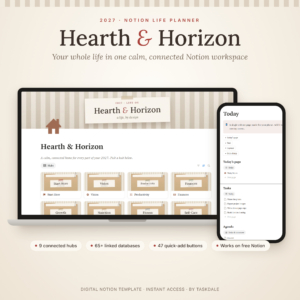 Hearth & Horizon 2027 Notion Life Planner – All-in-One Life OS Template | Notion (free plan) | Nine hubs, 65+ linked databases | 47 quick-add buttons, 4 page templates, Life Wheel, debt payoff dates | Year-long planning and goal tracking |
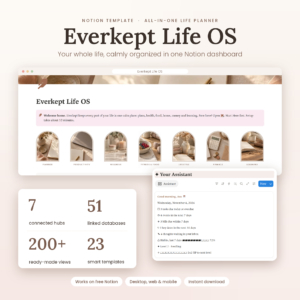 Notion Life Planner Template | Everkept Life OS All-in-One Second Brain Dashboard with Habit Tracker, Budget, Meal Planner, Wellness & Student Hub | Notion | Seven hubs, 51 linked databases | 60-second Daily Check-in, Assistant, grocery list, 4 smart templates | Daily routines, wellness and students |
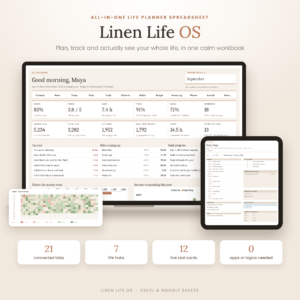 Linen Life OS: Ultimate Life Planner Spreadsheet for Excel & Google Sheets | Budget, Habit Tracker, Goals & Life Dashboard | Excel and Google Sheets | 21 linked tabs | Live dashboard with 12 stat cards and 4 charts, example and blank versions | People who prefer spreadsheets and no subscription |
Which second brain suits which person?
Each template suits a different habit of working, so match the person first and the feature list second.
Brainloft suits anyone who forgets things the moment they leave sight. The inbox, the Top 3 and the alerts do the remembering. Its hubs for meds, chores and pets also cover the small daily items that other planners skip.
Hearth & Horizon suits the planner who likes a yearly view. With hubs for Vision, Growth and Reviews, it rewards sitting down regularly to look at the bigger picture. It's dated 2027, so it fits best if you want a fresh year-based system.
Everkept Life OS suits people who prefer a short daily ritual over browsing databases. The Assistant shows what is due today, upcoming bills, birthdays and your habit streak. Wellness and cycle tracking and the student grades section make it the broadest fit for health-minded users and learners.
Linen Life OS suits anyone who already trusts spreadsheets and doesn't want to join another app. It's also the clearest choice for readers who dislike subscriptions, since it needs no Notion account. Its dashboard gives a quick read of your numbers in one view.
How do you set up and use a second brain?
You set up a second brain in about an hour by importing the template, entering your essentials, and committing to one daily habit. Here is a sequence that works for any of the four.
- Open the download. Follow the Quick Start or Start Here instructions to copy the template into your workspace or open the workbook.
- Set your currency once. Brainloft, Hearth & Horizon and Everkept all use a single currency setting, so do this before entering any money.
- Fill in only what you use today. Start with tasks, one budget and two or three habits. Leave the other hubs empty until they're needed.
- Pick one daily touchpoint. That might be a brain-dump, a Top 3 or the Daily Check-in. Do it at the same time each day.
- Review weekly. Spend ten minutes clearing the inbox, checking due items and archiving finished work.
Linen Life OS includes an example-filled version, so open that first and learn how entries flow before you switch to the blank one.
What mistakes should you avoid with a second brain?
The most common mistake is switching on every hub at once, which turns a helpful system into a chore. Other pitfalls are easy to spot and avoid.
- Buying for features you won't use. A large database count doesn't help if you only track tasks and money.
- Choosing the wrong platform. A Notion template will frustrate a committed spreadsheet user, and the reverse is also true.
- Skipping the guide. Every option here comes with a user guide, and reading it saves hours of guesswork.
- Duplicating entries. If you retype the same bill in two places, you're working against the linked design.
- Never reviewing. A second brain that you only write into becomes a pile. A weekly review keeps it useful.
What affects the price of a second brain template?
The price of a second brain template mostly reflects how much structure and support comes with it. Templates with more hubs, linked databases, page templates and a longer user guide generally cost more up front than a simpler dashboard.
Ongoing costs matter too. Linen Life OS needs no subscription and no app. The Notion options are stated to work on the free plan in the case of Brainloft and Hearth & Horizon, so check the Notion plan you'd need for Everkept before you buy. The live product cards show current prices.
Which second brain should you choose?
Choose by your daily habit. If you forget things easily, pick Brainloft. If you plan by the year, pick Hearth & Horizon. If you want one short daily check-in, pick Everkept Life OS. If you'd rather avoid Notion entirely, pick Linen Life OS. You can browse all 4 options below, and starting small with a single hub is the safest first step.
Common questions
Do I need to pay for Notion to use these templates?
Brainloft and Hearth & Horizon are both stated to work on the free Notion plan. Everkept's listing doesn't confirm the plan in the details supplied, so check the product page. Linen Life OS doesn't use Notion at all.
Is a spreadsheet a real second brain?
Yes. A second brain is defined by what it holds and how it connects, not by the app. Linen Life OS links 21 tabs, covering calendar, tasks, goals, habits, budget and more, and works in both Excel and Google Sheets.
Can I change the currency?
Yes, on the Notion options. Brainloft, Hearth & Horizon and Everkept each use a single currency setting, so you set it once and every amount updates. The Linen Life OS listing doesn't mention a currency setting.
Which option is best for students?
Everkept has a Student Hub with grade tracking, and Brainloft includes a study tracker. Both also cover budgets and habits, which helps with term-time routines. Linen Life OS includes courses and books if you prefer a spreadsheet.
What do I get after buying?
Each purchase is a digital download. Brainloft sends a Quick Start PDF with your template link and a full guide. Hearth & Horizon includes a DOCX guide. Everkept includes a full user guide. Linen Life OS includes example and blank versions plus a guide.