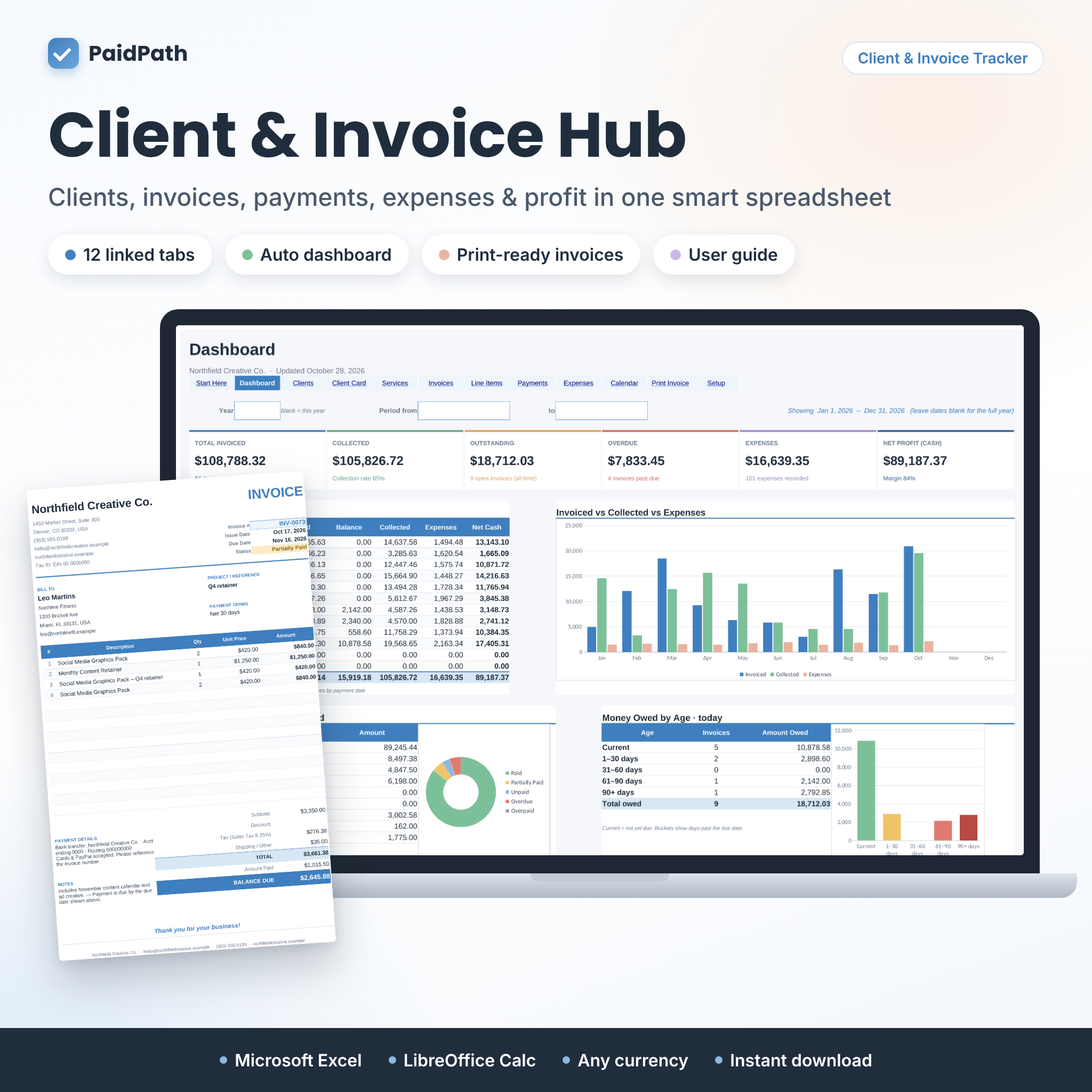
PaidPath Client & Invoice Hub is a client tracker and invoice tracker spreadsheet for Microsoft Excel that keeps your clients, services, invoices, quotes, payments and expenses in one linked workbook. Add an invoice, log a payment, and everything else updates on its own: the invoice status, the client’s balance, the calendar and a full business dashboard.
It was designed for freelancers, consultants, creative studios, coaches and small service businesses who want to know, at a glance, who owes them money, what is overdue and how much profit they are really making, without paying for monthly accounting software.
Why You’ll Love This Client and Invoice Tracker
- Get paid faster. Overdue invoices rise to the top of your dashboard, sorted by how late they are, with a separate list of everything due in the next 14 days.
- Stop doing math by hand. Subtotals, discounts, up to three taxes, shipping, totals, balances and due dates calculate automatically.
- See your real profit. Track expenses next to income and see net profit and margin for any month, year or custom date range.
- Look professional. Print a clean invoice, quote or client statement in one click, on US Letter or A4.
- Use your own currency. Change one setting and every displayed amount shows your symbol, before or after the number. The default is $.
Features
Automated Dashboard
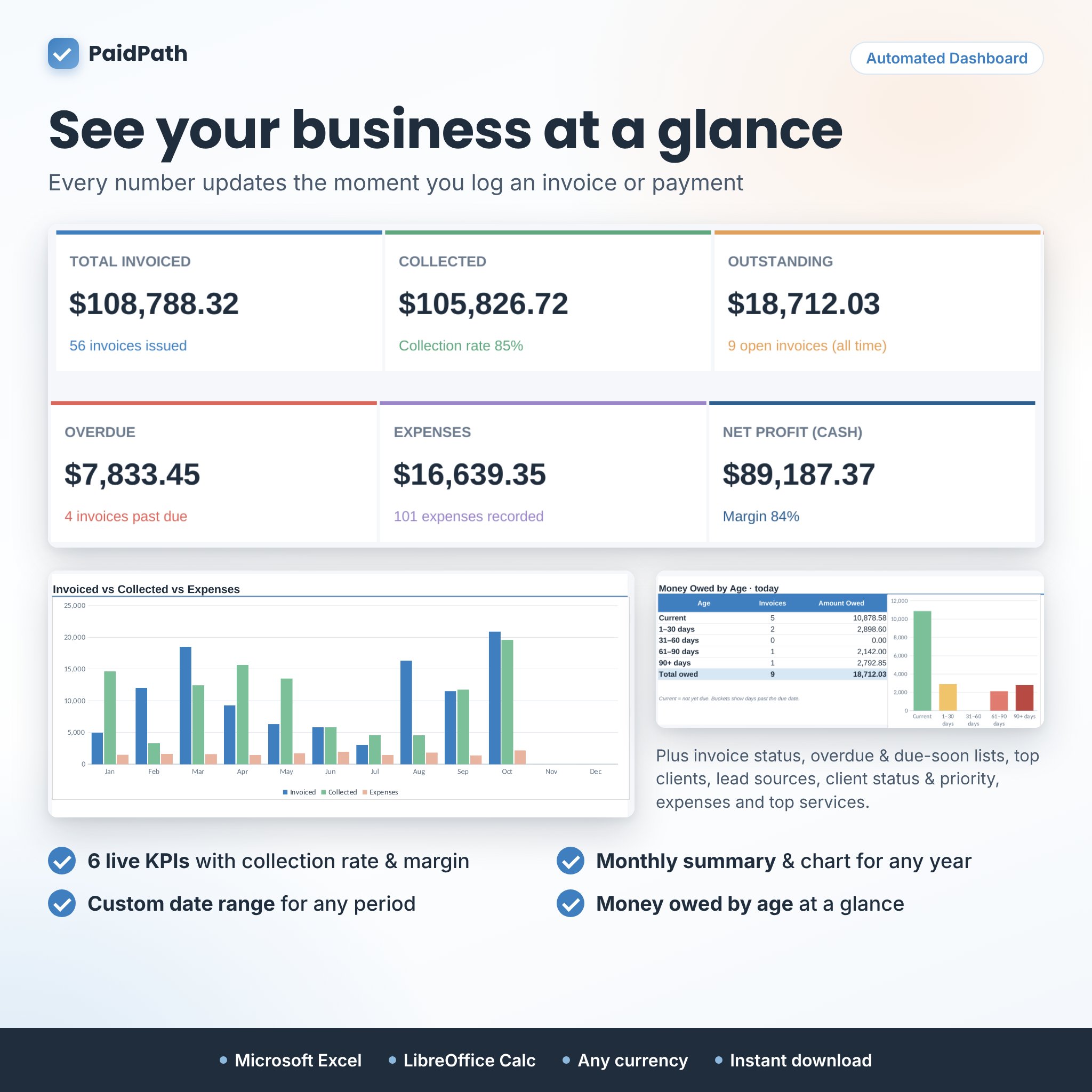
- Six live KPI cards: total invoiced, collected, outstanding, overdue, expenses and net profit, with collection rate and margin
- Monthly summary table and chart: invoiced, paid, balance, collected, expenses and net cash
- Any year, or any custom date range you choose
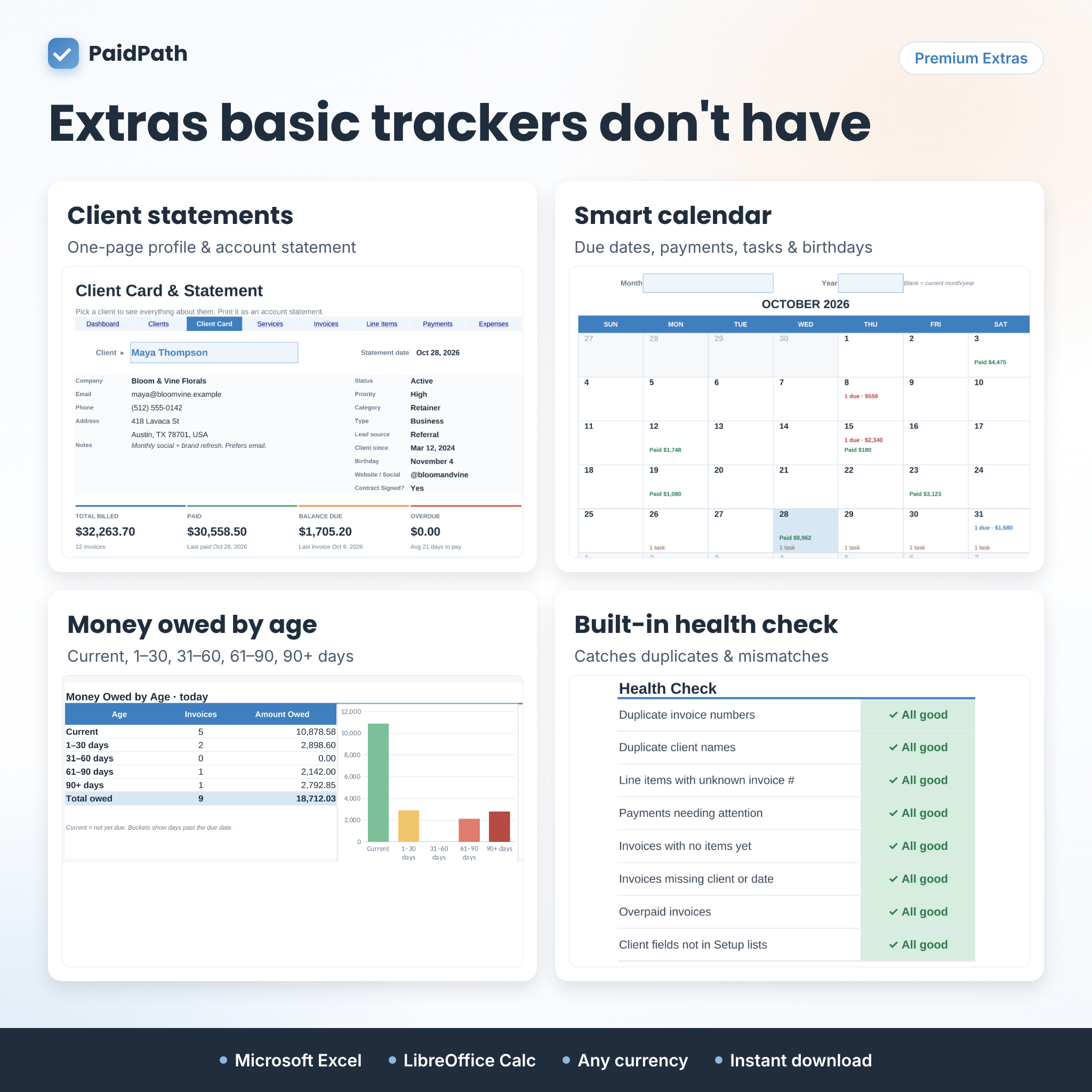
- Invoice status breakdown with chart, plus money owed by age (current, 1–30, 31–60, 61–90 and 90+ days)
- Overdue invoices list, due-in-the-next-14-days list and top clients
- Revenue by lead source, clients by status and priority, expenses by category and top services
Invoice and Payment Tracker
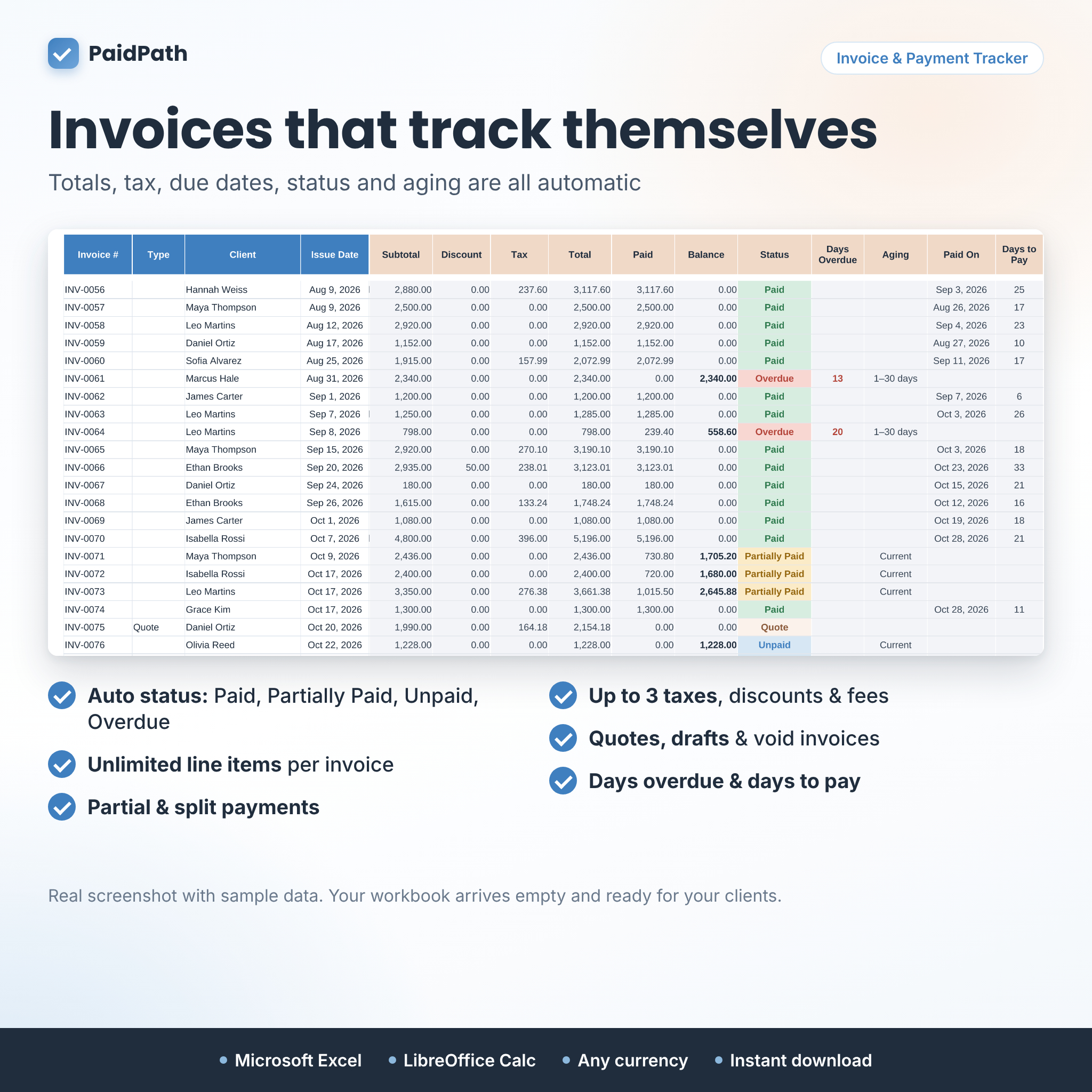
- One row per invoice, quote or draft, with automatic status: Paid, Partially Paid, Unpaid, Overdue or Overpaid
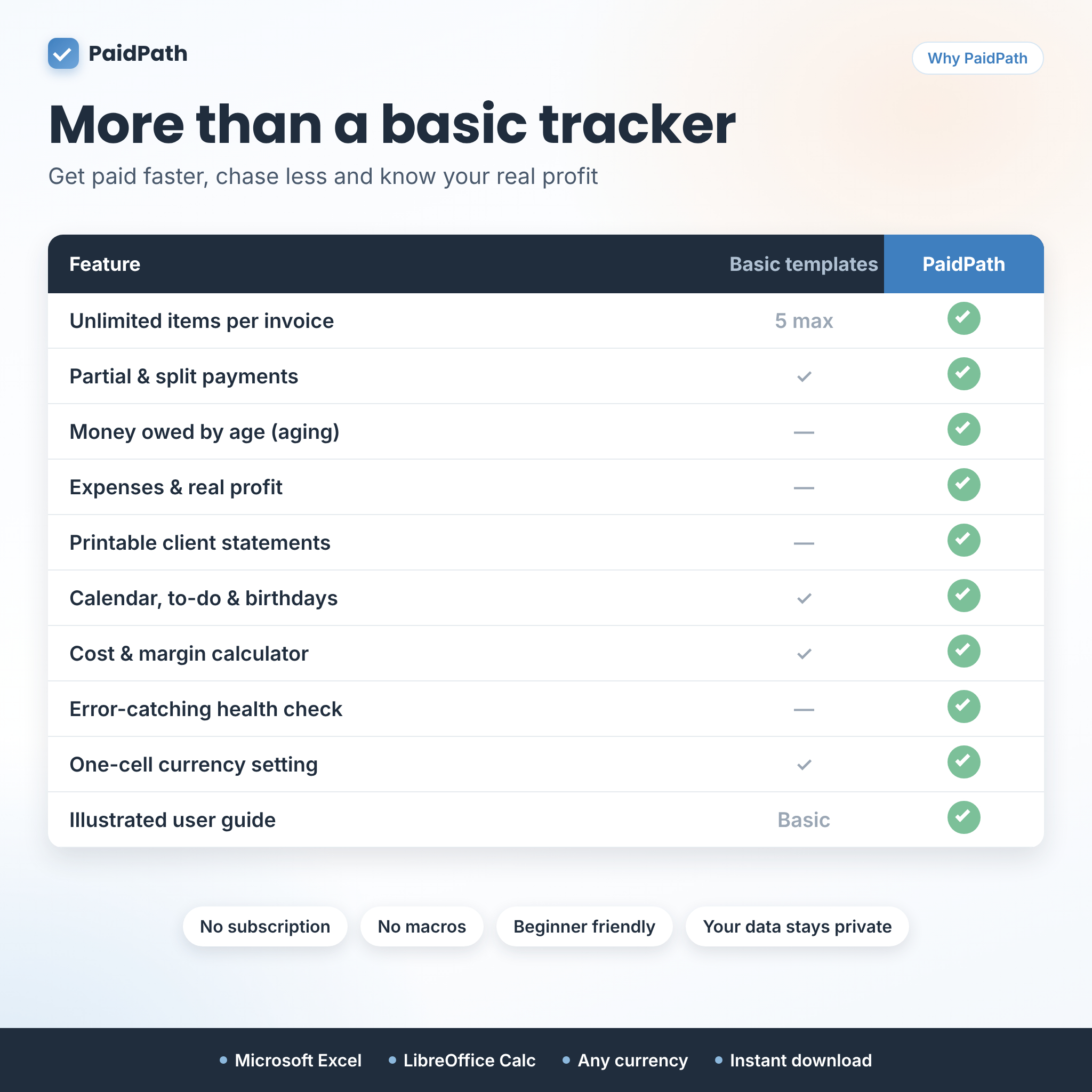
- Unlimited line items per invoice on a separate Line Items tab; prices fill in from your service list
- Percentage or flat discounts, up to 3 named taxes, shipping or other fees and invoice notes
- Payment terms by default, by client or by invoice, with automatic due dates
- Partial, split and installment payments, refunds, days overdue, aging and days to pay
- Quotes, drafts and void invoices are tracked but never counted as income
Client Database and Client Card
- Category, type, status, lead source, priority, client since, birthday, payment terms, notes and 2 custom fields you can rename
- Live totals per client: invoices, billed, paid, balance due, overdue, last invoice and last payment
- Client Card: pick a client to see their full profile, totals, average days to pay, latest invoices and payments. It prints as a one-page account statement.
Services and Pricing Calculator
- Price list with categories and units
- Cost calculator: materials, labor hours, labor rate and other costs, with profit, margin and a suggested price for your target margin
- Units sold and revenue for every service
Expenses, Calendar and To-Do List
- Expense tracker with categories, payment method, related client, billable and receipt flags
- Smart monthly calendar showing invoices due, payments received and tasks, with this month’s totals and client birthdays
- 40-task to-do list with due dates, client, priority and a Done marker
Print-Ready Invoice and Quote
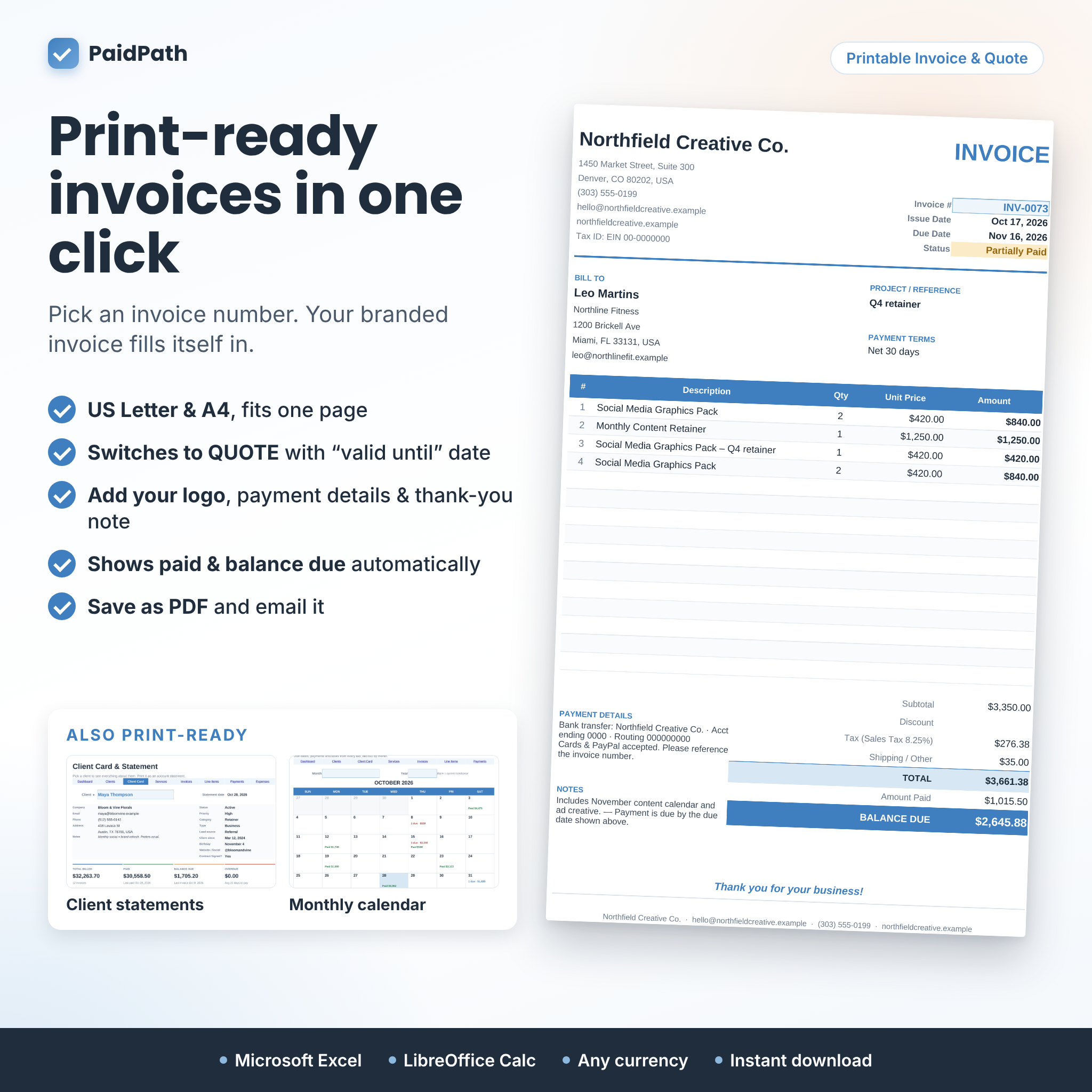
- Choose an invoice number and the page fills itself in: your business details, client, items, totals, amount paid and balance due
- Switches automatically to QUOTE (with a valid-until date), DRAFT INVOICE or VOID
- Add your logo, payment instructions, terms and a thank-you message
- Fits one page on US Letter or A4; save as PDF to email it
Built-In Health Check
The Start Here tab flags duplicate invoice numbers, duplicate client names, line items or payments that point to a missing invoice, invoices with no items or missing details, overpaid invoices and client fields that no longer match your lists.
What’s Included
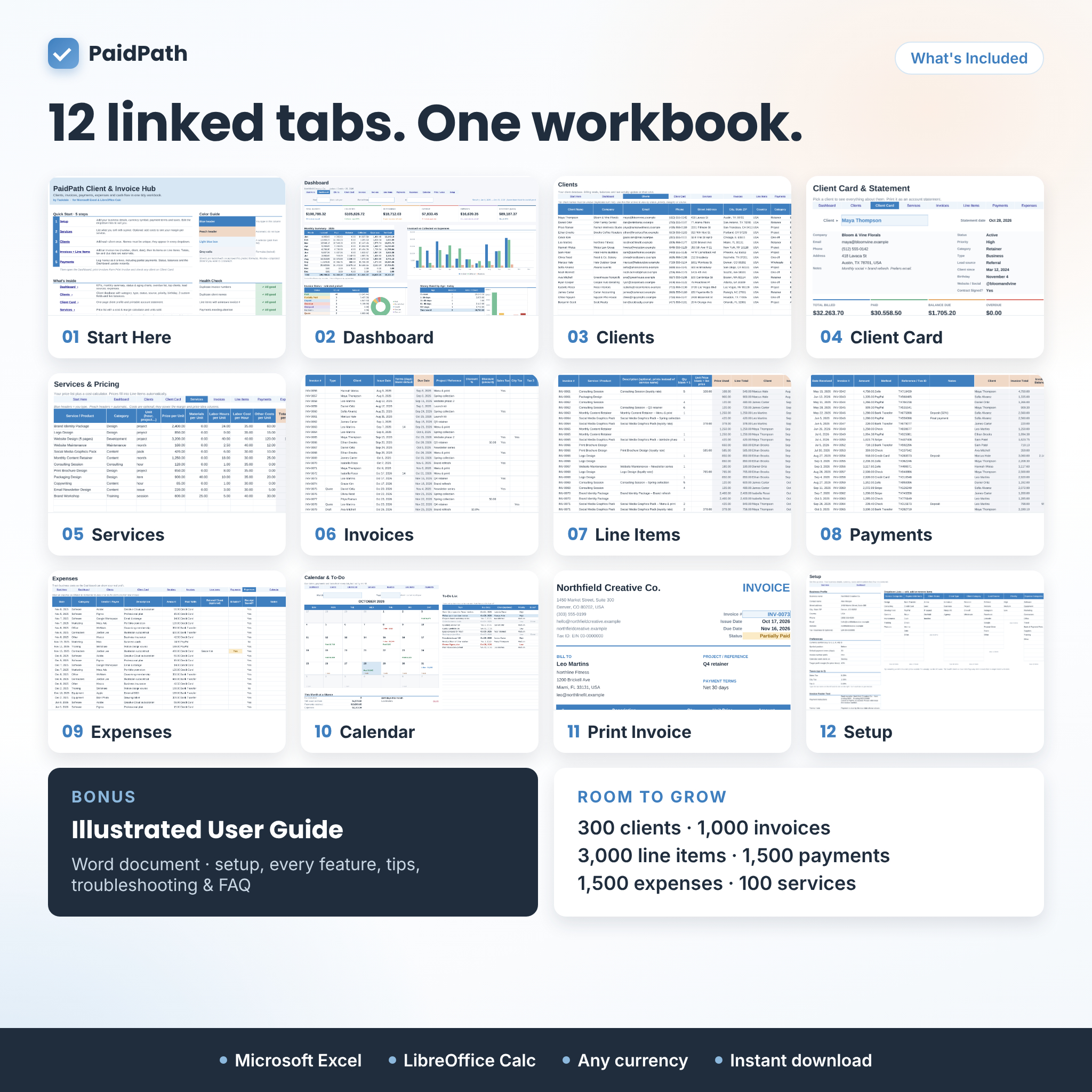
- PaidPath-Client-Invoice-Hub.xlsx: the Excel workbook with 12 tabs: Start Here, Dashboard, Clients, Client Card, Services, Invoices, Line Items, Payments, Expenses, Calendar, Print Invoice and Setup
- PaidPath-User-Guide.docx: a 21-page illustrated user guide covering setup, every feature, customizing, tips, troubleshooting and FAQ
Capacity: 300 clients, 100 services, 1,000 invoices, 3,000 line items, 1,500 payments, 1,500 expenses and 40 to-do tasks.
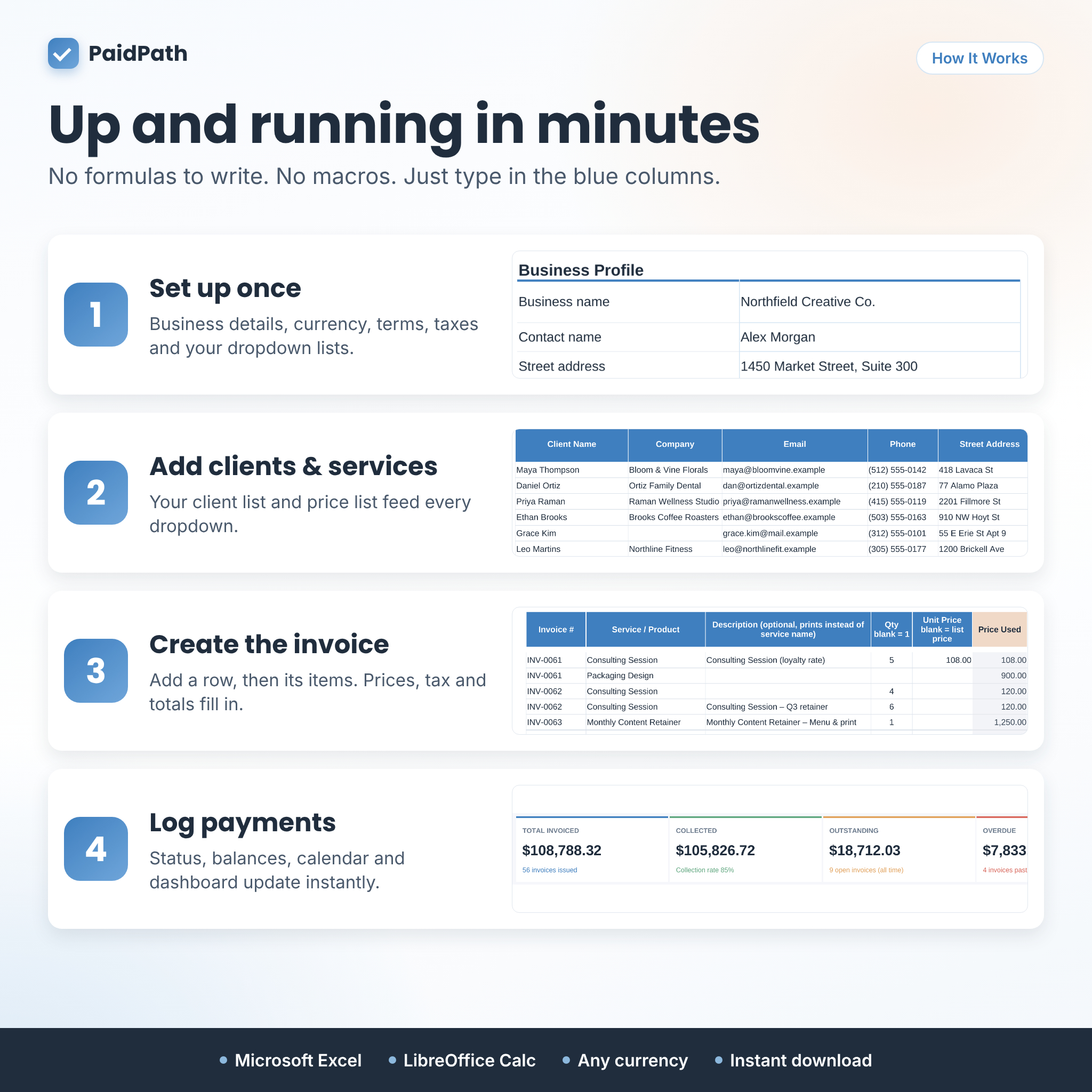
How It Works
- Set up once: add your business details, currency, payment terms and taxes, and edit the dropdown lists.
- Add clients and services: they appear in every dropdown.
- Create invoices: add the invoice row, then its items. Totals and due dates fill in.
- Log payments: statuses, balances, the calendar and the dashboard update instantly.
Blue headers mean “type here”; peach headers are automatic and locked (no password) to protect formulas.
File Format and Software Requirements
- Excel workbook (.xlsx) for Microsoft Excel (desktop, Windows or Mac, including Microsoft 365)
- Also opens and calculates in the free LibreOffice Calc
- No macros, add-ins or internet connection needed
- User guide in Word format (.docx)
Customization
Change the currency symbol and position, payment terms, invoice number prefix, week start day, target profit margin, tax names and rates, invoice footer text and the names of two custom client fields. Edit, add or remove items in eight dropdown lists: service categories, payment methods, client status, type, category, lead source, priority and expense categories. Add your logo to the invoice.
Use Cases
- A freelance designer tracking project deposits and final payments for a dozen clients
- A consultant billing hourly sessions with sales tax and sending a monthly statement
- A photographer or event planner sending quotes, then turning them into invoices
- A small agency checking which clients and lead sources bring in the most revenue
Digital Download
This is a digital product. No physical item will be shipped. Your files are available to download right after purchase. Your workbook arrives empty and ready for your own clients; listing images show sample data for illustration only.
FAQ
Does this invoice tracker work on Mac?
Yes. It is a standard .xlsx file for Excel on Mac or Windows, and it also opens in LibreOffice Calc.
Can I use my own currency?
Yes. Change one currency setting and every displayed amount follows it, with the symbol before or after the number.
How many items can one invoice have?
As many as you need. The printed invoice lists up to 15 items, and every item is always included in the totals.
Can I record partial payments or deposits?
Yes. Add a payment row each time money arrives. The invoice moves from Partially Paid to Paid automatically.
Can I create quotes?
Yes. Set the invoice type to Quote and the printable page becomes a quote with a valid-until date. Quotes are never counted as income.
Do I need spreadsheet experience?
No. You only type in the blue columns, and the included guide walks you through every step.
Does it need macros or a subscription?
No. There are no macros, no add-ins and no monthly fees. Your data stays on your own computer.
Licence
© Taskdale. For personal use and internal use in your own business only. You may not resell, share or redistribute the files, in whole or in part.
Reviews
There are no reviews yet.