Service work is hard to invoice well. You are not selling a box with a barcode. You are selling hours, visits, skill and sometimes a change of plan halfway through. An invoice builder template made for services gives each of those its own line, so the client can see exactly what they paid for.
This guide is for painters, cleaners, organizers, consultants, coaches and anyone else who sells their time. We will cover how a service invoice differs from a product one, how to bill a project from deposit to final payment, how to handle monthly clients, and which Taskdale template sets fit which kind of service business.
Quick picks for service business invoicing
| Product | Best for | Price | Link |
|---|---|---|---|
| ScopeSigned Contract and Proposal Kit | Project jobs with deposits and change orders | $2.99 | View |
| PaidPath Client & Invoice Hub | Recurring clients and monthly billing | $9.49 | View |
| Sorted & Signed Organizer Bundle | Professional organizers | $8.99 | View |
| Ledgerline Business Forms Kit | Simple quote, invoice and receipt set | $2.99 | View |
How a service invoice is different
A shop invoice lists items. A service invoice tells a short story about work. That changes what the template needs.
- Time-based lines. Hours or half-days, with a rate. A bookkeeper billing 6.5 hours at $55 needs a quantity column that accepts decimals.
- Flat fees and packages. “Standard home clean, 3 bedrooms” at one price, no matter how long it took.
- Deposits. Many service jobs start with money up front. The final invoice has to subtract it clearly.
- Change orders. The client asked for the hallway too. That extra needs its own line and, ideally, a signature before you start.
- Pass-through costs. Paint, storage bins, parking. Some clients want these listed separately from your labor.
A generic invoice with “Item” and “Price” columns can be forced to do all of this. It just looks a little awkward, and awkward invoices get queried. Clean ones get paid.
The building blocks of a good service invoice
Think of an invoice builder as a set of blocks you stack in the same order every time. Clients start to recognize the layout, and you stop having to think about it.
Top block
Your business name and logo, contact details, invoice number, issue date and due date. Add the job address if it differs from the billing address. Cleaners and landscapers often bill a landlord for work at a tenant’s home.
Middle block
The line items. Group them if the job had stages: “Prep”, “Painting”, “Clean-up”. Put labor first, then materials, then any travel or call-out fee.
Bottom block
Subtotal, discount, tax, total, deposit received, balance due. Then payment instructions and a short thank-you line. Keep the thank-you to one sentence. “Thanks for choosing us, see you in spring” is plenty.
Numbering block
Give every invoice a number that never repeats. A simple year-and-count format such as 2026-001 works well. Some service businesses add a client code, like 2026-014-HAR for the Harbor Road property, which makes searching your folder much faster when a landlord with six addresses calls about one of them.
If your work begins with a written price, our guide on how to write a price quote covers the matching document and the details clients look for before they say yes.
Billing a project from deposit to final payment
Here is a worked example. Rosa runs a two-person painting business. A homeowner wants the kitchen and living room painted.
- Proposal. Rosa quotes $3,200, including paint, with a 30% deposit.
- Agreement. The client signs the proposal and a short service agreement. Rosa sends a deposit invoice for $960.
- Change order. On day two, the client asks for the hallway as well. Rosa writes a change order for $450, and the client signs it before she opens a tin. New contract total: $3,650.
- Final invoice. Job done. The invoice shows the original work at $3,200, the hallway at $450, a total of $3,650, deposit received $960, and a balance due of $2,690.
Every number on that final invoice traces back to a signed document. If the client asks “why is it more than the quote?”, Rosa points to the change order. No argument, no awkward phone call. Just a calm, paid job.
That chain of paperwork is what a project-style template set gives you.
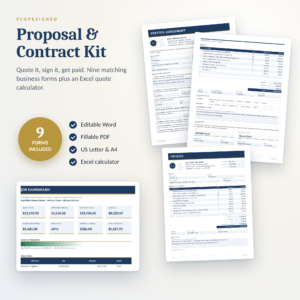
ScopeSigned Contract and Proposal Kit
Price: $2.99 | Best for: contractors and project-based services
ScopeSigned has nine matching forms in a navy and gold design, each as an editable Word template and a fillable PDF in US Letter and A4. You get a project proposal and quote, a plain-English service agreement, a one-page proposal and contract for small jobs, a change order, an invoice and more, plus a bonus Excel calculator for totals, tax, deposit and payment plans. Start by putting your logo and terms into the proposal, since every later form follows its layout.
For small jobs, the one-page proposal and contract saves time. A $180 gutter clean does not need a two-page agreement.
Monthly clients, retainers and repeat visits
Repeat work needs a different kind of invoice builder. A cleaner with 22 weekly clients, or a virtual assistant on a 20-hour monthly retainer, is not sending one-off project bills. They are sending the same invoice, with small changes, again and again.
What helps most here is a spreadsheet that remembers each client and service. You pick the client, pick the service, type the quantity, and the invoice builds itself. Then the workbook tracks which of those 22 invoices have been paid.
A retainer example
Jordan is a virtual assistant with a client on a 20-hour monthly retainer at $35 an hour, so $700 a month. In March, the client used 23 hours. Jordan’s invoice shows the retainer at $700 and 3 extra hours at $35, which is $105, for a total of $805. One glance and the client sees why the bill is higher.
A weekly cleaning round
Now picture a cleaner, Mei, with 22 weekly homes. She could send 88 tiny invoices a month, but most of her clients prefer one bill. So on the last working day of each month she builds one invoice per client, with one line per visit and the dates listed. A client with four visits at $95 sees $380. A client who cancelled one week sees three visits and $285. It takes her about 40 minutes for all 22, and her clients like knowing exactly which visits they paid for.

PaidPath Client and Invoice Hub
Price: $9.49 | Best for: service businesses with repeat clients
PaidPath is an Excel workbook that keeps clients, services, quotes, invoices, payments and expenses linked together. Add an invoice and log the payment, and the client balance, calendar and dashboard update by themselves, with overdue invoices listed first. It prints a clean invoice, quote or client statement on US Letter or A4. Enter your regular clients and your standard services on day one.
If you also want to track the work itself, not just the billing, our guide to a client project tracker shows which columns stop deadlines slipping.
When a trade-specific kit saves you hours
Some services have paperwork quirks that a general template does not cover. Professional organizers are a good example. Who decides what gets thrown out? What happens to the $40 in cash found inside a coat pocket? Who pays for the storage bins bought on the client’s behalf?
A kit written for one trade answers those questions on paper before they turn into arguments. It also gives you the invoice, receipts and estimate in the same style as the agreement, so your business looks settled from the very first client.

Sorted and Signed Organizer Bundle
Price: $8.99 | Best for: new and growing professional organizers
Sorted & Signed has 21 matching documents across 26 pages in editable Word, from discovery call notes and a client intake form to a service agreement written for organizers, a donation and discard authorization, a product purchase list and an invoice. The calm greige and cream design keeps everything consistent. Begin with the service menu and pricing page, since your invoice lines will come straight from it.
The product purchase list is the quiet hero. It records what you bought for the client and the reimbursement total, which then drops straight onto the invoice as its own line.
Writing line items clients never question
A clear description is worth more than a fancy design. Compare these two lines:
- “Services: $640”
- “Deep clean, 4-bedroom house, incl. oven and fridge interior, 2 cleaners, 4 hours each: $640”
The second one answers every question before it is asked. Use this simple formula: what, where, how much, how long. Add a date for multi-visit work. If a line covers several visits, list the dates: “Lawn care visits on 3, 10, 17 and 24 June”.
Keep your wording the same from month to month. A client who sees “Weekly garden maintenance” in April and “Yard work” in May may wonder if it is a different service.
Payment terms that suit service work
Service businesses often carry the cost of labor before they see a cent. So terms matter.
- Deposits for projects. 25% to 50% up front is common for jobs with materials or long bookings.
- Due on receipt for small jobs. A one-off $120 call-out does not need 30 days.
- Short terms for regulars. 7 or 14 days keeps cash moving for weekly and monthly clients.
- Stage payments for long work. A six-week renovation might bill at start, halfway and finish.
Put the terms in your agreement and repeat them on every invoice. Then plan around them. If most clients pay in 14 days, your bills that fall on the 25th need money that arrived by the 11th. A simple cash flow forecast shows those gaps before they hurt.
Following up when a client pays late
Late payment is part of service work. Most of the time it is not bad faith. The invoice got buried, the person who approves payments is on leave, or the client simply forgot. A calm, planned follow-up fixes most of it.
Here is a schedule that works for many small service businesses:
- Two days before the due date. A friendly heads-up: “Just a reminder that invoice 2026-088 for $1,150 is due on Friday.”
- Three days after. A short note with the PDF attached again, so they do not have to dig for it.
- Fourteen days after. A phone call. Ask when you can expect payment and write the date down.
- Thirty days after. A firmer email that mentions the late fee from your agreement, if you have one, and pauses new work until the account is settled.
The trick is to make this a routine, not a mood. When reminders go out on fixed days, you never have to work up the courage to send one. And the first time a long-overdue $1,150 lands in your account after a polite call, you will feel the weight lift off your week.
A tracker that lists overdue invoices by days late makes this schedule easy to follow. You open it on Monday, see who has crossed which line, and send the right message.
Who does not need a full invoice builder
Not everyone needs a kit. If you do two jobs a month for the same friendly client and they pay on the day, a single invoice template is enough. If you already run booking software that sends invoices and takes card payments, adding a template on top just doubles your work.
The kits above earn their keep when you have several clients, deposits, changing scopes or a mix of one-off and repeat work. That is where matching, ready-made paperwork saves real time each week.
Frequently asked questions
What should a service invoice include?
Your details, the client’s details, an invoice number, the date, a due date, a clear description of the work with hours or a flat fee, any materials, the total, any deposit already paid, the balance due and how to pay.
How do I invoice for hours worked?
Use a line with the task, the number of hours and your hourly rate. For example, “Bookkeeping, March, 6.5 hours at $55”. A spreadsheet invoice builder multiplies the hours by the rate for you.
How do I show a deposit on the final invoice?
List the full job total, then a line called “Deposit received” with the amount and date, then the balance due. That way the client sees the whole price and what is left to pay.
Should I invoice a change order separately?
You can do either. Many service businesses add the signed change order as its own line on the final invoice. Bigger changes may get their own invoice with a separate deposit.
How often should a service business send invoices?
Match the rhythm of the work. Project jobs get a deposit invoice and a final invoice, with stage invoices for long jobs. Repeat clients are usually billed weekly or monthly. Whatever you choose, send on the same day each time so clients know when to expect it.
Can I use these templates for more than one business?
Check the licence on each product page. Most Taskdale templates are licensed for use in your own business, not for resale or sharing with other companies.
Your next step
Write down how your typical job runs, from first call to final payment, and count the documents you need along the way. If the list includes a proposal, a signed agreement, a change order and an invoice, get the ScopeSigned Contract and Proposal Kit and set up the proposal first.