Owning your invoice templates means the files sit on your computer, the layout is yours to change, and your client history goes wherever you go. No platform decides what your invoice looks like or what happens to your records if you stop using it. For a lot of small sellers, that peace of mind is the whole point.
This guide is for craft sellers, market traders, freelancers and service businesses who use Square Invoices, or something like it, and wonder whether a set of templates they own would suit them better. You will get an honest look at what each approach is good at, a hybrid setup that keeps card payments easy, and the Taskdale files that fit makers and service businesses.
Quick picks: invoice templates you keep for good
| Product | Best for | Price | Link |
|---|---|---|---|
| Maker’s Business Forms Kit | Crafters with custom orders and market stalls | $3.00 | View |
| PaidPath Client & Invoice Hub | Service businesses that bill the same clients often | $9.49 | View |
| Ledgerline Invoice, Quote & Receipt Kit | Auto-calculating invoices with client statements | Original price was: $3.00.$1.50Current price is: $1.50. | View |
| Ledgerline Business Forms Kit | Matching Word quote, invoice and receipt forms | $2.99 | View |
What it means to own your invoices
When you invoice through an online platform, your invoices live inside that platform. You see them when you sign in. The design, the fields and the features are what the platform offers at the time.
When you own templates, things work the other way round. You have a Word, Excel or PDF file. You can open it offline, add a field for a pet’s name or a tumbler color, change the font, and save a hundred copies in a folder you control. If you stop trading for a year and come back, the files are still there and still work.
Ownership also covers your client list. A spreadsheet with 140 customers, their orders and their balances is a business record you can sort, filter, print and back up however you like. That record has real value. It is how you send a “spring collection” email to every customer who bought in the autumn.
And there is a calmer, quieter benefit. Nothing changes unless you change it. No new menu to learn on a busy Saturday morning.
Where Square Invoices shines, and where templates fit better
Square Invoices is part of a wider payments system. Fairness matters, so here is what a tool like that does well:
- Clients can pay by card straight from the invoice.
- Payments, refunds and card readers sit in the same place.
- Reminders and recurring invoices can be set to run on their own.
- It works across phone, tablet and computer once you sign in.
Those are good features, and some businesses rely on them. Card payments through any provider carry processing fees, and the plans, features and terms are set by the provider, so check the current details yourself before you decide.
Templates fit better when:
- Most clients pay by bank transfer or cash, not card.
- You want paperwork the platform does not offer, such as custom order forms or deposit agreements.
- You want your records in a file you control, not only inside an account.
- You send a modest number of invoices and want something simple.
A soap maker who sells at two markets a month and takes eight custom orders by email does not need a full platform for the custom side. A café with a card reader and 300 card sales a day is a different story.
A hybrid setup: your own invoice, easy card payments
You do not have to choose all or nothing. Plenty of sellers keep their card reader for in-person sales and use their own templates for invoices.
Here is how the hybrid usually works:
- Build the invoice in your own template, with your layout and your terms.
- In the payment section, list bank transfer details first.
- If a client wants to pay by card, create a payment link in whichever payment service you already use and paste it into the email or the invoice notes.
- When the money lands, mark the invoice paid in your own spreadsheet.
The client still gets an easy way to pay. You keep the invoice, the record and the layout. The only extra step is pasting a link, which takes about 20 seconds.
How it looks in practice
Priya makes custom wedding signage. A couple orders a welcome sign and 12 table numbers for $340. She sends a quote from her own template, they sign it, and she invoices a 50% deposit of $170. The invoice lists her bank details, plus a line that reads “Prefer to pay by card? Use the link in this email.” The couple pays by card the same evening. Priya marks the deposit paid in her spreadsheet, starts cutting wood on Saturday, and sends the final $170 invoice the day she delivers. Every document carries her own logo and wording, and the whole history sits in one file on her laptop.
Market stalls and custom orders: paperwork for makers
Makers have a problem general invoicing tools rarely solve. The order details matter as much as the price. Six youth medium shirts and two adult XLs. A wooden sign that says “The Okafor Family, est. 2019”, with the comma. A tumbler in rose gold glitter, not silver.
Miss one detail and you remake the piece, losing materials and a weekend. An order form with a box for every detail stops that. Then the invoice and receipt pull from the same order, so the customer sees exactly what they agreed to.
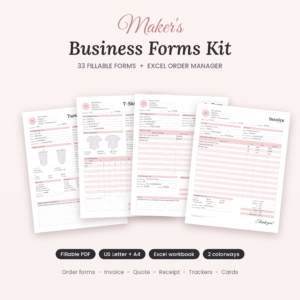
Makers Business Forms Kit
Price: $3.00 | Best for: crafters taking custom orders
This kit has 33 printable and fillable PDF forms in US Letter and A4, including order forms for apparel, tumblers, mugs, signs, ornaments, tote bags and decals, plus an invoice, price quote, sales receipt and custom order and deposit agreement. A 13-tab Excel Order Manager builds a print-ready invoice or receipt from an order number and tracks balances and due dates. Print a few general order forms for your next market table first.
For keeping the money side straight after a busy market season, our guide to an Etsy bookkeeping spreadsheet shows how to track real profit after fees and materials.
Service businesses: a tracker that stays on your computer
For service work, the most useful thing an invoicing app does is tell you who owes you money. A good spreadsheet does the same job and keeps the data on your own machine.
Picture a dog trainer with 30 regular clients. Each pays for a block of six sessions. Some pay up front, some halfway, a few pay late. On Monday morning she wants one view: who is overdue, who is due this week, and how much came in last month. That is what a linked client and invoice workbook gives her, without signing in to anything.

PaidPath Client and Invoice Hub
Price: $9.49 | Best for: freelancers, coaches and service businesses
PaidPath is an Excel workbook for Windows or Mac that links clients, services, invoices, quotes, payments and expenses. Overdue invoices rise to the top of the dashboard, and there is a separate list of everything due in the next 14 days. It also opens and calculates in the free LibreOffice Calc, needs no macros or internet connection, and keeps your data on your own computer. Add your clients first, then your regular services.
Freelancers who want the bigger picture, including expenses and tax set-asides, may find our 20-minute weekly bookkeeping system for freelancers a good companion to any invoice tracker.
Moving your records out of an app
If you have been invoicing in an app for a while, take your history with you before you switch. It is your record of who bought what.
- Check the export options. Many apps let you download customers and invoices as a spreadsheet or CSV file. Look in the settings or reports area.
- Save past invoices as PDFs. At least the last 12 months, and anything still unpaid.
- Copy your customer list. Paste names, emails and addresses into your new client tab. Clean up duplicates as you go.
- Pick up the numbering. If your last invoice was 0418, your first template invoice is 0419. Clients and your accountant will thank you for the unbroken run.
- List open balances. Enter any unpaid invoices in your new tracker so nothing gets lost in the move.
Give it one quiet evening. By the end you will have your whole business on one screen, in a file nobody can switch off.
Clients in the middle of a job
Switch at a natural break if you can, such as the start of a month. For clients halfway through a project, finish that job on the old system so their deposit and final invoice match. Start them on your new template with the next job. If a client asks why the invoice looks different, a short line is enough: “We have updated our invoices. Payment details are the same.” Most people will not even notice, and the few who do usually say the new one is easier to read.
Recurring clients
If some clients were billed automatically each month, set a calendar reminder for the same date and send their invoice by hand for the first few months. After three cycles it becomes routine.
Invoices that do their own math
If you are leaving an app, you are probably used to totals that calculate themselves. A plain Word template will feel like a step backwards. An Excel invoice with dropdowns and automatic sums keeps that convenience.
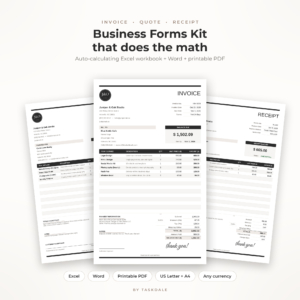
Ledgerline Invoice, Quote and Receipt Kit
Price: Original price was: $3.00.$1.50Current price is: $1.50. | Best for: sellers used to automatic totals
The Excel workbook has invoice, quote, receipt, statement, invoice log and dashboard sheets. Pick a client and an item from dropdowns and the details fill in, and the subtotal, discount, tax, shipping and balance due work themselves out. The log holds up to 300 invoices with statuses like Due Soon and Overdue. Matching Word templates and printable PDFs come in the same design.
The statement of account is handy if you take part payments. It shows the client every invoice, every payment and what is left, split into age bands from current to over 90 days.
A simple weekly routine with your own templates
Owning your system means running it yourself. It only takes a small habit.
- After each market or busy day: enter new orders and deposits while you still remember them. Ten minutes, max.
- Monday: create and send invoices for finished work. Paste a payment link for clients who prefer card.
- Thursday: check the overdue list and send friendly reminders.
- Last day of the month: copy your invoice folder and workbook to a backup drive.
Four small touch points. That is the trade for full control, and most owners find it easy to keep.
For more ready-made files to run the rest of a small business, see our list of the best small business templates.
Who should stay with an all-in-one platform
Templates are not for everyone, and it is better to know that before you switch. Stay with a payments platform if most of these sound like you:
- Nearly every customer pays by card, often on the spot.
- You send dozens of invoices a week and rely on automatic reminders.
- Several staff members create invoices from different devices.
- You use recurring billing that charges a saved card every month.
A busy salon with four stylists and a card reader at the desk falls into this group. So does a cleaning company billing 60 homes by saved card each month. For them, the automation is worth more than owning the layout. Everyone else, especially sole traders and small studios, usually finds templates simpler and calmer.
Frequently asked questions
Can I still accept card payments without Square Invoices?
Yes. Most payment services let you create a payment link. Paste it into your invoice notes or email, and the client pays by card while your invoice comes from your own template.
Are invoice templates cheaper than invoicing apps?
A template is a one-time purchase you keep. Apps and payment platforms set their own plans and fees, which can change, so compare the current terms against how many invoices and card payments you handle.
What is the best Square Invoice alternative for crafters?
A forms kit with custom order forms, a deposit agreement, invoices and receipts suits crafters best, since it captures every detail of the order. The Maker’s Business Forms Kit adds an Excel order manager that builds invoices from orders.
Can I use these templates on a phone?
The PDF forms open on phones and tablets. Excel workbooks work best on a computer, though you can view them in the Excel mobile app. Most owners fill in invoices on a laptop and send them from anywhere.
Can I share these templates with my staff or another business?
Check the licence on each product page. Taskdale templates are generally licensed for use in your own business, so staff in your business can use them, but you should not pass copies to other companies.
Will I lose my old invoices if I stop using an app?
That depends on the app’s terms. Export your customers and save PDFs of past invoices before you close an account, so your records stay with you.
Your next step
Spend one evening on the five-step move above, then send your next invoice from your own file. If you take custom orders at markets or online, start with the Maker’s Business Forms Kit and print a stack of order forms for your next stall.