You buy a beautiful planner. For nine days it’s the best thing you own. Then a busy week happens, you miss three days, and opening it again means facing a row of empty pages. So you don’t open it. By March it’s under a pile of post. If that sounds familiar, the problem probably isn’t you. It’s that most planners are built for people who fill in every box every morning. An ADHD planner is built for the other kind of week.
This isn’t about fixing anything or promising miracles. It’s about design choices that make a planner easier to come back to. Below are the features worth looking for, a low-effort way to use any planner, and two on Taskdale that were designed around missed days.
Why regular planners get abandoned
- Too many boxes. Fifteen sections on a daily page turns planning into a chore before the day has started.
- Guilt pages. Missed days stay blank and visible. Every return starts with a small wince.
- Long lists. Ten priorities aren’t priorities. They’re a wall.
- Hard to find today. If you have to scroll or flip, the friction is enough to skip it.
What to look for in an ADHD planner
A tiny daily minimum
One main task and up to three must-dos. That’s the bar. If you only write one line, the day still counts. Short lists are easier to start, and starting is usually the hard part.
A way back in without backfilling
Look for a “fresh start” or reset page that tells you what to do after a gap. The rule should be: skip the missed pages, start today. No catching up.
Time guesses next to tasks
Writing “20 min” next to a task, then noting how long it really took, is a simple way to get better at estimating. After a couple of weeks you start to see your patterns, like the “quick email” that always takes 45 minutes.
Quick wins and an energy option
A short list of tasks under 15 minutes for days when your brain won’t do big things. And an “if I have energy” list so ambitious tasks have somewhere to wait without making you feel behind.
Trends, not streaks
Streak counters punish one missed day. Trackers that show trends over a month treat a gap as information, which makes them much easier to keep using.
Fast access
Tabs on every page, today one tap away, and a brain dump page always close by for the thoughts that pop up mid-task.
A low-effort way to use any planner
- Put it where you already go. Next to the kettle or on your tablet’s home screen. Pair it with something you already do every morning.
- Two-minute rule. Planning shouldn’t take longer than making coffee. Write your one thing and stop.
- Evening check-out. One win and the first step for tomorrow. Mornings get easier when the first step is already decided.
- Weekly reset, 10 minutes. Clear the brain dump, move leftovers, choose next week’s few priorities.
- Forgive the gaps. Missed a week? Turn to today and write one line. That’s a successful return.
Two ADHD planner options that expect missed days
Unscatter ADHD Digital Planner 2026-2027
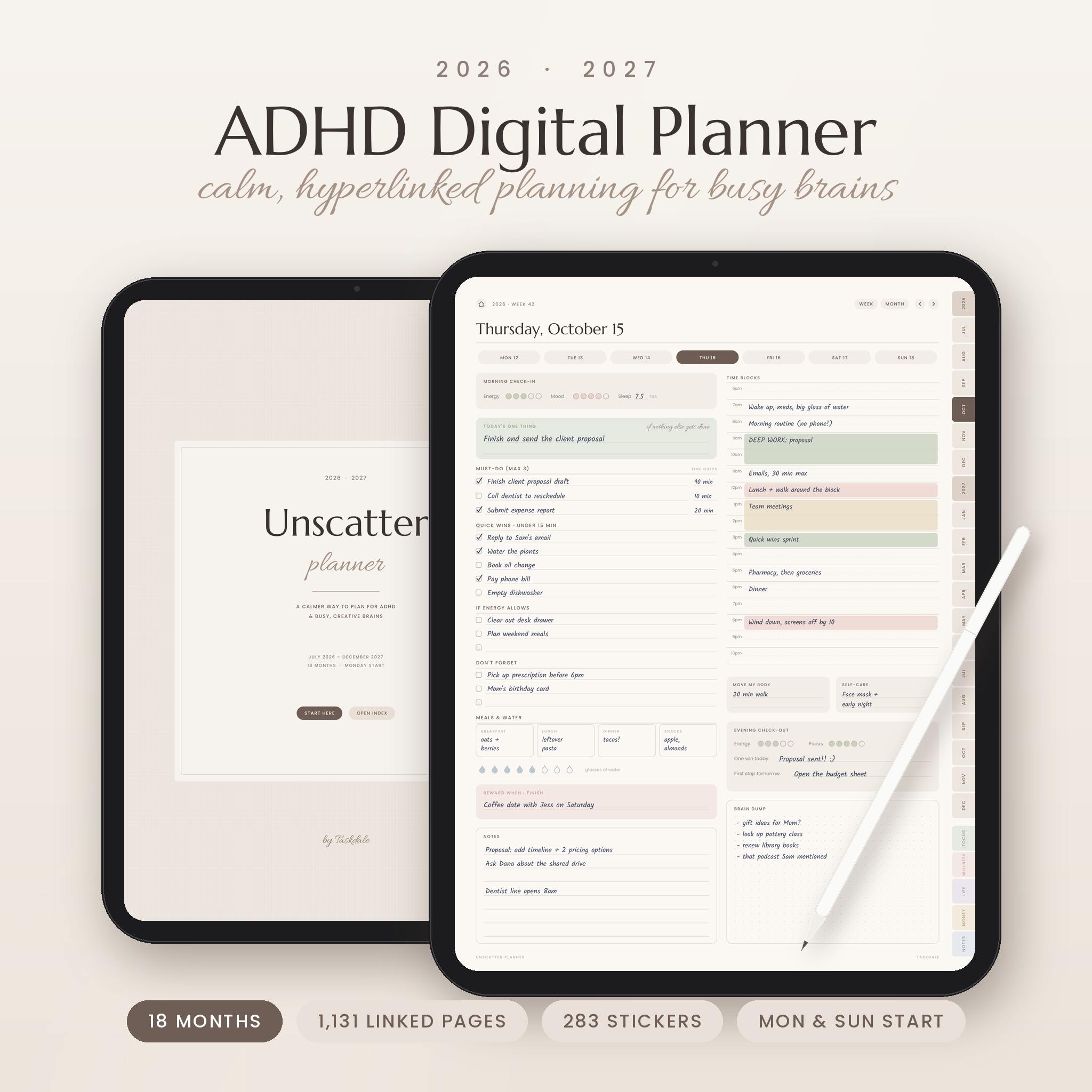
Unscatter covers 18 months, July 2026 to December 2027, so if you start in October you still have more than a year ahead. Each daily page starts with the ONE thing that has to happen today, then three must-do slots, each with a small box for how long you think it’ll take. Below that: a ten-second morning check-in, quick wins under 15 minutes, an “if energy allows” list, time blocks from 6am to 10pm and an evening check-out with one win and the first step for tomorrow.
Its Focus Toolkit has 13 tools for specific sticking points, including a Task Breakdown, a Time Estimate Trainer, an Energy Budget, a Bare-Minimum Day page for low days, a Hyperfocus Parking Lot, an Overwhelm Reset and a Wins Jar. There are five weekly layouts (including a To do, Doing, Done board and a weekly Reset page), and the money section has an Impulse Buy Pause list that asks you to wait 48 hours before you buy. You also get 283 stickers and 62 undated printable pages.
Steady Bloom ADHD Digital Planner 2026-2027
Steady Bloom is the most openly forgiving. Its listing describes a planner that expects you to miss a few days: skip one and nothing breaks, come back after a month and the Fresh Start page tells you exactly what to do, with no backfilling.
The daily page has an energy, mood and focus check-in, One Thing, three Must Dos with time guesses, Quick Wins, If I Have Energy, Don’t Forget and a Reward line. The toolkit is sorted by feelings, which is a lovely touch: “My head is too full” takes you to Brain Dump, and “I can’t get started” takes you to a Stuck? Start Here flowchart. Habit and mood trackers show trends rather than streaks, and a brain dump is one tap from every page.
It also runs July 2026 to December 2027, with four weekly layouts (Plan, Hours, a Board limited to three things in Doing, and a 10-minute Weekly Reset), 15-minute cleaning zones, a budget with guilt-free fun money, 221 stickers and a 37-page printable toolkit.
Which one?
Pick Unscatter if you want the bigger toolkit and more weekly layouts. Pick Steady Bloom if you’ve quit planners before and the Fresh Start idea speaks to you. Both work in GoodNotes, Notability and other PDF apps that support links.
FAQ
What makes a planner an ADHD planner?
Mostly design choices: short daily lists, quick access to today, ways to restart after a gap, and tools for getting started and estimating time. Anyone who finds standard planners overwhelming can use one. You don’t need a diagnosis.
Digital or paper?
Digital planners are hard to lose and jump to today in one tap, which removes a lot of friction. Paper has no notifications. Both planners above include printable pages, so you can mix the two.
What if I stop using my ADHD planner for weeks?
Open today’s page and write one thing. Skip the gap entirely. Planners built around missed days, like Steady Bloom with its Fresh Start page, are designed for exactly that moment.