Looking for a budget app without subscription fees is a slightly ironic hunt. You’re trying to spend less, and nearly every budgeting app wants $8 to $15 a month to help you do it. Over three years that’s $300 to $500, for a tool whose whole job is telling you to cancel subscriptions.
There’s another route. A one-time-purchase budget app that runs on your own computer, offline, with no bank login and no monthly fee. This guide walks through how that works in practice using Peony, a browser-based budget planner app on Taskdale, including who it suits and who should look elsewhere.
Why people want a budget app without a subscription
Three reasons come up again and again:
- Cost. Paying monthly for budgeting feels backwards, especially when money’s tight.
- Privacy. Plenty of people don’t want to hand their bank password to a third-party app.
- Control. Apps change pricing, drop features or shut down. A file you own doesn’t.
The trade-off is that you type in your own spending. No automatic bank feed. Some people see that as a downside. Others find that typing each purchase is exactly what makes them notice it.
How Peony works
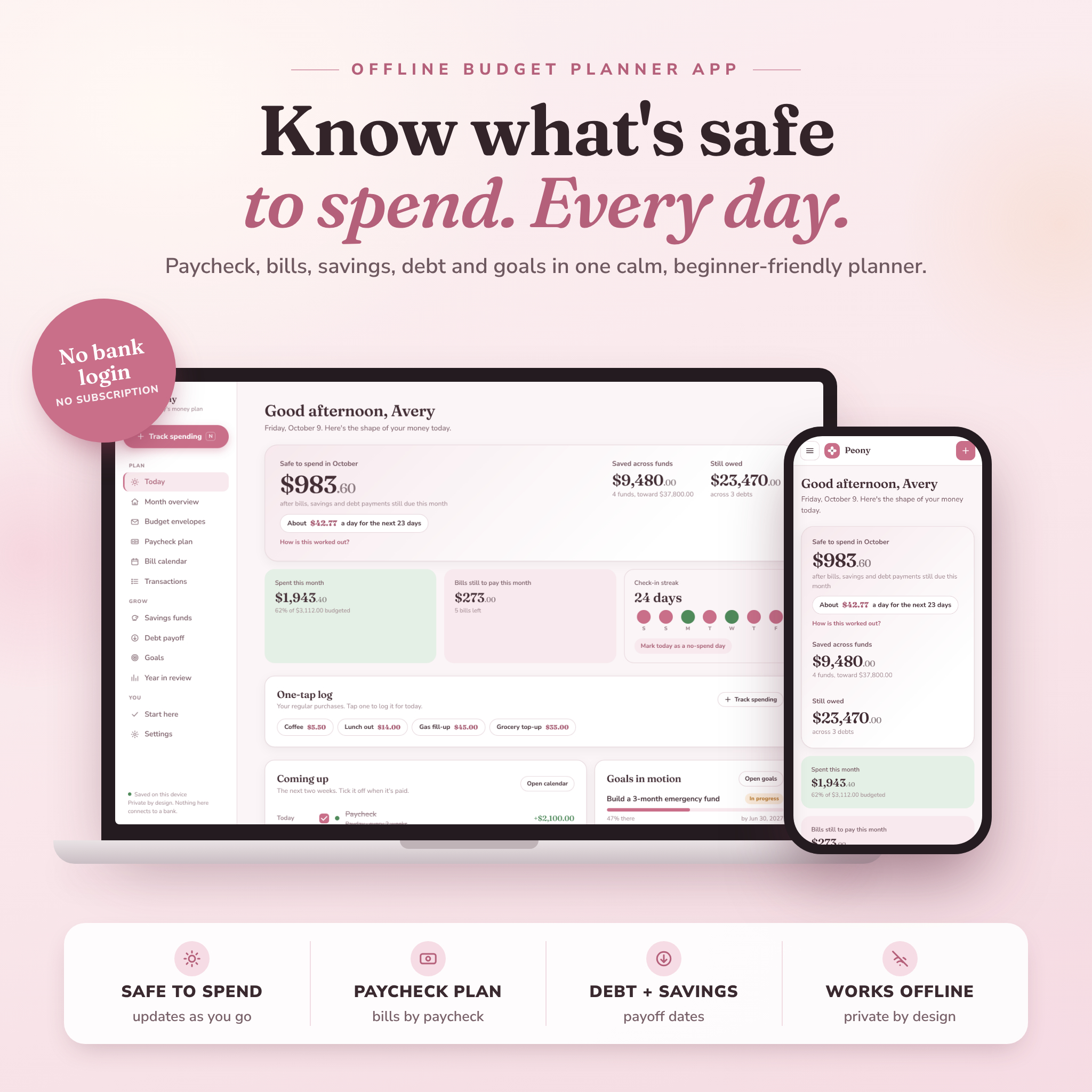
Peony Budget Planner is one HTML file. You unzip the download, double-click it, and it opens in Chrome or Edge like an app. No internet needed after download. Your data stays in the browser on your computer and nothing connects to a bank.
The home screen answers one question: how much can you actually spend right now? Peony takes your balance, subtracts every bill, savings transfer and debt payment still due this month, and shows a “safe to spend” number for the month and per day. There’s a breakdown if you want to see how it got there.
Setup takes a couple of minutes
Add your name, currency and monthly take-home pay. Or load the sample data first and click around. Then add your bills and paydays once and set them to repeat. Rent on the 1st, phone on the 12th, paycheck every second Friday.
Daily use is mostly ticking
Tick a bill when it’s paid and it’s logged in the right budget envelope. Tick payday and the money shows up as income. Tick a savings transfer and your fund grows. To log a purchase, press N on your keyboard. There’s also a one-tap favorites list for things you buy often, like your Tuesday coffee.
A week with Peony, roughly
Here’s what normal use looks like. Monday morning you open the app with your coffee. Safe to spend says $412 for the rest of the month, about $27 a day. Two bills are coming up this week, so you glance at them and close the tab. Thirty seconds.
Wednesday you buy groceries and press N to log $86. Thursday the phone bill goes out and you tick it. Friday is payday, so you tick that too. Saturday you skip it entirely. Sunday you notice you forgot Thursday’s takeaway, so you add it. The streak breaks. Nobody cares, least of all Peony.
That’s the whole habit. Most of the week you’re just reading one number.
Why it’s called ADHD-friendly
Most budget spreadsheets fall apart by week three. Too many tabs, too many formulas, too easy to break something. Peony was built with fewer steps in mind, which helps a lot of people with ADHD and plenty of people who are simply tired.
A few things make that real rather than a label:
- One number to look at (safe to spend), not twelve.
- A “coming up” list showing bills and paydays for the next 14 days, with tick boxes.
- A check-in streak and a no-spend day button for small wins.
- A friendly catch-up option if you miss a few days. Log one catch-up amount and carry on.
- Large text, night mode and a motion-off setting.
That catch-up feature matters more than it sounds. The moment most people quit a budget is the day they realize they’re five days behind. Peony expects it.
What else is in there
Under the simple surface there’s a full budget planner:
- 16 budget envelopes you can rename, recolor or delete, carrying forward each month
- A “left to assign” meter for zero-based budgeting
- A paycheck plan that groups bills under the paycheck that pays them
- A bill calendar and a recurring bills table with monthly and yearly cost
- A transactions log with search, filters, undo and CSV export
- Savings funds with target dates and monthly amounts
- A debt payoff tracker comparing avalanche and snowball, with your debt-free date
- Goals you can link to a fund or debt
- A year in review and print-friendly pages
It supports 44 currencies or a custom symbol, and seven colorways.
Who Peony is for
- Beginners who want a budget without learning spreadsheets
- People who’ve tried and dropped budget apps because they felt like homework
- Anyone living paycheck to paycheck who needs to know what’s safe to spend today
- Privacy-minded people who won’t link a bank account
- Couples sharing one household budget on one computer
Who it isn’t for
Be clear-eyed here. Peony is not a phone app. The layout adapts to small screens, but phones can’t reliably save data from a downloaded file, so you need a laptop or desktop. If you want to log every coffee on your phone at the counter, this isn’t the right fit.
It also doesn’t import from your bank. If automatic transaction feeds are a must, you’ll want a subscription app. And because data lives in your browser, you need to use the two-click backup now and then. That’s also how you move it to a new computer.
Budget app without subscription: FAQ
Is there a good budget app with no monthly fee?
Yes. Downloadable apps and spreadsheets that you buy once are the main option. Peony is a one-time purchase that runs offline in your browser, with no account and no subscription.
Is Peony an Excel template?
No. It’s a single HTML app file. There are no formulas to break and no spreadsheet skills needed.
Can I use it next year?
Yes. Switch years with the arrows and your history keeps building.
Does it work on a Mac or Chromebook?
Yes, in Google Chrome or Microsoft Edge on Windows, Mac or Chromebook.