A budget organizer for bills and receipts does three things for a small business. It shows what is due and when, so nothing goes late. It holds the proof of what you spent, so tax time is not a hunt. And it compares what you planned to spend with what actually left the account, so you can see where money is leaking.
This guide is for small business owners who currently keep bills in one inbox, receipts in a shoebox and the budget in their head: the studio owner, the Etsy seller buying supplies every week, the landlord with three units. You will get a simple category setup, a bill calendar method, a receipt system that takes seconds per receipt, a month-end routine, and a few spreadsheets that pull it together.
Quick picks: budget organizers for business bills and receipts
| Product | Best for | Price | Link |
|---|---|---|---|
| Petal & Profit Small Business Finance Planner | Budget, bills, receipts and tax set-aside in one file | $9.99 | View |
| Tallyhive Small Business Spreadsheet | Makers with supply bills and a bill calendar | $35.99 | View |
| Porchfolio Rental Property Tracker | Landlords tracking property bills and rent receipts | $21.99 | View |
| Client Billing Hub Invoice Tracker | The bills you send clients, and their receipts | $6.49 | View |
What a bills and receipts organizer actually has to do
Lots of tools claim to “organize your finances”. For a small business, the job is narrower and more practical. You need to answer four questions any day of the month:
- What bills are due in the next two weeks, and how much?
- Which bills have I paid, and which are overdue?
- Where is the receipt for that $186 printer cartridge order in April?
- Am I spending more than I planned in any category?
A notebook can answer the first two if you are careful. Only a linked spreadsheet or app answers all four without effort. That’s the test to hold any organizer up against. If it cannot tell you which receipts are missing, it is a budget sheet, not an organizer.
Set up your categories before anything else
Categories are the skeleton of the whole system. Too few and every expense lands in “Other”. Too many and you spend five minutes deciding where a roll of tape belongs. For most small businesses, 12 to 20 expense categories is about right.
Split them into three groups:
Fixed bills
Same amount, same date, every month. Rent, software subscriptions, insurance, phone, loan repayments. These go on the bill calendar first, because they are predictable and painful to miss.
Variable bills
Due regularly but the amount changes. Utilities, card statements, supplier accounts, shipping. You budget an average and adjust once a quarter.
Spending with receipts
Everything you buy as you go: materials, fuel, postage, a client lunch, a new tripod. These do not arrive as bills, so the receipt is the only record.
Here is what a simple monthly budget looks like for a one-person design studio:
| Category | Type | Monthly budget | Due date |
|---|---|---|---|
| Studio rent | Fixed bill | $650 | 1st |
| Design software | Fixed bill | $85 | 8th |
| Business insurance | Fixed bill | $42 | 15th |
| Internet and phone | Variable bill | $95 | 20th |
| Printing and supplies | Receipts | $120 | As needed |
| Travel and mileage | Receipts | $80 | As needed |
Six lines, and already the owner knows that roughly $1,070 has to be covered each month before a single dollar of profit.
Build a bill calendar so nothing slips
Late fees are the most annoying money a small business loses, because they buy nothing. A $35 late charge on a card statement you simply forgot is pure waste. A bill calendar stops it.
List every bill with its due date, then look at the month as a whole. Patterns jump out. Maybe four bills land between the 1st and the 8th while client payments usually arrive mid-month. That is useful to know, because you can ask suppliers to move a due date, or hold a small buffer in the account at the start of each month.
The best organizers color bills by status: paid, upcoming, overdue. A glance on Monday morning tells you what needs doing this week. Mark each bill paid the day you pay it, not at the end of the month, or the calendar stops telling the truth. For a closer look at due-date tracking, our guide to a bill tracker walks through the setup.
Annual and quarterly bills
The bills that cause the most trouble are the ones that come once or twice a year. A $480 annual insurance premium, a $120 domain and hosting renewal, a professional membership. Divide each one by the months until it is due and budget that amount monthly. In this case, $40 for insurance and $10 for hosting, set aside in a separate pot. When the bill lands, the money is already waiting, and you barely notice it leave.
Petal and Profit Small Business Finance Planner
Price: $9.99 | Best for: freelancers, makers and service businesses
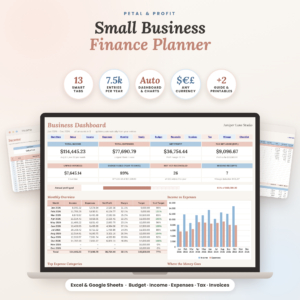
A 13-tab workbook for Excel and Google Sheets that holds bookkeeping, a budget tracker, an invoice tracker, a quarterly tax planner and mileage in one file, in any currency. Eight live KPI tiles show income, expenses, profit, tax set-aside, unpaid invoices, budget used and missing receipts, and every entry gets a plain-English status check. It also comes with an 18-page user guide and printable expense, receipt, income and mileage logs. Begin with the five-step quick start.
A receipt system that takes ten seconds a receipt
Receipts get lost because saving them feels like a chore. So make it tiny. The goal is one action at the moment of purchase and one line in your spreadsheet later.
- Snap it straight away. Photo the paper receipt before you leave the shop or the car. Forward email receipts to one folder or label.
- Name it plainly. Date, shop and amount, such as “2026-04-11 OfficeMart 186.40”. You can find it again in seconds.
- Log one row. Date, vendor, amount, category and a tick in a “receipt saved” column.
- Bin the paper once the photo is saved, unless your tax rules say keep originals.
Paper, digital or both?
Most small businesses end up with a mix. Card purchases at shops give paper receipts, online orders send emails, and a few suppliers still post invoices. Do not try to force everything into one form. Just make sure every receipt, whatever it started as, ends up as a file in the same dated folder and a row in the same log. A receipt that exists in two places, paper in a drawer and a photo on your phone, is fine. A receipt that exists nowhere is the only real problem.
That “receipt saved” tick is the quiet hero. A good organizer counts the rows without a tick, so at month end you see “3 receipts missing” and fix them while the purchases are fresh. Our guide to business expenses you can track and claim covers which receipts are worth the most effort.
Budget vs actual: a worked month
A budget only helps if you check it against reality. Here is the design studio from earlier at the end of April.
| Category | Budget | Actual | Difference |
|---|---|---|---|
| Studio rent | $650 | $650 | $0 |
| Design software | $85 | $85 | $0 |
| Business insurance | $42 | $42 | $0 |
| Internet and phone | $95 | $104 | $9 over |
| Printing and supplies | $120 | $214 | $94 over |
| Travel and mileage | $80 | $46 | $34 under |
Fixed bills behave. The surprise is printing and supplies, nearly double the plan. A quick look at the receipts shows why: two large print jobs for one client’s trade show. Now the owner has a decision to make. Either raise the supplies budget, or start passing print costs on to clients as a line on the invoice. Without the receipts tied to the category, that $94 would just be a vague feeling that money was tight.
That is the real payoff of a budget organizer. Not the tidy rows. The moment of clarity when a number explains itself.
For makers: supply bills, stock and a bill calendar
Product businesses have a messier version of this problem. Supply orders arrive weekly, some on account and some paid by card. Materials get used up in batches. A candle maker might buy wax, wicks, jars and labels from four suppliers in one month, and each purchase is both an expense and new stock.
For this kind of business, a workbook that links purchases to stock and to the bill calendar saves a lot of double entry. Buy 20 pounds of wax, log it once, and the expense, the stock level and the supplier bill all update.

Tallyhive Small Business Spreadsheet
Price: $35.99 | Best for: makers, Etsy sellers and craft-fair vendors
A 30-tab connected workbook for Excel and Google Sheets covering bookkeeping, inventory, orders, invoices, pricing and bills. Bills appear on a monthly calendar colored paid, upcoming or overdue, and the transactions log flags tax-deductible items and tracks receipts. Restock purchases raise materials stock and can feed your expenses, and seven dashboards show profit by month, quarter and year. Start by adding your suppliers and regular bills.
For landlords: property bills and rent receipts
Landlords juggle bills and receipts in both directions. Money goes out for mortgage payments, insurance, property tax, repairs and utilities on vacant units. Money comes in as rent, and tenants often want a receipt for every payment.
A landlord with a duplex and a small four-unit building could easily handle 60 rent payments and 40 expense receipts a year. Keeping those in one place, sorted by property, turns tax season from a weekend of sorting into an afternoon of checking.
Porchfolio Rental Property Tracker
Price: $21.99 | Best for: independent landlords with up to 50 properties
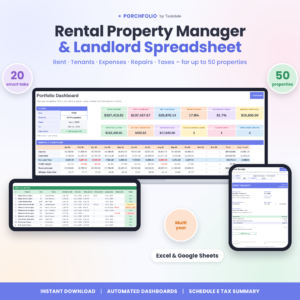
A rental property tracker for Excel and Google Sheets that handles up to 50 properties and 300 units. It tracks rent by tenant as paid, partial or overdue, works out late fees and proration, builds tenant statements and rent receipts, and lines up expenses with IRS Schedule E categories. A settings tab lets you choose your currency symbol and expense categories. Begin with the five quick-start steps on the Start Here tab.
A month-end routine in 30 minutes
Once a month, ideally in the first few days, sit down for half an hour and close the books on the month before. Put it in your calendar like a client meeting.
- Check every bill. All paid? Any due dates changed? Any new subscriptions you forgot about?
- Chase missing receipts. Look at the count of rows without one and find them now.
- Match the bank. Compare the account balance with your records. Small gaps usually mean a missing row.
- Review budget vs actual. Note any category more than 20% off plan and decide whether to adjust.
- Move tax money. Set aside your share of last month’s profit.
There is a small, real pride in closing a month cleanly. You know your numbers. Nobody can surprise you.
If you also bill clients, add one more check: which invoices you sent are still unpaid. The Client Billing Hub Invoice Tracker handles that side, with numbered payment receipts and an aging view of who owes what.
Mistakes that make bill and receipt tracking fall apart
- Mixing personal and business spending. One account for the business keeps every receipt and bill clean.
- Logging in batches every quarter. By then the receipts are faded and the memories are gone.
- Too many categories. If you hesitate over where something goes, merge two categories.
- Forgetting annual bills. Domain renewals and insurance paid once a year deserve a monthly budget line too, or they ambush you.
- Never looking at the budget again. A budget you set in January and ignore until December is just a wish list.
Frequently asked questions
What is the best way to organize business bills and receipts?
Use one spreadsheet or app with a bill calendar, an expense log with a receipt column, and a budget that compares plan with actual. Save receipt photos in a dated folder and log each one the same day.
Can I use a household budget planner for my small business?
You can at the very start, but business categories, tax set-aside and receipt tracking matter more as you grow. A business-focused organizer keeps those separate from personal spending.
Do I need to keep paper receipts?
Many tax authorities accept clear digital copies, but rules vary. Check yours once, then photograph receipts and store them in a backed-up folder.
How often should I update my bills and receipts?
Log receipts weekly at least, mark bills paid the day you pay them, and do a full review once a month. Little and often beats a big catch-up.
How do I stop missing bill due dates?
List every bill on a calendar view with its due date and amount, color each one paid, upcoming or overdue, and check it every Monday. Where you can, set the due dates of large bills for just after your clients usually pay you.
What should a small business budget include?
Fixed bills like rent and software, variable bills like utilities and supplier accounts, everyday spending like materials and travel, and a line for tax savings.
Your next step
Write down every bill your business pays and its due date, then put them into one organizer this week and start logging receipts from today. At the end of the month, run the 30-minute close for the first time. For one file that holds the budget, bills, receipts and tax set-aside together, start with Petal and Profit.