Canva makes a beautiful invoice. The fonts are lovely, the colors match your brand, and the layout looks like a designer had a hand in it. Then you sit down to bill a client for 14 items with a discount, sales tax and a deposit, and you are back to a calculator and a nervous feeling that one number is wrong.
This guide is for small business owners, makers and creatives who like a polished invoice but want the totals to work themselves out. We will be fair about what Canva does well, show where a design tool runs out of road for invoicing, walk through a worked example with automatic totals, and look at Taskdale templates that keep a designed look while Excel handles the sums.
Quick picks
| Product | Best for | Price | Link |
|---|---|---|---|
| Rosewater Price Quote Template Kit | A soft, designed look with quotes and matching invoices that add up | $3.97 | View |
| Ledgerline Invoice, Quote and Receipt Kit | A clean black or taupe invoice with a client list and price list | Original price was: $3.00.$1.50Current price is: $1.50. | View |
| PaidPath Client and Invoice Hub | Tracking which invoices are paid once they are sent | $9.49 | View |
| QuoteBloom Price Quote Template | Blush quote and invoice set with a sales dashboard | $4.99 | View |
Why so many small businesses start with Canva
It makes sense. Canva is a design tool that lots of business owners already use for social posts, flyers and logos. The invoice templates sit right next to those designs, in the same fonts and colors. You can match your invoice to your Instagram grid in ten minutes, and the result looks far better than a plain table in a word processor.
For a calligrapher sending two invoices a month, or a photographer who bills one session fee per client, that is often plenty. Type the client’s name, type the amount, download a PDF, send it. Job done.
The trouble starts when the invoice gets busier. More lines, more clients, more invoices per week. That is when a design tool and an invoicing tool start to feel very different.
Where a design-tool invoice falls short
In most Canva invoice templates, the numbers are text boxes. They look like a table, but they do not behave like one. That is fine for a poster and risky for money. Canva has added more data features over time, but the invoice templates most people pick are layouts where you type each figure yourself.
You do the math by hand
Three items at 45.00 each is 135.00. Typed late at night, it can easily become 145.00. Add a 10 percent discount, then tax on some lines but not others, then a deposit already paid, and you have five places for a slip. A client who spots a wrong total wonders what else is wrong.
There is no record behind the invoice
A designed invoice is a picture of the bill. It does not know which invoices you sent last month, which were paid, or who owes you. You keep that list somewhere else, or nowhere.
You retype everything
Client names, addresses, your usual prices and item descriptions get typed fresh, or copied from an old design and edited. Forget to change one field and Client B gets an invoice with Client A’s address. It happens more than people admit.
You need to be online and logged in
Web design tools need an account and an internet connection, and some templates or features sit behind a paid plan. If you invoice from a craft fair with patchy signal, or simply want files on your own computer, that matters.
What automatic totals actually do for you
“Automatic totals” sounds small. In practice it covers a chain of calculations that you currently do in your head or on your phone:
- Each line: quantity times unit price
- Subtotal of all lines
- A percentage or flat discount
- Tax on taxable lines only, after the discount
- Shipping or delivery
- Deposit or amount already paid
- Balance due
- A due date worked out from your payment terms
Each figure is rounded to the cent before it is added, so the printed total always matches the lines above it. You type quantities. The sheet does the rest. The first time you send an invoice without double-checking the sums on your phone, it feels like getting an hour of your week back.
Keeping the designed look in Excel
The good news: you do not have to choose between pretty and accurate. A well-built Excel template can look every bit as polished as a design-tool invoice, with soft colors, a logo spot and clean type, while the cells underneath do the arithmetic.
If your brand leans soft and feminine, a blush or rose palette will feel familiar after Canva. If it is more minimal, black and taupe or navy work well. Either way, the printed or PDF invoice is what the client sees, and a good template keeps unused rows pale so the page stays clean.
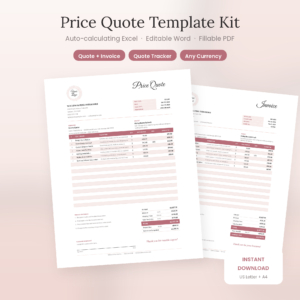
Rosewater Price Quote Template Kit
Price: $3.97 | Best for: Creatives who want pretty and accurate
A blush-and-rose price quote with a matching invoice, built in Excel with the same design in Word and fillable PDF. Each line works out quantity times unit price minus any line discount, then the sheet adds tax, shipping and the deposit due. A saved price list of up to 150 items and 200 clients fill in from dropdowns, and a quote tracker logs up to 300 quotes with follow-up dates. Add your logo and your five most-booked services first.
Worked example: an event florist’s invoice
A florist invoices a bride for a June wedding. She charges sales tax of 8 percent on flowers and goods, but not on delivery and setup labor in this example. The bride paid a 400.00 deposit when she booked, and the florist gives a 5 percent discount for booking early.
| Item | Qty | Unit price | Taxable | Line total |
|---|---|---|---|---|
| Bridal bouquet | 1 | 185.00 | Yes | 185.00 |
| Bridesmaid bouquets | 4 | 65.00 | Yes | 260.00 |
| Buttonholes | 8 | 12.00 | Yes | 96.00 |
| Table centerpieces | 12 | 48.00 | Yes | 576.00 |
| Delivery and setup | 1 | 150.00 | No | 150.00 |
The subtotal is 1,267.00. The 5 percent discount takes off 63.35, leaving 1,203.65. The taxable lines total 1,117.00, which drops to 1,061.15 after their share of the discount, so tax at 8 percent is 84.89. The total is 1,288.54. Less the 400.00 deposit, the balance due is 888.54.
Count the steps there. Five line totals, a subtotal, a discount, a discounted taxable base, tax, a total and a balance. Eleven calculations. In a design tool, every one is yours to get right. In a spreadsheet template, you type five quantities and the rest appears. That is the whole argument for switching, in one invoice.
What happens when the bride changes her order
Two weeks before the wedding, the bride adds two more centerpieces and drops one bridesmaid bouquet. In a design tool, you would edit two lines, then redo the subtotal, the discount, the taxable base, the tax, the total and the balance. Seven numbers to retype, any one of which could go wrong. In a spreadsheet, you change two quantities. Everything below them updates in the same second, and you can send the revised invoice before your coffee goes cold.
How to move from Canva to a spreadsheet invoice
You can make the switch in one evening. Here is a simple order of work:
- Export your logo from Canva as a PNG with a transparent background.
- Note your brand colors as hex codes, such as #C98B8B, so you can match them in Excel if you want to tweak the template.
- List your services and products with their usual prices and units. Ten to twenty items covers most small businesses.
- List your regular clients with addresses and emails.
- Set your business details, tax rate and payment terms once in the template’s settings.
- Pick your next invoice number. Carry on from your last Canva invoice so your numbering never repeats.
- Make a test invoice for an old job and compare the total to what you sent. If they match, you are ready.
Keep your old Canva PDFs in a folder named by year. They are still your records. From here on, new invoices come from the spreadsheet.
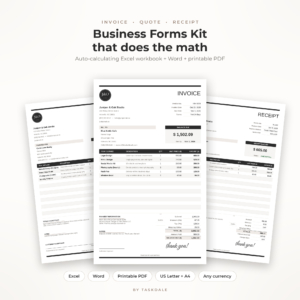
Ledgerline Invoice Kit
Price: Original price was: $3.00.$1.50Current price is: $1.50. | Best for: Owners leaving design-tool invoices behind
An Excel workbook with invoice, quote, receipt and statement sheets in Classic Black or Soft Taupe. Pick a client and their address fills in, pick an item and its description and price appear, and the subtotal, discount, tax, shipping and balance due work themselves out. A Settings sheet holds your details, currency, tax rate and terms, and the logo slot takes a right-click to replace. Word templates and printable PDFs in US Letter and A4 come too. Swap in your logo first, then load your price list.
After the invoice: knowing who has paid
A design tool stops at the PDF. A spreadsheet can keep going. Once your invoices come from a workbook, it is a short step to logging each one, recording payments as they land, and seeing who is overdue without scrolling through your sent emails.
For someone sending 20 invoices a month, this is where the time savings really stack up. You stop asking “did she pay?” and start seeing it. If you are new to tracking, our guide to an invoice tracker for paid, unpaid and overdue invoices explains the columns and the weekly routine.

PaidPath Client and Invoice Hub
Price: $9.49 | Best for: Creatives sending invoices every week
An Excel workbook that keeps clients, services, invoices, quotes, payments and expenses linked together. Choose an invoice number and a print-ready invoice fills itself in with your logo, terms and a thank-you message, on US Letter or A4. Statuses update on their own as payments come in, and the dashboard shows invoiced, collected, outstanding, overdue and net profit. Enter your current clients, then create your next invoice from the Invoice tab.
Can you still use Canva at all?
Of course. Plenty of owners keep Canva for what it does best: the logo, the letterhead, the thank-you card that goes in the parcel, the price menu for the market stall. The spreadsheet handles anything with sums in it. Your brand stays consistent because the logo and colors come from the same source.
One tidy approach is to design a header strip in Canva, export it as an image, and drop it into the top of your Excel or Word invoice. You keep the look you love and lose the manual math.
Who should stay with a design-tool invoice
A design-tool invoice is still fine if you send fewer than five invoices a month, each with one or two lines, no tax and no deposits. A tutor who bills one monthly fee per family, for example, gains little from automatic totals. Switch when the sums start to make you nervous, or when you catch yourself searching your sent folder to see who paid. If your jobs are small and occasional, our roundup of free printable invoice layouts for small jobs shows simple formats that work well on paper.
Mistakes to avoid when you switch
- Restarting invoice numbers at 1. Carry on from your last number.
- Typing over formula cells. Type only in the input cells. Good templates lock formulas for you.
- Skipping the test invoice. Recreate one old invoice to check the template matches your tax and discount habits.
- Leaving the sample data in. Clear example clients and items before your first real invoice.
- Forgetting the file type. Send invoices as PDFs, not editable spreadsheets.
If you are weighing up Word, Excel and PDF for your new setup, our comparison of invoice templates in Word, Excel and PDF covers when each one makes sense.
Frequently asked questions
Does Canva calculate invoice totals?
In most Canva invoice templates, the numbers are text you type in, so you add up lines, tax and totals yourself. A spreadsheet template calculates them for you.
Can an Excel invoice look as good as a Canva one?
Yes. A well-designed Excel template can carry soft colors, clean fonts and your logo, and it prints or saves as a polished PDF.
Do I need Excel to use a spreadsheet invoice?
The templates mentioned here are built for Microsoft Excel and also come with Word and printable PDF versions. Check each listing for exact software versions.
How do I put my Canva logo on an Excel invoice?
Download the logo from Canva as a PNG, then replace the logo placeholder in the template. In many templates you right-click the placeholder and choose Change Picture.
Can I still email invoices as PDFs?
Yes. Fill in the invoice in Excel, then save or print it to PDF and attach it to your email, just as you did with Canva.
Is a spreadsheet invoice better than invoicing software?
It depends on volume. A spreadsheet suits small businesses that want files they own with no monthly fee. Larger teams or very high invoice counts may prefer dedicated software.
Your next step
Take your most recent Canva invoice and rebuild it in a spreadsheet template tonight. Check that the total matches. If it does, send your next real invoice from the new file and keep Canva for your logo and marketing. The Rosewater Price Quote Template Kit is a natural fit if you want to keep that soft, designed look.