A digital meal planner is a hyperlinked PDF that lives in an app like GoodNotes or Notability. You tap a tab, land on this week, write the plan with a stylus, then tap again to reach that week’s grocery list. No scrolling through 500 pages. No paper stuck to the fridge with a magnet that keeps sliding off.
The four below are all undated, all tablet-friendly and all go well past a weekly grid. They differ in size, in how much they track, and in how fast they open on an older iPad. I’ve put the details side by side so you can pick by what you’ll actually use.
What to look for in a digital meal planner
- Weekly page linked to its own grocery list. This is the whole point. If you have to hunt for the list, you’ll stop using it.
- Kitchen inventory. Pantry, fridge and freezer pages stop the “we have three tins of chickpeas” problem.
- A recipe book inside the file. Otherwise your favourites stay scattered across screenshots.
- Undated pages. Start in any month and reuse a fresh copy next year.
- File size. Big files with thousands of links can feel sluggish on older tablets. Light files open instantly.
1. Copper Kettle: the biggest, most complete planner
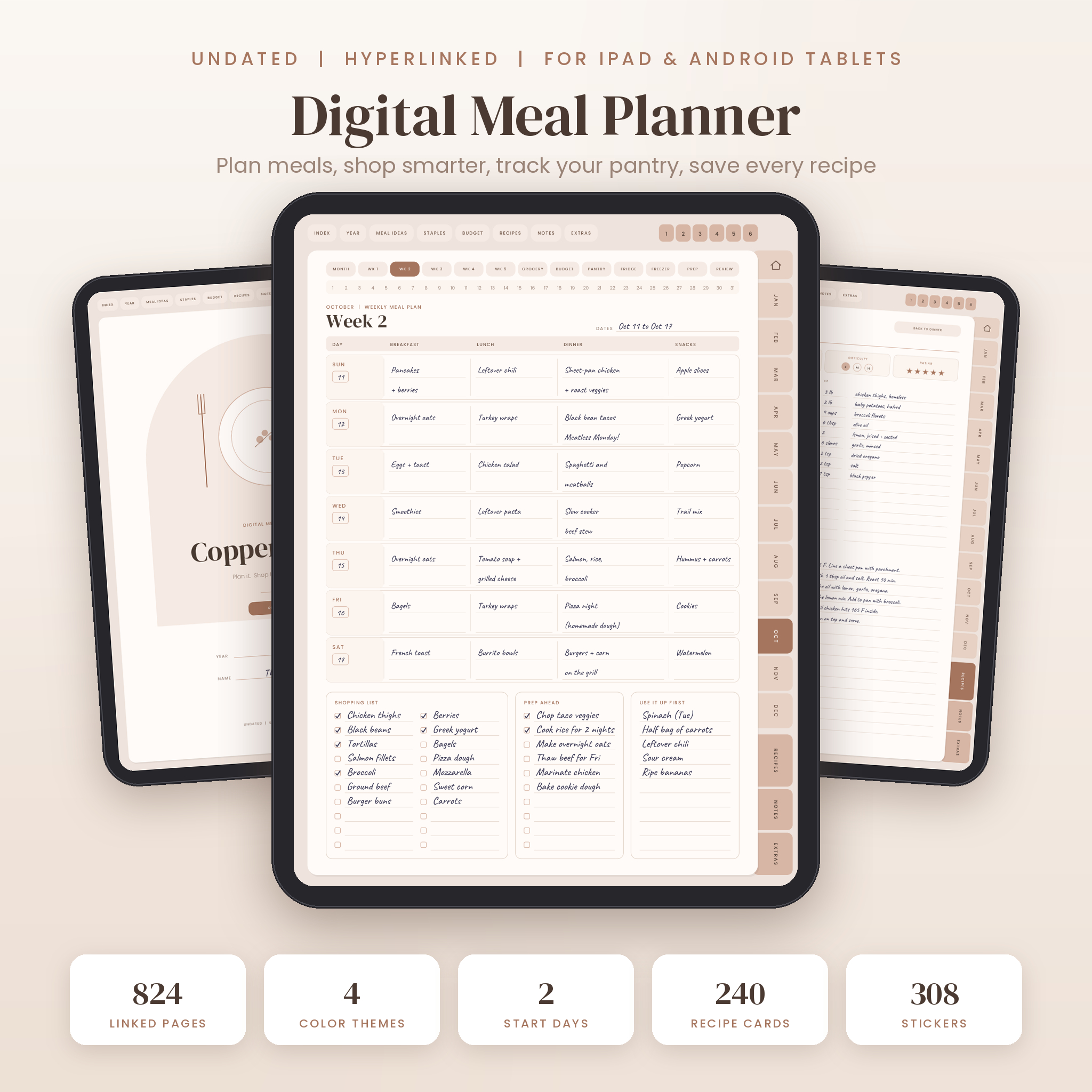
Copper Kettle is the one for people who want every part of feeding a household in one place. Each file has 824 pages and more than 49,000 working links.
Every month gets its own set: a meal plan calendar, five weekly plans, a grocery list sorted into eight aisles, a grocery budget, pantry, fridge and freezer inventories, a meal prep plan and a month in review. Weekly pages include a shopping list, prep tasks and a “use it up” box. On top of that you get 366 daily meal pages with a water tracker.
The recipe book has 12 categories and 240 recipe cards, each with an x2 column next to the ingredient amounts for doubling. There’s a Household page for likes, dislikes and allergies, a Pantry Staples checklist with 64 items already listed, and a seasonal produce guide.
You choose from four colour themes (Latte, Sage, Blueberry and Pastel) in Sunday or Monday start. It also comes with 308 PNG stickers, 12 covers and 30 printable pages in US Letter and A4. Each planner file is about 7 MB.
Best for: planners who want daily pages and a monthly review, and families managing allergies.
2. Basil & Birch: best for food journaling
Basil & Birch runs to 712 pages, with US Letter and A4 versions. It has 60 weekly meal plans, each paired with a Shop & Prep page that holds an aisle-by-aisle grocery list, a meal prep table and a small budget strip showing planned, spent and left.
Where it stands apart is the daily food journal: 372 pages with water drops to colour in, a mood and energy score, meal notes and optional boxes for calories and macros. If you’re tracking how food makes you feel, not just what you bought, this is the pick.
The recipe book has 144 pages across 12 categories with space for photos, dietary tags, a cook log and tweaks. The kitchen section includes a Use-It-Up board sorting food into “today”, “this week” and “freeze it”, plus a leftover tracker. There are 12 monthly food budgets that split groceries from eating out.
Best for: people who want a food diary and a meal planner in one.
3. Spoonful: the lightest and quickest
Spoonful is 211 pages and about 3.4 MB, so it opens fast even on a tablet that’s a few years old. It keeps things tight: 52 weekly meal plans, each linked to its own weekly grocery list in eight store sections. Tap “Grocery list”, tap “Meal plan”, back and forth.
It still covers the important extras. A recipe index links to 60 recipe pages, there are 60 printed dinner ideas for when your brain is empty, and the kitchen pages track pantry, fridge and freezer with use-by dates. A Takeout Tracker with a home-cooked streak row is a nice nudge if takeout is where your money goes. Monday and Sunday start editions are both included, plus 26-page printable sets.
Best for: people who want a simple weekly rhythm without hundreds of pages they’ll never open.
4. Plate & Pantry Digital: best for choosing your own layout
Plate & Pantry Digital Meal Planner is 216 pages with 52 weekly spreads. Each week has two pages: a meal plan with grocery list and notes beside it, then a Shop & Prep page with eight aisle boxes, a quick budget and a prep day checklist.
Its unusual feature is choice. There are four weekly layouts and ten colours (white, grey, black, beige, yellow, purple, pink, blue, orange and green), each in Monday and Sunday start. That’s 20 tablet PDFs to pick from. They’re light too, around 1.2 MB each, and every one of the 2,946 links per file was checked by script.
The recipe section is smaller at 40 pages, and there’s a printable pack of 29 pages in US Letter and A4 in all ten colours.
Best for: people fussy about layout and colour, and anyone who prints as often as they write digitally.
Side-by-side
| Planner | Pages | Weekly plans | Recipe pages | Daily pages |
|---|---|---|---|---|
| Copper Kettle | 824 | 60 (5 a month) | 240 | 366 |
| Basil & Birch | 712 | 60 | 144 | 372 |
| Spoonful | 211 | 52 | 60 | None |
| Plate & Pantry Digital | 216 | 52 | 40 | None |
Which digital meal planner should you pick?
- You want everything, including daily pages and a monthly review: Copper Kettle.
- You want a food journal as much as a planner: Basil & Birch.
- You want something light and fast with a simple weekly loop: Spoonful.
- You care about layout and colour choices: Plate & Pantry Digital.
A rule of thumb: if you’ve never kept a planner past March, go smaller. Fewer pages means less guilt about the empty ones.
Setting one up in GoodNotes
- Save the PDF to the Files app on your iPad.
- In GoodNotes, tap the plus button, choose Import, and pick the file.
- Tap a tab to test the links. If your pencil is set to draw, links respond to a finger tap or in read-only mode.
- Duplicate the file before you start if you want a clean master for next year.
Notability, Xodo, Noteshelf and Samsung Notes work in a similar way. Link behaviour varies a little by app, so try a couple of tabs before you fill in a whole month.
FAQ
Can I use a digital meal planner on an Android tablet?
Yes. These are standard hyperlinked PDFs, so they work in Android apps that follow internal links, such as Xodo, Noteshelf or Samsung Notes. Test a tab after importing.
Do I need an Apple Pencil?
No. A stylus makes handwriting easier, but you can type on any page with your app’s text tool.
Can I print a digital meal planner?
All four include printable pages in US Letter and A4, so you can print a weekly plan or grocery list when paper suits you better.
Are these planners dated?
No. All four are undated. Start any month and reuse a fresh copy the following year.