Every industry bills a little differently. A plumber lists parts and labor. A designer lists rounds of revisions. A pressure washer lists square footage. A wholesaler lists case quantities and a purchase order number. Yet underneath, every invoice shares the same bones, which is why good editable invoice templates for any industry start with a solid core and let you change the rest.
This guide is for owners in any trade who want one invoice they can shape to their own work. You will get the core fields every invoice needs, a field-by-field guide to what each industry adds, step-by-step editing in Word and Excel, and the mistakes that make a customized template harder to use than the blank one you started with.
Quick picks: editable templates that adapt to your trade
| Product | Best for | Price | Link |
|---|---|---|---|
| Ledgerline Business Forms Kit | Five editable forms for almost any service or trade | $2.99 | View |
| Ledgerline Invoice, Quote & Receipt Template Kit | A clean black-and-taupe invoice with automatic totals | Original price was: $3.00.$1.50Current price is: $1.50. | View |
| Rinsewell Pressure Washing Business Kit | Pressure and soft washing businesses | $7.59 | View |
| Rosewater Price Quote Template Kit | Industries that quote before they invoice | $3.97 | View |
The core every invoice shares
Whatever you do for a living, these fields belong on the page. Get them right once and you can reuse them across every job.
- Your business name, address, phone and email, plus a logo if you have one.
- The client’s name and billing address.
- A unique invoice number that never repeats.
- Invoice date and due date.
- Line items with description, quantity, rate and amount.
- Subtotal, discount, tax and total.
- Amount already paid and balance due.
- Payment instructions and terms.
Everything else is industry flavor. The trick is adding the right extra fields without cluttering the page. If you are still choosing a file type, our comparison of Word, Excel and PDF invoice templates covers the trade-offs.
What each industry adds to the core
Here is a practical cheat sheet. Pick your row and add only those fields.
| Industry | Extra fields worth adding |
|---|---|
| Plumbing, electrical, HVAC | Job address, parts and labor as separate lines, callout fee, warranty note |
| Cleaning | Service date, property address, recurring frequency, add-ons such as ovens or windows |
| Pressure washing | Surface type, square footage, minimum charge, deposit |
| Landscaping and gardening | Visit dates, materials, disposal fee, seasonal contract reference |
| Design and creative | Project name, rounds of revisions, usage rights, milestone stage |
| Consulting and coaching | Hours or sessions, date range, retainer period |
| Auto repair | Vehicle make, model, plate, mileage, parts with part numbers, labor hours |
| Events and catering | Event date, venue, guest count, staffing hours, service charge |
| Wholesale and product sales | PO number, SKU, unit and case quantity, shipping method |
| Tutoring and lessons | Student name, lesson dates, term or month |
Notice the pattern. Most industries add one of three things: where the work happened, what it was measured in, or which agreement it belongs to. A spare “Job details” box near the top covers all three in a single place.
How to edit an invoice template in Word
Word is the easiest place to make visual changes. Here is a safe order to work in:
- Save a copy first. Name it after your business, such as “Brightwater Plumbing invoice MASTER”.
- Swap the logo. Right-click the logo placeholder and choose Change Picture, or Insert, Pictures.
- Replace placeholders. Use Find and Replace for your business name, phone and website so you catch every instance.
- Add your industry fields. Click in the details table and insert a row, then type a label such as “Vehicle” or “Property address”.
- Change colors with styles. If the template uses heading styles, change the style once and every heading follows.
- Save as PDF and check it on your phone.
Word gives you freedom, but it will not add up totals. That’s fine for simple jobs. For anything with tax, discounts or a deposit, the Excel version is safer.
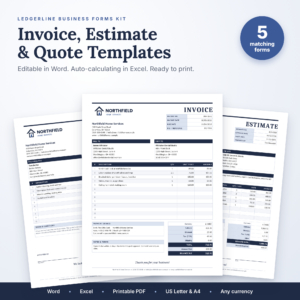
Ledgerline Business Forms Kit
Price: $2.99 | Best for: Trades and services of every kind
Five matching navy-and-blue forms (invoice, job estimate, quote, sales receipt and purchase order) as editable Word templates in US Letter and A4, using real Word styles so colors and fonts change in a few clicks. An 11-tab Excel Invoice Maker adds saved clients and items, automatic totals, PAID and OVERDUE status, a 300-invoice tracker and a dashboard. Rename labels, add rows and swap the header color to your brand before your first job.
How to edit an invoice template in Excel
Excel templates do the math, so editing them needs a lighter touch. You want to change words and settings without breaking a formula.
- Start on the Settings tab. Business details, currency, tax rate and payment terms usually live here and flow to every form.
- Fill the item or price list with your industry’s services: “Driveway wash per sq ft”, “Callout fee”, “Logo concept”.
- Rename labels only in unlocked cells. If a label is locked, look for a setting that controls it, or unprotect the sheet (good templates use no password) and edit carefully.
- Do not insert columns inside the line item table. Use the description column for extra detail instead.
- Test with a fake invoice for a made-up client and check every total with a calculator once.
A few minutes of testing now saves an embarrassing correction later.
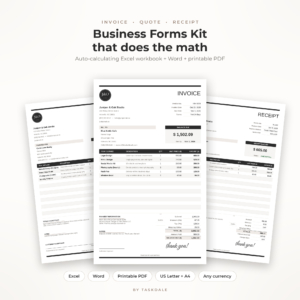
Ledgerline Invoice Quote and Receipt Kit
Price: Original price was: $3.00.$1.50Current price is: $1.50. | Best for: Any business wanting automatic totals
An auto-calculating Excel workbook with Invoice, Quote, Receipt, Statement, Invoice Log and Dashboard sheets, plus six Word templates and printable PDFs in black and soft taupe, US Letter and A4. It holds 100 clients and 150 products or services, and custom lines let you add one-off items that never print in the helper columns. Load your industry’s price list into the Items sheet first.
Industry spotlight: pressure washing
Pressure washing is a good example of an industry where a generic invoice struggles. Jobs are priced by area: a 600 square foot driveway, a two-story house, a 40-foot fence. There are minimum charges, add-ons like gutter brightening, and often a deposit for bigger commercial work. Typing all of that into a blank invoice means doing area math on a calculator in the customer’s driveway.
A trade-specific kit solves it with a price book and a measuring tab, so the quote and invoice work out the totals for you. Our pressure washing price list guide explains how to set those rates in the first place.
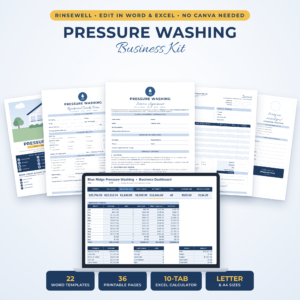
Rinsewell Pressure Washing Business Kit
Price: $7.59 | Best for: Pressure and soft washing businesses
Editable Word templates for client intake, proposals, contracts, inspection, job sign-off, invoice, estimate and receipt, plus flyers, door hangers and business cards. The Excel Quote and Invoice Calculator has a Price Book, a Measure tab for driveways, walls, roofs and fences, automatic minimums, discount, tax, deposit and balance, a job log and a dashboard. Fill in Settings and your Price Book first.
Industry spotlight: auto repair and other parts-heavy trades
Garages, appliance repairers and HVAC techs bill a mix of parts and labor, sometimes with dozens of lines. Each part needs a description, ideally a part number, a quantity and a price. Labor is often in tenths of an hour. Insurance work may need supplements.
For these trades, two rules help. Keep parts and labor in separate groups so the customer can see both totals. And put identifying details at the top: vehicle, serial number or appliance model. Our guide to the auto body repair estimate template walks through what a body shop estimate needs, and most of it carries over to the final invoice.
Industry spotlight: creative and consulting work
Designers, writers, photographers and consultants sell time and ideas. The invoice must make invisible work visible. List the project name, the stage (for example “Milestone 2 of 3: first drafts”), what was delivered and the rounds of changes included. If you bill hourly, attach a short time summary or list the dates.
Usage rights matter too. A line such as “Logo license: unlimited use by Client for business purposes” prevents later confusion. It costs one line and saves a long email thread.
Industry spotlight: wholesale, retail and product sellers
Businesses that sell goods rather than time need a different kind of line item. Each line should carry a product code or SKU, a clear description, the unit (each, case of 12, kilo) and the quantity. Wholesale buyers often insist on their purchase order number on your invoice, and their accounts team will hold payment until it matches. Add a PO field near the top and fill it every time.
Shipping is the other detail. Show it as its own line, with the method if it matters to the buyer: courier, pallet, collected. If you sell to shops on 30-day terms, write the due date as a date, not just “Net 30”. A candle maker supplying six gift shops, for instance, will get paid sooner when every invoice shows the shop’s PO number, the case count and an exact due date.
One template, three businesses: a worked example
To see how far a single editable template can stretch, picture three owners using the same invoice kit.
Maria, mobile hairdresser
She adds one field, “Appointment date”, and fills her price list with cut, color, blow-dry and a travel fee. Most invoices have two lines. She sends them as PDFs from her phone after each visit to her care home clients.
Tom, landscaper
He adds “Property address” and “Visit dates”, then lists mowing, hedge trimming, green waste disposal and materials. His monthly invoices to six regular clients list four visits each. He keeps parts and labor apart so clients can see where the money went.
Priya, bookkeeper
She adds “Period covered” and bills a monthly retainer plus extra hours for year-end work. Her invoices are one or two lines, but the period field stops clients asking which month they are paying for.
Same template, same core, three very different invoices. Each owner spent less than an hour making it their own, and each felt a small lift seeing their own name and services on a clean, finished page.
Payment terms that suit your industry
Terms are part of the template too, and they differ by trade. Put yours in the footer so they print on every invoice.
- Home services such as cleaning, gardening and repairs: often due on completion or within 7 days.
- Trades with big materials costs: a deposit up front, then the balance on completion.
- Creative and consulting work: milestone payments, or monthly in advance for retainers.
- Business clients and wholesale: 14 or 30 days is common, with a PO number required.
- Events: deposit to book, balance before the event date.
Whatever you choose, keep it short and specific. “Payment due within 7 days by bank transfer. Thank you.” works better than a paragraph of small print.
Industries that quote before they invoice
In some industries the quote does most of the selling: events, interior design, florists, renovation. Clients compare several quotes before choosing. Here, a beautiful quote that converts cleanly into an invoice is worth having. The Rosewater Price Quote Template Kit is built for that, with a quote tracker and a matching invoice.
Mistakes when customizing invoice templates
- Adding too many fields. If a field is blank on most invoices, remove it.
- Breaking formulas by inserting columns or typing over locked cells.
- Losing the master. Always keep an untouched copy.
- Inconsistent wording between quote and invoice. Use the same item names on both.
- Forgetting paper size. A4 invoices printed on US Letter cut off the footer, and the other way round.
- Licensing. Most templates are for use in your own business. Do not share copies with other businesses.
Frequently asked questions
Is there one invoice template that works for every industry?
A well-built general template covers most industries once you add a few trade-specific fields. Some trades, like pressure washing or auto repair, benefit from a specialist kit.
What extra fields does a contractor invoice need?
A job address, parts and labor lines, any permits, deposits already paid and a short warranty note.
Can I use the same template for quotes and invoices?
Many kits include a quote and an invoice in the same design. Keep them as separate documents with separate numbers.
Do I need a different invoice if I work in another country?
The core stays the same, but tax rules, currency and paper size change. Use the A4 version outside North America, set your currency symbol, and check which tax details your local tax office expects to see.
How many line items should an invoice template have?
Enough for your busiest job. Ten to fifteen rows suits most service businesses. Parts-heavy trades may need more, so look for a template where rows can grow or line items sit on their own tab.
Can I add terms and conditions to an editable invoice?
Yes. Keep the short version on the invoice footer, such as payment terms and late fees, and put full terms in your quote or contract.
Your next step
Find your industry in the cheat-sheet table above and write down its extra fields. Then open one editable template, add only those fields, and save it as your master tonight. Your next invoice will look made for your trade. For a flexible kit that suits most businesses, start with the Ledgerline Business Forms Kit.