$6.50 does not sound like much. A lunchtime sandwich, three days a week. But run it through a year and it becomes $1,014. Suddenly that sandwich is a weekend away. The same trick works in reverse: a $480 yearly car registration looks scary until you see it is $40 a month.
An expense calculator for monthly and yearly costs lets you flip between those two views for anything you pay for. This guide shows the conversions, how to set up a simple calculator in a spreadsheet or on paper, a worked example for one person’s spending, and how the yearly view helps you make better decisions about gyms, subscriptions, cars and habits. No complicated maths. Just multiplication and division used well.
Quick picks: tools for tracking and calculating expenses
| Product | Best for | Price | Link |
|---|---|---|---|
| Pennygrove Budget Planner for Google Sheets | Monthly and annual dashboards from one log | $7.99 | View |
| Soft Ledger Budget Planner | Printable pages plus an Excel file | Original price was: $12.99.$8.99Current price is: $8.99. | View |
| Steady Budget Planner | Expense tracking by hand on a tablet | $2.70 | View |
| Petalwise Budget Planner | Monthly expense pages with color-in progress | $3.20 | View |
Why you need both a monthly and a yearly view
Monthly numbers are how you live. Rent, groceries and phone bills arrive monthly, and your paycheck probably does too. That is the view you need for keeping the lights on.
Yearly numbers are how you decide. Seeing that streaming costs $540 a year, or that eating out came to $3,100, lands differently than $45 or $258 a month. Big numbers make you ask: is this worth it to me? Sometimes the answer is yes, happily. Sometimes it is a clear no.
Both views use the same numbers. You just move between them with simple multiplication. Once you get used to it, you will start doing it in your head at the shop: $14 a week on snacks? That is about $730 a year. Still want it? Maybe. Maybe not.
The yearly view also catches costs the monthly view hides. A $1,200 trip, $600 of holiday gifts and a $350 car service do not appear in a normal month. Add them up for the year, divide by twelve, and you find a hidden $179 a month that your budget never mentioned.
The conversions you need
Every expense calculator runs on a handful of conversions. Keep this table handy.
| From | To yearly | To monthly |
|---|---|---|
| Daily | Multiply by 365 | Multiply by 365, divide by 12 |
| Weekly | Multiply by 52 | Multiply by 52, divide by 12 |
| Every two weeks | Multiply by 26 | Multiply by 26, divide by 12 |
| Monthly | Multiply by 12 | Already monthly |
| Quarterly | Multiply by 4 | Divide by 3 |
| Yearly | Already yearly | Divide by 12 |
Small habits, yearly totals
Here is what a few everyday costs look like when you run them through a year. Not to shame anyone. Just to see.
| Habit | Cost | How often | Per year |
|---|---|---|---|
| Coffee out | $5.25 | 5 days a week | $1,365 |
| Bought lunch | $12 | 3 days a week | $1,872 |
| Takeout dinner | $38 | Once a week | $1,976 |
| Streaming (three services) | $42 | Monthly | $504 |
| Ride share home | $18 | Twice a month | $432 |
Some of these will be worth every cent to you. The point is to choose them knowingly. A person who loves their morning coffee and decides it is worth $1,365 a year can enjoy it without a flicker of guilt.
Build your own expense calculator
You can build a simple calculator in any spreadsheet in about 15 minutes. Set up these columns:
- Expense: what it is.
- Amount: what you pay each time.
- Times per year: 365, 52, 26, 12, 4 or 1.
- Yearly cost: amount times times per year.
- Monthly cost: yearly cost divided by 12.
In a spreadsheet, if Amount is in column B and Times per year is in column C, the yearly cost in D2 is =B2*C2 and the monthly cost in E2 is =D2/12. Copy those down. Add a total at the bottom of columns D and E. That is a working expense calculator.
Using “times per year” instead of a frequency label keeps the maths simple. Weekly is 52. Every two weeks is 26. Twice a year is 2. One column handles every schedule.
Add a reality check column
Once you have a few months of real spending, add one more column: actual so far this year. Put it next to the yearly estimate. In March, groceries should be about a quarter of the yearly figure. If they are already at 40 percent, you know early, while there is still time to adjust. This one column turns a static calculator into a quiet early-warning system.
Group the rows
Sort expenses into a few groups: housing, transport, food, subscriptions, personal, yearly one-offs. Subtotals per group show where most of the money goes. For many people, food and transport together end up bigger than they guessed.
Worked example: one person’s monthly and yearly costs
Leo is 38, lives alone in a rented condo, drives to work and has a weakness for concert tickets. Here is his calculator.
| Expense | Amount | Times a year | Yearly | Monthly |
|---|---|---|---|---|
| Rent | $1,400 | 12 | $16,800 | $1,400 |
| Utilities and internet | $165 | 12 | $1,980 | $165 |
| Phone | $50 | 12 | $600 | $50 |
| Car payment | $310 | 12 | $3,720 | $310 |
| Car insurance | $660 | 2 | $1,320 | $110 |
| Fuel | $48 | 52 | $2,496 | $208 |
| Groceries | $95 | 52 | $4,940 | $412 |
| Eating out | $40 | 52 | $2,080 | $173 |
| Gym | $45 | 12 | $540 | $45 |
| Streaming and apps | $38 | 12 | $456 | $38 |
| Concerts | $120 | 6 | $720 | $60 |
| Car registration | $240 | 1 | $240 | $20 |
| Holiday gifts | $500 | 1 | $500 | $42 |
| Trip home to family | $900 | 1 | $900 | $75 |
| Total | $37,292 | $3,108 |
Leo takes home $3,700 a month. He thought he had about $900 spare. The calculator says $592, because the yearly one-offs (registration, gifts, the trip home) add $137 a month he never planned for. That is the gap that kept showing up as a December credit card balance.
He kept the concerts, because they make his year. He dropped one streaming service and cut eating out from $40 to $30 a week, freeing up more than $600 a year. Then he set up a $137 monthly transfer for the yearly costs. Small moves. Big relief the following December.
Trips are often the biggest yearly line people forget. Our guide on working out what a trip will really cost helps you put a fair number on it.
Use yearly numbers to make better decisions
Cost per use
Divide a yearly cost by how often you use it. Leo’s gym is $540 a year. If he goes 90 times, that is $6 a visit, which is good value. If he goes 15 times, it is $36 a visit, and a pay-per-class option might be cheaper.
Car versus alternatives
Add every car cost for a year: payment, insurance, fuel, registration, servicing, parking. Leo’s comes to $7,776 before servicing and repairs. Compare that with transit passes plus occasional rentals or ride shares. For some people the car clearly wins. For others, seeing the yearly figure changes everything.
Subscriptions
Multiply each subscription by 12 and ask whether you would pay that lump sum today. Many people would happily pay $120 a year for music they use daily. Fewer would hand over $180 for a fitness app they opened twice.
Debt in yearly terms
Interest is easier to ignore monthly than yearly. A $4,000 credit card balance at a 22 percent rate costs roughly $880 a year in interest if the balance stays put. Seen that way, paying it down looks less like a chore and more like giving yourself a raise. Check your own statement for the actual rate before running the numbers.
Shared costs
Yearly totals also help when splitting costs with others. A group trip or shared household bills are easier to divide fairly when everyone sees the full amount. Our guide to a group trip expense splitter shows one way to do it without awkward conversations.
Feed the calculator with real spending
A calculator is only as good as the numbers in it. The first time, use three months of bank statements and estimate the rest. After that, track spending as it happens, and your monthly and yearly figures get more accurate every month.
Keep the calculator and the tracking separate in your head. The tracker records what happened. The calculator turns it into the monthly and yearly figures you plan with. Every three months, copy the real totals from the tracker into the calculator and see what moved. Leo found his fuel line crept up 15 percent over one summer of road trips, and that was worth knowing before the next one.
The easiest way is a budget spreadsheet that logs each expense once and builds both monthly and annual views from it. You get the calculator for free, updated in real time.
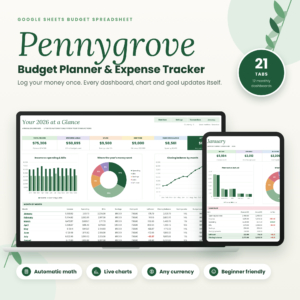
Pennygrove Budget Planner
Price: $7.99 | Best for: tracking expenses in Google Sheets
Pennygrove is a 21-tab budget planner spreadsheet for Google Sheets with 12 monthly dashboards and an annual dashboard. You type only in the cream-colored cells, log income and spending as it happens, and charts, bill statuses, savings goals and debt estimates update for you. Categories turn amber at your warning level and red when you go over, and it works in your own currency. Log one month of expenses, then check the annual dashboard.
Calculating expenses on paper
Not everyone wants a spreadsheet. Writing expenses by hand works just as well for the calculator, and some people find it makes each purchase feel more real. A simple routine: log every expense in a monthly spending log, total each category at month end, then multiply by 12 for a rough yearly figure. After three months, average them for a better estimate.
A notebook works fine for this. Draw five columns on one page per month, write each purchase as it happens, and add a category letter beside it: G for groceries, T for transport, F for fun. At month end, total each letter. It takes about 15 minutes, and you will have a month of real data to feed your calculator.
If you like paper but want the maths checked, a planner that comes with an Excel file gives you both.
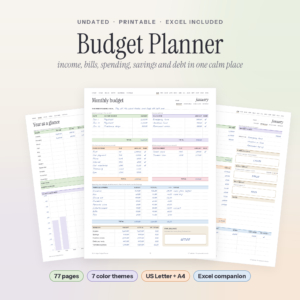
Soft Ledger Budget Planner
Price: Original price was: $12.99.$8.99Current price is: $8.99. | Best for: paper planners who want an Excel helper
Soft Ledger is a 77-page undated budget planner you can print or use in a PDF app, plus an Excel budget spreadsheet that does the maths. Each month has a Budget page, an Overview that turns what is left into a weekly and daily number, a Daily log for purchases and a Review page, and totals carry onto a Year at a glance sheet. It works in any currency. Print one month and the Year at a glance page to start.
Tracking expenses on a tablet
On a tablet, a hyperlinked planner keeps the monthly log and yearly trackers a tap apart. Planners like Petalwise and Steady each have monthly expense pages alongside trackers for bills, savings and debt.
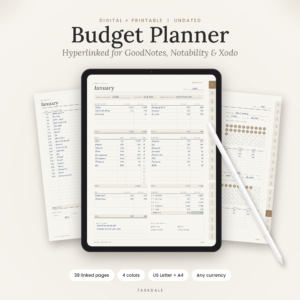
Steady Budget Planner
Price: $2.70 | Best for: tablet users tracking monthly expenses
Steady is a digital budget planner for GoodNotes, Notability, Xodo and other PDF apps, with printable US Letter and A4 versions in the download. Each month has one budget page with Budget and Actual columns and one spending log, and thirteen trackers cover bills, savings, sinking funds, debt, subscriptions, net worth and a full year review. A summary box shows what is left after savings, bills, expenses and debt. Fill in the subscriptions tracker first.
Yearly costs people forget to include
Run through this list and add anything that applies to your calculator with “1” or “2” in the times-per-year column.
- Car registration, inspection and servicing
- Insurance paid yearly or twice a year
- Holiday gifts, birthdays and weddings
- Trips, including a trip home for the holidays
- Annual memberships and software renewals
- Dentist, eye tests and new glasses
- Tax preparation fees
- Clothing and shoe replacement
- Professional fees or license renewals
- Side business costs, if you run one (our startup costs calculator guide covers these)
For most people, this list alone adds $100 to $300 a month to their true costs. Finding it now is a lot better than finding it on a credit card statement.
Frequently asked questions
How do I calculate yearly expenses from monthly?
Multiply the monthly amount by 12. For weekly costs, multiply by 52. For costs every two weeks, multiply by 26.
How do I convert a yearly expense to monthly?
Divide the yearly amount by 12. A $600 yearly bill is $50 a month.
Why is weekly times four not the same as monthly?
Most months have a little over four weeks. Multiply a weekly cost by 52 and divide by 12 for an accurate monthly figure.
What should an expense calculator include?
Every regular and irregular cost, with its amount and how many times a year you pay it, plus columns for the yearly and monthly totals.
What is the easiest way to find my yearly spending?
Download 12 months of bank and card statements and total them by category. Many banks also offer a yearly summary you can export as a spreadsheet.
How often should I update my expense calculator?
Update amounts whenever a bill changes, and review the whole thing every three to six months using real spending data.
Your next step
Open a blank spreadsheet tonight and add five columns: expense, amount, times per year, yearly and monthly. Fill in ten of your regular costs and three yearly ones. Look at the yearly column and circle the number that surprises you most. When you want the tracking done for you, log your spending in the Pennygrove Budget Planner for Google Sheets and let the annual dashboard build itself.