You walk in, grab bananas, head to dairy for milk, remember the list says “garlic”, go back to produce, find cereal, spot “tomatoes” further down the list, go back to produce again. Forty minutes later you’ve walked the store three times and still forgot the bin bags.
A grocery list by aisle fixes that. You write items under the sections of your store, in the order you walk through it. Then you shop top to bottom, one lap, no doubling back. It’s a small change that cuts the time of a big shop noticeably and makes it much harder to forget things.
Step 1: Map your store once
Next time you shop, take a pen and walk the store the way you normally would. Write down each section in the order you hit it. A typical supermarket might look like this:
- Produce
- Bakery
- Deli and meat
- Fish
- Dairy and eggs
- Tins, jars and sauces
- Pasta, rice and grains
- Baking and spices
- Breakfast and cereal
- Snacks and drinks
- Frozen
- Household and cleaning
Your store will be different, and that’s the point. The list should match your walk, not a generic one. If you shop at two stores regularly, map both.
Step 2: Decide where the awkward items go
Some things live in odd places, and they’re the ones you’ll miss. Decide once and stick to it:
- Tortillas and wraps: bakery in some stores, “world foods” in others
- Coconut milk: tins, or the international aisle
- Fresh herbs: produce, usually near the salad
- Nut butters: breakfast aisle, near the jams
- Eggs: chilled dairy in the US, often near baking in the UK
- Tofu: chilled, near the deli or the vegetarian section
Write these on your store map so you’re not guessing next time.
Step 3: Build your list under the sections
Whether it’s paper or a spreadsheet, the list now has headings in store order. As you plan the week’s meals, drop each ingredient under its section. Two tips:
- Merge duplicates as you go. If three recipes need onions, write “onions x4” once under produce.
- Leave a catch-all section at the bottom for things you’re not sure about. Check it before you leave.
Step 4: Shop in one lap
Start at the top of the list, work down. Tick each item as it goes in the trolley. When you reach the bottom, look back up for anything unticked. That one glance catches nearly everything you’d normally forget.
Put frozen near the end of your route if your store allows it. Ice cream doesn’t enjoy a 30-minute tour.
What a sorted list looks like
Here’s a real-looking weekly list for a family of four, sorted for a store that starts with produce and ends with frozen:
- Produce: onions x4, garlic, peppers x3, bananas, apples, salad bag, lemons x2, coriander
- Bakery: sliced bread, tortillas x2 packs
- Meat: chicken thighs 1 kg, mince 500 g, sausages
- Dairy: milk x2, cheddar, yogurt, butter
- Tins and jars: chopped tomatoes x3, kidney beans x2, salsa
- Dry goods: rice, spaghetti
- Household: bin bags, dish soap
- Frozen: peas, fish fingers
Notice the onions. Four separate recipes needed them, but they appear once. That merging is half the value of planning the list properly.
Let a spreadsheet sort it for you
Sorting by hand works, but the moment you plan meals in a spreadsheet, the computer can do it. You tell each ingredient which aisle it lives in once, and every list after that comes out sorted.
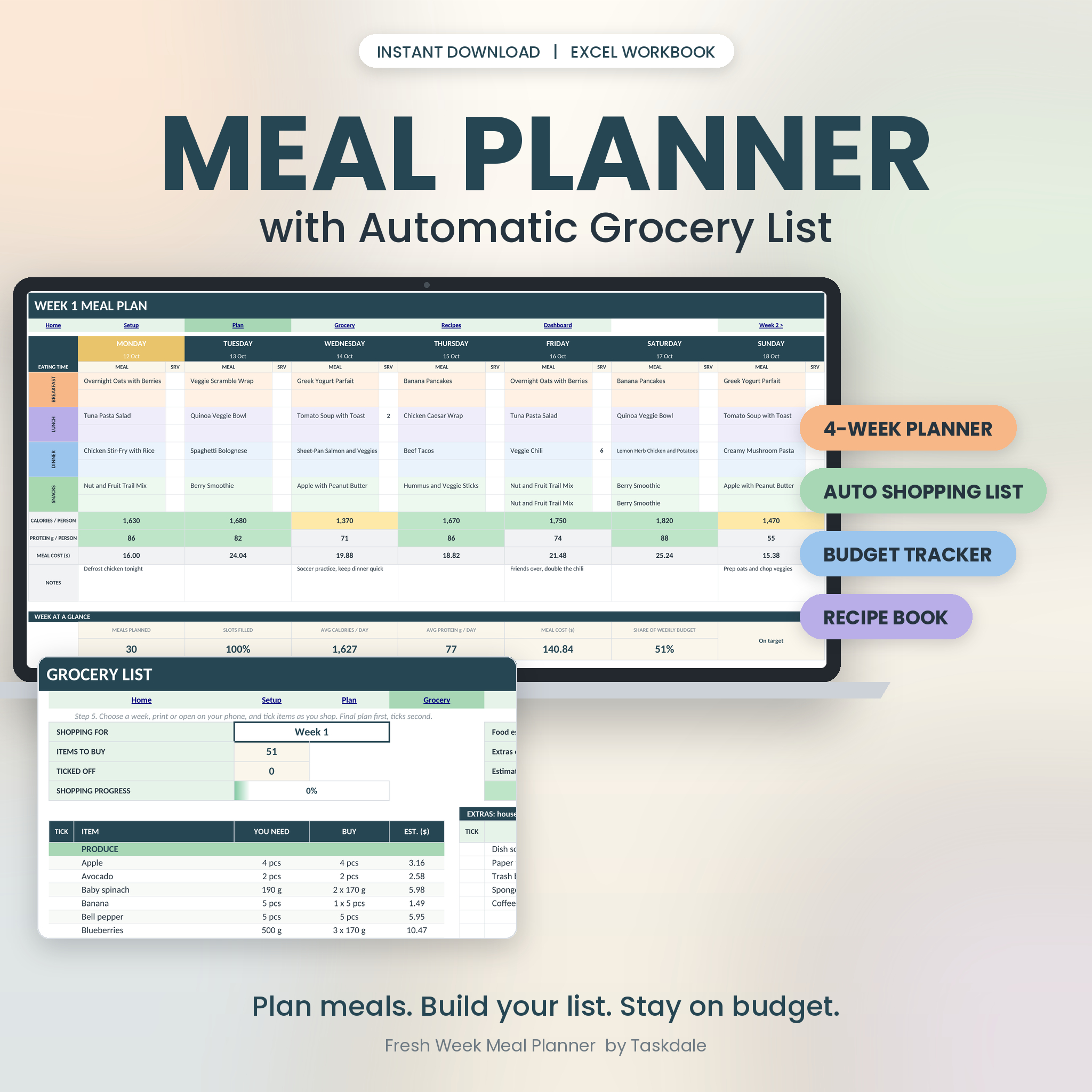
The Fresh Week Meal Planner workbook does exactly this. You pick meals from a dropdown across four weekly planners, then open the Grocery List and choose what you’re shopping for: Week 1, Week 2, Weeks 1 and 2 together, or all four weeks. You get a tick list sorted into 12 aisles. Pantry stock is taken off, pack sizes are rounded up (you can’t buy 0.4 of a carton of eggs), and the top shows an estimated total and whether you’re under or over budget. There’s also an extras list for soap, coffee and one-offs.
It holds up to 60 recipes and 200 ingredients, and an example workbook comes filled with 19 recipes and four planned weeks, so you can see the aisle sorting before entering your own. It’s made for Microsoft Excel and was also tested in LibreOffice Calc. It hasn’t been tested in Google Sheets.
If you want Google Sheets support and a set aisle order, Plate & Pantry lets you put the aisles in your store’s order on its Settings tab. Its grocery list labels each line Buy, Top up, In pantry or Staple, and has a tick-off column. It also comes with 42 starter recipes and 104 priced ingredients already set up with aisles, which saves a lot of setup.
Prefer paper?
A printed list by section works well too. You just do the sorting as you write. The Everyday Grocery Planner has a Category List page with ten sections so you shop aisle by aisle, plus staples checklists for kitchen and household items. It comes in A4, US Letter, A5 and Half Letter, in colour or ink-saver black and white, with fillable versions if you’d rather type.
How much time does it save?
It depends on the store and how long your list is, but the savings come from three places: no backtracking, fewer forgotten items (so fewer extra trips), and less wandering past things you don’t need. That last one saves money as well as time. Every extra lap of the store is another chance for the biscuit aisle to get you.
Grocery list by aisle FAQ
How do I organise a grocery list by aisle?
Walk your usual store once and write down the sections in the order you pass them. Use those as headings on your list and write every item under the right one.
What are the main grocery store sections?
Most stores have produce, bakery, meat and fish, dairy and eggs, tins and jars, dry goods, baking, breakfast, snacks and drinks, frozen and household. The order varies by store.
Can a meal planner sort my grocery list by aisle automatically?
Yes. Spreadsheet planners like Fresh Week and Plate & Pantry assign each ingredient an aisle once, then sort every new list for you.
What if I shop at different stores?
Map each store and keep a separate section order for each. In a spreadsheet you can change the aisle order in settings before you print the list.