It’s 7:40pm, you promised yourself you’d post today, and you’re scrolling your camera roll looking for something that isn’t a blurry photo of lunch. Sound familiar? An Instagram post planner fixes that moment. You decide what goes out, when, and why, days before the pressure hits.
Planning ahead doesn’t mean being stiff or corporate. It means the thinking happens on a calm Sunday afternoon, and the posting is just the last step. You can still jump on a trend. You just won’t be scrambling every single day.
This guide walks through a simple planning system: content pillars, a batching session, a feed preview and a quick look at your numbers each week. You can do all of it on paper. A spreadsheet just makes it faster.
What an Instagram post planner should actually do
A lot of planners are just a calendar with empty boxes. That helps a little. But a useful one answers four questions for you:
- What’s going out this week? Dates, times, formats.
- Where is each post up to? Is it an idea, a draft, or ready to schedule?
- How will the grid look? Do three dark photos land side by side?
- What’s working? Which posts earned saves and comments, and which ones flopped?
If your system covers those four, you’re ahead of most accounts. Here’s how to set one up.
Step 1: choose three to five content pillars
Pillars are the topics you keep coming back to. A home bakery might use: behind the scenes, finished cakes, baking tips, customer stories and offers. A freelance designer might use: portfolio, process, client wins and personal.
Give each pillar a rough target share. Something like 30% finished work, 25% tips, 20% behind the scenes, 15% stories, 10% offers. You won’t hit it exactly. The point is to notice when you’ve posted six promos in a row and wonder why nobody’s engaging.
Step 2: keep an idea bank
Ideas show up at bad times. In the shower, on a walk, halfway through a client call. Keep one running list and tag each idea with a pillar. When planning day comes, you’re picking from 25 ideas instead of staring at a blank page.
Mark a few as high priority. Seasonal stuff, launches, anything with a deadline.
Step 3: batch a week (or a month) in one sitting
Set a timer for 90 minutes. Pull ideas from the bank and give each one a date, a time, a format (Reel, carousel, single photo, Story) and a status. Most people find three to five feed posts a week is plenty. Consistency matters more than volume.
A simple status flow keeps you honest:
- Idea
- Drafting
- Ready
- Scheduled
- Posted
When something sits in Drafting for two weeks, that tells you something. Maybe the idea is weaker than you thought. Swap it out.
Write captions in the same session
Captions take longer than people expect. Write them while you’re in the zone. Instagram allows up to 2,200 characters, but most good captions are far shorter. Lead with one strong line, since only the first bit shows before “more”.
Save hashtag groups so you’re not retyping them. Four or five sets (one per pillar) covers most accounts.
Step 4: preview the feed before anything goes live
This is the step people skip, and then they wonder why their profile looks messy. Your grid is the first thing a new visitor sees. Before you schedule, look at the next nine posts together. Are two carousels with the same cover colour sitting next to each other? Is every third tile a text graphic?
A quick fix is to colour-code each tile by pillar. If one colour dominates the preview, your mix is off before you’ve posted a thing.
Step 5: track a few numbers, not all of them
Instagram Insights gives you plenty of numbers. You only need a handful. For each post, note reach, likes, comments, saves and shares. Then work out engagement rate: add up the interactions, divide by reach and multiply by 100.
Say a carousel reached 1,200 people and got 54 likes, 8 comments, 20 saves and 6 shares. That’s 88 interactions, or about 7.3%. Now compare it with your Reels and single images. After a month, patterns show up. Maybe your Tuesday tips beat your Friday promos by a mile. Maybe 7am posts do better than 7pm ones.
Look at the day of the week, the time and the format. Those three answer most “what should I post?” questions.
Using a spreadsheet as your Instagram post planner
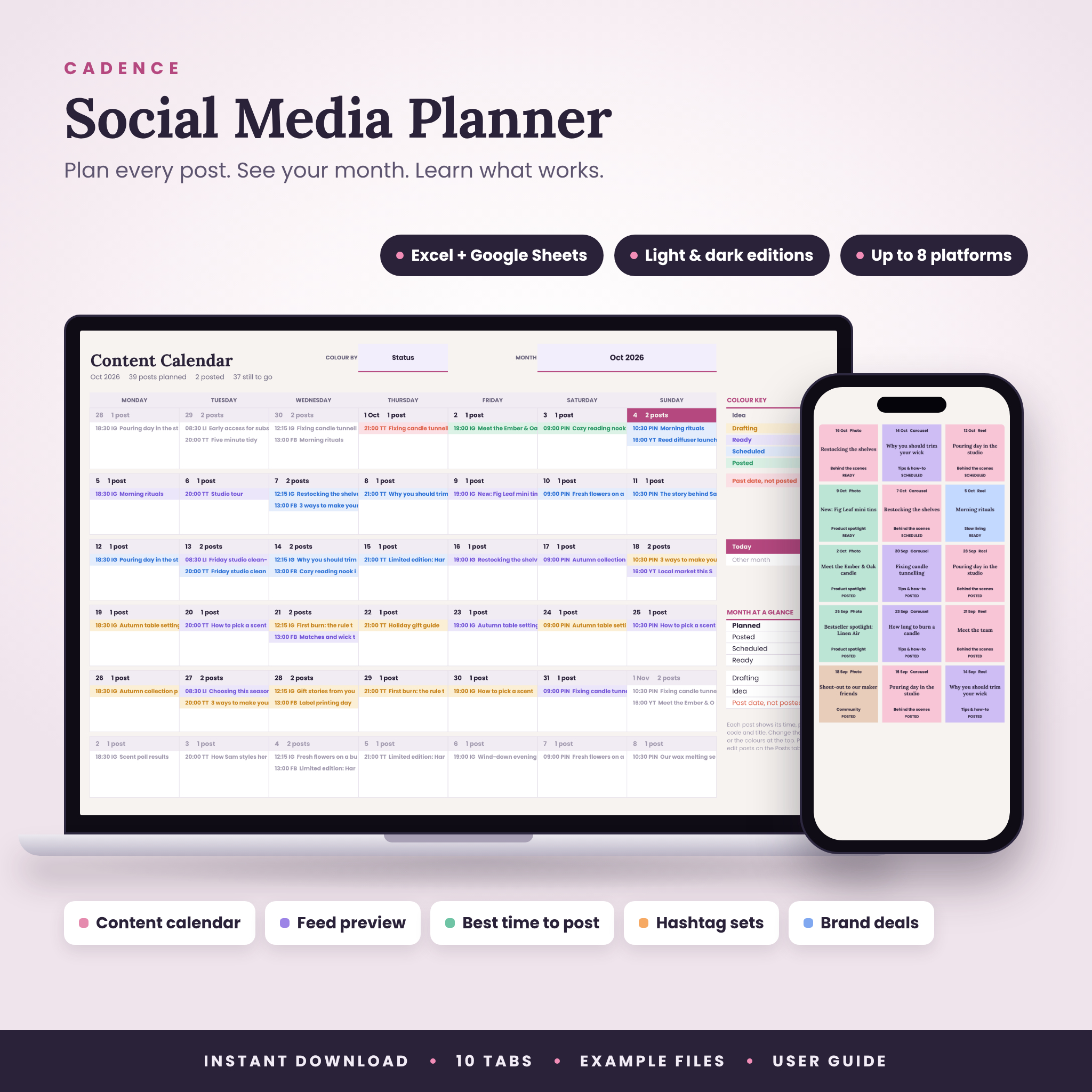
You can do all of this in a notebook. But a spreadsheet does the boring sorting for you, and that’s where Cadence, the social media planner spreadsheet, comes in.
The idea behind it is simple: you plan each post once, on a single Posts list, and everything else fills in from there. The month calendar (up to four posts a day, coloured by status, platform or pillar), the Next 14 Days list, the Feed Grid preview and the dashboard all pull from that one list. No copying posts into twelve monthly tabs.
A few parts map nicely onto the steps above:
- Idea bank with priority, status and a count by pillar.
- The five-step status workflow: Idea, Drafting, Ready, Scheduled, Posted.
- Next 14 Days lists what’s due by date and time, and anything that slipped turns red.
- Feed Grid preview for any platform, newest first, with each tile coloured by content pillar.
- Caption length check against each platform’s limit, plus a hashtag count and 30 saved hashtag sets you fill in with one pick.
- Analytics: engagement rate by platform, weekday, time of day and format, your top five posts, and each pillar compared with the target share you set.
It also tracks followers against goals and has a brand deal tracker from pitch to payment, which helps if you’re starting to work with brands. It runs in Excel 2016 or newer, or in Google Sheets. Setup takes about 15 minutes. One thing to know: it doesn’t post for you or connect to Instagram. You plan in the sheet and post or schedule in whatever app you already use.
A weekly routine that takes 20 minutes
Once the big batch is done, keep it ticking with a short weekly check:
- Open the next 14 days. Anything still in Drafting? Finish it or swap it.
- Look at the feed preview for the coming week.
- Add last week’s numbers for each post.
- Check which format and day did best. Plan one more of that.
- Dump any new ideas into the bank.
That’s it. Twenty minutes on a Monday morning with a coffee.
FAQ
How far ahead should I plan Instagram posts?
Two to four weeks works for most small accounts. It’s far enough to stay calm, but close enough that you can still react to news, trends or a sudden sale. Planning a whole quarter usually means rewriting half of it later.
How many times a week should I post?
Pick a number you can keep up for three months. For most small businesses that’s three to five feed posts a week plus some Stories. Posting daily for two weeks and then vanishing hurts more than a steady, slower rhythm.
Is a spreadsheet better than a scheduling app?
They do different jobs. A scheduling app publishes the post. A spreadsheet planner is where you decide what to post and check what worked. Plenty of people use both: plan in the sheet, then schedule in the app.
Can I use one planner for Instagram and TikTok?
Yes, if the planner supports more than one platform. Cadence handles up to 8 platforms, each with its own handle, caption limit and weekly target, so Instagram, TikTok and the rest sit in one plan.