An invoice generator in Google Sheets works like a small app. You pick an invoice number, and the page fills itself in: your details, the client’s address, every line item, the tax and the total. Then you download a PDF and send it. No subscription, nothing to install, and it runs on any computer or phone with a browser.
This guide is for freelancers, small service businesses and makers who like Google Sheets, or who need to invoice from more than one device. You will learn how an invoice generator Google Sheets template actually works, how to set one up from an Excel file, the Sheets-only tricks for PDFs, sharing and phones, how to build a simple one yourself, and a worked example from a mobile bike mechanic.
Quick picks: invoice generators that run in Google Sheets
| Product | Best for | Price | Link |
|---|---|---|---|
| Client Billing Hub Invoice Tracker Spreadsheet | Service businesses: invoices, receipts, statements and aging | $6.49 | View |
| Tallyhive Small Business Spreadsheet | Makers who invoice orders and track stock | $35.99 | View |
| Clear Ledger Bookkeeping Spreadsheet | Invoice tracking inside full books | $9.95 | View |
| Sorbet Books Bookkeeping Spreadsheet | Beginners who want a colorful invoice log and books | $17.00 | View |
What makes a sheet an invoice generator
A plain invoice template is a form you fill in by hand. A generator is different. The data lives in lists, and the invoice page builds itself from those lists. You never type the client’s address on the invoice. You type it once in a Clients tab, and the invoice looks it up.
A typical generator has these parts:
- Settings: your business name, address, logo, currency, tax rate and payment terms.
- Clients: one row per client with billing details and terms.
- Products or services: one row per item with description and price.
- Invoices: one row per invoice with number, client, date and status.
- Line items: one row per item on each invoice.
- Print invoice: the page the client sees. Choose an invoice number and it fills in.
The magic is in that last step. Change the number in one cell from 0042 to 0043 and the whole page switches to a different client, different lines, different totals. It feels like a trick the first time. A handy one.
Why Google Sheets suits invoicing
Excel is excellent, and many generators are built in it. Google Sheets brings a few extra benefits that matter for small businesses on the move:
- Any device. Open the same file on a laptop at home, a tablet in the van or a phone at a client’s door.
- Autosave. Every change saves as you type. No lost work after a laptop dies.
- Version history. File, Version history lets you roll back to yesterday if something breaks.
- Sharing. Give a partner or bookkeeper view-only or edit access without emailing files around.
- Free. All you need is a Google account.
The trade-off is that Sheets can feel slower with very large files, and printing takes a little setup. Both are easy to live with.
Setting up an Excel invoice generator in Google Sheets
Many invoice generators are sold as .xlsx files that work in both programs. Here is how to bring one into Sheets cleanly.
- Upload the file to Google Drive. Drag it in, or use New, File upload.
- Open it with Google Sheets. Double-click and choose Google Sheets at the top.
- Save as a native Google Sheet. Choose File, Save as Google Sheets. You now have a copy that autosaves and works on the Sheets phone app.
- Rename it clearly, such as “Invoices 2026 Brightside Studio”.
- Check a few formulas. Open the print page, pick a sample invoice number, and confirm the totals look right.
- Delete sample data if the file came with some, following the guide’s instructions so you do not remove formulas by mistake.
Always check that the product listing says it works in Google Sheets. Some workbooks are tested only in Excel, and a few Excel features do not carry over.
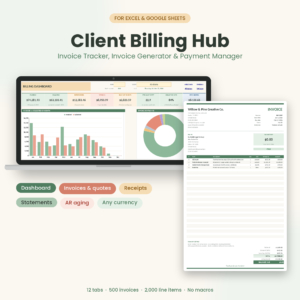
Client Billing Hub Invoice Tracker Spreadsheet
Price: $6.49 | Best for: Service businesses invoicing from Sheets
A 12-tab workbook for Excel 2010 or newer and Google Sheets, with steps in the guide for opening it in Sheets. Choose an invoice number on Print Invoice and the page fills with your details, the client, every line, discount, two named taxes, shipping, paid to date and balance due. Payments, numbered receipts, client statements, AR aging and a dashboard are all linked. Start with Settings, then add clients and products.
Making clean PDFs from Google Sheets
This is the step that trips people up, because Sheets prints the whole tab by default. Set it up once and it is quick after that.
- Open the invoice tab and choose File, Download, PDF.
- Under Export, pick Current sheet, not the whole workbook.
- Set paper size to Letter or A4, and orientation to Portrait.
- Choose Fit to width so the invoice stays on one page.
- Untick Show gridlines under Formatting.
- If the template has a set print area, choose Selected cells after highlighting the invoice area.
- Export, then rename the file with the invoice number and client.
Open the PDF on your phone before sending. If it reads well on a small screen, it will read well anywhere.
Using your generator on a phone
The Google Sheets app on iPhone and Android lets you add a client, log a payment or check the dashboard. A cleaner can mark a job paid from the client’s driveway. It is less comfortable for building a long invoice, so many people do this:
- On the phone: log payments, check what is overdue, add quick notes.
- On a laptop: create invoices, download PDFs and send them.
If you need to create invoices on your phone often, keep your item list short and clear so picking from dropdowns is easy with a thumb.
Keeping your invoices organized in Google Drive
A generator in Sheets is only half the filing. The PDFs you send need a home too, or you end up with dozens of files called “Invoice – Print Invoice.pdf” in your downloads folder.
Make one Drive folder per year, with your generator file at the top and a subfolder for each month’s PDFs. Name every PDF the same way: invoice number, client, month. “0143 Riverside Cycling Club Nov.pdf” sorts neatly and is easy to search. When a client asks for a copy, type the number into Drive’s search bar and it appears in a second.
Turn on offline access for the generator if you sometimes work without signal. In Drive settings, switch on offline mode, then mark the file as available offline. You can then open and edit it with no connection, and Sheets syncs your changes when you are back online. For a client list with notes and follow-ups alongside your invoices, our guide to a simple CRM in Google Sheets fits nicely in the same folder.
Build a simple invoice generator yourself
If you enjoy spreadsheets, a basic generator is a satisfying weekend project. Here is the outline.
- Create four tabs: Clients, Items, Invoices and Invoice.
- Clients: columns for name, address, email and terms in days.
- Items: columns for item name, description and price.
- Invoices: one row per line, with invoice number, date, client, item, quantity. Use Data, Data validation to make the client and item columns dropdowns from your lists.
- Invoice: put the invoice number in one cell, say B2. Use XLOOKUP or VLOOKUP to fetch the client’s address from Clients. Use FILTER to pull every line for that invoice number from Invoices, and another lookup to fetch each item’s price.
- Totals: SUM the line amounts, add tax with your rate from a settings cell, and round with ROUND to two decimals.
- Due date: invoice date plus the client’s terms.
That gets you a working generator. Payment tracking, statuses, receipts and aging take a fair bit more work, and that is usually where a ready-made template saves real time. If you are new to building in Sheets, our walkthrough on setting up a Google Sheets budget template in one evening covers the same basics of tabs, dropdowns and simple formulas.
A worked example: a mobile bike mechanic
Kofi fixes bikes from a van, mostly at people’s homes and for two local cycling clubs. He used to write invoices in a notebook and send photos of the page. Clubs kept asking for proper invoices.
He set up a Google Sheets invoice generator on a Sunday afternoon. His Items tab holds 25 common jobs (puncture repair, brake bleed, full service) plus parts such as chains and cables. His Clients tab holds the two clubs and about 40 regulars, with walk-up customers under one shared name.
On a typical day he logs each job on his phone between visits. In the evening, at the laptop, he picks each invoice number, checks the page, downloads the PDF and emails it. The clubs get a monthly statement listing every bike he worked on. The dashboard shows him which jobs earn the most per hour. Brake bleeds, it turns out. He raised his service price slightly the next month and nobody blinked.
For makers: invoices tied to orders and stock
If you sell products, your invoice generator should be part of a bigger loop. An order becomes an invoice and a packing slip, the sale lands in your books, and stock goes down. Running that loop in Sheets means you can check stock on your phone at a market stall.

Tallyhive Small Business Spreadsheet
Price: $35.99 | Best for: Makers and online sellers in Sheets
One .xlsx workbook tested in Excel for the web and Google Sheets, with 30 linked tabs. Type an order number and a printable invoice and packing slip fill in. Orders also update customer records, finished goods and raw materials stock, sales reports and profit dashboards, and a bill calendar shows paid, upcoming and overdue bills. Add products and stock first, then log your next order.
When your invoice log should live inside your books
Some owners already keep bookkeeping in Sheets and only need invoices tracked, not generated. In that case, a bookkeeping workbook with an invoices tab can be enough. You make the invoice however you like, log it in your books, and when the payment arrives, the invoice marks itself paid. One file to look at, one place for tax time. For more ideas on what else runs well in Sheets, browse our list of the best Google Sheets templates.
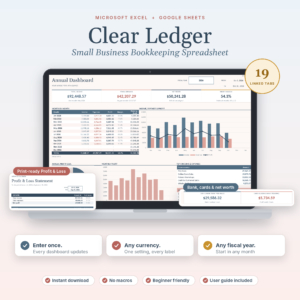
Clear Ledger Bookkeeping Spreadsheet
Price: $9.95 | Best for: Sellers and freelancers keeping books
A bookkeeping spreadsheet for Excel 2016 or newer and Google Sheets with 19 connected tabs: income, expenses, transfers, invoices, mileage, tax payments, dashboards, profit and loss, cash flow, budget and a tax center. Type an invoice number on an income row and that invoice switches to Paid, even for part payments, with 1 to 90-plus day aging. A health check flags duplicate invoice numbers. Fill in Setup, then log this month’s income.
Mistakes with Google Sheets invoice generators
- Editing the .xlsx instead of a Google Sheets copy. Save as Google Sheets so autosave and the phone app work properly.
- Downloading the whole workbook as a PDF. Choose Current sheet.
- Sharing edit access with clients. Never. Send PDFs only.
- Typing over formula cells. Use protected ranges, or a template that locks them.
- Sorting one tab on its own and breaking the links between tabs. Sort with care, or filter instead.
- No backup. Download a copy as .xlsx once a quarter, just in case.
Frequently asked questions
Does Google Sheets have a free invoice template?
Yes. The template gallery usually includes a simple invoice. It is fine for occasional use but rarely tracks payments or fills in client details from a list.
Can I generate invoices automatically in Google Sheets?
A generator template fills the invoice page automatically from your client and item lists when you pick an invoice number. You still choose when to create and send each one.
How do I save a Google Sheets invoice as a PDF?
Choose File, Download, PDF, then select Current sheet, set paper size, fit to width and turn off gridlines.
Can I add my logo to a Google Sheets invoice?
Yes. Use Insert, Image, Image over cells or Image in cell, and place it in the header area of the invoice tab.
Will an Excel invoice template work in Google Sheets?
Often, yes, if it uses standard formulas. Check the product listing says it has been tested in Google Sheets before you rely on it.
Can my bookkeeper see my Google Sheets invoices?
Yes. Use Share, add their email and choose Viewer if they only need to look, or Editor if they will log payments. You can remove access any time.
Your next step
Open Google Drive tonight and make a folder called “Invoices 2026”. Put your generator inside it, add your top ten clients and your ten most common items, and create one test invoice as a PDF. For a ready-made generator that also tracks payments and aging, start with the Client Billing Hub Invoice Tracker Spreadsheet.