A recruiter opens your résumé on a phone, between meetings, on patchy Wi-Fi. If the file takes eight seconds to load or the text is too small to read without pinching, you have lost them before the first bullet. Online résumés are judged in moments, on small screens, by tired people.
These online résumé tips are for anyone applying by email, job portal or LinkedIn. You will learn how to keep the file light, how to make it easy to read on any screen, how to set up links that actually work, and how to check everything before you hit send.
None of it needs design skills. Most of it is about small settings and a few minutes of testing.
Quick picks: tools for a fast, readable online résumé
| Product | Best for | Price | Link |
|---|---|---|---|
| Slatewell ATS Resume Template | A light, single-column résumé that reads well everywhere | $7.49 | View |
| Quillmark ATS Resume Kit | Matching keywords for portal uploads | $7.49 | View |
| Wellspoken LinkedIn and Interview Workbook | A LinkedIn profile that matches your résumé | $6.99 | View |
| Offerline Job Application Tracker | Knowing which version went where | $5.99 | View |
What an online résumé looks like in 2026
Your résumé now lives in four places at once, and each one reads it a little differently.
- The PDF attachment. Sent by email or uploaded to a careers page. A person opens it, often on a phone.
- The portal form. Many company sites pull your details into boxes, or ask you to paste plain text. Software reads it first.
- Your LinkedIn profile. Recruiters check it after reading your résumé, sometimes before.
- A link. A portfolio, a personal page or a shared Google Doc, clicked from inside your PDF.
So the goal is one story that survives all four. Same job titles, same dates, same headline. When a hiring manager sees March 2022 on your PDF and May 2022 on LinkedIn, it plants a small doubt you do not need.
Keep the file small so it opens instantly
A one-page résumé should weigh well under 1 MB. Most clean text résumés save at around 100 to 300 KB. If yours is 4 MB, something heavy is hiding in it, and that weight costs you on slow connections and on portals with upload limits.
The usual suspects
- A full-size photo. A photo straight off a phone can be 3,000 pixels wide. Your résumé shows it at the size of a stamp. Crop and resize it to about 400 pixels before you insert it.
- A scanned page. Printing a résumé, scanning it and sending the scan creates a heavy image that no software can read. Always export straight from Word or Google Docs.
- Decorative graphics. Background textures, large icons and skill bar images all add weight without adding information.
The export settings that help
In Word, use File, Save As, choose PDF and pick Minimum size (publishing online). In Google Docs, File, Download, PDF Document is already light. Then check the file size in your folder. If it is still over 1 MB, the photo is almost always the reason.
A single-column, text-only design is the lightest of all. The Slatewell kit was built that way: no text boxes, tables, icons or images, and fonts that are already on every computer.
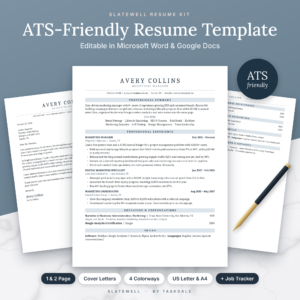
Slatewell ATS Resume Template
Price: $7.49 | Best for: clean résumés for email and portals
Slatewell gives you four single-column résumé layouts, including Executive and Entry-Level versions, plus two cover letters, a references page and a thank-you letter, in four colorways and both US Letter and A4. Every file uses Cambria, which is built into Word and Google Docs, so there is nothing to install and nothing to swap. Start with the standard layout, export a PDF and check that it lands well under 1 MB.
Make it easy to read on a phone
Open your PDF on your own phone before anyone else does. It is the single most useful test in this guide, and it takes thirty seconds. Hold it at arm’s length on a bus and ask: can I read the name, the title and the first job without zooming?
Text size and spacing
Keep body text at 10.5 to 11 point and headings a little larger. Below 10 point, a phone screen turns your work history into grey fuzz. Leave some white space between sections so the eye can find the next heading.
Short lines, short bullets
Aim for bullets of one or two lines. A five-line bullet looks like a wall on a phone. Lead with the result: Cut invoice errors by 30 percent reads faster than Was responsible for reviewing invoices, which led to fewer errors.
Contrast that holds up in sunlight
Pale gray text on white looks elegant on a laptop and vanishes on a phone outdoors. Keep body text dark. Use color for headings or a thin rule, not for the words people need to read.
The top third does the heavy lifting
On a phone, the first screen shows roughly the top third of your page. That space should hold your name, a one-line title, a two-sentence summary and the start of your latest job. A big photo, a long address block or a row of skill icons pushes your best material out of view. Put the strongest result you have in the first bullet of your current role, where a thumb has not had to scroll yet.
Length matters too. A tight one-page résumé loads fast and scrolls fast. If you are torn between one and two pages, our guide on how long a resume should be walks through the choice by career stage.
Links that work when someone clicks
A link in a PDF is an invitation. A broken one is a small embarrassment. Set them up once and test each one.
- Email. Make it a mailto link so a tap opens a new message. Use a plain address, like firstname.lastname at a common provider.
- LinkedIn. Claim a custom URL in your profile settings so it reads linkedin.com/in/your-name rather than a string of numbers.
- Portfolio. One link, to the best page, not your whole site. A designer might link a single case study. A developer might link one repository with a clear readme.
- Shared documents. If you link a Google Doc or slide deck, set sharing to anyone with the link can view. Then open it in a private browser window to make sure it works.
After exporting, open the PDF and click every link. Word sometimes drops a link when text is pasted from elsewhere, and you only find out when a recruiter does.
Should you build a résumé web page too?
A personal résumé page can help, but only in some fields. Designers, writers, photographers and developers often have work that a PDF cannot show, so a simple page with three examples earns its place. An accountant or a nurse rarely needs one, and a half-finished site does more harm than no site at all.
If you do build one, the same rules apply. Keep it to one page that loads in a couple of seconds on mobile data. Compress images before you upload them, so a gallery of six projects does not weigh 20 MB. Use the same headline and dates as your PDF. And put a download link to the PDF near the top, because many recruiters still want a file they can forward to a hiring manager.
A free website builder is fine for this. You do not need a custom design, just clean text, clear headings and working links. Test it on your phone over mobile data rather than home Wi-Fi, because that is closer to how a busy recruiter will see it.
Online résumé tips for portal uploads
Company job portals often run your résumé through screening software before a person sees it. That software reads text, not design. Two-column layouts, text in headers and icons can scramble the order or drop details entirely.
So for portals, upload a single-column version with standard headings: Experience, Education, Skills. Put your phone and email in the body of the page, not in the header. And if the portal asks you to paste plain text, paste from a .txt copy you prepared earlier so odd symbols do not appear.
Keywords matter here more than anywhere. If a posting for an accounts assistant mentions accounts payable, reconciliations and Xero, and you have done all three, those exact words should appear in your résumé. Our ATS resume template guide covers the full list of what screening software expects.
The Quillmark kit includes a keyword checker for exactly this step.
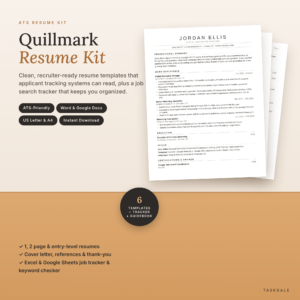
Quillmark ATS Resume Kit
Price: $7.49 | Best for: tailoring résumés for job portals
Quillmark includes one-page, two-page and entry-level résumés in a single-column layout, plus a cover letter, references page and thank-you letter, each in US Letter and A4. The bonus Job Search Tracker has a STAR story bank and contacts tab, and the ATS Keyword Checker lets you list keywords from a posting and paste in your résumé text to see what is covered. Run it once on the job you want most before you upload.
Make LinkedIn tell the same story
Recruiters cross-check. They read your PDF, then open your LinkedIn profile to see if it matches and to get a feel for you. A mismatch in job titles or dates is one of the easiest ways to lose trust.
Start with the facts. Line up job titles, employers and dates so they match your résumé exactly. Then write a headline that says what you do and for whom, rather than just your current title. Store Manager at a Supermarket says less than Retail store manager running a team of 40 and a 2 million turnover.
Your About section can be warmer than your résumé. Three short paragraphs: what you do, what you are proud of, and what you want next. Keep each to three or four lines so it reads well in the mobile app.
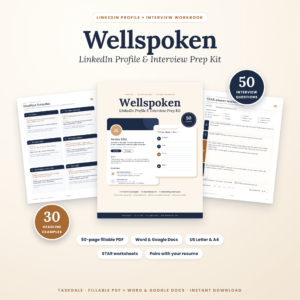
Wellspoken LinkedIn and Interview Workbook
Price: $6.99 | Best for: matching LinkedIn to your résumé
Wellspoken is a 50-page fillable PDF with templates you can also edit in Word and Google Docs. Part 1 covers your LinkedIn headline, with 30 example headlines, About section templates and networking messages. Part 2 has 50 common interview questions, STAR worksheets and research pages. Fill in the fact-matching page first so your profile and résumé agree.
Keep track of every version you send
Tailoring your résumé for each job is smart. It also means you end up with eleven files called resume-final-v3.pdf. When a recruiter calls two weeks later, you need to know which version they have in front of them.
Name files with your name, the role and the company: Jordan-Lee-Marketing-Coordinator-Brightwell.pdf. Then log each application with the date, the version and the follow-up date. Our job application tracker guide explains a simple way to set that up.
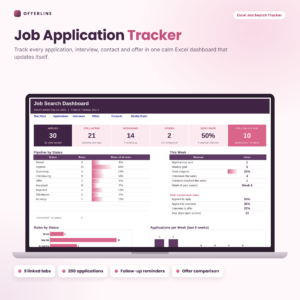
Offerline Job Application Tracker
Price: $5.99 | Best for: busy searches with many versions
Offerline is an Excel workbook with nine linked tabs. You enter the company, role, date and status, and it works out follow-up dates, counts down to interviews, tracks a weekly goal and shows which job sites lead to replies. There is also an offer comparison tab for weighing pay, time off and commute. Add a column note for the résumé file name on your first entry so the habit sticks.
Small mistakes that slow an online résumé down
- Sending a Word file when nobody asked for one. It may open with the wrong fonts on someone else’s machine and shuffle your layout.
- Linking a cloud folder instead of a file. A recruiter who has to sign in or hunt through folders usually gives up.
- Pasting a résumé into the body of an email. Formatting breaks in most inboxes. Attach the PDF and keep the email to four or five lines.
- Leaving tracked changes or comments in the file. Accept all changes and delete comments before exporting, or a note like ask Sam about dates may travel with it.
A two-minute check before you send
- File size under 1 MB.
- File name includes your name and the role.
- Opens and reads clearly on your phone without zooming.
- Every link clicks through to the right page.
- Job titles and dates match LinkedIn.
- Single-column version ready for any portal.
- Application logged with a follow-up date.
That list takes two minutes. The relief of knowing nothing is broken lasts the whole wait for a reply.
Frequently asked questions
What is the best file format for an online résumé?
PDF, unless the employer asks for Word. A PDF keeps your layout fixed and opens the same way on phones, tablets and laptops.
How big should my résumé PDF be?
Under 1 MB, and ideally a few hundred KB. If it is larger, resize the photo or remove heavy graphics, then export again.
Should I put a link to my LinkedIn on my résumé?
Yes, if your profile is up to date and matches your résumé. Use a custom LinkedIn URL so it looks tidy and is easy to type.
Can recruiters read a two-column résumé on a phone?
People usually can, if the text is large enough. Screening software often struggles, so keep a single-column version for portal uploads.
Do hyperlinks work in a PDF résumé?
They do when you export from Word or Google Docs as a PDF. They do not survive printing and scanning, so always export directly.
Is a résumé website better than a PDF?
Not on its own. A website can show work samples, but most employers still want a PDF to file and share. Treat a site as an extra, not a replacement.
Your next step
Export your current résumé as a PDF, check its size and open it on your phone right now. If it is heavy or hard to read, rebuild it in a light single-column layout like the Slatewell ATS Resume Template and send your next application with confidence.