Spending tells you where your money went this month. Net worth tells you where all those months have taken you. Track only spending and you can feel busy without knowing if you are getting anywhere. Track only net worth and you see the score but not the plays that made it. A personal finance tracker that holds both shows cause and effect on one screen.
This guide is for anyone who wants a clear, private view of their money without linking a bank to yet another app. You will see what a good tracker records, how to work out net worth properly, a three-month example showing exactly how spending moves the net worth line, a 20-minute monthly routine, the mistakes that make numbers lie, and three Taskdale trackers that work offline on your own computer.
Quick picks: personal finance trackers for net worth and spending
| Product | Best for | Price | Link |
|---|---|---|---|
| Cedarly Money Hub | An app-like dashboard that runs offline | $19.00 | View |
| Thriftwood Money Studio | Bank CSV import and a safe-to-spend figure | $12.99 | View |
| Penny & Petal Income and Expense Tracker | Spreadsheet fans who want net worth built in | $4.99 | View |
| Lilac Ledger Budget Planner | Google Sheets users paying off debt | $14.99 | View |
Why net worth and spending belong together
Think of your money as a bathtub. Income is the tap. Spending is the drain. Net worth is the water level. Watching the drain alone tells you how fast water leaves, but not whether the tub is filling. Watching the level alone tells you it rose by $400 this month, but not why.
When both live in one tracker, the story becomes obvious. A month where eating out jumped by $250 shows up as a smaller rise in net worth. A month where you paid an extra $500 off the car loan shows up as a bigger one, even though your bank balance dropped. Without the link, that extra loan payment can feel like a loss. With it, you see it for what it is: progress.
This connection is also what keeps people motivated past the first few months. Spending tracking on its own can feel like constant self-criticism. A net worth line climbing slowly upward, month after month, gives you something to feel good about.
What a good tracker records
You do not need dozens of tabs. You need four kinds of information, kept up to date.
Accounts
Every place money lives: checking, savings, cash, credit cards, loans, retirement and investment accounts. Each has a balance you update at least monthly.
Transactions
Money in and money out, each with a date, amount, category and account. This is where spending comes from.
Transfers
Moving $300 from checking to savings is not spending. Paying a credit card bill is not spending either, since the purchases were already counted. A tracker needs a separate way to record transfers so they do not inflate your spending total.
Assets and debts outside your bank
Your car, your home if you own one, a student loan, a family loan. These do not show up in a bank app but matter a great deal for net worth.
How to work out your net worth
Net worth is everything you own minus everything you owe. Simple to say. A little fiddly the first time you do it, so set aside 30 minutes and gather every login and statement.
Here is a real-feeling example for a couple in their thirties, on October 31.
| Assets | Value | Debts | Owed |
|---|---|---|---|
| Checking | $2,350 | Credit card | $1,840 |
| Savings | $6,200 | Car loan | $11,600 |
| Retirement accounts | $38,400 | Student loans | $19,300 |
| Car (resale estimate) | $14,000 | ||
| Total | $60,950 | Total | $32,740 |
Net worth: $60,950 minus $32,740 equals $28,210. That is their starting line. The exact figure matters less than what it does over the next six or twelve months.
A few rules keep the number honest. Use what you could actually sell something for, not what you paid. Leave out everyday belongings like furniture and clothes, since they rarely sell for much. If you own a home, use a cautious estimate and update it once or twice a year, not every month. Our guide to the net worth tracker goes into the edge cases in more detail.
Tracking spending without drowning in detail
Spending tracking goes wrong in two ways. Too little detail and you learn nothing. Too much and you give up by week three. A middle path works for most people.
- Use 12 to 15 categories. Housing, utilities, groceries, eating out, transport, health, kids, pets, subscriptions, shopping, gifts, fun and a misc line you keep small.
- Log weekly, not daily. Ten minutes on a Sunday with your banking app open is enough for most households.
- Import if you can. Some trackers read a CSV file downloaded from your bank, which saves typing and keeps your login private.
- Tag transfers as transfers. Card payments and savings moves stay out of spending totals.
After a month or two, you will know your real numbers. Most people find one or two categories much bigger than they guessed. That surprise is the first payoff of tracking.
A three-month example: watching spending move net worth
Back to the couple. Their combined take-home pay is $6,800 a month. Here is how three months played out.
| Month | Spending | Extra debt paid | Saved | Net worth at month end |
|---|---|---|---|---|
| October (start) | $28,210 | |||
| November | $5,950 | $200 | $650 | $29,180 |
| December | $6,620 | $0 | $180 | $29,410 |
| January | $5,480 | $600 | $720 | $30,890 |
November looked solid. December, with gifts and travel, barely moved the line. January, after a firm grocery and eating-out plan, brought the biggest jump of the three. Small changes in retirement balances and the car’s value played a part too, which is why net worth does not exactly equal income minus spending.
The lesson they took from it was not “never have a December”. It was “set up a gifts and travel sinking fund in February so next December does not stall the line”. That is the kind of plan you can only make when spending and net worth sit side by side.
Setting a net worth goal that keeps you going
A net worth number on its own can feel abstract. A goal attached to it gives the monthly snapshot a purpose. Keep it concrete and close enough to reach within a year.
- Pick a yearly target. The couple above might aim to add $9,000 over twelve months, about $750 a month.
- Break it into parts. For example, $400 a month in savings, $250 in extra debt payments and the rest from retirement contributions already coming out of pay.
- Celebrate milestones. Crossing zero, reaching $10,000, clearing a card. Mark them in the tracker with a note and the date.
- Allow for bad months. A yearly goal absorbs a weak December. A monthly goal would make it feel like failure.
For people starting below zero, the first milestone is simply reaching it. Going from minus $8,000 to zero is just as much progress as going from zero to $8,000, and it often feels even better.
Tracking as a couple or a family
Couples often split money in different ways: fully joint, fully separate or a mix. The tracker can follow whichever you use.
For joint finances, track every account in one file and review the snapshot together. For separate finances, each person can keep their own tracker and share just the household net worth once a month. For a mix, track the joint account and shared debts together, and let each person track their own fun money privately. The goal is a shared picture of progress, not a shared list of every coffee.
A short monthly money chat over dinner, with the net worth figure and one or two spending notes, tends to go much better than a long talk prompted by a surprise bill.
Choosing a tracker: spreadsheet, offline app or bank-linked app
There are three broad kinds of personal finance tracker, and each suits a different person.
- Bank-linked apps pull transactions automatically. Handy, but they usually need your bank login and often a subscription, and you depend on the company keeping the service running.
- Spreadsheets are flexible and private. You enter or paste transactions yourself, and you can change anything. They suit people who like seeing the workings.
- Offline HTML apps sit in between. One file opens in your browser and looks like an app, with forms and buttons instead of cells, but nothing is sent anywhere and there is no account to create.
If you want the feel of an app without handing over a bank password, an offline dashboard is worth a look. It shows net worth, cash flow and spending in one place and updates as you click.
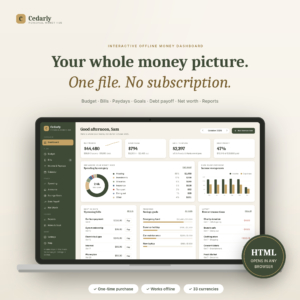
Cedarly Money Hub
Price: $19.00 | Best for: people who want an app feel without an account
A single HTML file that opens in your browser like an app, with a sidebar, live charts and a month switcher. The dashboard shows net worth, cash flow, safe to spend and debt progress, plus spending by category, six months of income against expenses and upcoming bills with a Pay button. Budgets, bills, accounts, debts and goals all link, and nothing leaves your computer. Add your accounts and balances first, then record this month’s bills and spending.
For anyone who would rather import than type, a tracker that reads your bank’s CSV download saves the most time. You download the file from online banking, drop it in, and the categories fill using rules you set once.
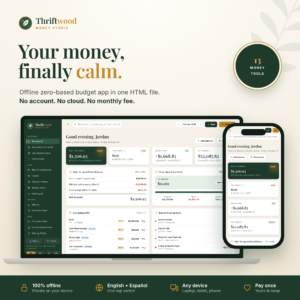
Thriftwood Money Studio
Price: $12.99 | Best for: households importing bank statements
An offline budget app in one HTML file with no account, bank login or monthly fee. It covers accounts and net worth with a 12-month chart, transactions with bank CSV import, duplicate skipping and auto-categorize rules, a zero-based budget, bills with a calendar, a paycheck planner, savings goals and a debt payoff calculator. The dashboard shows a daily safe-to-spend amount until payday. Add your accounts, import last month’s CSV and set a few category rules.
For more on why some people prefer this route, see want a budget app without subscription? try an offline one.
The 20-minute monthly snapshot
Weekly logging handles spending. Once a month, take a snapshot of the whole picture. The first weekend of the month works well.
- Finish logging last month. Every transaction in, every transfer tagged.
- Update every balance. Checking, savings, cards, loans, retirement, investments.
- Update asset values if needed. Car value every six months, home value once or twice a year.
- Write down net worth. Note the change from last month in dollars.
- Look at the top three spending categories. Were they what you expected?
- Write one sentence. What moved the number, and what will you try next month?
That last step turns a spreadsheet into a story. Six months of one-line notes is a surprisingly useful record, and reading back over it brings a real sense of how far you have come.
If you prefer a spreadsheet for all of this, choose one where spending entries, account balances and net worth update together, so you are not copying numbers between tabs.

Penny & Petal Income and Expense Tracker
Price: $4.99 | Best for: spreadsheet users who want net worth included
An Excel and Google Sheets workbook with 12 connected tabs. Each income or expense entry updates the monthly dashboard, budget tab, account balances and net worth at once, and card payments and savings moves sit on their own Transfers tab so they never count as spending. The annual dashboard adds a net worth trend line and heat maps by category. Enter your accounts and starting balances first, then log this month’s transactions.
Want everything, including bills, goals and debt, on one page? Our guide on how to run your money from one personal finance dashboard shows how to lay it out.
Mistakes that make the numbers lie
- Counting card payments as spending. The purchases were already logged. Paying the card is a transfer.
- Using purchase prices for assets. A car bought for $24,000 three years ago is not worth $24,000 now.
- Forgetting small debts. A buy-now-pay-later balance or money owed to a parent still counts.
- Updating at random times. Pick the same day each month so comparisons are fair.
- Panicking at one bad month. Market dips and big bills happen. Look at the trend over six to twelve months.
Frequently asked questions
How often should I track my net worth?
Monthly suits most people. It is often enough to see progress and spot problems, but not so often that normal ups and downs cause worry.
Should I include my house in net worth?
Many people do, using a cautious estimate of its value and subtracting the mortgage. Some also track a second figure without the home, to see liquid net worth.
What is the difference between a budget and a finance tracker?
A budget is a plan for future spending. A tracker records what actually happened, across spending, accounts and net worth. Many tools do both.
Can I track net worth without linking my bank?
Yes. Spreadsheets and offline apps let you type balances or import a downloaded CSV, so your bank login stays private.
Is negative net worth normal?
It is common, especially with student loans or early in a career. The direction matters more than the starting figure.
Your next step
Set a 30-minute timer tonight and list every account, asset and debt with today’s balance. Subtract, and write your starting net worth on a sticky note. Then set up the Cedarly Money Hub with those balances and log this week’s spending.