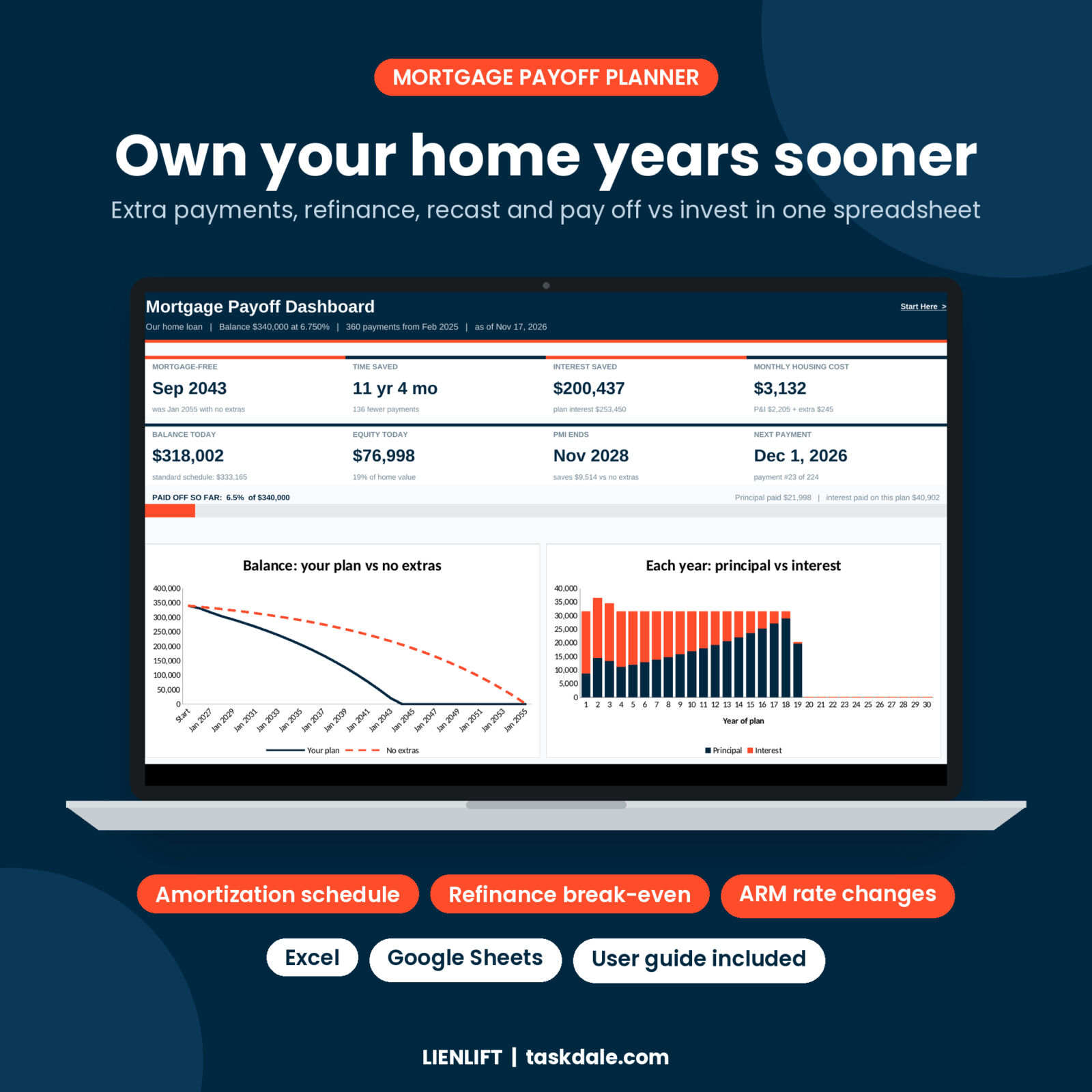


Lienlift is a mortgage payoff calculator spreadsheet for homeowners who want a clear plan to own their home sooner. Type your balance, rate and months left once. The workbook builds every payment of your loan, shows the date you will be mortgage-free, and tells you exactly how much interest each extra payment saves. Then it goes further than a basic calculator, with tools for refinancing, recasting, adjustable rates, PMI and the classic question: should I pay off the mortgage or invest?
What this mortgage payoff spreadsheet does
Most mortgage spreadsheets stop at a schedule and a single extra-payment box. Lienlift is built around real decisions.
- Shows your payoff date, live. The dashboard puts your mortgage-free date, time saved, interest saved, balance today, equity, PMI end date and next payment on one page.
- Tests every way to pay extra. Monthly extras with start and stop dates, a bi-weekly equivalent, a yearly bonus payment, round-ups and up to 24 one-time lump sums. Mix them however you like.
- Compares strategies side by side. See what each method saves on its own, which gives the most interest saved per dollar, and five what-if monthly amounts of your choice.
- Checks a refinance properly. Your current loan against three offers, with points, fees, lender credits, cash out and rolled-in costs. You get the break-even month and the true cost over the years you expect to stay.
- Tracks your real statements. Log each payment and the balance your lender reports. The tracker flags any balance that does not match your plan, which is how you catch an extra payment that went to escrow instead of principal.
Who it is for
- Homeowners who want to pay off a mortgage early and see the payoff in dollars and months
- First-time buyers planning payments, taxes, insurance and PMI before closing
- Anyone weighing a refinance offer, a loan recast or a cash-out refinance
- ARM borrowers who need a schedule that follows each rate reset
- People torn between prepaying the mortgage and investing the money
Features
Live dashboard
Eight key numbers, a paid-off progress bar, a balance chart (your plan vs no extras), a principal vs interest chart for every year, an interest-saved-by-method chart, milestones (25%, 50% and 75% paid off, principal beats interest, PMI comes off, final payment) and your monthly payment breakdown.
Amortization schedule with extra payments
Up to 480 monthly rows. Each row shows the date, rate, opening balance, scheduled P&I, extra principal, interest, principal, closing balance, PMI, tax and insurance, total paid, interest to date, equity and the no-extras balance next to it. Today’s row, the first month without PMI and your final payment are highlighted. A yearly summary rolls it all up and prints on one page.
Adjustable rate (ARM) support
Add up to 10 rate changes. At each reset the payment is recalculated on the balance left over the months left, the way lenders do it.
PMI drop-off date
Pick 78% LTV, 80% LTV or loan-life PMI. The spreadsheet finds the month PMI ends and how much your extras save on it.
Payoff goal calculator
Pick a date to be mortgage-free and get the extra needed each month, or the single lump sum that gets you there. A table shows the extra needed to finish in 5, 7, 10, 12, 15, 20 or 25 years.
Recast calculator
Have a lump sum? Compare a recast (lower required payment) with keeping your payment (faster payoff and more interest saved), fee included.
Pay off vs invest
Both paths spend the same money every month. See net worth on each path year by year, with a plain-English verdict and a chart.
Built to be easy
- Orange-edged input cells, locked formulas (no password) and dropdowns so nothing breaks
- A check-messages box that spots common mistakes, like a payment lower than the interest
- One currency cell: type $, £, € or any symbol and every label follows
- Print-ready dashboard, yearly summary and calculator tabs
What is included
- Lienlift Mortgage Payoff Planner (.xlsx) with 12 tabs: Start Here, Dashboard, My Mortgage, Extra Payments, Amortization, Yearly Summary, Strategy Compare, Payoff Goal, Refinance, Recast, Pay Off vs Invest and Payment Tracker
- Lienlift User Guide (.docx) with setup steps, tab-by-tab instructions, tips, troubleshooting and FAQs
How it works
- Download the files right after purchase.
- Open the spreadsheet in Microsoft Excel, or upload it to Google Drive and open it with Google Sheets.
- Type your loan on My Mortgage. For an existing loan, use your latest statement balance and next payment date.
- Add extra payments and watch the dashboard update.
- Use the refinance, recast, payoff goal and invest tabs whenever a decision comes up, and log each statement in the tracker.
File formats and software
One .xlsx workbook for Microsoft Excel (desktop or web) and Google Sheets, plus a .docx user guide. No macros, no add-ins and no subscriptions. Excel Mobile and Apple Numbers were not tested.
Customization
Change the currency in one cell, name your loan, and pick your PMI rule. Sheets are protected without a password, so you can unprotect them to change colors or fonts if you want to.
Real situations where it helps
- You got a work bonus and want to know whether to send it to the mortgage or recast.
- Your lender offered a lower rate with closing costs and you are not sure you will stay long enough to break even.
- Your ARM resets next year and you want to see the new payment before it arrives.
- You are rounding up your payment and want proof it is working.
- You want to be mortgage-free before the kids start college and need the monthly number that gets you there.
Frequently asked questions
Does this mortgage calculator spreadsheet work in Google Sheets?
Yes. Upload the file to Google Drive and open it with Google Sheets. It uses only formulas Google Sheets supports.
Can I use it for a mortgage I already have?
Yes. Type your current balance, rate, months left and next payment date. Add your statement P&I to match your lender to the cent.
How does it calculate bi-weekly payments?
It adds 1/12 of your P&I each month, which equals the one extra payment a year that a bi-weekly plan makes.
Does it include taxes, insurance, HOA and PMI?
Yes. They appear in your total monthly cost, on every schedule row and in the dashboard breakdown.
Will it work for a 15-year or 40-year loan?
Yes. Any term from 1 to 480 months.
Can I use it for car or personal loans?
It works for any fixed or adjustable amortizing loan with monthly payments. The labels are written for mortgages.
Is this a physical product?
No. It is an instant digital download. Nothing is shipped.
License: personal use only. Please do not resell, share or redistribute the files. This spreadsheet is a planning tool, not financial advice.



Reviews
There are no reviews yet.