


A baby name planner for two people and one perfect name
The Nomenest baby name planner turns the most fun (and most argued-about) decision of pregnancy into a calm, fair process. You get a spreadsheet for Excel and Google Sheets that collects, scores, ranks and checks your name ideas, plus a fillable PDF with partner ballots, a “say it out loud” tester and a keepsake certificate. Instead of a phone note full of names and a dozen half-finished conversations, you see exactly where you agree, where you disagree and which names are still standing.
Nomenest does not hand you a list of names or claim to know what every name means. Meanings and origins vary between sources, so you type your own notes from sources you trust. The planner does the organizing, scoring and checking.
Who it is for
- Expecting couples who each have favorites and want a fair way to agree.
- List lovers with dozens of ideas who need structure and a shortlist.
- Growing families who want the new name to sound right next to big brothers and sisters.
- Solo parents and helpers who want to weigh names carefully before committing.
Main benefits
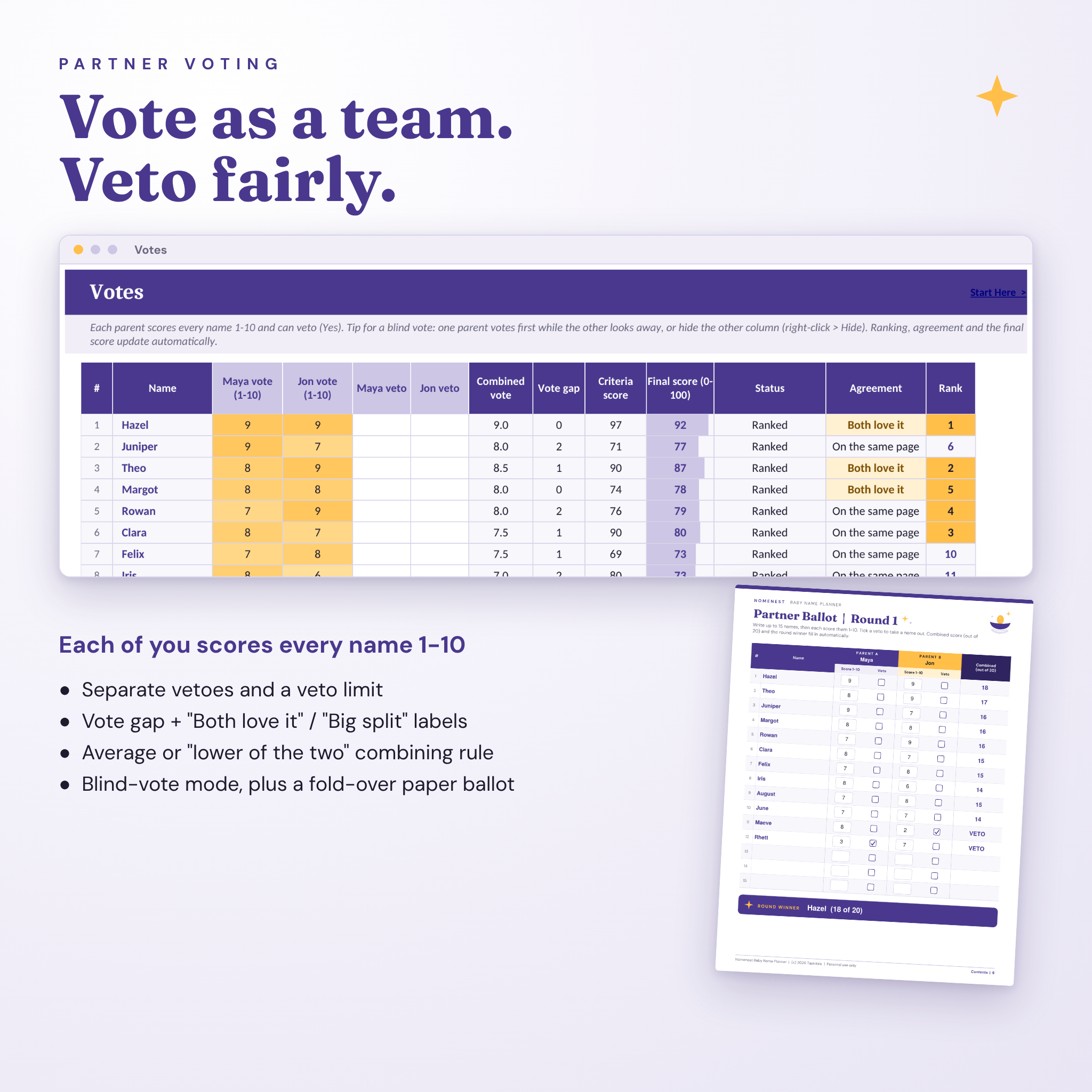
- Fair for both of you: equal 1-10 votes, separate vetoes, a veto limit and a clear agreement label for every name.
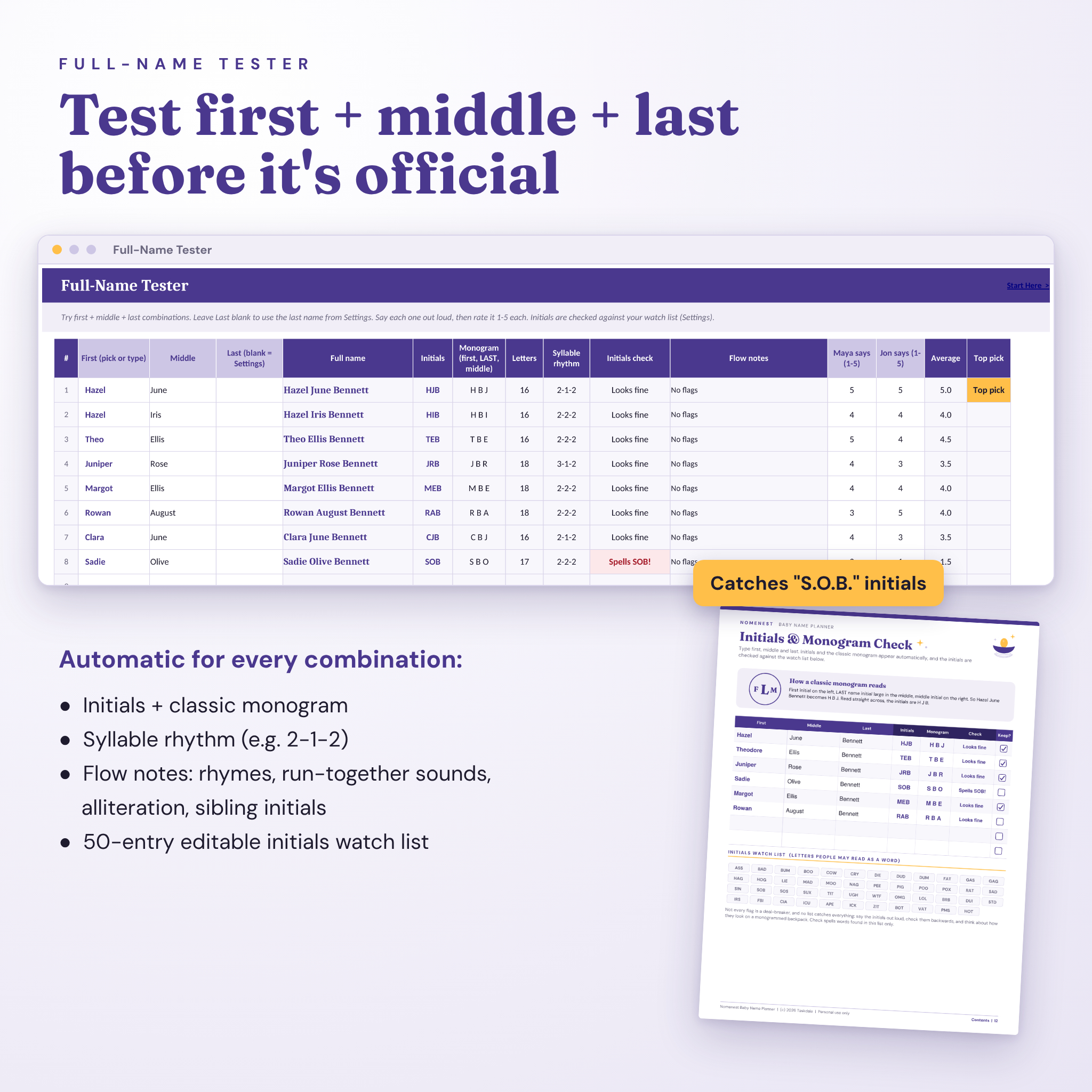
- No awkward surprises: initials, monograms, rhymes, run-together sounds, sibling clashes and nicknames are flagged before you announce.
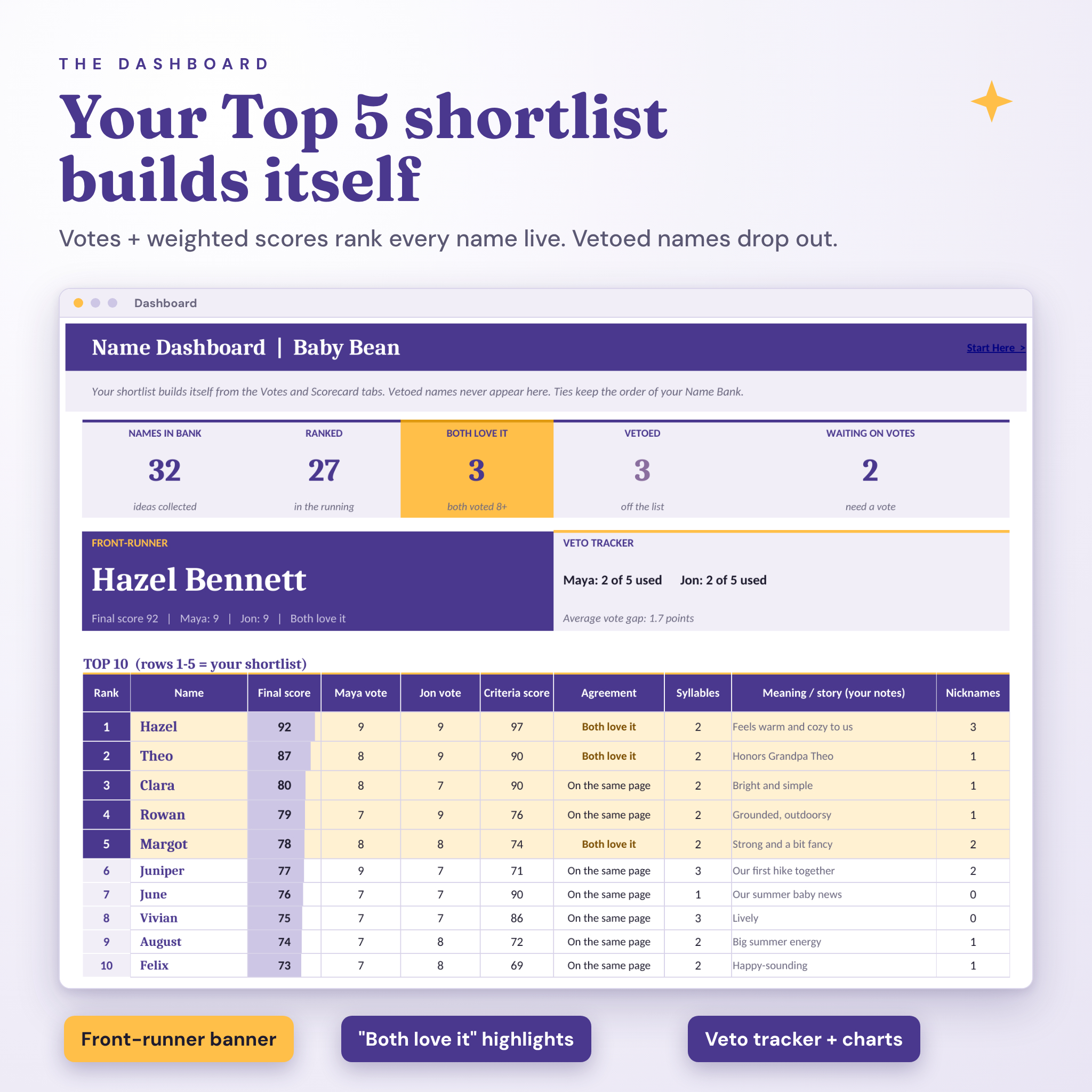
- A shortlist that builds itself: the dashboard ranks names live and highlights your Top 5 and front-runner.
- Your notes, not guesses: no made-up meanings or popularity rankings presented as facts.
Baby name spreadsheet features (Excel and Google Sheets)
Collect and score
- Name Bank for 100 names: use as first or middle, girl/boy/either, origin and meaning notes, the story behind it, family honor, letter count, syllable estimate (with your own override), initials, nickname count and live status.
- Weighted Scorecard: rate each name 1-5 on six criteria you name and weight yourself, such as “sounds good with our last name” or “works at every age”. You get a 0-100 criteria score, a top strength and a weak spot.
Vote and rank
- Partner Votes: each parent scores 1-10 and can veto. See the combined vote, vote gap, agreement (“Both love it”, “On the same page”, “Some debate”, “Big split”), a final 0-100 score and the rank.
- Your rules: choose how much votes count versus criteria, combine votes by average or by the lower of the two, set a veto limit, and decide whether a name ranks only after both of you vote (perfect for blind voting).
- Dashboard: KPI tiles, front-runner banner with your last name, veto tracker, Top 10 with the Top 5 shortlist highlighted, a final-score chart, a parent-vs-parent chart and an “Our decision” box.
Test and check
- Full-Name Tester: 15 first + middle + last combinations with initials, classic monogram, letter count, syllable rhythm, an initials check against an editable 50-entry watch list, flow notes and out-loud ratings from each parent.
- Sibling Flow: see “Lily, Owen & Hazel” style previews and catch shared initials, matching endings and rhymes, with a style-match rating.
- Nicknames: list the nicknames each name brings, mark the ones you would use or avoid, and spot red flags.
Printable and fillable PDF pages
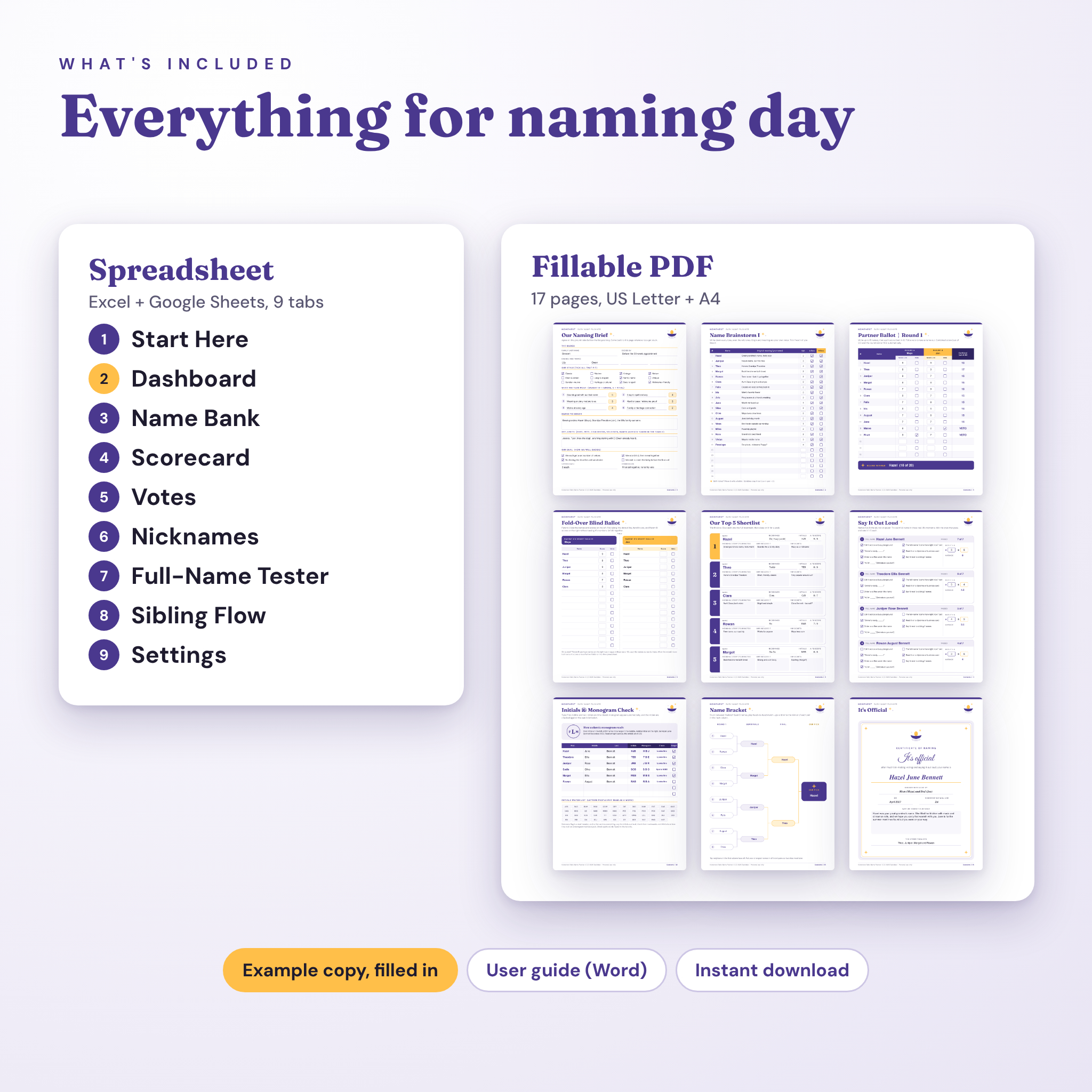
The 17-page PDF works on screen in Adobe Acrobat Reader or printed with a pen. Type your names on the cover and they appear on every ballot.
- Naming Brief: style, criteria and weights, names to honor, off-limits names and your decision rules
- Name Brainstorm for 48 names
- Two side-by-side Partner Ballots with automatic combined scores and a round winner
- Fold-over Blind Ballot
- Top 5 Shortlist and Name Spotlight pages
- Say It Out Loud tester with seven real-life tests and an automatic tally
- Initials and Monogram Check, Sibling Flow and Nickname Map
- 8-name Bracket, an “It’s Official” certificate of naming and a notes page
What is included
- Nomenest Baby Name Planner spreadsheet (.xlsx, 9 tabs)
- Example copy filled in with a sample couple, so you can see every feature working
- Fillable PDF in US Letter and A4 (17 pages each)
- User guide (Word .docx) with setup steps, tips, troubleshooting and FAQ
How it works
- Add both names, your last name, any siblings and your criteria on the Settings tab.
- Collect every idea in the Name Bank with your own notes.
- Rate names on the Scorecard and vote on the Votes tab (blind, if you like).
- Test full names, initials, siblings and nicknames.
- Check your Top 5 on the Dashboard, settle ties with the bracket and print the certificate.
File formats and software requirements
- Spreadsheet: .xlsx for Microsoft Excel 2016 or newer (Windows and Mac), Excel for the web, or Google Sheets (free Google account). No macros.
- PDF: fillable in the free Adobe Acrobat Reader on desktop, iPad, iPhone and Android. Automatic fields need an app that runs PDF JavaScript, such as Acrobat Reader; in other viewers you can still type in every box. Prints on any home printer.
- Guide: .docx for Word, Google Docs or Pages.
Customization
Rename the six criteria and change their weights, set the share of votes versus criteria, choose the vote-combining rule, change the veto limit and add your own letter combinations to the initials watch list. Formula cells are locked without a password, so you can unprotect a tab to change colors or fonts.
Digital download
This is an instant digital download. No physical item ships. Download the files from your order confirmation or account page right after purchase. Personal use only.
Real situations where it helps
- You love vintage names and your partner loves modern ones: the scorecard and agreement labels show the middle ground.
- One of you keeps vetoing: the veto limit and tracker keep it fair.
- You are naming a second or third child and want the sibling set to sound good together.
- You want to check the initials and monogram before ordering anything personalized.
- You want a keepsake of how you chose the name for the baby book.
Baby name planner FAQ
Does it include baby names and meanings?
No. It is a decision tool. You add the names you are considering and your own notes, so nothing is presented as a verified meaning or a popularity ranking.
Does it work in Google Sheets?
Yes. Upload the .xlsx to Google Drive and open it with Google Sheets. Every formula uses functions that work in both Excel and Google Sheets.
Can we vote without seeing each other’s scores?
Yes. Use blind-vote mode in the spreadsheet or the fold-over paper ballot in the PDF.
Can I use it on my phone or iPad?
The PDF fills in Adobe Acrobat Reader on iPhone, iPad and Android. The spreadsheet works best on a computer or tablet in Excel or Google Sheets.
How many names can we compare?
Up to 100 in the Name Bank, 15 full-name combinations, 12 sibling checks and 60 nickname rows. The PDF has 48 brainstorm lines and 15 names per ballot.
Is it only for couples?
No. Solo parents can vote in one column and switch off “rank only after both vote”.
Can I print it?
Yes. Every spreadsheet tab is print-ready and the PDF comes in US Letter and A4.
Reviews
There are no reviews yet.