Free CV templates can be perfectly good. Some of the cleanest layouts around are sitting inside the software you already own. The trouble is that for every solid free template there are ten that look great in a preview and fall apart the moment you type your own details in.
This guide is for job seekers who want a professional CV without spending money first. You will learn where reliable free templates come from, how to test one in ten minutes before you trust your job search to it, and the honest signs that a low-cost kit would save you time.
There is no catch here. Plenty of people get hired with a free template. The aim is to help you pick one that works, and to know when it is time to stop wrestling with it.
Quick picks: if you outgrow free templates
| Product | Best for | Price | Link |
|---|---|---|---|
| Alder Resume Kit | A full matching set plus a job tracker | $4.79 | View |
| Hollis Resume Kit | Photo and monogram versions with a planner | $8.99 | View |
| Marlowe Resume Kit | Minimal design with a writing playbook | $4.79 | View |
Where good free CV templates come from
Start with the sources that do not ask for anything in return. They are often better than people expect.
Microsoft Word’s own templates
Open Word, choose New, and search for “resume” or “CV”. You will find a set of designs made to work inside Word. They use built-in fonts and usually proper styles. Some lean on text boxes and tables, so test them before committing.
The Google Docs template gallery
In Google Docs, open the template gallery from the start screen. There are a handful of resume designs. They are simple, they open in a browser on any computer, and they export to PDF in two clicks. The choice is small, so you may see the same layout on other applications.
LibreOffice and other free office suites
If you do not have Word, LibreOffice Writer is a free download from its official site and opens .docx files. It also has template collections you can browse.
University and college careers services
Many careers services publish CV templates and examples for their students and graduates. These are often plain, sensible and written with local hiring habits in mind, which is useful if you are applying in one country.
Free template websites and online builders
This is where quality varies most. Some sites offer a genuine free download. Others ask for an email address or an account first, and some online builders let you design for free but charge before you can download a clean PDF. None of that is wrong, but read the terms before you spend an hour typing.
What makes a free template worth using
A professional CV template has two jobs. It has to look clean to a person, and it has to keep behaving when you edit it. Use this checklist before you download anything:
- Real text, not images. If your name or headings are part of a picture, screening software cannot read them.
- No floating text boxes. They drift when you add a line and often scramble the reading order.
- Named styles. Headings that use Heading 1 or Heading 2 can be restyled all at once.
- Fonts you already have. A template built on a font you do not own will look different on your screen than in the preview.
- The right paper size. A4 for the UK, Europe, Africa and much of Asia. US Letter for the US and Canada.
- No watermark or credit line. A “made with” line at the bottom of your CV is not a good look.
- Editable in your software. Check it opens properly in Word or Google Docs, whichever you use.
If a template ticks five of these seven boxes, it is probably fine. If it misses the first two, walk away however pretty it is.
Test any template in ten minutes
Previews lie. They show short sample jobs and neat placeholder bullets. Your real CV has a job title like “Senior Accounts Payable and Supplier Relations Officer” and a bullet that runs three lines. So test with your messiest content.
- Paste your longest job title into the first role. Does it wrap neatly or push the dates off the line?
- Add three extra bullets to one role. Does the rest of the page move down, or does something overlap?
- Delete a whole section, such as Interests. Does the space close up, or is there now a gap?
- Change the heading colour once. Do all the headings follow, or do you have to fix each one?
- Export to PDF and open it. Does it look the same as the document?
- Copy all the text from the PDF and paste it into a plain text editor such as Notepad. Is it in a sensible order, with your name first and job titles next to their dates?
That last test is a rough stand-in for how screening software reads a page. If your skills end up between two job titles, or your phone number appears at the bottom, the template is likely to confuse a portal. For more on that, our ATS resume template guide walks through what the software looks for.
Where free templates usually fall short
A free template is often just one page. That is fine for a single application. It gets harder when your search goes on for weeks.
- One length only. You need a two-page version for a senior role and end up rebuilding the layout.
- No matching letter. Your cover letter and references page end up in a different font and style.
- One version for everything. The designed layout is great for email, but you also need a plain single-column copy for online portals.
- Thin guidance. Placeholder text that says “Lorem ipsum” teaches you nothing about what to write.
- Familiar designs. The most popular free layouts turn up again and again, so your CV can look like the one above it in the pile.
None of these stops you getting an interview. They just add hours. A graduate sending five applications may never notice. A career changer sending thirty, each tailored, probably will.
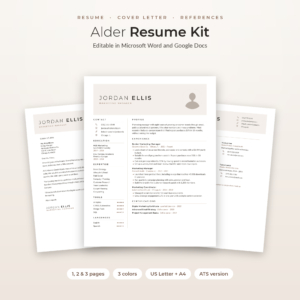
Alder Resume Kit
Price: $4.79 | Best for: long job searches with many applications
Alder fills the usual gaps in one set: 1, 2 and 3 page resumes, a no-photo version and a single-column ATS version, with a matching cover letter, references page and thank-you letter. Everything comes in Mocha, Sage and Slate and both US Letter and A4, plus a Job Application Tracker for Excel with follow-up alerts. Pick your length, type over the tip-style placeholders, and keep the ATS file ready for portal applications.
When a paid template is the better deal
This is a time question more than a money question. Count the hours you would spend fixing a free template, then decide.
Paying a small amount usually makes sense when:
- You need both a designed CV and a portal-friendly version that match.
- You need A4 and US Letter, for example when applying in the UK and Canada at once.
- Your experience needs two or three pages and you want the layout to hold up.
- You want a cover letter, references page and thank-you letter in the same style.
- You have already lost an evening to a template that keeps breaking.
And it usually does not make sense when you have a short work history, one target employer and a free template that passed the ten-minute test. Keep it. Spend your energy on the words. Our side-by-side look at free vs paid resume templates goes into more detail on what the extra files actually do.
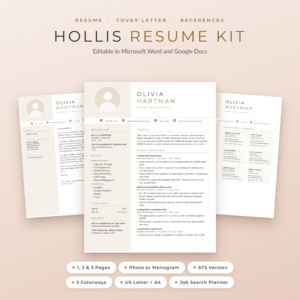
Hollis Resume Kit
Price: $8.99 | Best for: applying across countries and formats
Hollis gives you resumes with a photo or a monogram in 1, 2 and 3 pages, an ATS resume in 1 and 2 pages, matching letters and a references page, all in three colourways and both paper sizes. The fonts are built into each Word file, so nothing shifts when you open it. A Job Search Planner for Excel and Google Sheets and a Resume Writing Guide with 216 action verbs are included. Start with the monogram version if you are applying where photos are not expected.
Which free option suits your situation
The right free template depends a lot on where you are in your working life. Here is a rough guide.
School leavers and graduates
A one-page layout from Word or Google Docs is usually enough. Put education near the top, add part-time jobs, volunteering and one or two projects, and keep it simple. A careers service template is a strong choice here because it often reflects what local graduate recruiters expect to see.
Career changers
You need room for a short profile that explains the move and a skills section that connects old work to new. Pick a free template with a clear profile area at the top. If it only has space for a two-line summary, you will feel squeezed.
Experienced and senior applicants
Fifteen years of work rarely fits a free one-page design. Look for a layout that runs cleanly onto a second page, with the header repeated or your name in the footer. This is the group most likely to outgrow free options quickly.
Applying abroad
Check the paper size first, then whether a photo is expected. A UK applicant moving to Germany, for example, may want a photo version in A4, while the same person applying to a Canadian firm would want US Letter and no photo. Few free templates come in both.
Making any template look like your own
Whether you go free or paid, a few small changes stop your CV looking like a template.
- Change the accent colour to one muted shade you like, such as navy or deep green.
- Delete sections you do not need. An empty “Awards” heading looks worse than no heading.
- Rename headings sensibly. “Work Experience” is clearer than “My Journey”.
- Replace every word of sample text. Search the file for the placeholder name and phrases before you send it. Leaving “Jane Doe” in a footer happens more often than you would think.
- Keep the spacing. Templates look good partly because of their white space. Resist the urge to cram.
A recruiter who sees hundreds of CVs may still recognise a popular layout. That is fine. What they remember is a clear page with specific results, not who designed it.
A free-first plan for your search
If you are watching every penny, here is a sensible order. Begin with Word’s or Google Docs’ own templates. Run the ten-minute test on two or three. Build your master CV in the one that passes, and save a plain single-column copy for portals.
Then give it two weeks of real applications. If the layout behaves, you are done and you have spent nothing. If you find yourself rebuilding it for each job, fixing fonts, or making a cover letter from scratch every time, that is the moment a ready-made kit earns its place. You will feel the difference on the very next application.
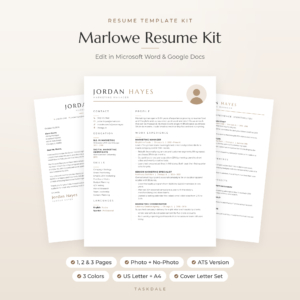
Marlowe Resume Kit
Price: $4.79 | Best for: people who want writing help too
Marlowe is a minimalist kit with 1, 2 and 3 page resumes with and without a photo, an ATS resume, a cover letter, references and a thank-you letter in Sand, Sage and Slate, US Letter and A4. The 10-page Resume Playbook covers a profile formula, before-and-after bullets, more than 120 action verbs and ATS tips. Read the playbook’s bullet section first, then rewrite your latest role straight into the template.
Frequently asked questions
Are free CV templates good enough to get a job?
Yes, many are. A free template that uses real text, named styles and no floating text boxes can look professional and pass screening software. Test it with your own content before you rely on it.
Where can I find a free professional CV template for Word?
Open Word, choose New, and search for “resume” or “CV” to see Microsoft’s own designs. University careers services also publish free templates, often with local advice.
Does Google Docs have free CV templates?
Yes. The Google Docs template gallery includes several resume designs you can edit in your browser and export as a PDF. The selection is small, so customise the colour and headings to make yours look less familiar.
Why does my free CV template look different after I download it?
Usually because the template uses a font you do not have installed, so your software swaps in another one and the spacing shifts. Choose a template built on fonts that come with Word or Google Docs, or install the font it lists.
Is it worth paying for a CV template?
It is worth it when you need several matching documents, two paper sizes, more than one length or a portal-friendly version, and a free template keeps costing you time. If a free one already works for you, keep using it.
Your next step
Open Word or Google Docs tonight, pick two free CV templates, and run the ten-minute test on both using your longest job title. If neither holds up, or you want the cover letter and portal version done too, have a look at the Alder Resume Kit.