Transfers between accounts aren’t income or spending, so they shouldn’t touch your budget categories.
Record money moved between your checking, savings and cash accounts as a transfer, not as income or spending. For transfers between accounts on paper, enter the same amount out of one account and into the other, using a shared reference so you can match the two entries later.
When printing and assembling planner inserts for this workflow, put a transfer register next to your account ledgers. The register of transfers between accounts answers where the money went; the ledgers show what’s left in each account. A £60 cash withdrawal, for example, moves £60 from checking to cash. Only the money you later hand over to a shop belongs in your spending totals.
Set up the planner and record transfers between accounts
Decide which balances the planner will track. Before recording transfers between accounts, start with checking (your current account), savings and cash on hand. Write an opening balance and date for each before entering any transfers between accounts. For cash, count the notes and coins in the wallet or envelopes covered by the ledger. If the bank shows both a cleared balance and an available balance, use the cleared balance for statement checks and flag pending items separately.
Treat cash as one account if you only need to know how much you have on hand. If you also track envelopes, use envelope balances as a breakdown of that cash, not as extra money. A wallet with £20 and a groceries envelope with £40 give you £60 in cash, not £120 across the cash account and its breakdown.
Choose the inserts and give each page one job. Set aside one register for transfers between accounts, one ledger per account and a separate expense log. The register for transfers between accounts needs columns for reference, amount, sending account, receiving account, debit date and credit date. A narrow Personal-size page can use one line for the account names and a second for the dates. On each ledger, leave room for money in, money out and a running balance.
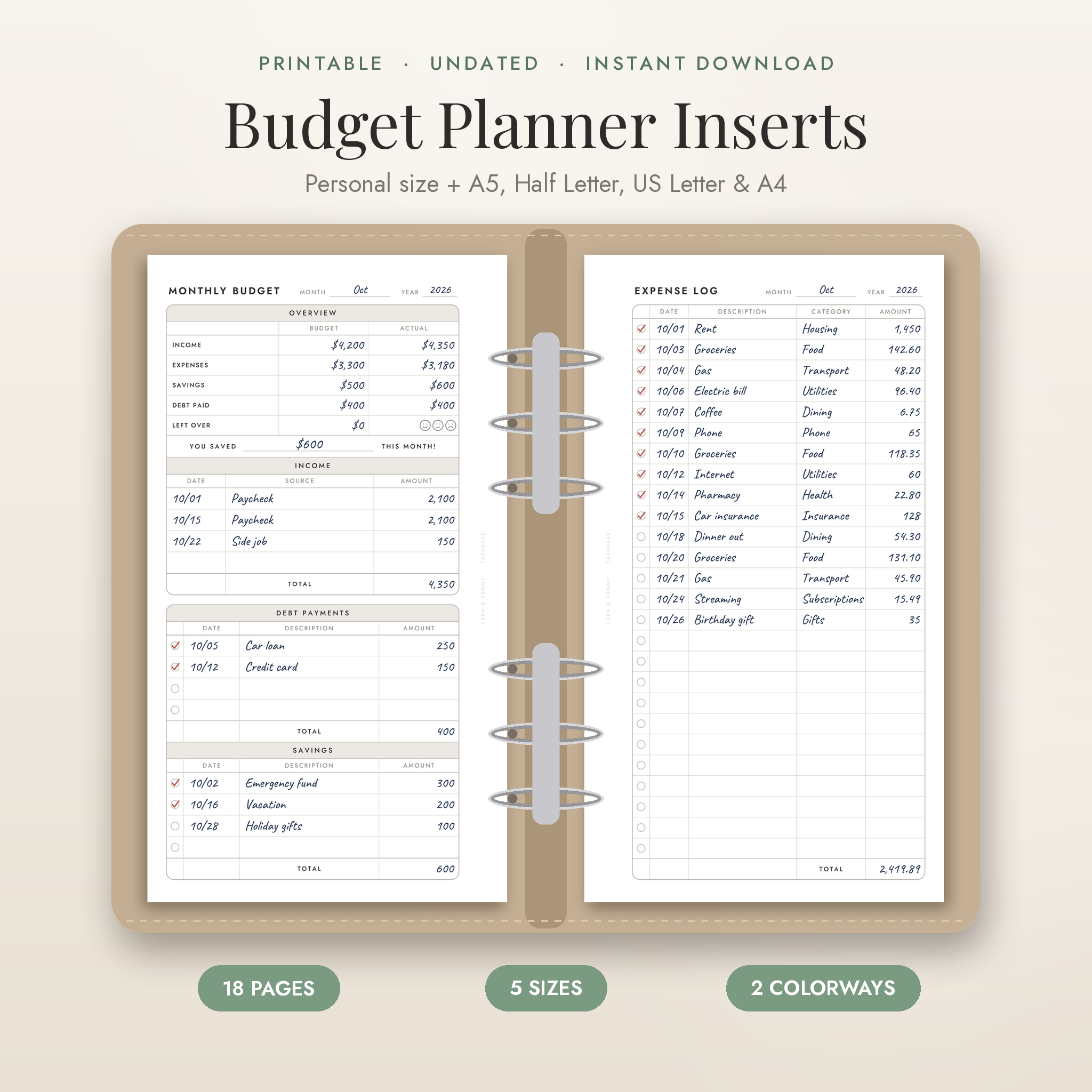
The Fern & Penny Budget Planner Printable costs $1.99 and supplies 18 undated pages, including an expense log and monthly budget. Select the file that matches the planner, then use a ruled insert for the transfer register so transfers between accounts stay out of the expense log.
If the binder already has dated dividers, keep them. If it doesn’t, a monthly refill can mark where one statement period ends and the next begins. Start with the binding: the 11-disc Letter monthly refill and 7/3-hole Letter monthly refill share a page size but use different bindings. For ring planners, compare the Forvencer A5 six-hole monthly refill and the 2027–2028 six-ring monthly inserts against a sheet that already fits. If you prefer a separate planning spread for a savings goal, the A5 six-hole project planning refill can hold milestones while the account ledger holds actual deposits.
Print, trim and punch one test sheet. Match the PDF to the finished page size before opening the print dialogue. A5 is 148 × 210 mm; Half Letter is 5.5 × 8.5 inches. They’re close enough to confuse at a glance, but an A5 sheet is wider and shorter. For Personal size, measure an existing insert and check the file’s stated trim size rather than trusting the name alone.
If the PDF is already laid out on the paper you’ll feed into the printer, select Actual size or 100%. For a smaller insert on a larger carrier sheet, use the supplied print layout if it has one, keeping the trim marks visible. Don’t use Fit to page to turn a Letter layout into an A5 insert. Cut the test sheet and measure it. If the printer clips a border at actual size, try a layout with wider margins instead of shrinking the whole batch.
Test both sides before printing multiple copies. For an upright portrait sheet printed on both sides at its finished size, start with long-edge flipping. If the file places two inserts on one sheet, check the back after trimming: the right flip setting depends on the orientation of the carrier sheet and the layout. Mark the top edge with a pencil if you need to work out how to re-feed a sheet by hand.
Trim before punching, and use an existing insert as the guide for hole or disc positions. Turn the test page in the binder and check that the amount and balance columns clear the rings on both sides. Assemble the monthly budget first, then the transfer register and account ledgers, with the spending log behind them. Print enough ledger pages for one month before deciding how many to keep in the binder.
Log the movement once in the register, then post both sides. Give each of your transfers between accounts a short ID such as T01. For £250 moved from checking to savings, enter
T01 | Checking to savings | £250in the register. On the checking ledger, enter £250 out; on the savings ledger, enter £250 in. Add T01 to both lines and update each running balance.For transfers between accounts, use the date shown by each account for its own ledger entry. If checking shows the debit on 30 April but savings doesn’t show the credit until 1 May, leave the receiving side open in the register until it posts. If the money has left checking but hasn’t arrived by month end, list it separately as in transit on the balance summary. It’s part of the money you’re tracking, but it isn’t available in savings yet.
Record spending and savings allocations separately. Log an ATM withdrawal as checking to cash. Log the later shop purchase as an expense from cash. If one £18 receipt includes £12 of groceries and £6 of cleaning supplies, make one £18 deduction in the cash ledger and split the receipt across spending categories in the budget. Moving money to savings can count towards a savings target without being counted as spending.
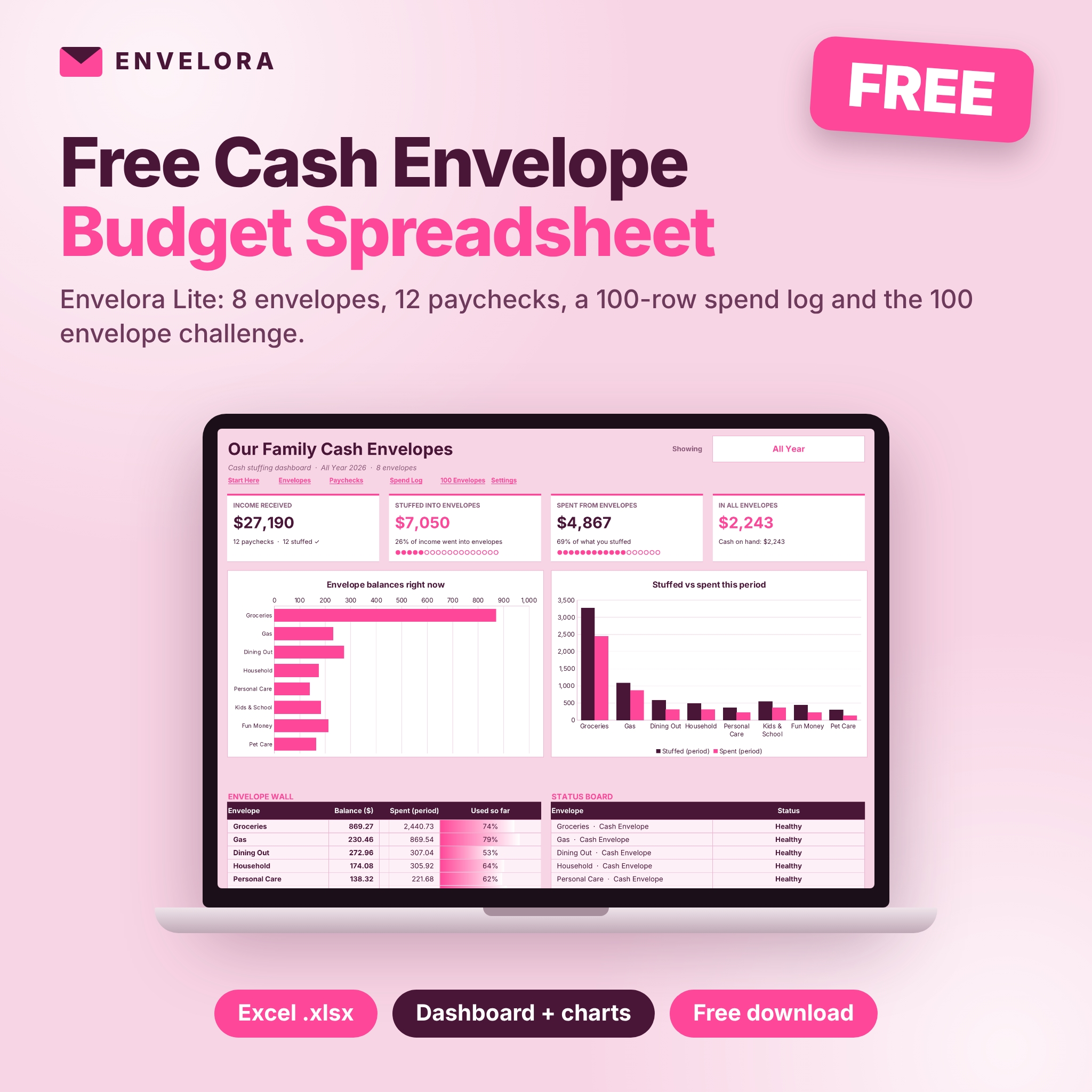
If the main task is dividing one withdrawal among envelopes, the free Envelora Lite cash envelope spreadsheet can hold the envelope breakdown in Excel. Keep the withdrawal itself on one transfer line in the paper register.
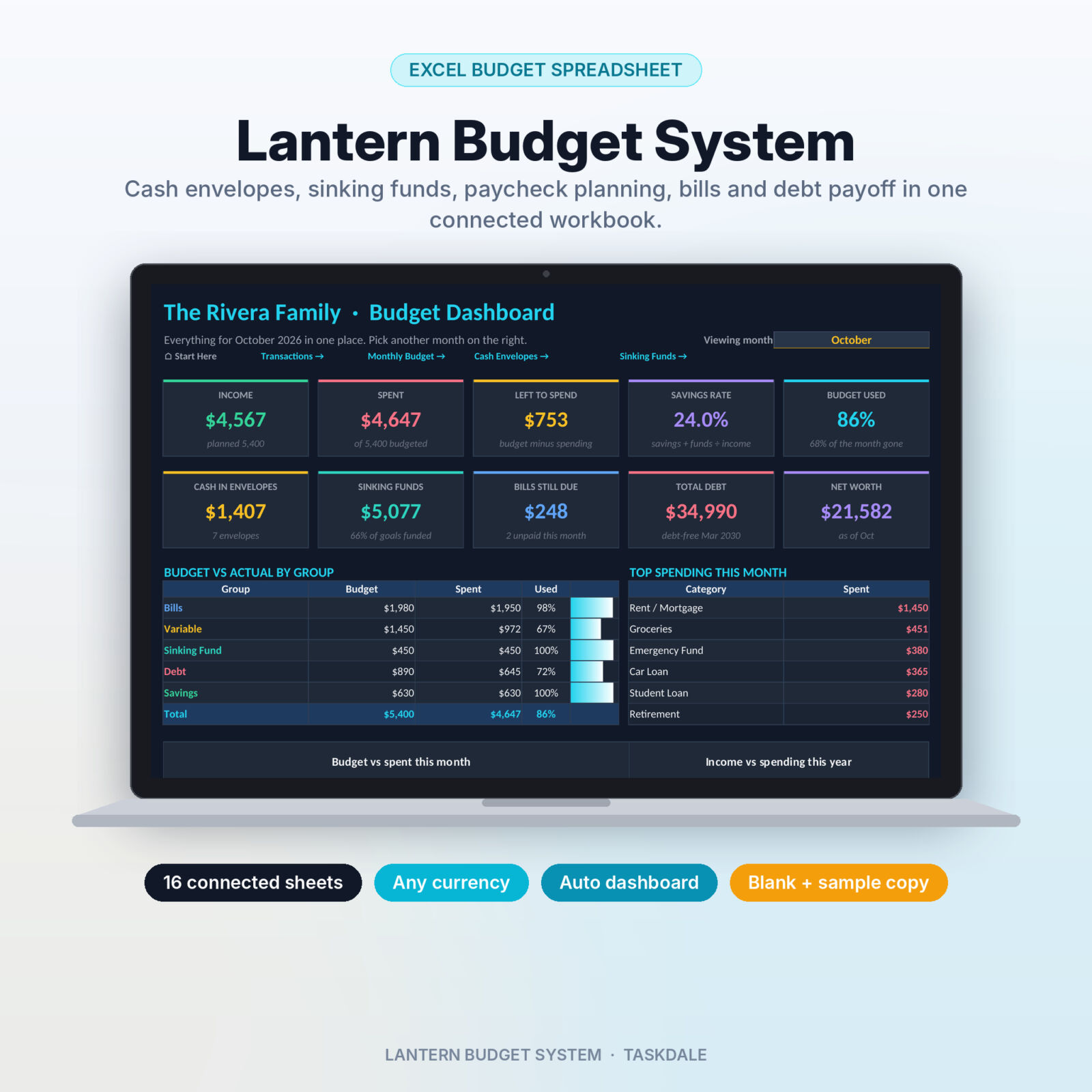
For a household that wants the envelope breakdown and sinking fund balances in the same workbook, the Lantern Budget System costs $12.99. Use the workbook for the detailed allocation if that’s where purchases are logged; the paper planner can hold the statement check without duplicating every expense.
Check the account balances before closing the month. Match each posted bank ledger balance to its statement on the same date. Count cash on hand, then compare it with the cash ledger. Tick off a transfer only when both sides are present. If the two sides appear in different months, carry its reference into the next month’s register so it doesn’t get entered again as fresh income.
Worked example: From savings transfer to cash spending
On 27 April, the planner shows £900 in checking, £1,400 in savings and £25 in cash. The total tracked balance is £2,325. The household withdraws £80, spends £34 in cash, deposits £20 of leftover cash into checking and sends £200 to savings at the end of the month.
| Date | Entry | Checking | Savings | Cash | In transit |
|---|---|---|---|---|---|
| 27 April | Opening balances | £900 | £1,400 | £25 | £0 |
| 28 April | T01: ATM withdrawal | £820 | £1,400 | £105 | £0 |
| 28 April | Groceries paid in cash | £820 | £1,400 | £71 | £0 |
| 29 April | T02: Cash deposited into checking | £840 | £1,400 | £51 | £0 |
| 30 April | T03: Savings transfer leaves checking | £640 | £1,400 | £51 | £200 |
| 1 May | T03: Savings transfer arrives | £640 | £1,600 | £51 | £0 |
At the April close, the account ledgers add up to £2,091. Add the £200 in transit and the total is £2,291, exactly £34 below the opening balance. Groceries are the only expense. The £80 withdrawal and £20 redeposit did not change the amount owned.
At the May opening, carry T03 forward as unmatched. When savings receives the £200, enter the credit in that ledger, clear the in-transit amount and tick off T03. May income stays at £0 for this transaction. The savings goal page can show £200 contributed, with the same reference so the contribution can be traced back to the deposit.
Fixes when transfers don’t balance
An imported withdrawal appears as spending
If the planner is copied from a bank feed, an entry labelled ATM £80 may arrive under a cash withdrawal category that feeds spending reports. Change it to a transfer and match it to the £80 cash receipt line. Keep the cash ledger entry even though it won’t appear on a bank statement. The same matching principle helps when you record credit card purchases and payments without counting spending twice, although a credit card payment reduces a debt rather than increasing cash on hand.
The debit is larger than the amount received
If the bank debits £82 for an £80 withdrawal and the receipt shows a £2 fee, enter an £80 transfer and a £2 bank fee expense. The two checking ledger entries should add up to the £82 statement debit. If the amount differs without a documented fee, check the receipt and any pending entry before recording the difference as spending.
Savings is outside the monthly spending plan
A £200 savings transfer can reduce the amount available for bills even when it doesn’t reduce household assets. If the monthly budget covers checking only, show the £200 as allocated to savings on that budget page. Include the savings balance on the account summary, but don’t add the allocation to the groceries, rent and other spending totals.
A partner’s payment looks like a transfer
Use the scope of the planner to decide. If it includes both partners’ personal accounts and the joint account, a £150 contribution from a tracked personal account to the joint account is internal. If the planner covers only the joint account, record it as a contribution from outside that ledger. For a repayment tied to a bill one partner paid first, track the reimbursable purchase until repayment arrives rather than treating the repayment as wages.
The Oursly Couples Budget Spreadsheet costs $14.99 and can calculate contributions when the shared budget uses an income-based split. The printed ledger still records what actually cleared, which may differ from the amount planned for payday.
Pre-punched inserts to pair with the transfer register
A dated refill can hold statement dates and transfer reminders while the printed register holds the amounts. The prices and ratings below are from the supplied listings; check the page dimensions and binding pattern against the existing planner before ordering.
Letter calendars for disc and ring systems
The 2027–2028 Monthly Planner Refill, 11-disc Letter is listed at $11.99 with a 4.6 rating. It contains 18 monthly calendars in 8.5 × 11-inch format. Use it to mark bank statement dates in an 11-disc planner, then place the ledger behind the relevant month.

The 2027–2028 Monthly Planner Refill, 7/3-hole Letter is also listed at $11.99 with a 4.6 rating and contains 18 monthly calendars. Pick this version only if its hole positions match the rings or posts in the binder.

Six-hole calendars and savings goal pages
The Forvencer 2027 A5 monthly planner refills are listed at $11.99 with a 4.8 rating. The A5 six-hole format suits a matching binder where the calendar and home-printed A5 ledger need to sit together.

The Beautiful 2027–2028 monthly inserts for six-ring binders are listed at $5.69 with a 4.8 rating. They’re the lower-priced six-ring calendar here, but six rings alone don’t establish the page size or spacing. Check both against the binder.

The A5 six-hole project planner inserts are listed at $9.99 with a 3.9 rating. The pack has 100 double-sided sheets, or 200 pages, with space for goals, milestones, tasks and deadlines. Use one sheet for a defined goal such as a boiler replacement, and write the transfer references by the milestones rather than copying every bank entry.

Before printing a month’s worth of inserts, enter one real transfer on the test sheet. If the two ledger lines can be matched by reference and the movement leaves your spending total unchanged, the layout is ready to copy.