A reimbursable purchase stays open until every penny comes back.
Record the full reimbursable purchase against the account that paid for it, then track the amount someone owes you on a separate reimbursement insert. When the repayment arrives, match it to the original reimbursable purchase and reduce the outstanding balance. Don’t count it as wages or assume it’s available to spend before it clears.
A £96 shop with a £60 share owed by a flatmate has three figures worth keeping separate: £96 left the account, £36 was yours to cover, and £60 is still due. Printing and assembling planner inserts gives those figures a permanent place to live, even if the flatmate pays after the monthly budget page has been filed.
Print and assemble an insert that stays open across months
Set up one register for money owed. Give each reimbursable purchase or claim a reference, such as
R-014. Use that reference on the register, the receipt and any payment entry. A register can be one sheet in a ring planner, but it needs enough space to record more than a tick when someone pays.Use the following layout for a full-size page. On a narrow insert, split each entry into three lines: purchase and payer, claim and follow-up, then payments and balance.
Part of the entry Fields to include Purchase Reference, purchase date, shop or supplier, paying account, full amount, receipt location Amount owed Your share, payer’s name, amount requested, date sent, expected date or next review date Repayment Date cleared, amount received, receiving account, payment reference, outstanding balance Status To send, sent, part paid, disputed or closed Leave room for at least two payment lines per entry. If two people owe shares of the same reimbursable purchase, use one purchase reference with a separate line for each payer.
R-014-AandR-014-Bcan share a receipt without sharing a balance or follow-up date.Test one sheet before printing the full set. Measure an insert already in the planner, including the distance from the binding edge to the writing area. Select the matching paper size in the PDF print dialogue. For a correctly sized insert or a layout with trim marks, start at Actual size or 100% rather than Fit, then check the preview for clipped fields.
Print a test sheet, trim to the marks if needed and line it up with an existing page before punching. Check that the holes miss both the first field on the front and the last field on the back. For double-sided printing, test the flip setting with one sheet marked at the top. Cut and punch that copy before committing to a batch.
File the register behind a permanent tab, not behind January or February. Put the follow-up date on the monthly calendar, but leave the balance on the register. When a page fills, carry forward only open entries with their original references and remaining balances. Mark the old entries as carried forward so they aren’t added twice.
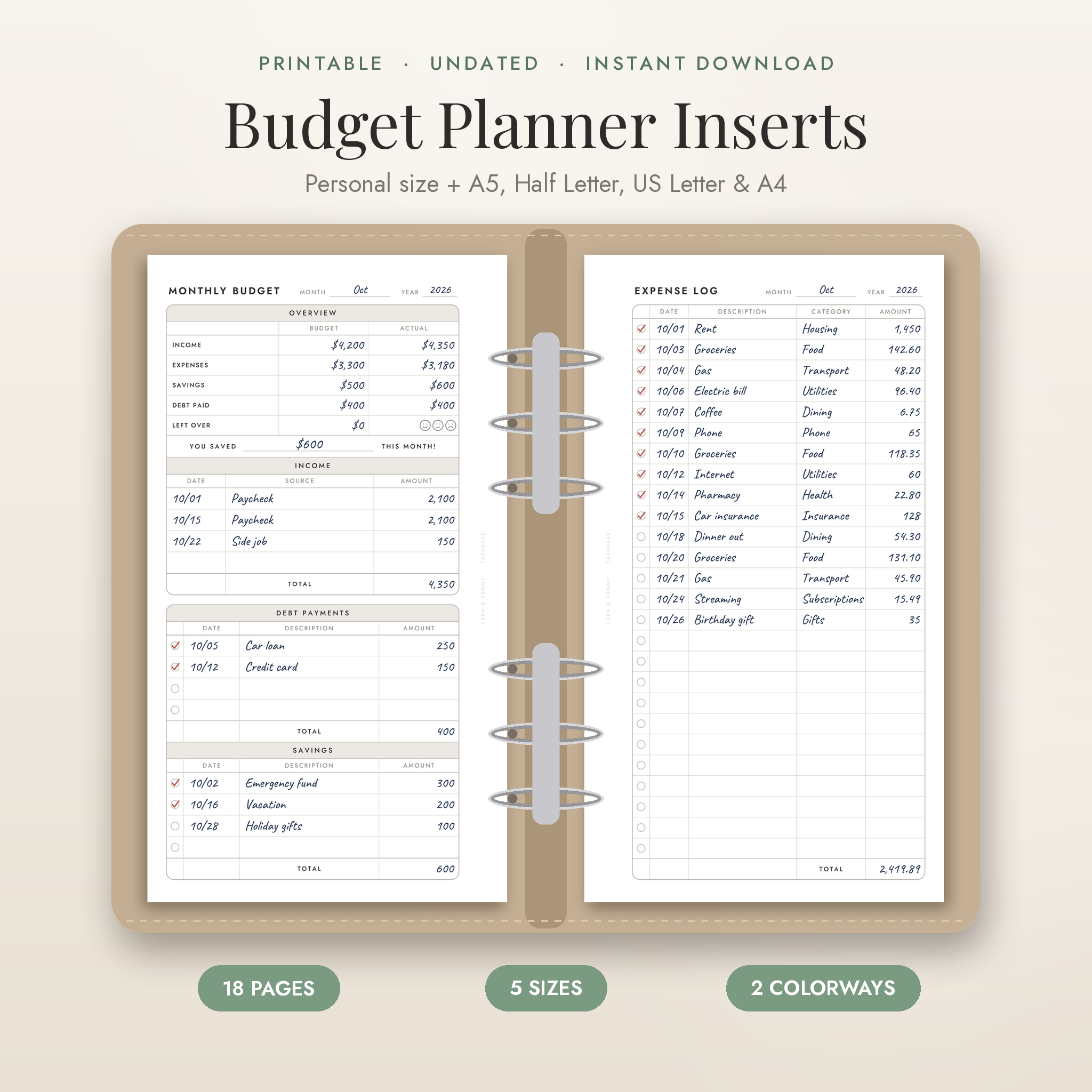
If the planner also needs monthly budget and expense pages, the Fern & Penny Budget Planner Printable provides 18 undated pages in Personal, A5, Half Letter, US Letter and A4 formats. Pair its expense log with a separate register for each reimbursable purchase so the original outflow and the amount still owed have distinct records.
Choose a refill that fits the binder and the job
The register can sit beside a dated calendar or use an adapted project page. For calendar space, the supplied options include the 2027–2028 11-disc monthly refill, the 2027–2028 7/3-hole monthly refill, the Forvencer 2027 A5 monthly refills and the Beautiful 2027–2028 six-ring monthly inserts. The A5 six-hole project planner inserts are an option for claims with several actions. Compare the binding with a page already in the planner before choosing.
Full-size 11-disc calendar
The 2027–2028 11-disc monthly refill provides 18 monthly calendars at 8.5 × 11 inches. Use the calendar for follow-up prompts such as 12 Feb: chase R-014, and keep amounts on a separate sheet punched for the same disc system.

Full-size punched calendar
The 2027–2028 7/3-hole monthly refill also provides 18 monthly calendars at 8.5 × 11 inches. Match the listed hole pattern to the binder rather than choosing on page dimensions alone. Keep the calendar beside the register if both need to be visible during a budget review.

A5 six-hole calendar
The Forvencer 2027 A5 monthly refills are six-hole inserts sized for A5. In a compact layout, enter only the reference and reminder on the calendar. Keep the payer, receipt and balance together on the register rather than squeezing them into a date box.

Six-ring calendar with size to verify
The Beautiful 2027–2028 six-ring monthly inserts are listed for six-ring binders. Verify the sheet dimensions and ring spacing before ordering. Six rings alone don’t establish that a page will fit an existing A5 or Personal planner.

A5 project pages for claims with multiple actions
The A5 six-hole project planner inserts supply 100 double-sided sheets with space for goals, milestones, tasks and deadlines. Use one page for a claim that needs a receipt replacement, approval and a payment check. Keep the amount owed in the main register so the project notes don’t become a second set of figures to reconcile.

Record the reimbursable purchase, follow up and match the repayment
Enter the reimbursable purchase at its full value. Record the £96 transaction against the account or card that paid it. In the budget, allocate £36 to your own spending and £60 to a reimbursable outlay category or a dedicated reimbursement buffer. The two allocations must add back to £96. If the receipt includes several kinds of spending, split the receipt and check the allocations against the original total before copying the owed portion to the register.
The register is a record of money owed, not a second £60 transaction. If the £96 went on a credit card, keep enough available to cover the card bill even if repayment is late. When you pay the bill, record the card payment without counting the purchase twice.
Send the request and assign a review date. Give the payer the exact amount, what it covers and any receipt or claim evidence they need. Change the status from
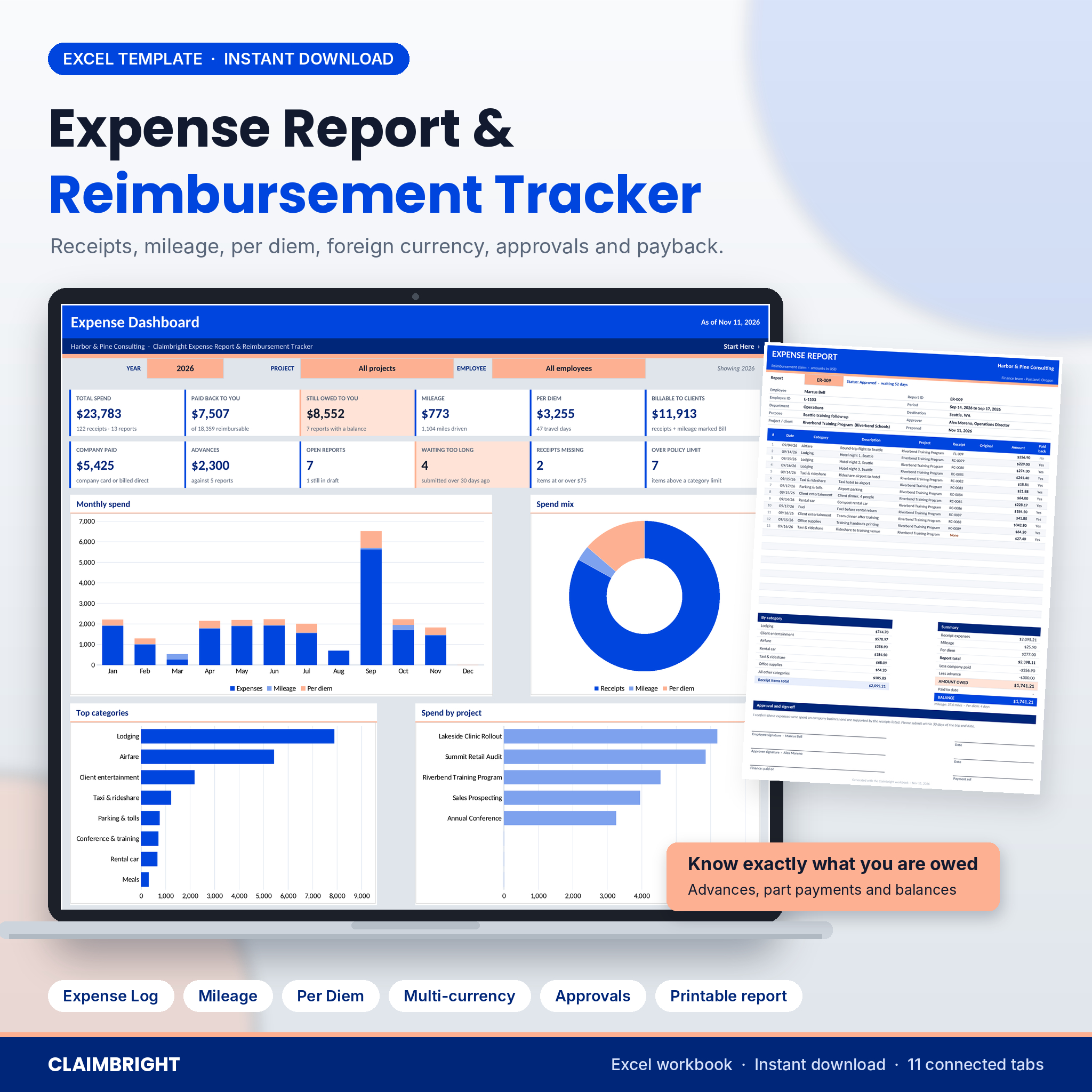
To sendtoSentonly after sending it. Record the date and the next action, such asCheck payroll on 28 FeborMessage flatmate on 5 Mar. If there’s no promised payment date, the review date is a reminder, not a prediction.For an employer claim that combines receipts, business mileage and per diem, the Claimbright Expense Report Template for Excel can prepare the detailed claim. Keep the submitted amount and next review date on the insert, and update the amount if the employer approves less.
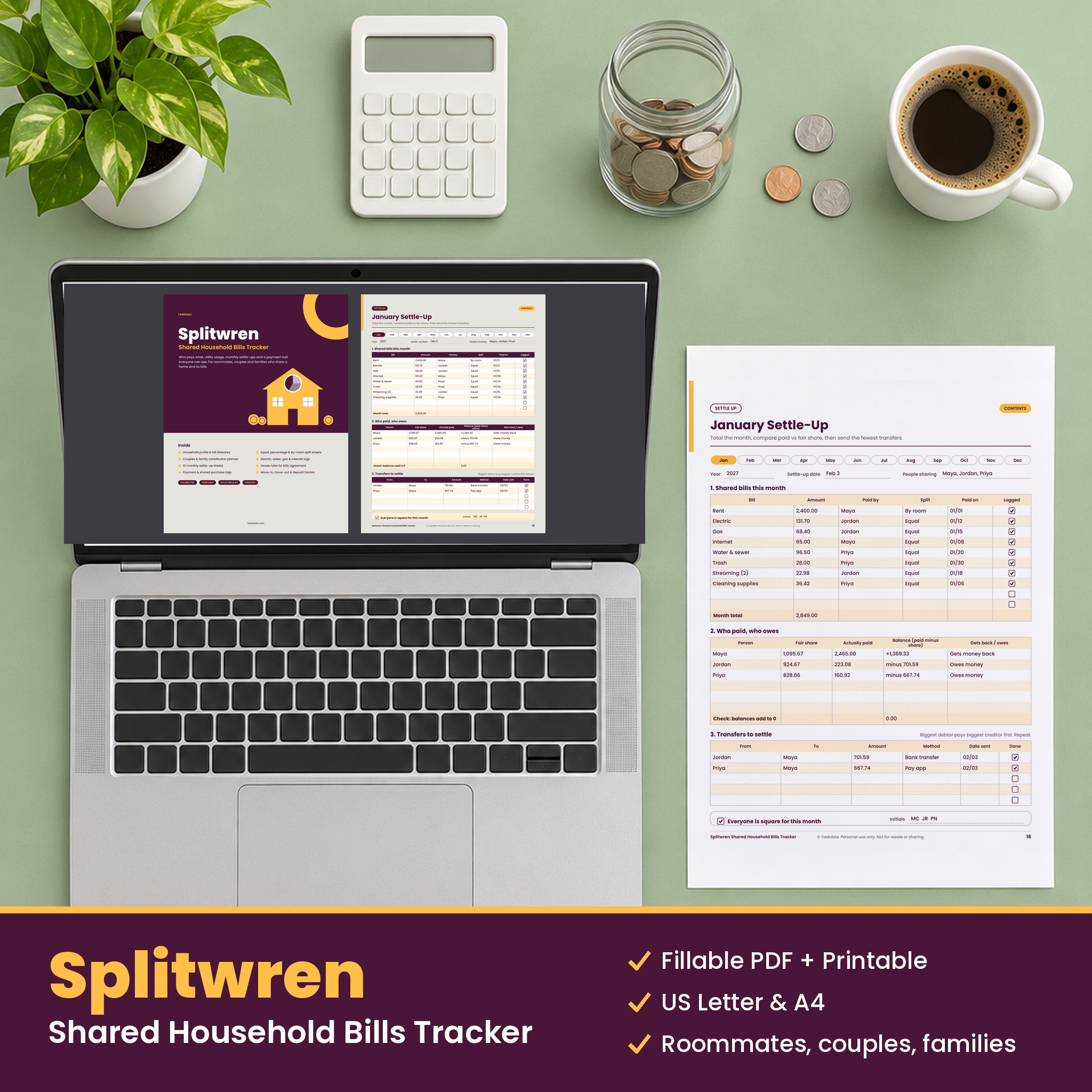
For repeated household costs, the Splitwren Shared Household Bills Tracker Printable can calculate shares and record the monthly settlement. If the settlement combines utilities and rent, note the matching register references on the settle-up sheet so one transfer doesn’t get credited in full to several entries.
Match each cleared repayment before changing the balance. Check the amount, date and account against the statement. If £40 clears against a £60 claim, log £40, leave £20 outstanding and mark the entry
Part paid. Preserve the original claim amount. For one payment covering several claims, write the allocation beside each reference and check that the allocated amounts add up to the deposit.In the budget, record the cleared money as a reimbursement to the original outlay category or as a refill of the buffer that covered it. If the budgeting tool labels every deposit as income, use a separate reimbursement category and exclude it from ordinary earnings where reporting allows. If the money lands in savings and is then moved to the current account, record that second movement as a transfer between accounts, not as a second repayment.
Close the entry only when the balance is resolved. Use outstanding balance = amount owed − matched repayments − agreed reductions. Mark the entry closed when the balance is zero, and write the date and reason: paid in full, reduced by agreement or written off. If a £10 shortfall becomes yours to absorb, move that £10 into the relevant spending category without recording a new bank outflow.
At month-end, leave the reimbursable purchase on its original date and any later repayment on the date it cleared. Carry the open balance forward on the register, not as a fresh expense. The same date distinction matters when a refund arrives in a different budget month, even though a merchant refund and a flatmate’s repayment come from different payers.
Worked example: a January reimbursable purchase repaid in two February transfers
On 27 January, a £96 household shop clears in the current account. The receipt includes £24 of personal items and £72 of shared items. Under the household’s agreed split, the flatmate owes £60 of the shared amount. The buyer’s share is £36: £24 personal plus £12 shared.
The buyer records the £96 reimbursable purchase as an outflow, allocates £36 to their own spending and uses £60 of the reimbursement buffer for the rest. On the insert, R-014 shows the receipt location, £60 requested on 27 January and a review date of 5 February. When January closes, the register still shows £60 outstanding. February starts with the buffer £60 below its previous level, not with £60 of expected income available for bills.
On 3 February, a £40 transfer clears. The buyer logs it under R-014, puts £40 back into the buffer and records the remaining £20 as Part paid. On 9 February, the flatmate sends £25 with a note: £20 for the shop and £5 for a separate internet bill. The buyer records one £25 deposit, allocates £20 to R-014 and assigns £5 to the internet bill’s reference.
The shop entry closes on 9 February with £60 repaid and £0 outstanding. The original January reimbursable purchase remains £96, the buyer’s share remains £36, and the two February deposits replenish the buffer only by the amounts that actually belong to it.
Fix entries that don’t settle cleanly
The claim was approved, but there’s no deposit
An employer approval or a payment screenshot isn’t a cleared transaction. Keep the entry open and note the promised payment date or payroll run. If the repayment arrives through payroll, use the reimbursement line on the payslip to identify the amount within the bank deposit rather than entering a second deposit that never occurred.
The payer disputes part of the amount
If the payer sends £45 against a £60 request and disputes the rest, keep £15 outstanding while the issue is unresolved. If you agree to accept £45 as full settlement, record a £15 agreed reduction and assign the cost to the appropriate spending category. The register should still show that only £45 came in.
The insurance paperwork and the payment don’t match
An explanation of benefits can show an insurer payment to a provider rather than a repayment to the household. If the insurer pays the provider directly, check what you still owe the provider. Don’t record cash coming into your account. For US households tracking insurance claims alongside HSA or FSA records, the Copaynest Medical Expense Tracker gives bills, explanations of benefits and receipts a separate record from the household cash register.
At the next weekly review, give every open row one next action and a date. If a repayment is late and the card bill is due first, plan for the bill using money already available. Leave the claim open until the payment clears or the unpaid amount is formally resolved.