You can get a simple CV template for free in about two minutes. Word and Google Docs both ship with them, and many job centers and college career offices hand them out. For a lot of people, especially for a first job or a quick application, that is genuinely enough.
The catch is what happens next. Some free downloads come with a sign-up wall, a watermark or a layout that falls apart when you add a second job. Others export as an image, which online application systems cannot read. A plain, clean CV should not need a fight.
This guide shows you where the real free options are, what to check before you use one, how to turn a blank template into a finished CV in an hour, and when a low-cost set from Taskdale is the better use of your time.
Quick picks: simple CV templates on Taskdale
| Product | Best for | Price | Link |
|---|---|---|---|
| Marlowe Resume Template | A plain, calm full set with letters to match | $4.79 | View |
| Alder Resume Template with Photo | Simple layout with tips in every placeholder | $4.79 | View |
| Hollis Resume Template | No font installs, opens looking right | $8.99 | View |
| Sloane Resume Template | A modern simple page in three colors | $4.49 | View |
Where free simple CV templates actually come from
Skip the pages of search results with flashing download buttons. The most reliable free sources are the ones you may already have.
Microsoft Word
Open Word, choose New, and search for “resume” or “CV”. You get a range of built-in templates. Some are very plain, a few are more designed. They are made for Word, so they open cleanly and save as a PDF without trouble. Good for: a quick, safe one-page CV.
Google Docs
Open Google Docs, click Template gallery at the top, and scroll to the Resumes row. There are a handful of styles. They work on any computer or phone with a browser and save straight to your Drive. Good for: people without Word, or anyone applying from a phone or a library computer.
Job centers, colleges and libraries
Public employment services, college career offices and many public libraries keep plain CV templates and printed guides. Some will sit with you while you fill one in. Good for: first-time CV writers and anyone who would like a person to look it over.
Online design sites
Several design and CV-builder sites offer free templates, often with limits. Some ask you to create an account. Some let you design for free but charge to download, or add a small logo unless you upgrade. Others export your CV as a flat image inside a PDF, which looks fine to a person but reads as blank to screening software. None of that is wrong of them. Just read the terms before you spend an evening typing.
If you want a fuller look at the trade-offs, our guide to free versus paid resume templates goes through what each kind really gives you.
What “simple” should mean on a CV
Simple is not the same as bare. A good simple CV has a clear order and nothing extra. Before you settle on any template, free or paid, check it against this list.
- One or two fonts, both easy to read at 10 or 11 pt
- Clear section headings: Profile, Experience, Education, Skills
- Dates lined up on one side so the reader can scan your history
- Real text, not text inside images, so it can be read by software and copied by a recruiter
- No skill bars, charts or icons that need explaining
- Room to grow. Add a job and see whether the layout copes
That last test is the one people skip. Type four extra lines into the experience section and watch. If the sidebar breaks, text jumps to page two, or the photo slides over your name, choose another template now rather than at midnight before a deadline.
Build a simple CV in one hour
Here is a plan that works with any template. Make a cup of tea, set a timer and go.
- Minutes 0 to 10: contact and profile. Name, phone, email, town. Then three sentences: who you are, your best two strengths, what you want next.
- Minutes 10 to 35: experience. Most recent job first. Job title, employer, months and years. Three bullets each, starting with a verb, with a number where you have one.
- Minutes 35 to 45: education and skills. Highest qualification first. Skills as a short, specific list: “Excel”, “forklift license”, “Spanish (conversational)”.
- Minutes 45 to 55: cut. Remove anything repeated, anything older than about 15 years unless it matters, and any sentence starting with “Responsible for”.
- Minutes 55 to 60: check and save. Read it out loud. Save as a PDF with your name in the file name.
An hour. One finished page. There is real relief in hitting save on something that has been hanging over you for weeks.
If you are working in Google Docs
Google Docs is the easiest free route for most people, but it has a few habits worth knowing. Bullet indents sometimes shift when you paste text from elsewhere, so paste without formatting (Ctrl+Shift+V). Margins live under File, then Page setup, where you can also switch between Letter and A4. And when you download, pick PDF rather than Word, or the layout may change on the other end. Our step-by-step guide to making a resume in Google Docs covers tab stops, columns and the download settings in detail.
Worked example: a simple CV after a career break
Lerato spent five years at home with two young children and is applying for a receptionist role at a dental practice. Before the break she worked three years in a hotel front office. She used a free Google Docs template and kept it to one page.
Profile: Friendly, organized receptionist with three years on a busy hotel front desk. Comfortable with booking systems, phones and handling complaints calmly. Returning to work after a family career break and looking for a steady front-of-house role.
Experience:
- Career break, 2021 to 2026. Full-time parent. Volunteer treasurer for a parent group of 40 families, keeping a simple spreadsheet of subscriptions.
- Front Office Receptionist, city hotel, 2018 to 2021. Checked in up to 80 guests a day, handled phone and email bookings, and dealt with complaints at the desk.
Short. Honest. The career break is named in one line, with something useful from that time. Nobody reading it has to guess, and the volunteer treasurer detail quietly shows she can still handle numbers.
When a free template is enough
Be honest with yourself about what you need. A free template is a perfectly good choice when:
- You are applying for one or two local jobs and will hand in a printed copy
- It is your first CV and you have one or two jobs to list
- The employer uses an online form and only wants a basic attachment
- You already have Word or Google Docs and the built-in style looks fine to you
In those cases, spend your time on the words, not on hunting for designs. A plain CV with three strong bullets beats a beautiful one with vague ones every single time.
When a low-cost set saves you time
Things change once you are sending lots of applications, applying across countries, or need more than one page. That is when people start losing evenings to layout problems: the cover letter does not match, the A4 version breaks when the company is in the US, there is no plain version for online portals, and the references page has to be built from scratch.
A paid set fixes all of that in one download. Every page matches, every size is ready, and you just type.
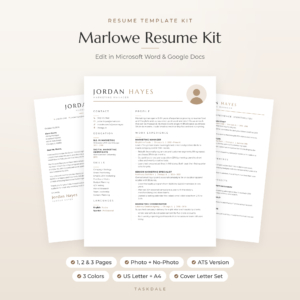
Marlowe Resume Template
Price: $4.79 | Best for: people sending many applications
Marlowe is a minimalist set with 10 editable Word templates, each in Sand, Sage and Slate and in US Letter and A4: 1, 2 and 3 page resumes with and without a photo, an ATS single-column resume, a cover letter, a references page and a thank-you letter. It opens in Word and Google Docs. The bonus Resume Playbook and Job Search Tracker help with the writing and the follow-ups. Start with the 1-page no-photo file and the Playbook’s profile formula.
The plain version for online applications
Many larger employers ask you to upload your CV to an online system that reads the text automatically. Fancy layouts, tables and text inside images can confuse it. The safest file is a plain one-column version with standard headings.
Some free templates are already simple enough. Others look plain but hide tables underneath. A quick test: open your PDF, select all the text, copy it and paste it into a plain note. If it comes out in the right order, the software can probably read it too. If the words come out scrambled, use a single-column file instead.
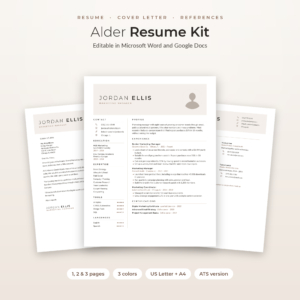
Alder Resume Template with Photo
Price: $4.79 | Best for: first-timers who want guidance
Alder includes a dedicated ATS-friendly resume in one column with no tables, icons or images, next to its two-column 1, 2 and 3 page designs. Every placeholder line is a short tip telling you what to write, which helps if this is your first CV. You also get matching letters, a references page, an Excel Job Application Tracker and a 6-page Job Search Toolkit, in Mocha, Sage and Slate, US Letter and A4.
Mistakes with free CV downloads
Leaving sample text in
Placeholder phrases such as “Your Name Here” or a fake company called Acme slip through more often than you would think. Search the document for the template’s sample words before you send it.
Missing fonts
A template built with a font you do not have will open in a fallback font, and the spacing goes wrong. Lines wrap differently and a one-page CV becomes one and a quarter. If the preview looks nothing like what opened on your screen, this is usually why.
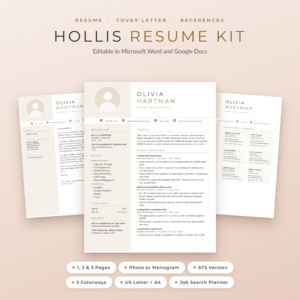
Hollis Resume Template
Price: $8.99 | Best for: anyone tired of broken layouts
Hollis has its Montserrat and Lato fonts built into every Word file, and Google Docs has them already, so the layout looks right the moment it opens. Each page sits on a simple invisible table, so nothing jumps when you add a line. You get resumes in 1, 2 and 3 pages with a photo or a monogram, ATS versions, cover letters, a references page and a Job Search Planner, in three colorways and both paper sizes.
Downloading from unknown sites
Stick to trusted sources. A CV template should be a document file, such as .docx or a Google Docs link. If a site asks you to download and run a program, close the tab.
Saving with the wrong name
“Resume_template_final_v3.docx” tells the reader you used a template and forgot to rename it. Save as Firstname-Lastname-CV.pdf.
A five-minute check before you press send
However you made it, give the finished CV one last pass. This takes five minutes and catches the small things that cost interviews.
- Ring your own phone number from the CV. Yes, really. A single wrong digit has cost people a job offer.
- Send a test email to the address on the page.
- Check that every date range has a start and an end, and that no two jobs overlap by accident.
- Open the PDF on your phone. If it is hard to read there, the font is too small.
- Print one copy. Errors you missed on screen often jump off paper.
Once your CV is ready, keep a simple record of where you send it. Our guide to running a job application tracker shows how to keep every application, reply and follow-up on one sheet.
Frequently asked questions
Where can I download a simple CV for free?
Start with the templates built into Microsoft Word (File, then New, then search “resume”) and the Google Docs template gallery. Job centers, college career offices and libraries also offer free plain templates.
Are free CV templates good enough?
For one or two applications, often yes. What matters most is clear, true content. Paid sets help more when you need matching letters, several lengths, both paper sizes or an ATS version.
What is the simplest CV format?
One column, with Profile, Experience, Education and Skills in that order, dates on one side, and one font. It suits almost any job and is easy for software to read.
Can I make a simple CV on my phone?
Yes. The Google Docs app has the same templates as the desktop version. Typing a whole CV on a phone is slow, though, so draft the bullets in a notes app first and paste them in.
Should a simple CV have a photo?
It depends on the country. In the US, UK and Canada most people leave it off. In parts of Europe, Africa and Asia a photo is common. Check what is normal where you are applying.
What file type should I send?
PDF, unless the advert asks for Word. A PDF keeps your layout exactly as you made it on any screen.
Your next step
Open Word or Google Docs today, pick the plainest built-in template, and run the one-hour plan above. If you find yourself wrestling with the layout, or you need a matching letter and an ATS copy, switch to a ready set such as the Marlowe Resume Template and paste your finished words straight in.