Here’s how the honeymoon usually gets planned. Two weeks before the wedding, at 1am, on a phone, with whatever money is left after the flowers went over budget. Not ideal for a trip you’ll remember for the rest of your lives.
A wedding planner bundle that includes the honeymoon fixes the order of things. The trip gets its own budget, its own pages and its own checklist from day one, instead of being whatever’s left over.
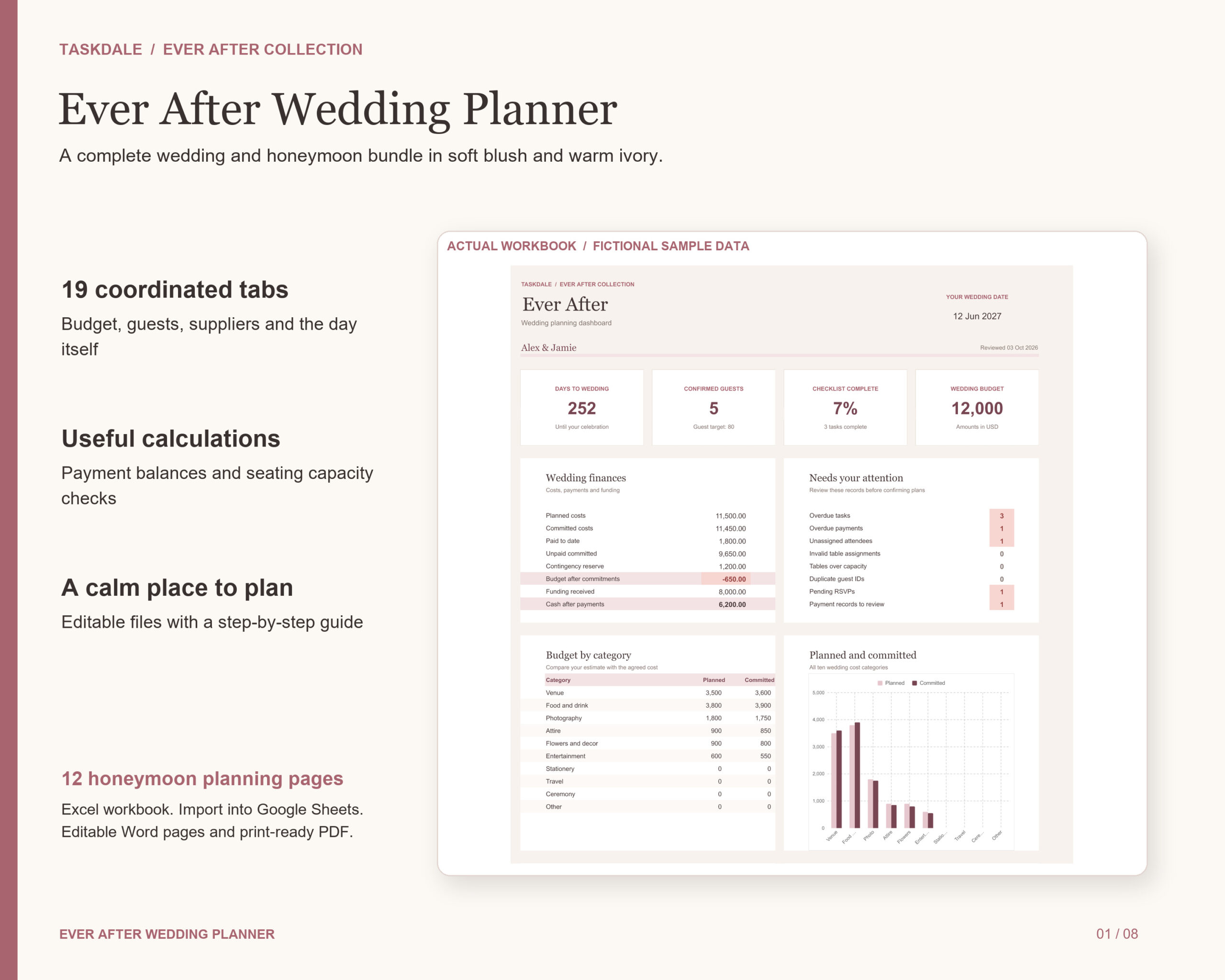
This guide covers what a good bundle should actually contain, then walks through the Ever After bundle: a 19-tab wedding workbook plus a 12-page honeymoon planner.
What a good wedding planner bundle should include
“Bundle” can mean anything from a useful kit to 40 random printables in a zip. Before you buy one, check for these four things:
- One place for the numbers. A workbook that adds up costs, payments and guests. Paper can’t do math.
- A separate honeymoon budget. If the trip shares a budget with the wedding, the wedding eats it.
- A guide. Setup instructions and worked examples, so you’re not guessing what a column means.
- Something printable. For the trip in particular, a paper itinerary is handy when your phone dies at the airport.
The Ever After bundle covers all four. You get the Ever After Wedding Planner workbook (XLSX, 19 tabs), a DOCX user guide with setup, customization, worked examples, capacity limits and troubleshooting, a 12-page A4 honeymoon planner PDF, and the same honeymoon planner as an editable DOCX.
Setting up the wedding workbook
Open the workbook in Excel, or upload it to Google Drive, open it with Google Sheets and save it as a native Google Sheets file. Then fill in the Setup tab: your names, wedding date and budgets. Note the plural. You set the wedding and honeymoon budgets separately from the start.
Here’s what the other tabs handle.
Budget and payments
Compare planned and committed costs, record installments, and see paid totals and remaining balances. There’s room for a contingency reserve, which is the line most couples forget until the alterations bill arrives. Promised and received contributions are tracked separately too, so “Dad said he’d cover the bar” and “Dad has paid for the bar” never get mixed up.
Guests and seating
Up to 500 individual guests with contact details, invitations, RSVPs, meals and dietary notes. Allocate people to up to 40 tables, then review the flags: unassigned guests, invalid table IDs and tables over capacity.
Checklist
42 starter tasks, each with an owner and a deadline tied to your wedding date. You can override dates to fit a shorter engagement, then review milestone completion and anything overdue.
Supplier research
Compare venues and supplier quotes side by side: fees, availability, pros, cons and questions. Once you book, keep vendor contacts and contract links next to their budget totals.
The day itself
A run sheet with start times, durations and calculated end times, plus owners, contacts and backup plans. There’s also space to coordinate the wedding party, ceremony, decor, music and gifts.
The honeymoon side of the bundle
This is the bit that sets a wedding planner bundle like this apart from a plain wedding spreadsheet.
Inside the workbook, the honeymoon gets its own trip budget and packing list. Then the 12 companion pages walk you through the rest: your vision, destinations, budget, bookings, travel and daily itineraries, experiences, packing, preparation, final tasks, notes and memories.
Why a separate budget matters: say your total is $30,000 and you’ve mentally set aside $4,000 for the trip. Without its own line, that $4,000 looks like spare cash every time a vendor quote comes in high. Give it a separate budget and it stays protected.
A simple honeymoon planning timeline
Use the honeymoon pages alongside a rough schedule like this:
- 8 to 10 months out: fill in the vision and destinations pages together. Beach or city? Rest or adventure? Agree before you browse.
- 6 to 8 months out: set the trip budget and book flights and the main stay.
- 3 months out: check passport expiry dates and any entry requirements for where you’re going.
- 1 month out: plan the daily itinerary and experiences. Leave gaps. You’ll be tired.
- 1 week out: work through the packing list and final tasks pages.
One tip that catches people: if either of you is changing your name, book travel in the name on your current passport. The honeymoon is not the time to test an airline’s flexibility.
Who it suits, and the honest limits
Good fit: couples organizing their own wedding who want to share the work with a partner or coordinator, and anyone who wants the honeymoon planned with the same care as the reception.
A few limits worth knowing, because the product page is upfront about them:
- Amounts use one currency at a time. Changing the currency code doesn’t convert amounts.
- Seating manages table allocations and capacity. It doesn’t draw a venue floor plan.
- It doesn’t send invitations, issue reminders, pay vendors or make bookings for you.
- It’s a file-based bundle. Google Sheets template links aren’t included, but you can upload the file to Google Drive yourself.
If you need a visual floor plan or a digital planner for an iPad, look elsewhere. If you want a practical spreadsheet plus real honeymoon pages, this is a good match.
FAQ
What usually comes in a wedding planner bundle?
It varies a lot. The useful ones pair a calculating spreadsheet with printable pages and a guide. Ever After adds a dedicated honeymoon planner on top.
Does the workbook use macros?
No. It uses dropdown menus, frozen headers, formulas and review flags, with no macros or scripts. That’s why it opens cleanly in Google Sheets.
What size is the honeymoon planner?
The PDF is A4 and 12 pages. You also get it as an editable DOCX, which you can open in Word or a compatible editor.
Can I share it with my partner and wedding team?
Yes. You can share your completed copy with your partner and wedding team. Reselling or passing on the blank templates isn’t allowed.