You can keep the method and drop the monthly bill. YNAB made zero-based budgeting popular, and its core idea is simple enough to run in a spreadsheet: before the month starts, every dollar of income gets a job, until the amount left to assign hits zero.
This guide is for anyone who likes that way of budgeting but is tired of another subscription, another login, or another company holding their spending history. You will see what YNAB does well, how the same method works in a file on your own computer, a full worked budget for one month, and how to choose between a spreadsheet and an offline budget app.
No bank password required. No renewal email in your inbox every year. Just a file you open, fill in and keep.
Quick picks: zero-based budget files you buy once
| Product | Best for | Price | Link |
|---|---|---|---|
| Pocketbloom Annual Budget Spreadsheet for Excel | Excel users who want a full year in one file | $24.99 | View |
| Ultimate Annual Budget Spreadsheet | Google Sheets and phone access | $6.00 | View |
| Thriftwood Money Studio Offline Budget App | The closest feel to a budgeting app | $12.99 | View |
| Cedarly Money Hub | Matching paychecks to bills | $19.00 | View |
What you get from YNAB, and what you give up
Credit where it is due. YNAB is a well-known budgeting app built around one habit: assign the money you have right now to categories, then adjust when life happens. The method is the real star, and it is easy to see why people stick with it.
It also does the busywork. It syncs between your phone and your computer, it can connect to bank accounts so transactions come in on their own, and two people can share one budget. For a couple who both tap their cards at the grocery store four times a week, that is handy.
The trade-offs are the usual ones for any subscription app:
- You keep paying. The fee comes around every month or year, whether you open the app daily or once a quarter.
- You need an account. Your budget lives on the company’s servers, and you sign in to reach it.
- Bank connections can wobble. Linked accounts in any app sometimes need re-linking, and some banks are not supported everywhere.
- You rent your history. Stop paying and your budget is no longer something you can open and use the same way.
None of that makes YNAB bad. It just means you are paying for convenience. If you would rather pay once and type your own numbers, a file you own does the method part just as well.
How a spreadsheet you own runs the same method
Zero-based budgeting needs only three numbers per category: what you planned, what you spent and what is left. A spreadsheet handles that in a few columns. Add one cell that shows income minus everything planned, and you have the heart of any zero-based app.
That one cell is the whole game. Say your take-home pay is 3,400 and you have planned 3,250. The cell reads 150. So you give that 150 a job, maybe extra on the credit card, and the cell drops to zero. Done. If you want the method explained from scratch, our guide to zero-based budgeting covers it step by step.
Owning the file changes how it feels, too. It sits in a folder on your laptop next to your tax papers. It opens without the internet. You can add a column for “who paid” or rename “Fun” to “Saturday tacos” and nobody asks you to upgrade.
A worked zero-based budget: one month, every dollar assigned
Here is a real-looking month for a single parent with one child, paid monthly, take-home pay of $3,400. The amounts are an example, not advice. Your rent and grocery bill will be different, but the shape is the same.
| Category | Planned | Type |
|---|---|---|
| Rent | $1,250 | Fixed bill |
| Utilities | $180 | Bill that varies |
| Groceries | $520 | Day to day |
| Gas and transit | $210 | Day to day |
| Phone and internet | $95 | Fixed bill |
| Car insurance | $140 | Fixed bill |
| Credit card payment | $300 | Debt |
| Car repairs fund | $60 | Sinking fund |
| Christmas fund | $50 | Sinking fund |
| Yearly subscriptions | $25 | Sinking fund |
| Emergency fund | $200 | Savings |
| Kids’ activities | $150 | Day to day |
| Eating out | $120 | Fun |
| Next month buffer | $100 | Savings |
| Total planned | $3,400 | Left to assign: 0 |
Notice the three sinking funds. Car repairs, Christmas and yearly subscriptions are the costs that wreck most budgets, because they do not show up every month. Setting aside $60 a month means a $700 brake job next October is already mostly covered. That is the quiet relief zero-based budgeting gives you.
The $100 buffer is the other trick. Over a few months it grows into a cushion, and once it equals a full month of spending, you can budget this month on last month’s pay. It is the single change that ends the scramble on the 25th when rent leaves before payday.
Setting up your zero-based spreadsheet in one evening
Give yourself two hours, a cup of tea and last month’s bank statement. That is enough to go from nothing to a working budget.
- Write down your real take-home pay. Not salary. The amount that lands in your account.
- List every fixed bill with its due date. Rent, phone, insurance, loan payments.
- Pull three months of statements and average your groceries, gas and eating out.
- Add sinking funds for anything yearly or lumpy. Divide the yearly cost by 12.
- Fill categories until the “left to assign” cell reads zero.
- Log spending for one week before you judge whether the plan works.
A ready-made workbook saves the formula work, which is where most homemade sheets break. One wrong cell reference in March and your totals quietly drift for the rest of the year.

Pocketbloom Annual Budget Spreadsheet for Excel
Price: $24.99 | Best for: Excel users budgeting a whole year
Pocketbloom is one Excel workbook with 34 connected tabs: setup, up to 112 budget categories, a transaction log, 12 monthly budget-versus-actual tabs, a bill tracker, a paycheck planner, savings goals and a debt payoff planner. Recurring paychecks and bills fill all 12 months for you, and you can roll unspent money forward. It works in Excel 2010 or newer and LibreOffice, with no macros. Start on the Setup tab, then add your recurring items before you plan the first month.
If you want to compare more workbooks before you pick one, our roundup of the best budget spreadsheets for Excel and Google Sheets lays them side by side.
Handling overspending and irregular costs without an app
Overspending is not failure. It is information. When groceries run $40 over in week three, a zero-based budget asks one question: which other category gives up $40? Maybe eating out drops from $120 to $80. You change two numbers, the total still balances, and you move on.
In an app, you drag money between categories. In a spreadsheet, you edit two planned amounts. Same result. The spreadsheet just makes you type it, which some people find keeps them more honest.
Rolling money forward
Say you planned $60 for car repairs and spent nothing. That $60 should carry into next month, not vanish. A good annual workbook does this by keeping a running balance for each sinking fund, so by month six you can see $360 sitting ready.
Lumpy months
Some months have three paychecks, or a tax refund, or a birthday. Treat any extra money the same way: give it a job before you spend it. A bonus split between the emergency fund and the Christmas fund feels far better in December than a bonus that slowly disappeared.
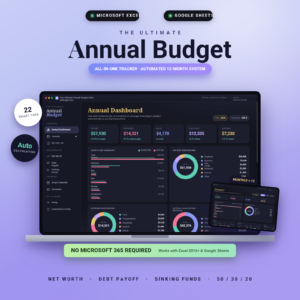
Ultimate Annual Budget Spreadsheet
Price: $6.00 | Best for: Google Sheets users who check on phones
This workbook has 22 tabs, including an annual dashboard, 12 monthly dashboards with expected versus actual, a sinking funds tracker, a debt payoff calculator and a net worth tracker. You only fill the gold cells and everything else calculates. You get the Excel file and a Google Sheets link, so you can check your budget on your phone through the Google Sheets app. Set up your sinking funds first, since they are the line items that make zero-based budgeting work.
Spreadsheet or offline app: which one fits you
Some people love cells and formulas. Others just want buttons. Both can be yours to keep, with no subscription.
Pick a spreadsheet if
- You already use Excel or Google Sheets at work and feel at home in them.
- You like to add your own columns, notes or charts.
- You want to share a Google Sheet with a partner who also has a Google account.
Pick an offline budget app if
- You want the look and feel of YNAB: buttons, a counter, envelopes.
- You import bank CSV files instead of typing every coffee.
- You never want to see a formula again.
An offline app is a single HTML file that opens in your browser and saves everything on your device. It looks and acts like a web app, but nothing is uploaded. For people leaving YNAB, this is often the easiest switch, because the screens feel familiar.
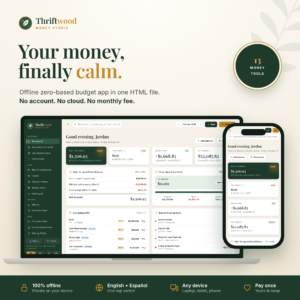
Thriftwood Money Studio Offline Budget App
Price: $12.99 | Best for: people who want an app feel
Thriftwood is one HTML file that runs in Chrome, Edge, Safari, Firefox or Brave, fully offline. Its zero-based budget has a live To assign counter that turns green when every dollar has a job, plus rollover envelopes for sinking funds, a bills calendar, a paycheck planner and a debt payoff planner. You can import bank CSV files, back up and restore between devices, and add it to a phone home screen. Open it, explore the sample data, then clear it and add your accounts.
If you keep starting a fresh sheet every month, our post on a monthly budget spreadsheet you set up once shows how to stop rebuilding.
Budgeting each paycheck, not each month
Monthly budgets assume one payday. Many people get paid every two weeks, and the real question is not “What do I spend in March?” but “Which paycheck covers rent?”
Here is how that looks with two paychecks of $1,700. The one on the 1st covers rent at $1,250, the phone bill and half the groceries. The one on the 15th covers insurance, the credit card payment, the other half of the groceries and the sinking funds. Everything else is split between the two. Each paycheck gets its own small zero-based plan. When a third paycheck arrives twice a year, it goes straight to savings or debt.
That small shift ends the most common budgeting panic: having enough money for the month but not on the right day.
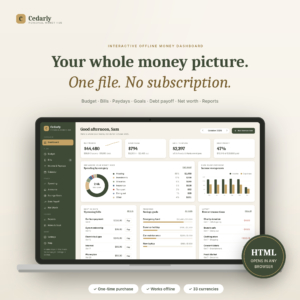
Cedarly Money Hub
Price: $19.00 | Best for: paid weekly or every two weeks
Cedarly is an offline HTML dashboard with a zero-based budget whose banner counts down what is left to assign and turns green at zero. Its payday planner shows which paycheck covers which bill and what is left after, and it handles weekly, every-two-weeks, twice-monthly, monthly and variable pay. It also has bills, debt payoff, savings goals, net worth and CSV import. Load the sample household first to see how it all links up, then erase it and enter your own paydays.
Your first month after switching
The first month on a new system is clumsy. That is normal. By the third month it feels automatic.
A 15-minute Sunday check-in
Once a week, sit down with your phone’s banking app and your budget file. Enter the week’s spending, usually 10 to 20 lines. Look at the two or three categories running hot. Move money if you need to. Close the file. Fifteen minutes on a Sunday afternoon is enough for most households, and that small habit is what makes the budget real.
Three mistakes to skip
- Starting with 40 categories. Begin with 12 to 15. You can split “Household” into “Cleaning” and “Toiletries” later if it matters.
- Budgeting gross pay. Only plan the money that actually arrives.
- Forgetting the yearly stuff. Car registration, school photos, the dog’s shots. If it happens once a year, it needs a sinking fund.
Before you cancel your subscription, export your YNAB data so you have your old transactions on file. A year of history makes your first spreadsheet budget far more accurate, especially for groceries and gas.
Who should stay with YNAB
A file you own is not the right answer for everyone. Stay with a synced app if automatic bank imports are the only reason you log spending at all. Stay if you and a partner both spend all day and need the same numbers on two phones within seconds. And stay if you use the app’s learning material and it is helping.
For everyone else, a one-time file is a calm way to keep the method and stop the payments. Many people find that typing their own numbers makes them notice more, not less.
Frequently asked questions
Is there a free alternative to YNAB?
You can build a basic zero-based budget in a blank Google Sheet or Excel file for free. It takes longer to set up and the formulas are on you. A ready-made workbook or offline app costs a one-time fee and saves that setup time.
Can I do zero-based budgeting in Excel?
Yes. List your income, plan every category, and add a cell for income minus total planned. When that cell reads zero, every dollar has a job.
What is the best YNAB alternative without a subscription?
That depends on how you like to work. If you like spreadsheets, an annual Excel or Google Sheets budget works well. If you want an app feel, an offline HTML budget app with a live “left to assign” counter is the closest match.
Can I use a budget spreadsheet on my phone?
Yes, if it runs in Google Sheets, through the Google Sheets app. Offline HTML budget apps can also be added to your phone’s home screen and open full screen.
Is my data safe in an offline budget app?
Your data stays in the browser on your own device and is not uploaded. The flip side is that backups are your job, so download a backup file once a month.
Your next step
This weekend, open last month’s bank statement and write down your take-home pay and every bill. Then pick the tool that fits how you work, such as Thriftwood Money Studio for an app feel, and assign every dollar for next month until the counter reads zero.