The last page of a job application is the one people forget. You spend three evenings on the resume, one more on the cover letter, and then an employer asks for references and you scramble. A phone number copied from an old email. A name you are not sure still works there. A references page for resume packets that looks like an afterthought, because it was.
Here is how to build a references page that works. Who to list, how many, how to lay it out, and when to hand it over.
Quick picks
| Product | Best for | Price | Link |
|---|---|---|---|
| Marlowe Resume Template Kit | A clean minimalist look with a matching references page | $4.79 | View |
| Ashford Resume Template Bundle | Senior roles that need an executive layout | $7.99 | View |
| Meridian ATS Resume Template Kit | ATS-minded applicants who also want a job tracker | $6.95 | View |
What a references page for resume packets actually is
It is a separate sheet. Not a section tacked onto the bottom of your resume, and not a line that says “references available on request.” It is its own page, with the same header, fonts and spacing as the rest of your documents, listing the people who will vouch for your work.
Why separate? Because your resume has a job to do, and that job is to get you the interview. Space on it is precious. Every line you spend on contact details for a former boss is a line you cannot spend on a result you delivered. So the references go on their own sheet, ready to send the moment someone asks.
Think of it like a spare key. You do not wear it around your neck all day. But when someone needs it, you want it in your hand in ten seconds, not buried in a drawer.
Most hiring teams ask for references late in the process, often after a second interview. That timing matters. If you wait until the request lands, you are writing it under pressure, usually with an offer waiting. Build your references page for resume packets early and the request becomes a quick reply instead of a small panic.
Who to list on your references page
Three people is the usual number. Some employers ask for two, some for four, so it helps to have a fourth name in your pocket. But three strong ones beat five lukewarm ones every time.
The best references have seen you work. That sounds obvious, yet people list a family friend with an impressive job title, and the hiring manager can tell within two minutes of the call. Pick the people who can answer a simple question: what was it like to work with this person?
Good choices
- A direct manager or supervisor from your most recent role.
- A colleague who worked next to you on the same projects.
- Someone you managed, if you are going for a leadership job.
- A client or vendor who dealt with you often.
- A teacher or professor, if you are early in your career.
Choices to skip
Skip relatives. Skip friends who never saw you at work. Skip anyone who might hesitate when asked if they would hire you again. And skip the boss you left on bad terms, however good the work was. A cold or guarded reference does more harm than having one fewer name.
Picture it. You list a former director because the title looks great. He takes four days to return the recruiter’s call and says he does not remember the details. Meanwhile another candidate’s reference answered in an hour. Title matters less than a fast, warm reply.
Ask first, every time
This is the step people skip, and it costs them. Before any name goes on your sheet, ask that person. A short message does the job: you are applying for a particular role, you would like to list them, and you will send them the job description so they know what to stress.
Then keep them in the loop. When an employer says they will call this week, send a quick heads up. People are happy to help, but they are busy, and a surprise call from an unknown number rarely gets picked up.
It also gives you a chance to check their details. Has their email changed? Do they prefer a mobile number or an office line? Did they move to a new company? Ten seconds of checking saves you from a bounced email at the worst moment.
How to format a references page for resume use
Formatting a references page for resume packets is the easy part, and it is where a lot of people still trip. Keep it plain and match your resume.
- Put your name and contact details at the top, in the same style as your resume header.
- Add a simple title: References, or Professional References.
- List each person in the same block layout: full name, job title, company, relationship to you, phone, email.
- Add one short line on how you worked together, such as “Managed me for three years at the Denver office.”
- Leave plenty of white space between entries.
That one line about the relationship is the detail most people leave out. Without it, the recruiter has to guess who this person is and what to ask. With it, the call starts well and stays on topic.
Use the same font and the same header as your resume and cover letter. A matching set looks organized before anyone reads a word. A mismatched one looks like three documents from three different people.
Matching sets save you the most time
Here is where templates earn their keep. If you build your resume in one style, your cover letter in another and your references in a third, you spend an hour just making them look related. A kit that gives you all three in one design removes that chore.
Taskdale has a few resume kits that bundle the pieces together. Two of them lean toward a clean, simple look, and one is built for senior roles.
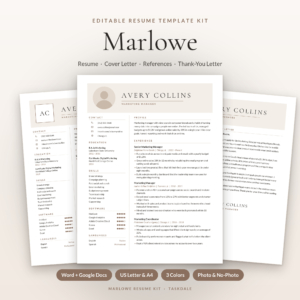
Marlowe Resume Template Kit
Price: $4.79 | Best for: Anyone who wants a resume, cover letter and references page in one clean style
Marlowe is a resume template kit for Word and Google Docs. The title lists a resume, cover letter, references and an ATS resume, in 1 to 3 page versions. It suits job seekers who want everything to match without fiddling with margins.
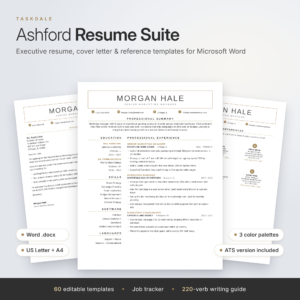
Ashford Resume Template Bundle
Price: $7.99 | Best for: Executives and senior applicants
Ashford is a resume bundle for Word and Google Docs, described as an executive and ATS-friendly design. It comes with a cover letter, a reference page and 1, 2 and 3 page CV options, plus a job tracker. It is a good fit when your resume is long and your references are high level.
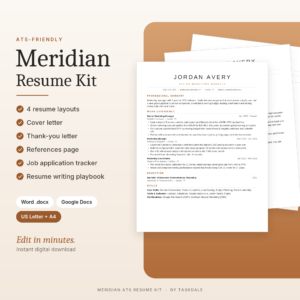
Meridian ATS Resume Template Kit
Price: $6.95 | Best for: ATS-minded applicants who like to track every application
Meridian is an ATS resume template kit for Word and Google Docs. The title lists a resume, cover letter and references, plus a job tracker. It suits people who are applying to many roles and want a place to log each one.
When to send your references page
Do not attach it to your first application unless the posting asks. Most do not, and an unrequested page adds clutter. Wait for the signal before you send a references page for resume packets. It usually shows up as a line in an email: “Could you send three professional references?”
When it comes, reply within the hour if you can. Attach the page as a PDF so the layout cannot shift, name the file something clear like “Jordan-Lee-References.pdf,” and keep your email short. Two sentences are enough.
A few other points on timing. If you are applying through an online form that has boxes for references, fill them in using the same details as your page. If a recruiter asks for references at the very first call, that is a bit unusual, so politely say you will send them once you have spoken to the hiring manager. And if you are currently employed, say so. Most employers will not contact your current boss until you accept an offer.
Common mistakes on a references page for resume packets
Most mistakes are small, and they add up.
Old or wrong details
A phone number from three jobs ago is the classic. Check every line the week you send it. If a person has moved on, ask for their new details or choose someone else.
Too many names
Seven references tells the employer you could not decide. Three is plenty. Keep a spare in reserve for the rare request for four.
No heads up
We covered this, but it is worth repeating because it causes the most trouble. A reference who is caught off guard sounds unsure, and unsure sounds like a warning.
A mismatched look
If the page does not match your resume, it reads as a rushed add-on. Same font, same header, same spacing. That is all it takes.
Adding it to the resume itself
Resume space is for achievements. Keep the names off that page unless an employer specifically asks for them there.
A simple example to copy
Picture a marketing coordinator named Dana. Her references page has her name and email across the top, then the title “Professional References.” Below that, three blocks. The first is her former manager, with a line that reads “Supervised my work on email campaigns for two years.” The second is a teammate from the design group. The third is a client contact who worked with her on a product launch.
Each block is the same size and shape. A recruiter can skim it in ten seconds and knows exactly who to call and why. That is the whole goal.
You can build the same thing in any word processor. A template just saves you the fiddling, and gets the spacing right the first time.
How the three kits compare
All three are designed for Word and Google Docs and all three include a references page. Here is how they differ at a glance.
| Product | Format | Price | Best for | Link |
|---|---|---|---|---|
| Marlowe Resume Template Kit | Word and Google Docs, 1 to 3 page versions | $4.79 | Clean, matching set | View |
| Ashford Resume Template Bundle | Word and Google Docs, 1, 2 and 3 page CV | $7.99 | Executive and senior roles | View |
| Meridian ATS Resume Template Kit | Word and Google Docs kit | $6.95 | ATS focus with a job tracker | View |
If you are unsure, start with the one whose look you would be proud to see on a hiring manager’s screen. Design is personal, and you will use it for years.
Frequently asked questions
Should I put “references available on request” on my resume?
No. Employers assume you have references, so the line wastes space. Use that space for a result or a skill instead. Keep your references page for resume packets separate and send it when someone asks for it, which is usually late in the hiring process.
How many references should I list?
Three is the standard. Some employers ask for two or four, so keep a spare name ready. Quality matters more than count. Three people who can speak clearly about your work will do more for you than six who barely remember it.
Can I use a personal reference?
Only if the employer asks for one, or if you have no work history yet. A teacher, coach, volunteer lead or community leader can work in that case. Avoid relatives. Pick someone who has watched you do real work and can give a specific example.
Do I need a references page if I have a cover letter?
Yes, a references page for resume packets and a cover letter do different jobs. The cover letter explains why you want the role. The references page proves other people trust you. Many employers want both, so having a matching set ready makes you look prepared and saves you a rush later.
What file format should I send?
PDF, almost always. It keeps your layout fixed on any screen or phone. Build the page in Word or Google Docs, then export it. Name the file clearly with your name and the word References so nobody has to hunt for it in their inbox.
Your next step
So, the short version: choose three people who know your work, ask each of them, and put them on a clean page that matches your resume. Do it this week, before an employer asks.
If you want the whole set in one go, start with the Marlowe Resume Template Kit for a simple matching look, or pick the Ashford Resume Template Bundle if you are applying at a senior level. Either way, you will have a references page for resume packets that is ready before the request arrives.