Senior hiring managers do not read resumes the way entry-level screeners do. They have seen a thousand. They skim for scope, results and judgment, and they decide in the first half page if you belong in the final round. Your layout either helps them or gets in their way.
That is what an executive resume template is for: a clean frame that lets your track record do the talking. Here is what senior readers expect, and how to build it.
Quick picks
| Product | Best for | Price | Link |
|---|---|---|---|
| Ashford Resume Template Bundle | Senior leaders who want an executive and ATS-friendly set | $7.99 | View |
| Northline Modern Resume Template Kit | A modern, clean resume layout for experienced applicants | $7.49 | View |
What makes an executive resume template different
A junior resume says what you can do. An executive resume says what you have already done, at what size, and with what result. That shift changes everything about the layout.
There is less decoration and more white space. Fewer bullet points per job, and each one carries weight. Headings are quiet. Fonts are plain. Nothing on the page competes with the numbers. When the person reading is deciding whether to put you in front of a board or a CEO, they want calm confidence, not a design show.
A good executive resume template also handles length well. Senior careers are long, and two pages is normal. Some roles justify three. The template needs to hold that without looking crowded or leaving a stray line on page three.
What senior hiring managers expect to see
Think of the reader as a busy person with a pile of folders and fifteen minutes. These are the things they look for.
A short, sharp summary at the top
Three or four lines. Who you are, the kind of organization you lead in, and the scale of what you handle. For example: “Operations executive with 15 years running multi-site logistics teams of up to 300 people.” Skip the adjectives. Facts do the work.
Scope in numbers
Team size, budget, number of locations, revenue you were responsible for. These numbers tell the reader what level you operate at, faster than any title can. Use only figures that are true and that you can discuss in detail, because you will be asked.
Results, not duties
“Responsible for the sales team” tells them nothing. “Grew regional sales from $4M to $7M over three years” tells them everything. Lead each bullet with the outcome, then add how you got there in a few words.
A clear career path
Executives are expected to show growth. Each role should look like a step up in scope or responsibility, or at least a sensible move. Gaps and sideways steps are fine, but a short line of context helps.
Leadership beyond the job
Board seats, advisory roles, speaking, mentoring, industry groups. Keep it brief, but include what is real. These show that people outside your company trust you.
How long should an executive resume be?
Two pages for most senior candidates. Three if you have a very long record with real depth, and only if every line earns its place. One page is possible for someone newly in a senior role, but it rarely does a long career justice.
The trick is to give your recent ten to fifteen years most of the space. Roles from twenty years ago can shrink to a single line with title, company and dates. The reader cares most about what you did lately, and a tight older section keeps the page from sprawling.
If you are tempted to cut the font to 9 points to fit everything on two pages, stop. Cut content instead. A reader squinting at tiny text will quit before reaching your best result.
Layout rules for an executive resume template
Here is the short checklist I give anyone building one.
- Use one clean font family, in a readable size. Eleven or twelve points is fine for body text.
- Keep margins generous. Tight margins feel crowded and anxious.
- Put your name, city, phone and email at the top. Skip the street address.
- Use bold sparingly, for job titles and company names only.
- Keep the dates aligned in one column, so the eye can run down your career quickly.
- Save as PDF unless the employer asks for Word.
Color is allowed, but a little goes a long way. One quiet accent color in the headings is plenty. Anything brighter looks out of place for a seat at the top table.
Do you need to pass the ATS?
Yes, even for senior roles. Many companies and recruiters run resumes through applicant tracking systems before a person sees them. Executive search firms may not, but the larger employers often do.
The fix is simple. Keep your structure plain: standard headings such as Summary, Experience and Education, text you can select with your cursor, and no text boxes holding key details. Avoid putting your contact details inside the header area of the file, where some systems skip them. If a template is described as ATS-friendly, it is built with this in mind.
It still needs to look good for humans. The best templates do both: clean for the software, calm and professional for the person who finally reads it.
Two executive resume template options on Taskdale
Building from scratch takes hours, and the formatting fights you at every turn. A ready-made frame saves that time so you can put your energy into the content. Taskdale has two options worth a look.
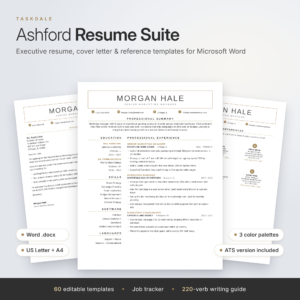
Ashford Resume Template Bundle
Price: $7.99 | Best for: Senior leaders who want an executive and ATS-friendly set
Ashford is a resume template bundle for Word and Google Docs. The title describes an executive and ATS-friendly resume, plus a cover letter and reference page, in 1, 2 and 3 page CV versions with a job tracker. It is the closest match here for senior candidates who want length options and matching documents.
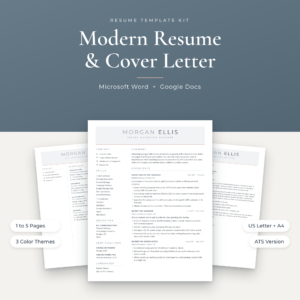
Northline Modern Resume Template Kit
Price: $7.49 | Best for: A modern, clean resume layout for experienced applicants
Northline is a modern resume template kit for Word and Google Docs. The title lists a modern design and a kit format. It suits experienced applicants who want a current, tidy layout they can adapt to their own career story.
A quick note on choosing. Ashford is the one built around the executive and ATS-friendly brief, with page-length choices and the extra documents senior applicants usually need. Northline is a modern resume kit, so it works well if you prefer a fresher look and plan to adapt it yourself.
Write the content before you choose the layout
Here is a mistake that costs people days. They open a template, start typing, and spend the evening fighting margins. Instead, write your content in a plain document first. Get the summary, the roles and the results down. Then drop them into the template.
This keeps you focused on the story, not on how it looks. It also makes it easy to switch templates later if one does not feel right.
When you write each bullet, ask three questions. What changed because of what I did? How big was it? How do I know? If you can answer all three, the bullet belongs. If you cannot, it is probably a duty, and a duty belongs on a shorter list.
A simple before and after
Before: “Managed the finance department and oversaw budgeting.”
After: “Led a 12-person finance team and rebuilt the annual budget process, cutting close time from ten days to six.”
Same job. Very different impression. The second line shows size, action and result in one sentence. (These are sample lines. Use your own real numbers.)
Put the right words on the page
Language matters at this level. Pick verbs that show ownership: led, built, rebuilt, negotiated, turned around, launched. Avoid weak openers like “helped with” or “assisted in,” unless that is truly what happened. And keep sentences short. A tight line like “Opened three regional offices in 18 months” reads better than a long one packed with clauses.
Match the vocabulary of the job posting too. If the role asks for “P&L ownership,” say so in those words, provided it is true. That helps the software and it helps the person, because they see their own language reflected back at them.
Finally, read the whole resume as the hiring manager would. Cover everything below the top third of page one and ask: would I call this person? If the answer is not a clear yes, the summary and first bullets need work. That top third is the sales pitch for everything else.
Mistakes senior candidates make
Listing every job ever held
You do not need to show 30 years in full. Trim the early roles to one line each, or group them under “Earlier experience.”
Using buzzwords in place of proof
“Visionary leader” and “strategic thinker” are easy to claim and impossible to check. Show the result and let the reader draw the conclusion.
Burying the best result
Put your strongest achievement in the first bullet of each role. The reader may not reach the fifth.
Sending the same resume everywhere
Adjust the summary and the top bullets to match the role. A chief operating officer role and a general manager role weigh different strengths, even if the careers look alike.
Skipping the cover letter
At the executive level, a short cover letter often matters. It explains why this company and why now. Using a template set that includes one keeps the look consistent.
How the two options compare
| Product | Format | Price | Best for | Link |
|---|---|---|---|---|
| Ashford Resume Template Bundle | Word and Google Docs, 1, 2 and 3 page CV | $7.99 | Executive and ATS-friendly set with job tracker | View |
| Northline Modern Resume Template Kit | Word and Google Docs kit | $7.49 | Modern look, adaptable layout | View |
Both are digital downloads you edit yourself. If your priority is a senior-level structure with page options and matching documents, start with Ashford. If you want a modern feel and are comfortable shaping the content yourself, Northline is a solid pick at a lower price.
Frequently asked questions
What is an executive resume template?
It is a pre-built resume layout designed for senior roles. It gives you room for a summary, scope, results and a longer career history. The design is clean and restrained so your achievements stand out. You add your own content and adjust it for each role you apply to.
How many pages should an executive resume be?
Two pages suits most senior candidates. Three can work for a very long, deep career, as long as every line adds value. Give your recent roles the most space and shrink older ones to a single line each.
Should an executive resume include a photo?
In the United States, usually not. Photos are more common in some other countries, so follow the norm for the market you are applying in. When in doubt, leave it out and let your results lead.
Is an ATS-friendly template really needed for senior jobs?
It helps. Many larger employers and recruiters use applicant tracking systems at every level. A plain, well-structured layout lets the software read your details correctly. It also keeps the page tidy for the human reader who follows.
Can I edit these templates myself?
Yes. Both options listed here are made for Word and Google Docs, so you can type straight into them. Write your content first, paste it in, and then adjust spacing so each page ends cleanly.
Your next step
So, the short version: write your results first, keep the layout calm, and aim for two pages. Then let a good frame hold it together.
If you want a senior-level structure with matching letters, grab the Ashford Resume Template Bundle. If you prefer a modern look to adapt yourself, try the Northline Modern Resume Template Kit. Either way, you will have an executive resume template ready to send this week.