You do not need design skills to make a good resume. You need a free Google account, about an hour, and a layout somebody else already built. A resume template google docs file opens in your browser, saves itself as you type, and exports to PDF in two clicks. No installs. No fighting with margins.
This guide walks you through the steps, from opening the file to sending it, and points out four Taskdale templates made for Word and Google Docs.
Quick picks
| Product | Best for | Price | Link |
|---|---|---|---|
| Sloane Resume Template | A modern photo resume at the lowest price | $4.49 | View |
| Linen Resume Kit | Photo resume with a thank-you letter and tracker | $4.70 | View |
| Marlowe Resume Template | A minimalist look in US Letter and A4 | $4.79 | View |
| Alder Resume Template with Photo | Minimalist design with a job tracker | $4.79 | View |
Why use a resume template google docs file
Google Docs is free, it works on almost any computer, and your file lives online. If your laptop dies the night before an interview, you log in on a friend’s machine and your resume is right there. That alone wins many people over.
A ready made template adds one more thing: structure. Instead of building a page from nothing, you replace placeholder lines with your own details. Headings, spacing and fonts are set. You focus on what you did at work, which is the part a hiring manager reads.
There is a catch. Some free templates online look fine on screen and break when you export them. Lines jump, fonts change and the second page appears from nowhere. A good paid template is tested for Word and Google Docs, so it holds its shape. For a few dollars, that peace of mind is worth having.
Step by step: how to make a resume in Google Docs
Here is the whole process, from a blank screen to a finished file. Take it in order and you will not get lost.
Step 1: Get your template into Google Docs
After you download a Taskdale kit, you will have a Word file or a link for the Google Docs version, depending on the product. If you have a Word file, open Google Drive, click New, choose File upload, and select it. Then right click the file and open it with Google Docs. Next, go to File and choose Save as Google Docs to turn it into an editable copy.
Step 2: Make your own copy
Before you type anything, copy the file. Go to File, then Make a copy, and give it a name like “Maria-Lopez-Resume”. Keep the original untouched. If you ruin the layout later, you can start again without buying anything.
Step 3: Replace the placeholder text
Click into each line and type over it. Start with your name and contact details. Use a professional email, not the one from high school. Then update the job title line so it matches the role you want, not your last job.
Step 4: Write your experience
List jobs from newest to oldest. Under each, add three to five short bullet points. Start each with a verb, like “Managed”, “Built” or “Reduced”. Add a number where you can. “Handled 40 customer calls a day” beats “answered phones”. If a bullet does not show a result or a skill, cut it.
Step 5: Add skills and education
Keep skills to the ones that match the job post. Ten honest skills beat thirty vague ones. Education goes below experience unless you are a recent graduate, in which case move it up.
Step 6: Swap the photo, if your template has one
Click the placeholder picture, then choose Replace image from the toolbar and upload yours. Resize with the corner handles, holding Shift so the shape does not stretch. If you would rather skip the photo, use the ATS version that comes with the kit.
Step 7: Check the length
Scroll to the bottom. Does the last page hold only two lines? Trim the wording instead of shrinking the font. If you have a lot to say, choose the two or three page version of the template.
Step 8: Download as a PDF
Go to File, then Download, then PDF document. Open the PDF yourself and look at every page. Check that links work and nothing moved. Only then send it.
Four resume template google docs options from Taskdale
Each resume template google docs pick here is made for Word and Google Docs, with a cover letter and references in the same style. They differ in look, extras and price.
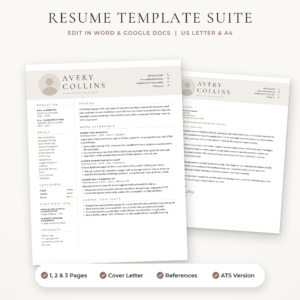
Sloane Resume Template for Word & Google Docs
Price: $4.49 | Best for: a modern resume with photo on a small budget
Sloane is a modern resume with photo, a cover letter and references. It includes an ATS resume and 1, 2 and 3 page CV versions, in US Letter and A4.
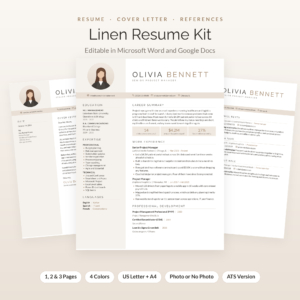
Linen Resume Kit
Price: $4.70 | Best for: a photo resume with every follow-up document
Linen is a resume template with photo for Word and Google Docs. It adds a cover letter, references and a thank-you letter. You also get 1, 2 and 3 page CV versions, an ATS resume and a job tracker.
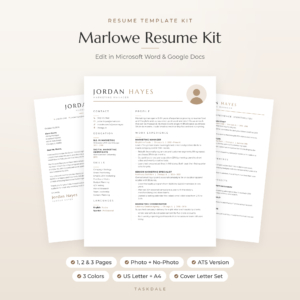
Marlowe Resume Template for Word & Google Docs
Price: $4.79 | Best for: a minimalist layout with a photo
Marlowe is a minimalist resume with photo, a cover letter and references. It has 1, 2 and 3 page CV versions and an ATS resume, in US Letter and A4.
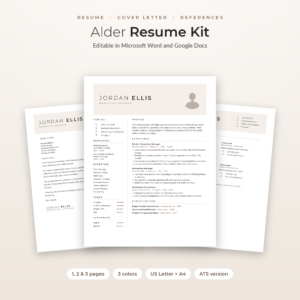
Alder Resume Template with Photo
Price: $4.79 | Best for: a minimalist design plus a job tracker
Alder is a minimalist resume with photo for Word and Google Docs, with a cover letter, references, an ATS resume and a job tracker. It comes with 1, 2 and 3 page CV versions.
Side by side
| Product | Format | Price | Best for | Link |
|---|---|---|---|---|
| Sloane | Word and Google Docs, 1 to 3 pages, ATS version | $4.49 | Modern look, lowest price | View |
| Linen | Word and Google Docs, 1 to 3 pages, ATS version | $4.70 | Thank-you letter and tracker | View |
| Marlowe | Word and Google Docs, 1 to 3 pages, ATS version | $4.79 | Minimalist look | View |
| Alder | Word and Google Docs, 1 to 3 pages, ATS version | $4.79 | Minimalist look with job tracker | View |
Fixing common problems in a resume template google docs file
Even a clean template can act strange the first time. These are the usual troubles and the quick fix for each.
The fonts look different. This happens when a font in the file is not available in Google Docs. Pick a similar one from the font menu and apply it to the whole document, not line by line, so the match stays tidy.
A bullet will not line up. Click inside the bullet, open the ruler at the top (View, then Show ruler) and drag the small indent markers until the text sits where you want it. Once you fix one, you can copy that formatting to the others with the paint format tool.
The page count changes after you export. Check your margins and your line breaks, and look for empty lines at the end of a section. Blank paragraphs cause surprise extra pages more often than anything else.
The photo moves. Photos in many templates are set to sit inside the text flow. If yours jumps, click it and choose the “In line” option, or the fixed position option, from the image toolbar. Then nudge it back.
None of this is hard. It only looks scary the first time, like a new kitchen where you cannot find the spoons.
Make your Google Docs resume stand out for the right reasons
A good resume template google docs file gets you a clean page. Content gets you the interview. So spend your last twenty minutes on these.
Write a short summary at the top, two or three lines at most. Say who you are, what you do best and what you want next. Something like “Customer service lead with six years in retail, focused on cutting wait times and training new staff.” It tells the reader why your page deserves the next minute.
Use words from the job post. If it asks for “inventory control” and you did “stock management”, write it their way. It helps both people and software notice the match.
Ask a friend to read it. Not to check spelling only, but to tell you what they remember afterward. If they cannot say what you are good at, the page is too crowded. A fresh pair of eyes finds the mess you stopped seeing an hour ago.
Using Google Docs on a phone or tablet
You can edit on the go with the Google Docs app, and it is fine for small fixes like a new phone number or a changed date. For real writing, use a laptop. Small screens make it hard to see the whole page, and you will miss spacing errors.
One thing worth doing on your phone is a final read. Open the PDF from your email, the way a recruiter might, and scroll through it. If the text is readable without zooming, you are in good shape. Many hiring managers skim on a phone between meetings.
Sharing and keeping your resume safe
Google Docs makes it easy to share a link, and that is handy, but a PDF is better for job applications. A link can change if you edit the file later, and a recruiter may open it long after you sent it. Send the PDF and keep the Google Doc as your working copy.
Create a folder in Drive called “Job Search”. Put your resume, cover letter and references page inside, along with the tracker if your kit has one. When you apply somewhere new, copy the files, rename them with the company name, and edit the copies. Your master version stays clean.
If you get stuck at any point, take a break and come back. Resume work feels harder at the end of a long day. A short walk and a fresh look the next morning often fix problems that seemed impossible an hour earlier, and the document will still be there, saved and waiting.
Frequently asked questions
Is there a resume template google docs users can edit for free?
Yes, Google Docs has free options built in. They are simple, and some people find them plain. Paid templates like Sloane, Linen, Marlowe and Alder add a photo option, a cover letter, references and an ATS version, all in matching styles, for under $5.
How do I open a Word resume template in Google Docs?
Upload the file to Google Drive, right click it, choose Open with, then Google Docs. For a clean copy, go to File and pick Save as Google Docs. Check the layout once, since small shifts can happen when a file moves between programs.
Can I add a photo to a Google Docs resume?
Yes. Click the placeholder image, choose Replace image, then upload your picture. Hold Shift while resizing so the proportions stay right. Photos suit some countries and employers and not others, so check the job post first.
Should I send a PDF or a Google Docs link?
Send a PDF unless the employer asks for something else. It keeps the layout locked, opens everywhere and cannot change after you send it. Use File, Download, PDF document, and open the result once before attaching it.
How long should my Google Docs resume be?
One page for early careers, two for most experienced workers, three only for long senior histories. The Taskdale templates here include 1, 2 and 3 page versions, so you can pick the one that fits your real content.
Your next step
So, pick a resume template google docs layout and open it tonight. If you want the lowest price, Sloane is $4.49. If you also want a thank-you letter and a tracker, go for Linen. Upload it to Drive, make a copy, and fill in your last job first. One honest hour will give you a resume you are happy to send.