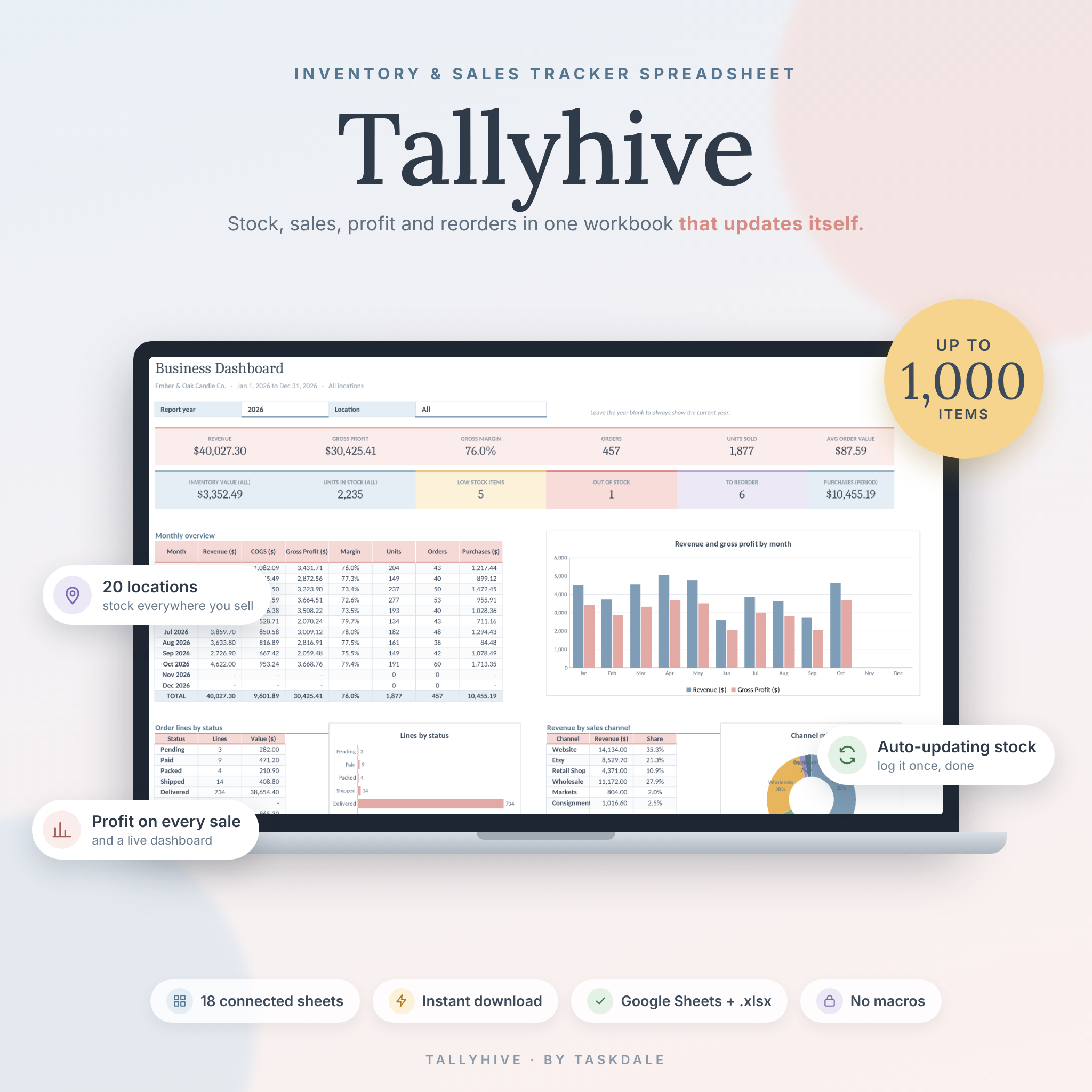


Tallyhive is an inventory tracker spreadsheet for small product businesses that want real stock control without paying for software every month. Log your purchases, sales and production once. On-hand stock, profit, reorder suggestions and a full dashboard update on their own, across up to 20 locations and 1,000 products and materials.
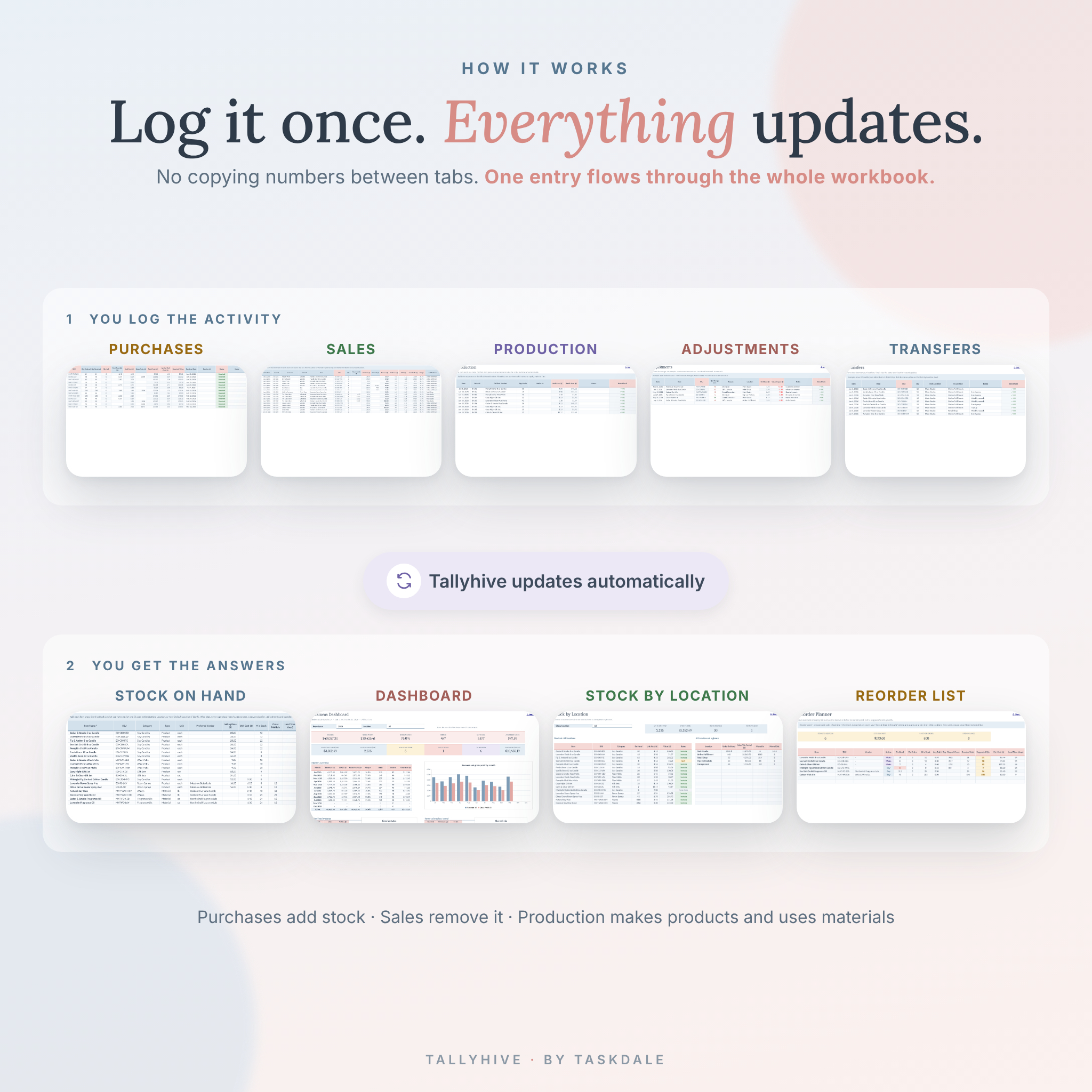
It started from a simple question: why do most inventory templates still make you copy numbers between tabs? Tallyhive doesn’t. One row in the right log is all it takes.
What this inventory tracker spreadsheet does
Think of it as the back office for a shop, studio or small warehouse. Every movement of stock has its own log, and everything else reads from those logs.
- Purchases add stock when it arrives, with partial deliveries, override costs and landed cost (shipping and duty spread across the units).
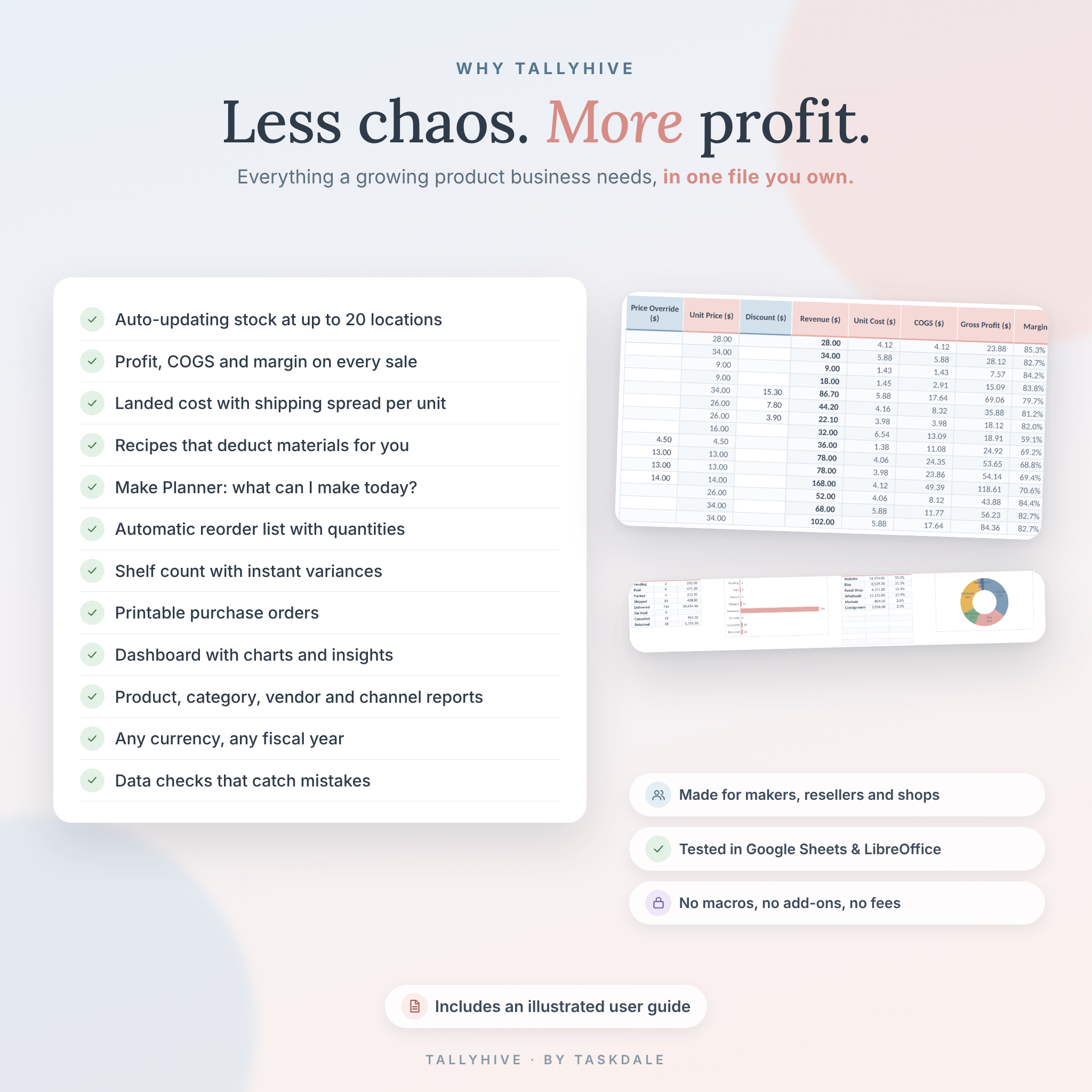
- Sales remove stock from the location it ships from and show price, cost, gross profit and margin on every line.
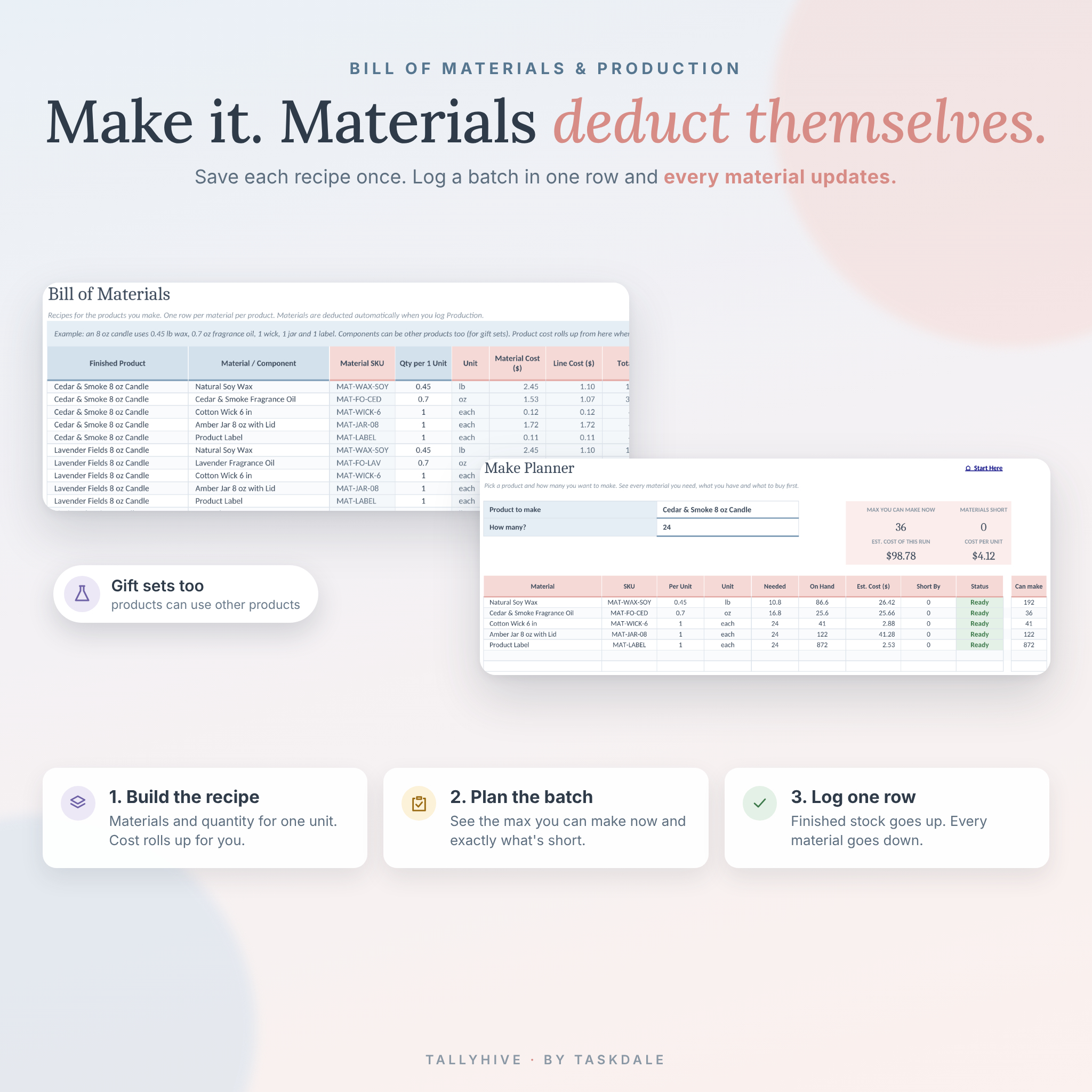
- Production adds finished products and deducts every material in the recipe automatically. No copying material lines across.
- Adjustments handle damage, loss, samples, returns and count corrections.
- Transfers move stock between your warehouse, shop, markets or consignment partners.
Who it’s for
Makers and Etsy sellers who buy materials and make what they sell. Candle, soap, jewelry and apparel brands. Online shops and resellers. Small retail stores, market vendors and wholesalers with stock in more than one place. If you have outgrown a basic stock list but don’t want a $50 a month inventory app, this is for you.
Features
Stock and inventory control
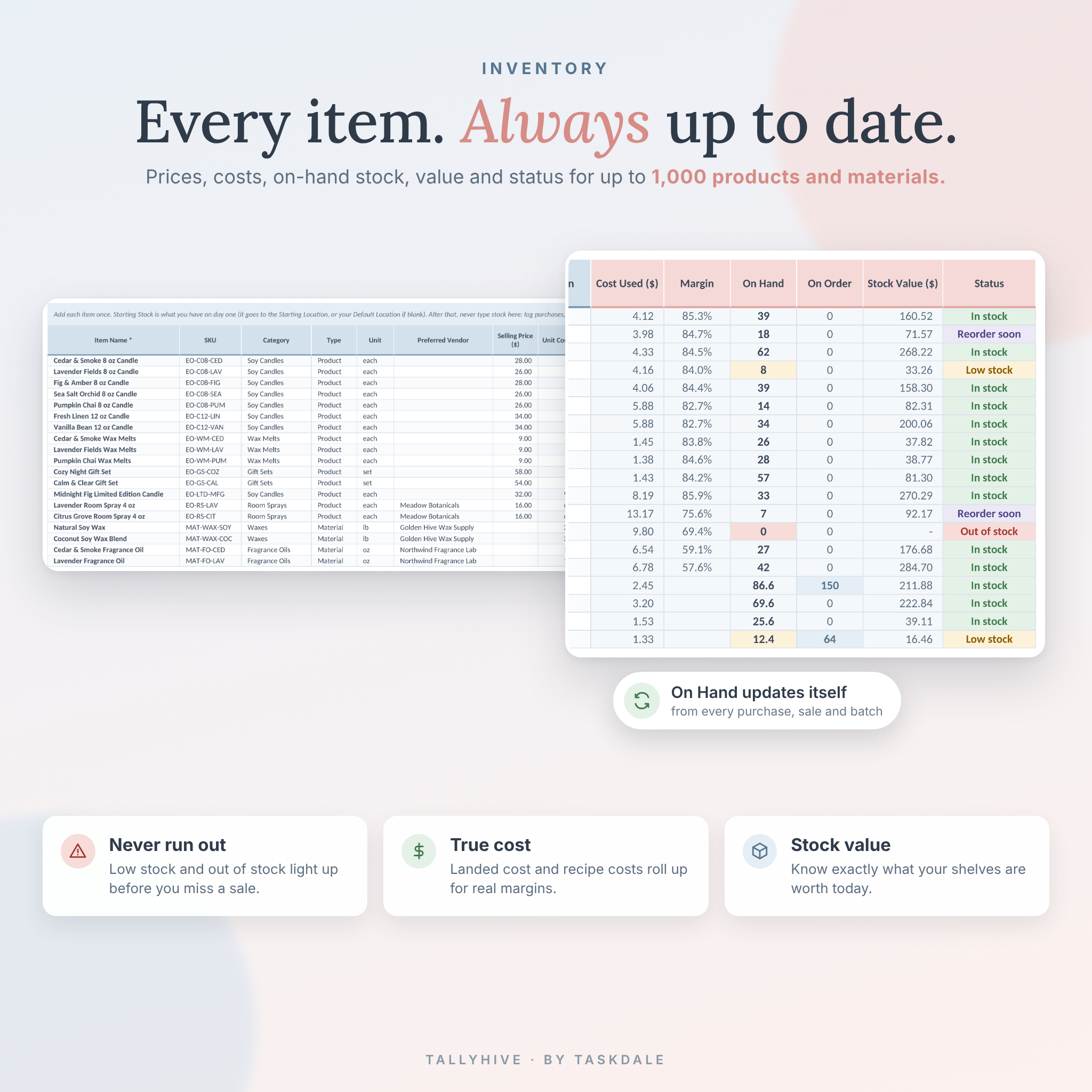
- Master inventory list for up to 1,000 items with SKU, category, type, unit, vendor, price, cost and notes
- Live on-hand count, units on order, stock value and a color-coded status: In stock, Reorder soon, Low stock, Out of stock
- Up to 20 locations, with a Stock by Location view and an all-locations summary
- Stock Count sheet: type what you counted and see the variance and its value straight away
- Two costing methods: fixed unit cost, or average landed purchase cost
Making products
- Bill of Materials for every product you make, including gift sets built from other products
- Product cost rolls up from the recipe when you leave the unit cost blank
- Make Planner: pick a product and a quantity to see what you need, what is short, the cost per unit and the most you can make right now
Restocking and purchasing
- Reorder Planner that reads your recent sales speed, lead times and minimum stock, then suggests how many to buy or make
- Suggested quantities round up to your pack size
- Printable purchase order built from your Purchases log in one click
- Vendor list with lead times, total spend, PO count and open quantities
Sales, profit and reporting
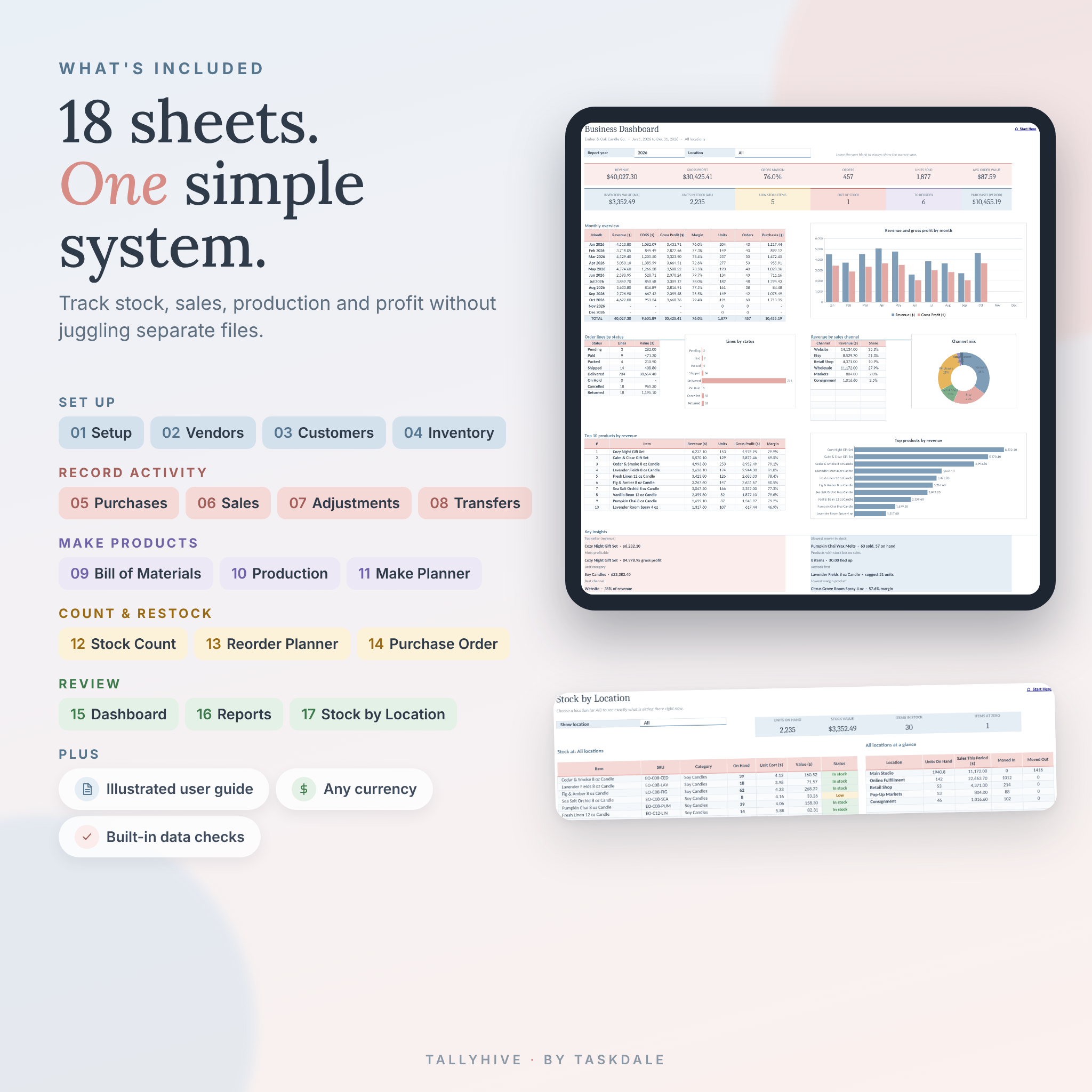
- Dashboard with revenue, gross profit, margin, orders, units sold, average order value and six stock alert cards
- Filter by year and location, with support for any fiscal year start month
- Monthly overview table and chart, order lines by status, channel mix and top 10 products
- Key insights in plain words: top seller, most profitable item, best category, best channel, slowest mover, what to restock first and lowest margin product
- Reports for product spotlight, category performance, top vendors and sales channels
- Optional customer list with order count, revenue and last order date
Built to stay accurate
- Data Check column on every log flags missing dates, unknown items, wrong locations and other mistakes
- Formula cells are locked (no password) so they can’t be overwritten by accident
- Dropdowns everywhere, so names always match
- One currency setting that every money label reads from
What’s included
- Tallyhive workbook (.xlsx) with 18 connected sheets: Start Here, Dashboard, Setup, Vendors, Customers, Inventory, Purchases, Sales, Adjustments, Transfers, Bill of Materials, Production, Make Planner, Stock Count, Stock by Location, Reorder Planner, Reports and Purchase Order
- Illustrated user guide (Word .docx) with a quick start, a walkthrough of every sheet, customizing tips, troubleshooting and FAQs
The workbook arrives clean and ready for your own data. The listing images show it filled with a sample candle business so you can see how it looks in use.
How it works
- Download the files right after checkout.
- Open the workbook and go to Setup. Add your business name, currency symbol, locations and categories.
- Add your items on the Inventory sheet with today’s stock as Starting Stock.
- Log purchases, sales and production as they happen.
- Check the Dashboard and Reorder Planner once a week.
File formats and software
- Workbook: Excel .xlsx file
- Guide: Word .docx file
- Tested in Google Sheets (free with a Google account) and LibreOffice Calc
- Uses only standard spreadsheet functions found in Microsoft Excel 2016 and newer. No macros, scripts or add-ons
- Works best on a laptop or desktop computer
Customizing
Change the currency symbol, fiscal year, default location and costing method from one Setup sheet. Add up to 20 locations, 30 categories and 12 sales channels, plus your own units and adjustment reasons. Need more rows? The guide shows how to add them so every formula keeps working.
Digital download
This is a digital product. Nothing is shipped. Your files are available to download as soon as your payment goes through.
Real ways sellers use it
- A candle maker logs a batch of 36 candles and watches wax, wicks, jars and labels drop on their own.
- An Etsy shop checks the Reorder Planner every Monday and orders packaging before it runs out.
- A boutique tracks stock at the shop, the stockroom and two consignment stores.
- A market vendor transfers 40 units to a weekend fair, sells 28 and sees exactly what comes back.
- A wholesaler uses Price Override for trade pricing and sees the margin difference by channel.
FAQ
Can I use this inventory tracker in Google Sheets?
Yes. Upload the .xlsx to Google Drive and open it with Google Sheets. We tested it there.
Does it work for a reseller who doesn’t make anything?
Yes. Skip the Bill of Materials, Production and Make Planner sheets. Everything else works the same.
How many products and locations can it handle?
Up to 1,000 items and 20 locations, with room for 3,000 sales lines and 2,000 purchase lines. You can add more rows later.
Can I use my own currency?
Yes. Type your symbol on the Setup sheet and every money label updates.
Does it connect to Etsy or Shopify?
No, it’s a standalone spreadsheet. Many sellers export their orders and paste the date, item and quantity into the Sales sheet.
Is there a monthly fee?
No. You pay once and the file is yours.
Will it calculate profit for me?
Yes. Each sale shows revenue, cost of goods, gross profit and margin, and the Dashboard totals them by month.
License
Personal license for one business. Please don’t share, resell or republish the workbook or guide. Tallyhive is a record-keeping tool and not financial or tax advice.

Reviews
There are no reviews yet.