Every year has the same money surprises. Car insurance renews in February. Back-to-school costs land in August. December arrives with gifts, travel and a heating bill that doubles. None of these are actually surprises. They just feel like it when you plan one month at a time.
An annual budget template for the year ahead lets you see all twelve months at once, so the expensive ones stop catching you out. This guide walks through planning next year in four steps: look back at this year, map the money calendar month by month, turn goals into monthly amounts, and build a baseline with seasonal lines. There is a worked example, a quarterly check-in routine and the mistakes that trip people up by spring.
Quick picks: annual budget templates
| Product | Best for | Price | Link |
|---|---|---|---|
| Northstar Budget Planner Spreadsheet | All 12 months in one workbook with a month picker | $12.99 | View |
| Seaglass Annual Budget Spreadsheet for Excel | A real bill calendar for the year | Original price was: $19.99.$9.99Current price is: $9.99. | View |
| Sagebloom 50/30/20 Budget Planner | Yearly goals, sinking funds and savings challenges | $14.99 | View |
| Ultimate Annual Budget Spreadsheet | An annual dashboard in Sheets, Excel or LibreOffice | $6.00 | View |
Why plan the whole year, not just next month
A monthly budget is great at handling rent and groceries. It is terrible at handling anything that only happens once or twice a year, because those costs are invisible until the month they arrive. Then they land on a credit card.
An annual view fixes that in a few ways:
- Big months stop being shocks. If you can see that August needs $650 more than usual, you can start setting money aside in January.
- Goals get real dates. “Save for a trip” becomes “$2,400 by July, which is $400 a month from January.”
- You notice patterns. Twelve months side by side show which categories creep up every quarter.
- It feels calmer. Knowing next December is already handled, in January, is a surprisingly good feeling.
It takes one or two evenings. The rest of the year then runs on a short monthly update.
Step 1: look back at this year
Before planning next year, find out what this one actually cost. Download 12 months of bank and card statements, or as many as you can get. Then total spending into broad categories: housing, utilities, transport, groceries, eating out, kids, health, gifts, travel, subscriptions and so on.
You are looking for three things:
- Your true monthly average for each everyday category.
- Every non-monthly cost and the month it hit: insurance renewals, registrations, annual memberships, holidays, birthdays, medical bills.
- The surprises. Costs you did not see coming. A new tire, a vet emergency, a wedding invitation. Most years have three or four.
Write the surprises down even though they will not repeat exactly. Next year will have its own versions, and knowing the rough size helps you set a realistic buffer. If this year’s surprises came to $1,800, a $150 monthly buffer is not paranoid. It is honest.
If you have done this before, our earlier guide on planning next year with an annual budget template covers the review step in more depth.
Step 2: map the money calendar month by month
Now take every non-monthly cost and place it on a twelve-month grid. This is the heart of an annual budget. Here is a sample calendar for a family of four. Your months will differ, but the shape is common.
| Month | Extra costs | Approx. amount |
|---|---|---|
| January | Gym renewal, post-holiday card balance | $180 |
| February | Car insurance (6 months) | $540 |
| March | Two birthdays, spring clothes for kids | $260 |
| April | Tax prep, home maintenance | $300 |
| May | Mother’s Day, end-of-year teacher gifts | $120 |
| June | Summer camp deposits | $400 |
| July | Family trip | $2,400 |
| August | Car insurance, back to school, car registration | $1,050 |
| September | Kids’ activity fees for the term | $350 |
| October | Halloween, heating service | $190 |
| November | Thanksgiving travel, early gift shopping | $450 |
| December | Gifts, holiday food, decorations | $900 |
| Total | $7,140 |
$7,140 spread across a year is $595 a month. Without a plan, it shows up as one terrible August and one terrible December. With a plan, it is a steady monthly transfer into sinking funds, and those months feel almost normal.
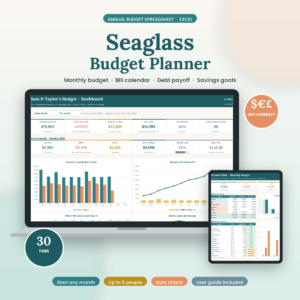
Seaglass Annual Budget Spreadsheet
Price: Original price was: $19.99.$9.99Current price is: $9.99. | Best for: seeing every due date on a calendar
Seaglass is a 30-tab annual budget spreadsheet for Excel. You enter your categories, recurring paychecks and bills once, and it fills all twelve monthly tabs, an annual dashboard with a switchable focus month and top 10 spending chart, and a bill calendar showing paid, due and overdue status. A paycheck planner shows what is due between paydays, and there are tabs for sinking funds and debt. Start by adding every yearly and twice-yearly bill.
Step 3: turn yearly goals into monthly amounts
Pick two or three money goals for the year. More than that and none of them get enough. Good ones are specific and dated:
- Build the emergency fund from $1,200 to $6,000 by December.
- Pay off the $4,300 credit card by October.
- Save $2,400 for the July trip.
Then do the division. $4,800 more for the emergency fund over 12 months is $400 a month. $4,300 of card debt by October is about $430 a month on top of the minimum, plus a bit for interest. The trip is $2,400 over 6 months if you start in January, or $400 a month.
Add those three together and you get $1,230 a month. If that is more than you can manage, change the dates or the amounts now, in November, not in a panic next June. Moving the emergency fund target to $4,000 or stretching the card payoff to December can make the whole plan fit. Adjusting on paper is free.
For a deeper look at linking goals to a budget, see our guide on planning your money year with a budget and goal planner.
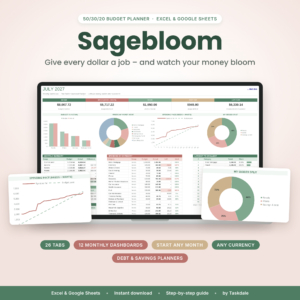
Sagebloom 50/30/20 Budget Planner
Price: $14.99 | Best for: tracking yearly goals and sinking funds
Sagebloom is a 26-tab budget spreadsheet for Excel and Google Sheets with monthly dashboards, an annual overview, an auto-filled bill calendar, a debt payoff planner, sinking funds, net worth and two savings challenges. You log each transaction once and every tab updates. Its 50/30/20 dashboard compares your real split with your target, and you can change the ratio in Settings. Set up your two or three yearly goals as sinking funds first.
Step 4: build the baseline and the seasonal lines
Now combine everything into one annual plan. It has two layers.
The monthly baseline
These are the costs that stay roughly the same every month: housing, utilities, groceries, transport, phone, childcare, minimum debt payments, subscriptions, personal spending. Use this year’s averages, adjusted for anything you know will change, like a rent increase in March.
The seasonal layer
This is the money calendar from step 2 and the goals from step 3, turned into monthly sinking fund transfers. Some people fund each one separately. Others pool them into one “irregular costs” fund and track the balances on paper.
A worked annual summary
The Reyes family take home $6,800 a month, or $81,600 a year. Here is the top line of their plan.
| Layer | Monthly | Yearly |
|---|---|---|
| Monthly baseline (housing, food, transport, childcare and more) | $4,650 | $55,800 |
| Seasonal costs fund (money calendar) | $595 | $7,140 |
| Emergency fund goal | $400 | $4,800 |
| Extra credit card payment | $430 | $5,160 |
| Retirement top-up | $300 | $3,600 |
| Fun and personal money | $275 | $3,300 |
| Buffer for surprises | $150 | $1,800 |
| Total | $6,800 | $81,600 |
The family trip is already inside the seasonal fund, so it does not need its own line here. It balances. And when next August comes, the $1,050 for school and the car is sitting there waiting. The Reyes household called the first such August “the quietest back-to-school we have ever had.” That is the payoff.
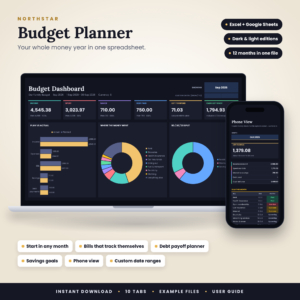
Northstar Budget Planner Spreadsheet
Price: $12.99 | Best for: running all 12 months in one file
Northstar holds all twelve months in one Excel and Google Sheets workbook. Pick a month from a dropdown and the dashboard follows, or view the full year or custom dates for pay periods. A Budget Plan shows what is left to assign each month, bills are marked Paid, Due soon or Overdue, savings goals show months left and the monthly amount needed, and snowball and avalanche payoff can be compared side by side. It comes in dark and light versions. Fill in the Budget Plan for January first.
Quarterly check-ins keep the year honest
A yearly plan is a forecast, and forecasts drift. Four short check-ins, one per quarter, keep it useful. Book them now: the first weekend of April, July, October and January.
At each one, spend about 30 minutes on these questions:
- Is each goal on track? If the card balance should be $3,000 by April and it is $3,400, what changes?
- Did any baseline category run high three months in a row? Raise it, and trim something else.
- What is coming in the next three months on the money calendar? Is the seasonal fund ready?
- Did anything change: a raise, a new car, a new baby, a job move? Update the plan.
Quarterly is often enough to catch drift and rare enough to feel light. Many people find the April check-in is the one that saves the year, because that is when January’s good intentions meet real life.
Setting up an annual template that lasts
A few setup choices make the difference between a file you use for 12 months and one you abandon in March.
- One file for the whole year. Not twelve separate files. One workbook where every month feeds a yearly dashboard.
- Enter recurring items once. Paychecks and bills should fill all months automatically.
- A month picker or clear tabs. You should reach any month in one click.
- Protected formulas. Colored input cells and locked calculations stop accidental breakage.
- Phone access if you need it. Google Sheets lets you log from anywhere. Our guide to setting up a Google Sheets budget in one evening covers this.
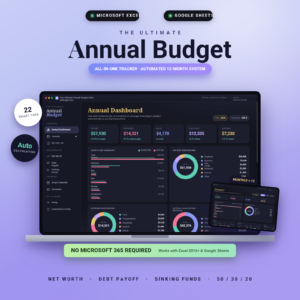
Ultimate Annual Budget Spreadsheet
Price: $6.00 | Best for: a year at a glance in any spreadsheet app
The Ultimate Annual Budget Spreadsheet has an annual dashboard that shows the whole year on one page, plus twelve monthly dashboards you can start from any month. It also includes a sinking funds tracker, debt payoff calculator, net worth tracker, accounts dashboard and smart calendar, across 22 tabs in Excel, Google Sheets or LibreOffice. You only fill the gold cells, and it comes in three color themes with sample data. Use Easy Setup to enter next year’s income and bills.
Planning the year together
If you share money with a partner, plan the year as a pair. One person building the plan alone and presenting it as finished rarely goes well. The other person did not choose the goals, so they do not feel like theirs.
Try a two-part planning date. In the first session, about an hour, each person brings a list: three things they want from next year’s money, and one thing that worries them. Maybe one of you wants a trip and the other wants the card gone. Maybe one of you is anxious about the car, which is 11 years old. Put both lists on the table and pick the two or three goals that matter most to both of you.
In the second session, a few days later, build the numbers. Fill the money calendar together, because each person remembers different costs. One remembers the dentist in April. The other remembers the cousin’s wedding in September and the $300 it will take to get there.
If you have kids old enough to understand, give them a small part too. Let a ten-year-old help plan the holiday fund, or choose between two summer outings with a price next to each. Children who see a plan made tend to grumble less when the answer is “that is not in this month’s budget.”
Finish with something nice: a takeout dinner from the fun line, or a walk. Planning money as a team should feel like a win, not a meeting.
Mistakes that sink an annual budget
Planning for a perfect year
No year goes to plan. Without a buffer, the first $400 surprise makes the whole budget feel broken. Keep a surprise line, sized from this year’s real surprises.
Too many goals
Five goals at $150 a month each rarely beat two goals at $375 each. Focus wins. Finish one, then roll its money into the next.
Forgetting raises and price rises
If you expect a raise in June or a rent increase in March, put it in the month it happens. A plan that ignores known changes goes stale by summer.
Setting it and never looking again
The quarterly check-ins are what make an annual plan work. Put them in your calendar tonight.
Frequently asked questions
How do I make an annual budget?
Review last year’s spending, list every non-monthly cost by month, set two or three yearly goals, then build a monthly baseline plus sinking fund transfers that cover the seasonal costs and goals.
When should I start planning next year’s budget?
November or December is ideal. You have most of this year’s numbers, and there is time to set up sinking funds before January.
What is the difference between an annual and a monthly budget?
A monthly budget covers one month at a time. An annual budget shows all twelve together, so yearly bills, seasonal costs and goals are planned in advance.
How much should I set aside for irregular expenses?
Add up last year’s non-monthly costs and divide by twelve. Many households find it is several hundred dollars a month.
How often should I review an annual budget?
Update it monthly with actual spending, and do a fuller review once a quarter to adjust goals and categories.
Your next step
This weekend, download this year’s statements and write down every cost that did not happen monthly, with the month it hit. Total it and divide by twelve. That number is your seasonal fund transfer for next year, and setting it up before January is the single best move you can make. When you want all twelve months in one file, start with the Northstar Budget Planner Spreadsheet.