A good meeting planner for agendas, notes and actions does three jobs in order. Before the meeting, it gives everyone a plan. During it, it catches what was decided. After it, it keeps chasing the actions until they are done. Most meeting notes only manage the middle job, which is why the same problem comes up again three weeks later with nobody sure who was meant to fix it.
This guide is for managers, team leads, committee members, freelancers with client calls, and anyone who runs a weekly meeting and wants it to be shorter and more useful. You will get a timed agenda you can copy, a simple way to take notes that are readable later, a rule for action items that stops things slipping, and four Taskdale tools for laptop, iPad or e-ink tablet.
The goal is modest. Fewer “wait, what did we agree?” moments. More meetings that end five minutes early.
Quick picks
| Product | Best for | Price | Link |
|---|---|---|---|
| HuddleKeep Meeting Planner App | Agendas, minutes and an action tracker on a laptop | $12.99 | View |
| Tidework 2027 Digital Work Planner | Meeting pages inside a full work planner on iPad | $17.49 | View |
| Inkframe Productivity Suite | A 150-meeting notebook for Paper Pro e-ink tablets | $24.99 | View |
| Smart Monthly Scheduler | Keeping meeting dates and appointments on one calendar | $2.00 | View |
The three parts of a meeting plan
Think of each meeting as having a before, a during and an after. A useful planner page has a space for each one.
- Before: the agenda. What will be discussed, in what order, for how long, and who leads each item.
- During: the notes. Who attended, the key points, and above all the decisions made.
- After: the actions. What needs doing, by whom, by when. These must live somewhere you will look again.
Most people are fine at the during. The before is often skipped (“let’s just catch up”) and the after is often lost in a notebook nobody opens again. Fix those two and your meetings change.
Write a timed agenda
An agenda without times is a wish list. Put a number of minutes beside every item, and the meeting starts to police itself. When the budget item hits its 10 minutes, someone will say “let’s take the rest offline”, and that is exactly what you want.
Here is a 30-minute weekly team meeting for a small marketing team of five:
| Time | Item | Lead |
|---|---|---|
| 0 to 3 min | Last week’s actions: done or not? | Chair |
| 3 to 13 min | Spring campaign: launch date and assets | Mei |
| 13 to 21 min | Website copy review: feedback round | Tom |
| 21 to 26 min | Any blockers | Everyone |
| 26 to 30 min | Recap decisions and actions | Chair |
Two details matter here. The meeting opens by checking last week’s actions, so unfinished work cannot hide. And it closes with a recap, so everyone leaves with the same list. Those eight minutes do more than the other twenty-two.
Send the agenda the day before. A meeting where people have read the agenda runs faster than one where they read it in the room.
Running the meeting on the day
A plan on paper still needs someone to steer. Pick a chair for each meeting, even an informal one. The chair’s only jobs are to keep time, keep to the agenda and make sure decisions are said out loud. It does not have to be the most senior person. In many teams it rotates weekly, which also stops one voice from running every discussion.
Give the note-taking to someone other than the chair. Trying to steer and write at once means doing both badly. A quick split works well: the chair watches the clock, the note-taker fills in decisions and actions as they happen.
Start on time, even if two people are missing. Waiting five minutes for late arrivals teaches everyone that the start time is a suggestion. Ten weeks of starting on the dot and people simply turn up. It is a small thing that feels oddly satisfying.
And when an item runs over, name it: “We are at our 10 minutes. Do we decide now, or park it for Thursday?” That one question rescues more agendas than any template.
Take notes you can read later
Meeting notes fail when they try to capture everything. Two pages of “Tom said, then Mei said” are useless a month later. You want three things: who was there, what was decided, and what happens next.
A simple note layout:
- Header: date, meeting name, attendees.
- Key points: a few short lines per agenda item, only what someone would need to know if they missed it.
- Decisions: numbered, one line each. “1. Spring campaign launches on March 4.”
- Actions: a table with what, who and when.
- Parking lot: anything raised that needs another meeting.
The decisions list is the bit people forget. Discussion is not a decision. If you cannot write it as one plain sentence, it was not decided, and it belongs in the parking lot.
Write decisions as they happen, not at the end. Say them out loud too: “So we are agreed, launch on March 4?” That small habit catches misunderstandings while everyone is still in the room.
Action items: one owner, one date
Here is the rule that fixes most meeting problems: every action has exactly one owner and one due date. Not “the team”. Not “soon”. A name and a day.
| Action | Owner | Due |
|---|---|---|
| Send final campaign brief to the designer | Mei | Wed 14th |
| Collect website feedback in one document | Tom | Fri 16th |
| Ask finance about the ad budget | Priya | Thu 15th |
Then the important bit: those actions must follow you into the next meeting. If they live only in last week’s notes, they get forgotten. Copy every open action onto the next agenda, or use a tool that does it for you. When an action has been carried forward three times, it is a sign. Either the task is blocked, too big, or nobody really wants it. Talk about that, kindly.
A meeting app that carries actions forward on its own saves a lot of copying.

HuddleKeep Meeting Planner App
Price: $12.99 | Best for: team leads with weekly meetings
HuddleKeep is a single offline HTML file that opens in your browser, with no sign-up and notes kept on your own computer. It has 38 meeting templates with timed agendas, notes, decisions and action items with owners and due dates, plus one action tracker for every meeting with filters for overdue and due this week. Repeat meetings open with unfinished actions carried in and marked. Start with the weekly team meeting template and run it with the built-in timer.
Recurring meetings and one-on-ones
Weekly meetings and one-on-ones are where a meeting planner pays off most, because each one builds on the last.
For a recurring team meeting, keep the same agenda shape every week. Same opening (last week’s actions), same close (recap). Only the middle items change. People learn the rhythm and come prepared.
For one-on-ones, keep a running page per person rather than a new page each time. A manager with six direct reports might have six pages, each with the date of every chat, what was discussed, what the person asked for, and actions on both sides. Before the next one-on-one, a two-minute read of that page means you remember that Sam asked about training in May. Sam notices. That small bit of memory builds a lot of trust.
A useful one-on-one agenda: how are you doing, what is going well, what is stuck, what do you need from me, and one thing about growth. Let the other person fill most of it.
Paper, tablet or app?
Where you plan your meetings depends on where you take them.
A laptop app
Best if you share minutes by email and track actions across many meetings. Typing is fast, search is easy, and a central action list shows everything open across all your meetings at once.
A tablet planner
Best if you like writing by hand but want everything linked. A digital work planner puts meeting pages beside your calendar, projects and to-do lists, so an action from Tuesday’s meeting can go straight onto Wednesday’s plan. Handwriting also feels less like a barrier between you and the person across the table than a laptop screen does.
Tidework 2027 Digital Work Planner
Price: $17.49 | Best for: managers who plan on an iPad
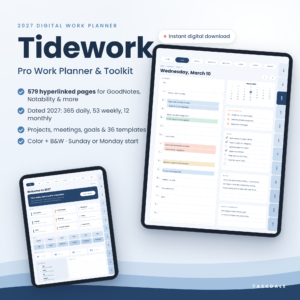
Tidework is a 2027 hyperlinked work planner for GoodNotes, Notability, Noteful and similar apps, in color and minimal black and white editions with Sunday or Monday start. It includes 24 numbered meeting pages with attendees, agenda, notes, decisions and an action items table, plus a meeting index, project pages and a 36-template printable library with meeting agenda, one-on-one and decision log templates. Open the meeting index and number your first recurring meeting.
An e-ink tablet
Best if you want the feel of paper with the tidiness of a file. E-ink tablets are quiet, with no notifications, which suits long meetings. A dedicated meeting notebook with an index means meeting 42 is one tap away.
Inkframe Productivity Suite
Price: $24.99 | Best for: e-ink tablet owners who take meeting notes
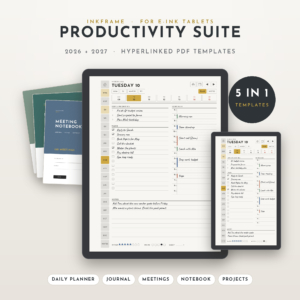
Inkframe is a set of five linked PDFs sized for the Paper Pro, Paper Pro Move and the second-generation Paper e-ink tablets, with tabs kept clear of the toolbar. Its Meeting Notebook holds 150 meetings with three pages each, covering date, attendees, agenda, notes, decisions and action items, plus index pages, a 5-page action item tracker and tables for recurring meetings and key contacts. Load the Meeting Notebook first and log your next meeting from its index.
For more e-ink options, see this guide to the best templates for Paper Pro tablets, and if you use an Android tablet, this walkthrough on setting up a digital planner for Android in Samsung Notes.
Keep the meetings themselves on one calendar
Agendas and actions are only half of it. The meetings have to be on a calendar you trust, alongside client calls, appointments and deadlines. A clash between a board meeting and a dentist appointment is not a planning problem you want to discover at 9:55.
Keep every meeting in one place, with a category so you can see the balance. If a week shows 14 meetings and two hours of free time, that is a calendar to fix, not to admire. Some people block one meeting-free morning a week just to get actual work done, and guard it fiercely.
A spreadsheet calendar such as the Smart Monthly Scheduler in the quick picks lets you log each meeting once and see it on monthly, weekly and year views, with categories and a count of upcoming events. If you work from home, this guide to a work from home planner covers protecting focus time between calls.
Meeting mistakes that waste time
No agenda, just “a catch-up”
Catch-ups expand to fill the hour. Even three bullet points with times change the tone.
Too many people
Everyone invited should either decide something or do something. If someone only needs to know the outcome, send them the decisions list instead.
Actions with no owner
“We should update the website” is a hope. “Tom updates the pricing page by Friday” is an action.
Notes nobody sends
Send the decisions and actions within an hour of the meeting, while memories are fresh. Five lines is enough.
Never checking last week’s list
If the first three minutes of every meeting review open actions, things get done. If they do not, the same items return month after month.
Frequently asked questions
What should a meeting agenda include?
The meeting name, date, time and attendees, then a list of items with how many minutes each one gets and who leads it. Start with a review of last meeting’s actions and end with a recap of decisions.
How do I take good meeting minutes?
Record who attended, short key points per item, a numbered list of decisions and a table of actions with an owner and due date. Skip word-for-word discussion.
How do I track action items from meetings?
Give each action one owner and one due date, keep them on a single list across all meetings, and review open actions at the start of the next meeting. An app that carries actions forward does this automatically.
What is the difference between meeting notes and minutes?
Notes are usually informal and for your own use. Minutes are a cleaner record shared with attendees, focused on decisions and actions, and sometimes approved at the next meeting.
Is there a meeting planner that works offline?
Yes. HuddleKeep is a single HTML file that opens in your browser and keeps notes on your computer, and the Tidework and Inkframe planners are PDF files that work in note apps without a connection.
Who should take notes in a meeting?
Someone other than the person chairing it. The chair keeps time and steers; the note-taker records decisions and actions. Rotating the role each week shares the load.
Your next step
Before your next meeting, write a timed agenda with an opening slot for last week’s actions and a closing recap, and send it the day before. At the end, read every action aloud with an owner and a date. If you want the agenda, minutes and action list in one place on your laptop, set your next meeting up in the HuddleKeep Meeting Planner App.