Two budget planners can look almost identical in the preview images and feel completely different by week three. One has a page for everything you need, right where you expect it. The other has 300 pretty pages and no obvious place to write down that the car insurance went up. The difference is in the features, and most listings do not make them easy to compare.
This guide lists the best budget planner features to look for, split into the must-haves, the ones that make a planner stick, and the extras that are nice but optional. You will also find which features matter for your situation (paid biweekly, paying off debt, sharing with a partner), a side-by-side look at four digital planners, and a short checklist to run before you buy anything.
Quick picks: digital budget planners compared in this guide
| Product | Best for | Price | Link |
|---|---|---|---|
| Petalwise Budget Planner | Fast tab navigation and color-in progress grids | $3.20 | View |
| Steady Budget Planner | A minimal month: one budget page, one log | $2.70 | View |
| Quiet Money Budget Planner | Budgeting one paycheck at a time | $1.95 | View |
| Even Keel Budget Planner | Weekly check-ins and a full monthly routine | $3.49 | View |
First, decide how you will use it
Features only matter once you know the format. A budget planner comes in three main kinds, and each one rewards different features.
- Digital planner (a hyperlinked PDF for GoodNotes, Notability and similar apps): handwriting on a tablet. Navigation and tabs matter most.
- Printable planner: paper in a binder. Page layout, writing space and print sizes matter most.
- Spreadsheet: typing, with automatic totals. Formulas and dashboards matter most.
This guide focuses on planners you write in, digital or printed. If you would rather type and let formulas do the adding, our roundup of the best budget spreadsheets for Excel and Google Sheets compares those instead.
The must-have features
Every budget planner worth buying should have these six pages or sections. If one is missing, you will end up keeping it on a scrap of paper, and scraps get lost.
A monthly budget with plan and actual columns
You write what you expect at the start of the month and what really happened at the end. The gap between the two columns is where all the learning happens. A planner without an “actual” column is a wish list.
A bill tracker with due dates
Name, amount, due date and a paid checkbox. Bonus if it has an autopay column. This one page stops late fees.
A spending log
Somewhere to write each purchase with the date, amount and category. Look for enough lines: a busy household can easily make 50 to 70 purchases a month.
Savings and sinking funds
A page for each goal (emergency fund, holiday, car repairs) with a target and a running total. Sinking funds, money saved monthly for yearly costs, deserve their own page.
A debt tracker
Each debt with balance, rate and minimum, plus a way to show progress. Snowball or avalanche order is a useful extra.
A month-end review
A short page to compare plan with actual and note what to change. This is the page that turns one month’s mistakes into next month’s better plan.
If you only want these six and nothing else, a minimal planner keeps things calm.
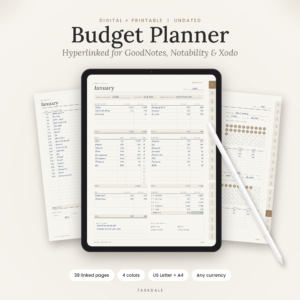
Steady Budget Planner
Price: $2.70 | Best for: beginners who want a minimal month
Steady is a hyperlinked PDF budget planner for GoodNotes, Notability, Xodo and similar apps. Each month gets one budget page with Budget and Actual columns plus one spending log, and thirteen trackers cover bills, savings, sinking funds, debt, subscriptions, net worth and a year review. You get four 39-page versions, including off-white, cream and a charcoal dark mode, plus printable US Letter and A4 files. Start with the bill tracker, then fill in your first month’s budget column.
Features that make a planner stick
The must-haves get you started. These features decide whether you are still opening the planner in April.
Fast navigation
In a digital planner, every page should have tabs to jump to any month and to the main trackers. If finding the bill tracker takes four taps, you will stop checking it. Two taps or fewer is the goal.
Undated pages
An undated planner lets you start in any month and pick up again after a gap without wasted pages. If you have ever abandoned a dated planner in March and felt guilty about the blank months, you know why this matters.
A weekly check-in
A small weekly card (planned, spent, left) keeps the budget in your head between month ends. Two minutes a week is easier to keep than a long monthly session.
Room to write
Lines that are too narrow or tables too small make handwriting messy, and messy pages feel like failure. Look at the preview images at full size before you buy.
Visual progress
Color-in grids, progress bars or shade-in charts for savings and debt. Coloring in one more square after a debt payment sounds small. It is a real lift on a tired day.
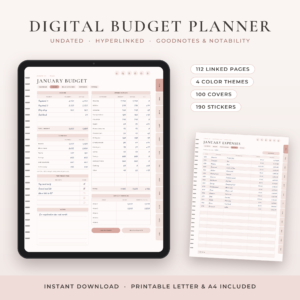
Petalwise Budget Planner
Price: $3.20 | Best for: tablet users who want two-tap navigation
Petalwise is an undated hyperlinked budget planner for GoodNotes, Notability, Noteshelf and Xodo on iPad and Android tablets. You get four 112-page versions in Blush, Sand, Mist and Sage, each with month tabs down the side and icons across the top, plus a six-page routine for every month and color-in progress grids for debt and savings. It also includes 100 covers, 190 stickers and a printable edition in US Letter and A4. Pick a color, then start with the current month’s calendar.
Nice extras, and when they become clutter
Extras can make a planner more pleasant. They can also bury the useful pages. Here is how to tell the difference.
| Extra | Helpful when | Clutter when |
|---|---|---|
| Stickers and covers | Decorating keeps you coming back | You spend more time styling than budgeting |
| Multiple color themes | You want a calm look or a dark mode | You switch themes instead of starting |
| Net worth tracker | You have debts and assets to watch | You are still learning to track spending |
| Savings challenges | A game helps you save | You already save automatically |
| Hundreds of pages | Each month has a full routine | You cannot find the page you need |
| Investing pages | You already invest and want it in one place | You have no emergency fund yet |
A big page count is not a bad sign on its own. A planner with 277 pages where you only touch three or four a week can be simpler in practice than a 60-page planner with no tabs. What matters is how many pages you use and how fast you reach them.
Features that matter for your situation
Paid weekly or every two weeks
Look for a paycheck planner: a page or card for each check that lists the bills it covers and what is left. Monthly-only planners leave biweekly earners guessing which check pays rent. Four or five paycheck cards a month is ideal.
Paying off debt
Look for a debt overview page, a snowball or avalanche order, and a progress chart you can color in. A page per debt is useful if you have several.
Couples and families
Look for room for two incomes, a shared bill tracker and space for personal spending money per person. Printable versions help if one partner prefers paper.
Irregular income
Look for an income tracker and a side income page, so you can see each payment as it lands. Undated pages are a must.
Any currency
If you do not use dollars, check that money fields do not have a printed $ sign. Planners that say “Amount” or “Plan” instead work anywhere.
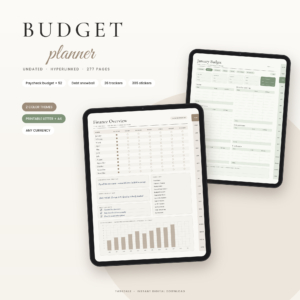
Quiet Money Budget Planner
Price: $1.95 | Best for: people paid weekly or every two weeks
Quiet Money is an undated digital budget planner built around paychecks, with 277 hyperlinked pages, though most weeks you only use three or four. You set a plan once on a Budget Blueprint page, with a 50/30/20 helper if you want one, then plan, track and review each paycheck and month. Money fields say Amount, Plan or Actual, so it works in any currency, and printable US Letter and A4 versions are included. Begin on the Budget Blueprint page.
Four digital planners, feature by feature
Here is how the four planners in this guide line up on the features above, based on their listings.
| Feature | Steady | Petalwise | Quiet Money | Even Keel |
|---|---|---|---|---|
| Pages | 39 per version | 112 per version | 277 | 148 |
| Undated | Not stated | Yes | Yes | Yes |
| Paycheck planning | Monthly focus | Six-page monthly routine | Built around paychecks | Paycheck Planner each month |
| Weekly check-ins | Not stated | Not stated | Not stated | Five cards a month |
| Dark mode | Charcoal version | Not stated | Not stated | Night Mode |
| Printable version | Letter and A4 | Letter and A4 | Letter and A4 | Letter and A4 |
| Best for | Keeping it minimal | Fast navigation | Paycheck budgeting | A full weekly habit |
If you are unsure, think about your week. Someone who wants to check in for two minutes every Sunday will love a planner with weekly cards. Someone who only wants to sit down at month end is better off with a lean layout.
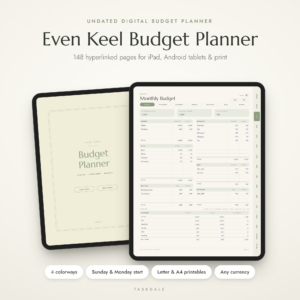
Even Keel Budget Planner
Price: $3.49 | Best for: people who want a weekly money habit
Even Keel is an undated, hyperlinked budget planner for iPad and Android with 148 linked pages. Every month has seven pages: Monthly Budget, Paycheck Planner, Money Calendar, five Weekly Check-in cards, a 66-line Spending Log, Bill Tracker and Month in Review. There are 22 extra trackers, four colorways including Night Mode, Sunday or Monday starts, printable Letter and A4 versions and a Word user guide. Start with the current month’s Paycheck Planner.
For a wider look across spreadsheets, printables and digital planners, our comparison of budget planner templates covers ten options side by side.
A 10-point checklist before you buy
Run any budget planner through these questions. If you can answer yes to eight or more, it is a good fit.
- Does it work in the app or format I already use?
- Does the monthly budget have plan and actual columns?
- Is there a bill tracker with due dates?
- Is there enough room in the spending log for my month?
- Are there savings, sinking fund and debt pages?
- Can I reach any month and any tracker in two taps?
- Is it undated, or does it start when I want to start?
- Does it fit how I am paid (monthly, biweekly, weekly)?
- Is there a short review page each month?
- Does it include a guide or sample page so I know how to start?
That last one matters more than people think. A good start page that says “fill this in first” saves a lot of first-night confusion.
Test-drive it in your first week
Features look good on a listing. The real test is how a planner feels with your own numbers in it. Give any new planner a seven-day trial before you decide it is the one.
- Day 1: fill in the bill tracker and the monthly budget’s plan column. If this takes more than 45 minutes, the layout may be fighting you.
- Days 2 to 6: log every purchase the same day. Notice whether the spending log is quick to reach and has room for your handwriting.
- Day 7: do a short check-in. Can you see, in under two minutes, how much is left this month?
Pay attention to small irritations. A tab that does not quite land where you expect. A table where the amount column is too narrow for $1,250.00. These grow from mild to maddening by week four. On the other hand, if you catch yourself opening the planner when you do not strictly need to, just to look, that is a very good sign.
Ruth, a retired nurse, tried two digital planners side by side for a week in GoodNotes. Both had every feature she wanted on paper. She kept the one where the bill tracker was one tap from every page, because she checked bills daily and spending only twice a week. A detail like that never shows up in a feature list, but it decided everything.
Red flags in a budget planner listing
- Only decorative previews. If you cannot see the actual budget page, ask why.
- No mention of the apps it works in. A digital planner should name them.
- Dated pages that started months ago. You will lose pages before you begin.
- No bill tracker. This is a core page, not an extra.
- Tiny tables. Zoom in on the preview. If the lines look cramped on screen, they will feel worse with a stylus.
Want to see more digital options before deciding? Our guide to digital budget planners for GoodNotes and iPad goes deeper on tablet setup.
Frequently asked questions
What should a good budget planner include?
A monthly budget with plan and actual columns, a bill tracker, a spending log, savings and sinking fund pages, a debt tracker and a month-end review.
Is a digital budget planner better than a printable one?
Neither is better for everyone. Digital suits tablet users who want tabs and no paper. Printable suits people who like a binder on the counter. Many planners include both.
Do I need a paycheck planner page?
If you are paid weekly or every two weeks, yes. It shows which check covers which bills and stops the guesswork.
Are undated budget planners better?
For most people, yes. You can start any month and restart after a break without wasting pages.
How many pages should a budget planner have?
Page count matters less than navigation. A large planner with good tabs can feel simpler than a small one without them.
Your next step
Write down how you are paid and which device you will use, then run your top two choices through the 10-point checklist above. Whichever scores higher wins. If you are paid every two weeks and like a weekly check-in, start with the Even Keel Budget Planner.