Plenty of budget templates are impressive. Thirty tabs, twelve charts, a net worth graph, investment returns, a habit tracker in the corner. Then you open it on a Tuesday night to log a $23 grocery run and cannot remember which tab it goes in. Impressive does not get used. Simple does.
This guide is about the budget template that keeps it simple: what simple really means, a four-number method you can run on any template, which features to switch off at first, and a weekly routine short enough to keep. You will also see a worked example and how to tell when you have outgrown simple. If you have quit two or three budgets before, start here.
Quick picks: simple budget templates
| Product | Best for | Price | Link |
|---|---|---|---|
| Budget Planner Spreadsheet for Excel and Google Sheets | One list for every transaction | $2.00 | View |
| Cashcove Budget Planner for Google Sheets | Entering recurring bills once for the year | $26.00 | View |
| Seaglass Annual Budget Spreadsheet for Excel | A 15-minute setup in desktop Excel | Original price was: $19.99.$9.99Current price is: $9.99. | View |
| Ultimate Annual Budget Spreadsheet | Filling only a few colored cells | $6.00 | View |
What “simple” means in a budget template
Simple does not mean basic. A simple template can do a lot of maths behind the scenes. What matters is how little it asks of you. Look for five traits.
- One place to type spending. A single transactions list, not twelve monthly tabs you have to find.
- Set-once setup. Recurring bills and paychecks entered once, then filled in for the whole year.
- Locked formulas. Input cells are colored, everything else is protected, so a stray keystroke cannot break a total.
- One headline number. “Left to spend” or “safe to spend today” right at the top.
- A short category list. Ten to fifteen lines, editable, not fifty.
A template with all five can have 25 tabs and still feel simple, because you only ever touch two of them. A template with none can have three tabs and feel like a chore.
The four-number budget
If you want the simplest method that still works, track just four numbers each month. Any template can run this. So can the back of an envelope.
- Income: what lands in your account this month.
- Fixed bills: rent, utilities, phone, insurance, loan payments, subscriptions.
- Savings: a set amount moved out on payday.
- Everything else: income minus bills minus savings.
Then divide “everything else” by the number of weeks in the month. That is your weekly spending number, and it is the only figure you need to watch day to day.
A worked example
Hannah teaches at a middle school and takes home $3,900 a month. Her fixed bills come to $2,050: rent $1,350, utilities $160, phone $50, car insurance $110, student loan $240, subscriptions $40 and renter’s insurance $100 split into monthly pieces. She saves $400 on payday.
| Number | Amount |
|---|---|
| Income | $3,900 |
| Fixed bills | $2,050 |
| Savings | $400 |
| Everything else | $1,450 |
| Weekly spending number (about 4.3 weeks) | About $335 |
Groceries, fuel, eating out, clothes, gifts, a haircut: they all come out of $335 a week. If she spends $290 one week, the extra $45 rolls forward. If she spends $380, next week is a little tighter. No categories to juggle. Just one number.
Hannah had tried a 40-category budget twice and dropped both by February. The four-number version has lasted since August. She says the relief came from finally knowing, on a Wednesday, whether a $30 dinner was fine. It usually was.
Here is how her first month went, week by week.
| Week | Spent | Against $335 | What happened |
|---|---|---|---|
| 1 | $310 | $25 under | Big grocery shop, quiet weekend |
| 2 | $372 | $37 over | Friend’s birthday dinner and a gift |
| 3 | $296 | $39 under | Cooked at home, packed lunches |
| 4 | $341 | $6 over | Fuel plus a haircut |
| Last 2 days | $118 | Small top-up shop | |
| Month | $1,437 | $13 left | Moved to savings |
Two weeks over, two under, and the month still landed inside the plan. That is how a weekly number works in real life. It bends without breaking.
When paydays do not line up with the month
Paid every two weeks? Run the same four numbers per paycheck instead of per month. Take one check, subtract the bills due before the next one, subtract that check’s share of savings, and divide what is left by two. That is your weekly number for the next two weeks of spending.
Two months a year bring a third paycheck. Do not fold it into everyday spending. Give it one job ahead of time, like an extra debt payment or a holiday fund, and enjoy watching it land there.
Pick a template where you type less
The fastest way to tell whether a template will stay simple is to count where you type. If logging a purchase means finding the right month tab, then the right category row, then the right day column, it will get skipped. If it means adding one row to one list, you will keep doing it.
A single transactions sheet also makes your phone useful. Open the file, add a line with the date, amount and category, close it. Thirty seconds, standing in the parking lot.
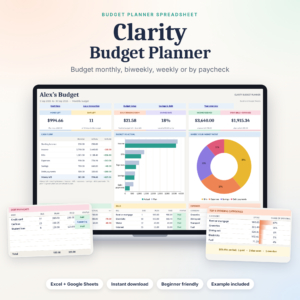
Budget Planner Spreadsheet
Price: $2.00 | Best for: beginners who want one list to type into
This budget spreadsheet for Excel and Google Sheets keeps all your purchases, paychecks and payments on one Transactions sheet. The dashboard shows six live cards, including money left, days left and daily spending room, and bills mark themselves as Paid, Due soon, Upcoming or Overdue. It works monthly, weekly, biweekly or payday to payday; change one date to start the next period. Begin by typing your symbol and your fixed bills, then log one week of spending.
Set it up once, not every month
Rebuilding a budget on the 1st of every month is where many people quit. Copy the tab, retype the bills, fix the formulas, adjust the dates. It takes 40 minutes and feels like homework. A simple template does that for you.
Look for templates where you enter your rent, phone bill, paychecks and subscriptions once, with their dates and how often they repeat. The template then places them in every month for the whole year. You only touch a bill again when its price changes. That alone can cut monthly upkeep from 40 minutes to about five.
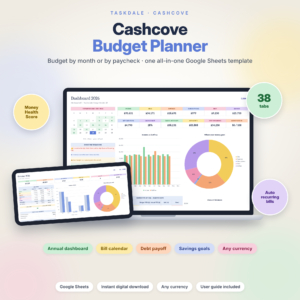
Cashcove Budget Planner
Price: $26.00 | Best for: Google Sheets users tired of retyping bills
Cashcove is a Google Sheets budget planner where a default monthly budget fills all twelve months and you can change any single month. Paychecks, rent, utilities, subscriptions, debt payments and savings are entered once and scheduled for the year. You can budget by month or by paycheck, and it suggests a plan for each pay period. It runs on standard formulas, with no scripts or add-ons to approve. Set up your accounts and recurring items first.
What to enter on setup night
Give yourself one evening, about an hour, and enter only these:
- Your take-home pay and payday pattern
- Every fixed bill with its amount and due day
- One savings line with a monthly amount
- Ten to fifteen spending categories, using the template’s defaults where they fit
- Your starting bank balance
Stop there. Do not log last month’s receipts or set up every goal you have. The first real log of this week’s spending is the moment the template comes alive, and it is a surprisingly satisfying one.
Features to switch off at first
Many good templates include extras that are great later and distracting now. In your first two months, feel free to ignore:
- Net worth tracking. Lovely once you have a rhythm. Not needed to stop overspending.
- Investment or retirement projections. Separate topic, separate day.
- Detailed subcategories. “Groceries” is enough. You do not need “dairy” and “snacks.”
- Savings challenges. Fun, but one savings line is plenty to begin.
- Multiple accounts. Start with your main checking account and one card. Add others in month three.
Ignoring these is not cheating. It is pacing. Once the weekly habit is solid, switch features on one at a time. Watching a debt payoff date move closer is far more motivating when you are not also wrestling with five other tabs.
When you are ready for more, our guide on what a budget dashboard should show explains which charts are worth adding first.
Excel or Google Sheets for a simple budget?
Both are fine. Choose based on where you already work.
Google Sheets suits you if
You want to log spending on your phone, share the budget with a partner, or switch between computers. It is free with a Google account, and edits sync straight away. Our guide on setting up a Google Sheets budget template in one evening covers the first-night setup.
Not sure yet? Some templates, such as the Ultimate Annual Budget Spreadsheet, run in Excel, Google Sheets and LibreOffice, so you can start in one and move to another later without rebuilding anything.
Excel suits you if
You already use Excel at work, you like having the file on your own computer, or you prefer a desktop app to a browser tab. A well-built Excel budget can be just as simple as a Sheets one.
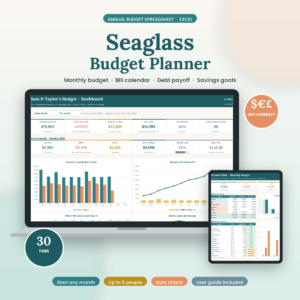
Seaglass Annual Budget Spreadsheet
Price: Original price was: $19.99.$9.99Current price is: $9.99. | Best for: Excel users who want a quick setup
Seaglass is an annual budget spreadsheet for Excel with 30 tabs and a Start Here menu, set up in about 15 minutes. You give it your categories and budgets, your recurring paychecks and bills, and your everyday spending, and it fills all twelve months, the dashboard and the bill calendar. Tick a bill as paid and everything updates. It arrives blank, so start with the setup and log a couple of times a week.
How people turn a simple budget into a complicated one
Most budgets do not start complicated. They drift there, one good idea at a time. Watch out for these.
Adding a category for every purchase
A $12 phone case does not need a “tech accessories” line. Put it under personal. Each new category is one more thing to check every week.
Tracking cash to the cent
If you pay cash for a $4.75 coffee, logging $5 is fine. Rounding to the nearest dollar saves time and changes almost nothing in the totals.
Rebuilding after a bad month
A messy month is not a reason for a new template. Keep the same file, adjust one or two numbers, carry on. A fresh start every few months means you never learn your real patterns.
Chasing the perfect template
It is easy to spend three weekends comparing templates instead of using one. Pick one that has the five traits above, set it up, and give it eight weeks. Almost any decent template beats the perfect one you have not started.
A 10-minute weekly routine
Simple templates still need a habit. Here is one that takes ten minutes, once a week.
- Log the week. Add any purchases you missed. Your bank app helps.
- Check the headline number. How much is left for this week and this month?
- Tick off paid bills. Look at what is due in the next seven days.
- Adjust one thing if needed. Over on eating out? Plan two home dinners. Under? Move $20 to savings.
Pick a time you already sit down: Sunday coffee, Friday lunch, the bus home on Thursday. Keep the same slot for a month and it stops feeling like effort.
When simple is no longer enough
Simple is a starting point, not a ceiling. Some signs it is time to add detail:
- “Everything else” keeps running out, and you cannot tell why. Split out groceries and eating out first.
- You have a debt you want gone by a specific date. Turn on the debt payoff tab.
- Big yearly costs keep catching you out. Add sinking funds for each one.
- You want to plan the whole coming year. Our guide to planning next year with an annual budget template is a good next step.
Add one layer at a time, and only when a real problem calls for it. The aim is still a budget you open every week.
Frequently asked questions
What is the simplest budget method?
The four-number budget: income, fixed bills, savings and everything else. Divide everything else by the weeks in the month to get a weekly spending number.
How many tabs should a simple budget template have?
The number of tabs matters less than how many you use. A simple template asks you to type in one or two places and calculates the rest.
Is a simple budget template good for beginners?
Yes. Beginners are more likely to keep a budget that needs a few minutes a week than one with dozens of categories and tabs.
Can I use a simple budget template on my phone?
If it works in Google Sheets, yes. Log spending in the free Sheets app and check the dashboard on the go. Setup is easier on a computer.
What should a simple budget template include?
One place to log spending, recurring bills entered once, locked formulas, a short editable category list and a clear left-to-spend number at the top.
How do I keep a budget template from getting complicated?
Keep 10 to 15 categories, ignore extra features for the first two months, and only add detail when a real problem shows up.
Your next step
Tonight, work out your four numbers: income, fixed bills, savings and everything else. Divide the last one by four and a bit, and write your weekly spending number on a sticky note. Watch it for one week. When you want the template to do the counting, start with the Budget Planner Spreadsheet for Excel and Google Sheets and its single transactions list.