Count the apps you use to run your life. A calendar, a to-do app, a budgeting app you stopped opening in spring, a habit tracker, a notes app with a grocery list from 2025. A life planner spreadsheet pulls all of that into one file. Log a coffee once and it shows up in your budget and your dashboard. Add a dentist appointment and it lands on your calendar. No logins, no subscriptions.
These “life OS” spreadsheets have become popular for a reason, but they’re not all built the same. Below are four on Taskdale, each with a different strength, and a plain answer on which one fits which kind of life.
What a good life planner spreadsheet should do
- Type once, see it everywhere. One entry should feed the budget, calendar and dashboard. If you’re copying numbers between tabs, it’s just a pretty notebook.
- Work in Excel and Google Sheets. All four here do.
- Come with an example file. Seeing a filled-in version first makes setup much less scary.
- Be hard to break. Protected or clearly marked formula cells save a lot of tears.
1. Linen Life OS: calm, balanced and good for learners
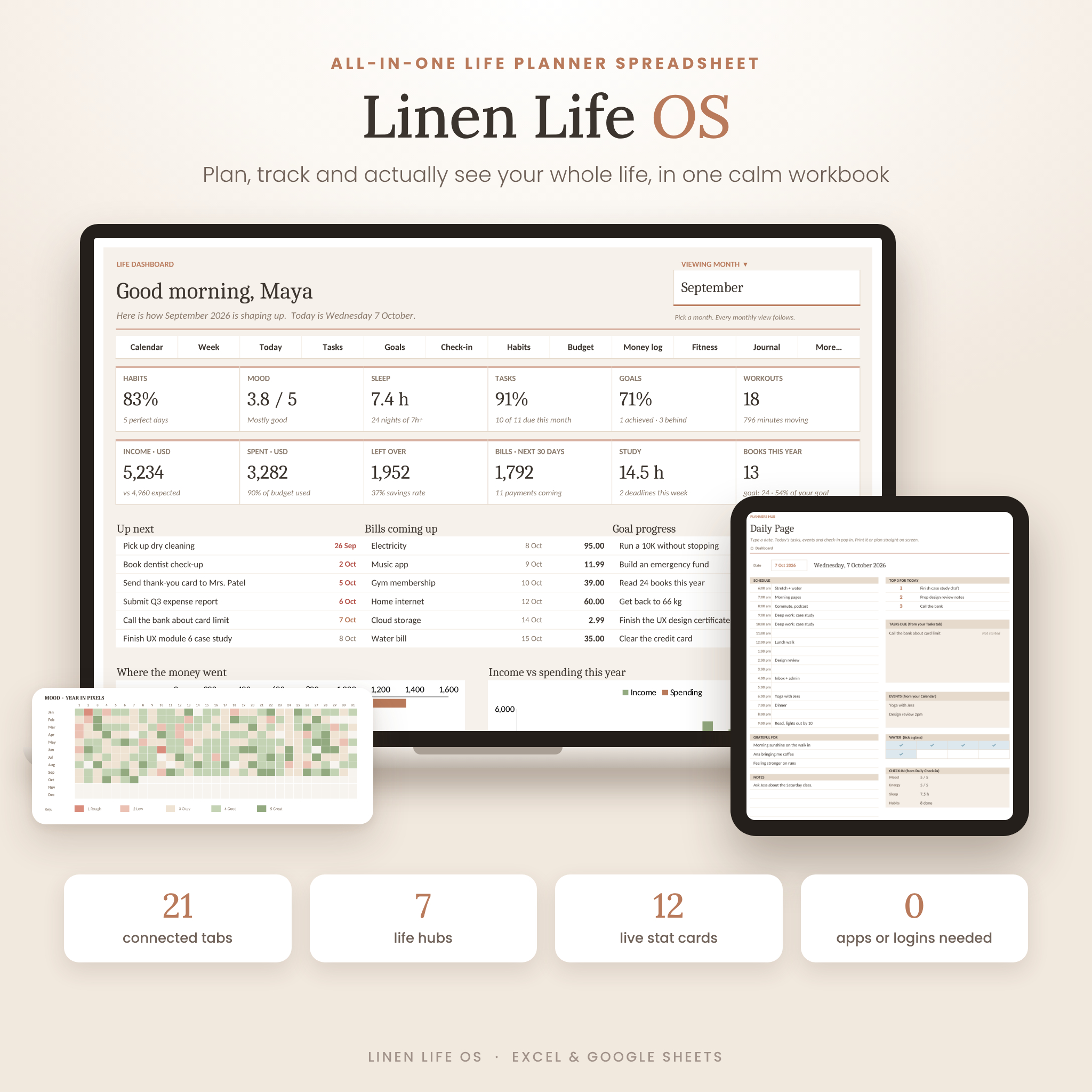
Linen Life OS has 21 tabs in 7 life hubs, held together by around 5,700 formulas. The dashboard shows 12 live stat cards (habits, mood, sleep, tasks, goals, workouts, income, spending, savings, bills, study hours and books) and four charts. Pick a month and everything follows.
It covers planners (a monthly calendar that builds itself, a weekly plan, a daily page from 6am to 9pm), tasks with Overdue and Due soon flags, goals with On track or Behind status, a daily check-in with eight renamable habits, a habit heat-map, a budget with 15 categories fed by up to 600 transactions, bills that roll forward, savings and a debt-free date calculator, fitness, meals with a grocery list, a journal with a daily prompt, a reading and watch list, and a Learning tab for courses, assignments, exams and study hours.
The rule is simple: white boxes are for you, tinted boxes fill themselves in. It’s undated, and every tab has a print layout.
Best for: students and professionals who want a calm, all-round system, and anyone who got stuck setting up Notion.
2. Noir Life OS: the deepest, with a dark mode
Noir Life OS is the biggest of the four: 32 tabs in 6 sections and over 11,000 formulas. Its dashboard greets you by name and shows 16 live tiles, from tasks due today to distance to goal weight, savings rate and next trip.
The depth shows in the extra sections. A Student hub with live weighted grades, a class timetable, flashcards with review dates and a job applications tracker. A Travel section with trip countdowns, bookings, an itinerary and a 32-item packing list. Fitness goes further too, with a 28-exercise library with how-to video links, strength sets with estimated one-rep max, and body tracking with BMI. Finance includes a 50/30/20 check and a snowball debt payoff planner.
You get Dark mode for screens and Light mode for printing, plus a demo file full of sample data.
Best for: students, gym-goers and travellers who want everything, and anyone who prefers a dark screen.
3. Linden Life Organizer: family life and paycheck budgets
Linden has 28 tabs and is built around a household. You can budget by month or by paycheck: type your pay dates and every budget scales to that period. Bills roll forward on any schedule (weekly, every two weeks, monthly, quarterly, twice a year or yearly), and a daily allowance tells you what a normal day can cost. Debt payoff shows snowball and avalanche order side by side.
The home side is clever. The meal planner builds a grocery list that adds up quantities and takes off what’s already in your pantry. The cleaning schedule never resets: type the date you last did a chore and it tells you when it’s next due and who’s on it. A smart calendar fills itself with bills, tasks, routines, events and chores, and the Week Ahead tab shows the next seven days. You can start in any month.
Best for: busy parents and paycheck-to-paycheck budgeters. It also opens in older Excel (2010 or newer on Windows) and LibreOffice Calc.
4. Daybloom Life Planner: money-first and fully undated
Daybloom Life Planner has 27 linked tabs and leans hardest on money. A 1,000-row money log feeds a budget with plan versus actual and a “safe to spend per day” number, plus bills and subscriptions, 10 savings goals, debt payoff dates with snowball or avalanche order, a month-by-month net worth tab and an annual money view.
Beyond money: 120 task rows with a priority matrix, recurring jobs, a smart calendar, a half-hour week plan, 20 habits with live streaks, a self-rescheduling cleaning schedule, goals with five dated steps, a quarterly life balance wheel, a weekly review with a score trend, and meals that build a grocery list by aisle. It follows today’s date, so the same file keeps working year after year. Setup takes about two minutes, and there’s a 35-page guide.
Best for: anyone whose main goal is getting their money sorted, with life planning alongside.
Which life planner spreadsheet should you choose?
| You want… | Pick |
|---|---|
| A calm, balanced system with study tracking | Linen Life OS |
| Everything, plus travel, fitness depth and dark mode | Noir Life OS |
| Paycheck budgets, meals and family chores | Linden |
| Money first: safe-to-spend, net worth, debt | Daybloom |
If you’re new to spreadsheets, Linen or Daybloom are the gentlest starts. Noir is brilliant but has the most to explore.
FAQ
Do I need to know Excel formulas?
No. All four are built so you type in marked cells and pick from dropdowns. The formulas run in the background, and each comes with an example file and a user guide.
Can I use a life planner spreadsheet on my phone?
Yes, through the Excel or Google Sheets app, which works well for quick logging. Setup and big reviews are easier on a computer.
Is a spreadsheet better than Notion for life planning?
Spreadsheets are stronger on numbers: budgets, totals, streaks and charts work out on their own. Notion is better for long notes and linked pages. If money and habits matter most to you, a spreadsheet is usually the better fit.