


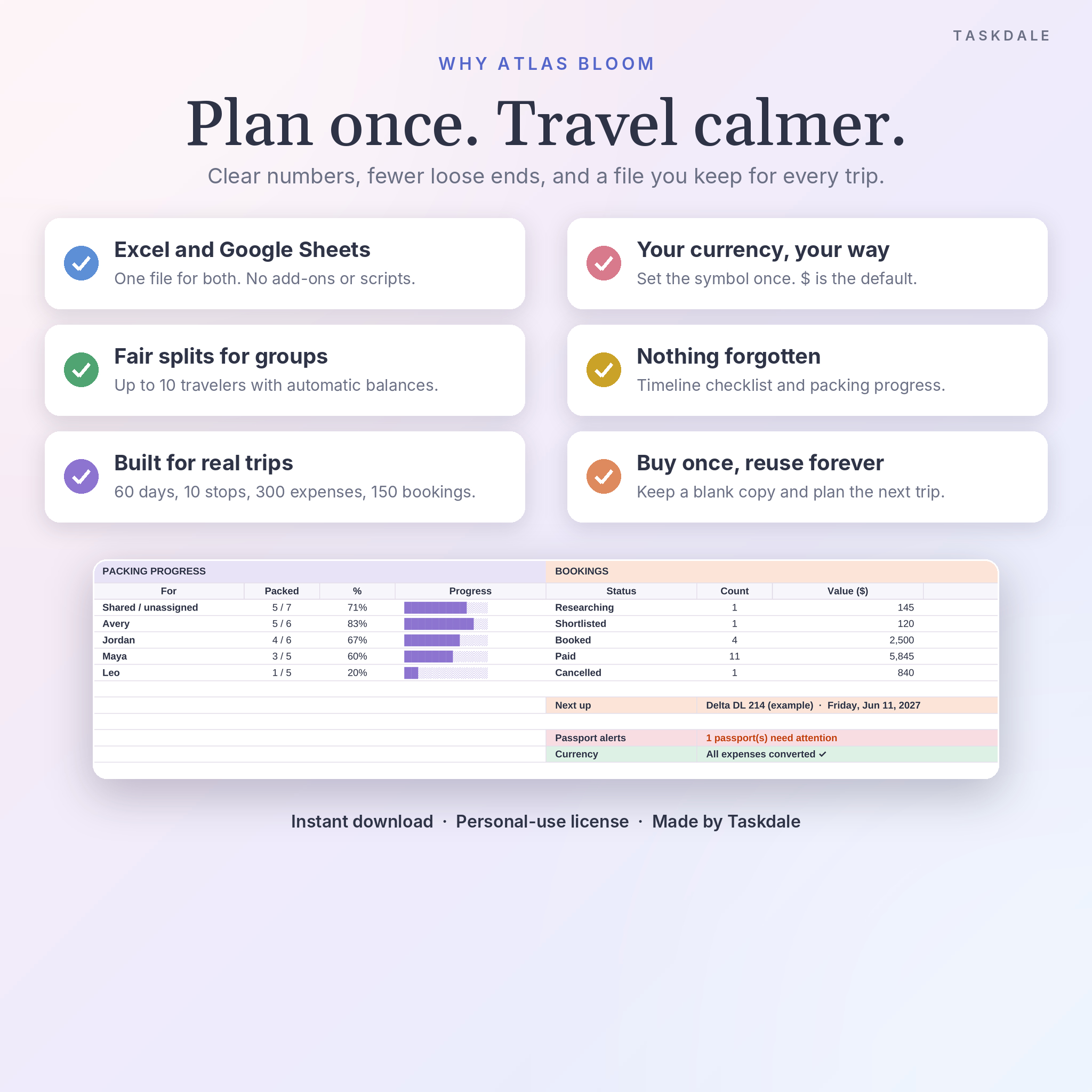
This travel planner spreadsheet keeps your whole trip in one file: the budget, every booking, a day-by-day itinerary, packing lists for each traveler, and a running tally of who paid for what. It opens in Microsoft Excel and Google Sheets. You fill in the white cells. The formulas handle the rest, and the dashboard updates while you type.
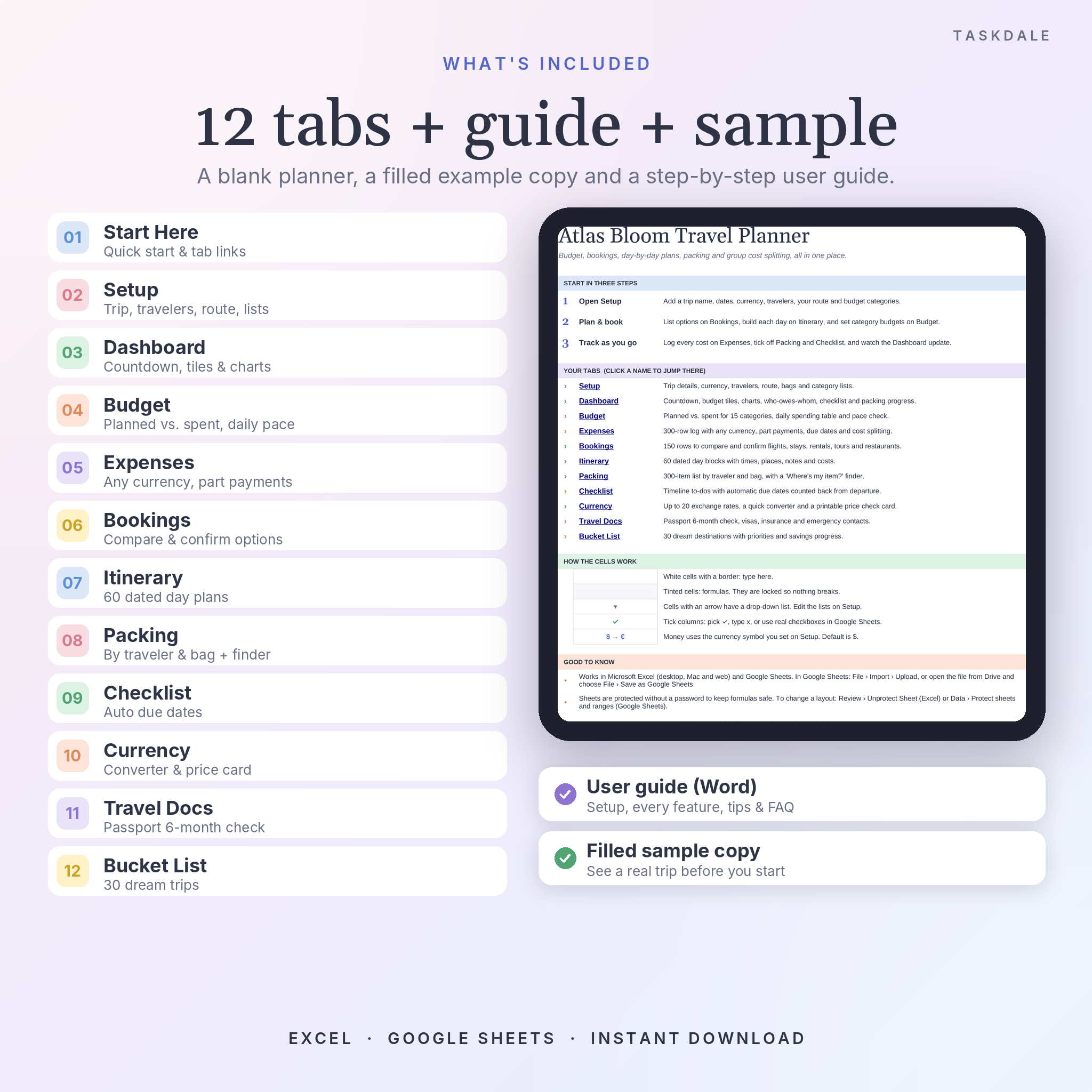
Atlas Bloom has 12 connected tabs in a soft pastel design that’s easy on the eyes. It comes with a blank copy, a filled sample trip so you can see how it all works, and a step-by-step user guide.
What this travel planner spreadsheet does for you
Planning a trip usually means juggling booking emails, a notes app, a currency app, and a group chat full of “who paid for dinner?” This brings all of that together. Set your dates and currency once on the Setup tab. From there the countdown starts, the itinerary dates fill in, checklist due dates count back from departure, and every money label uses your currency.
Main features
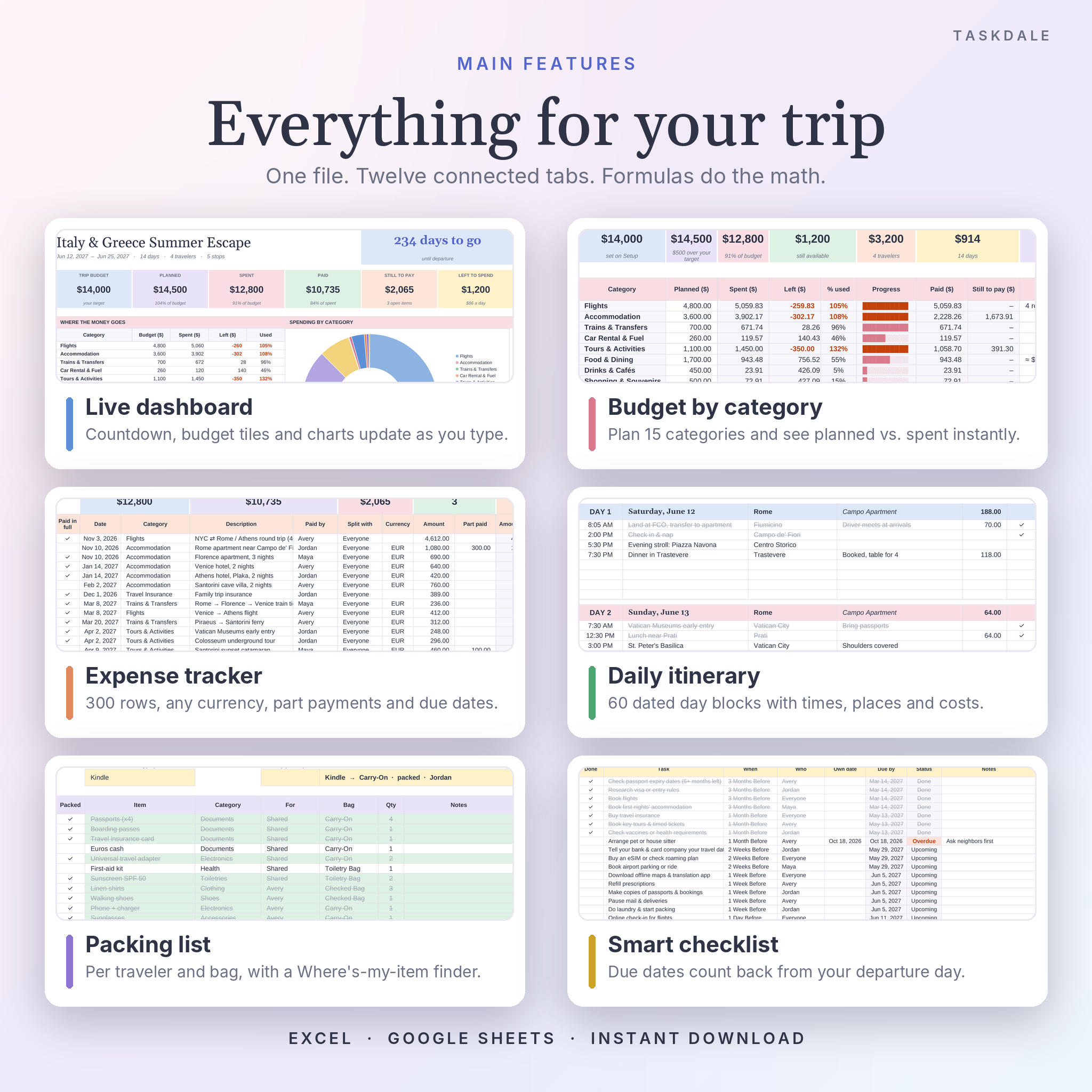
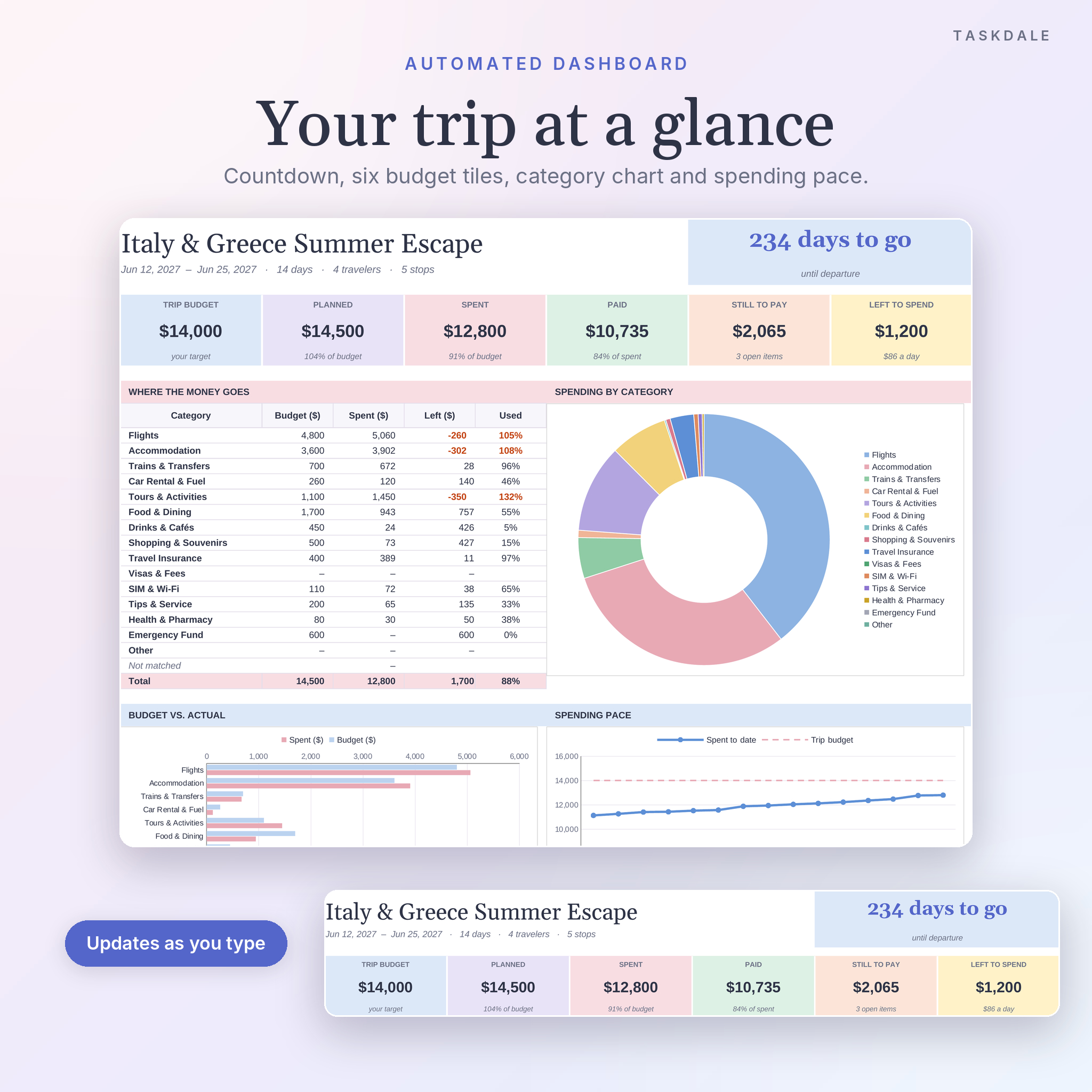
- Live trip dashboard: countdown, six budget tiles (budget, planned, spent, paid, still to pay, left to spend), a spending-by-category donut, budget vs. actual bars and a spending pace chart.
- Travel budget tracker: 15 editable categories with planned, spent, paid and remaining amounts. Categories that go over budget turn red.
- Expense log for 300 costs: any currency, deposits and part payments, due dates, and a status for each row (Paid, Part paid, Unpaid, Overdue).
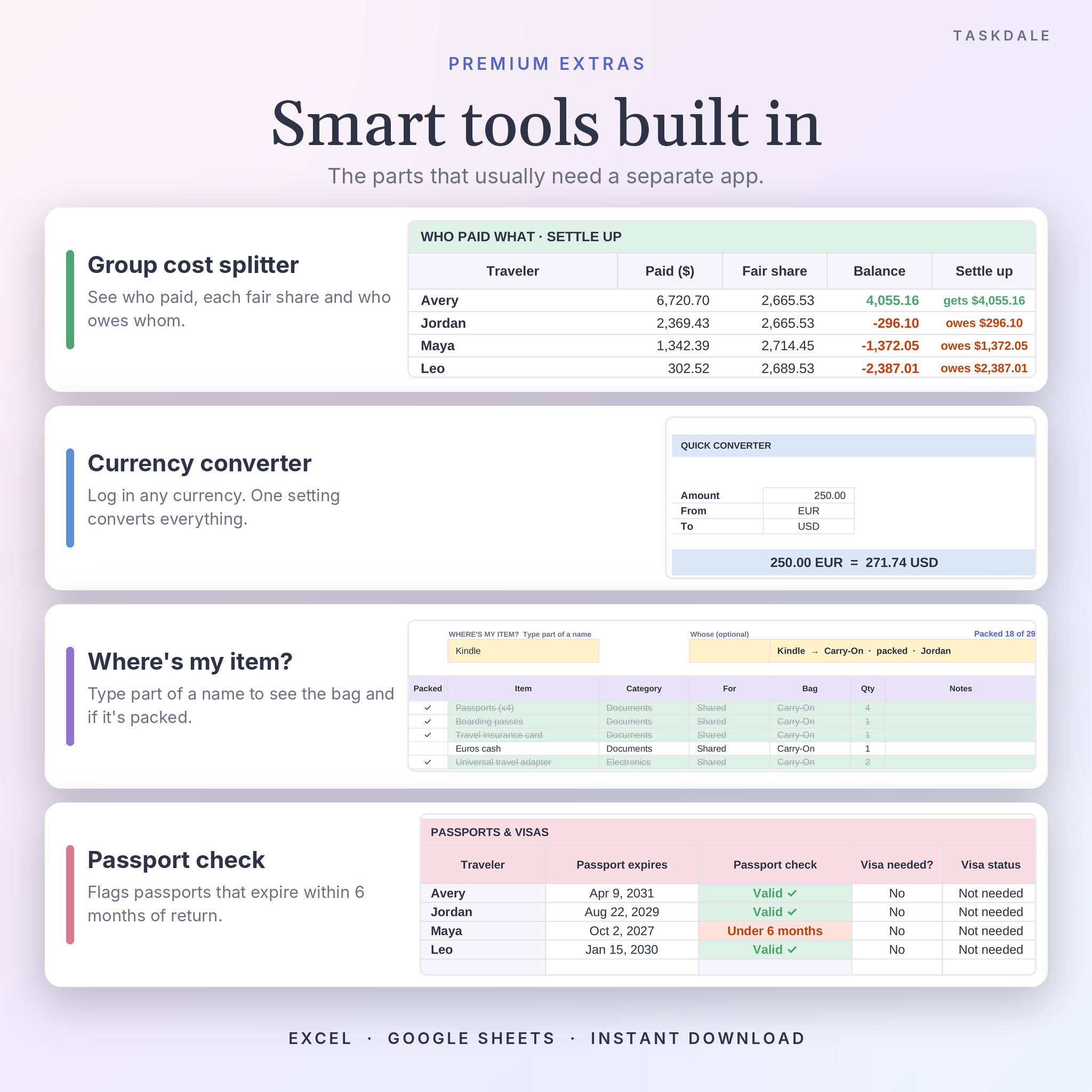
- Group expense splitter: up to 10 travelers. Mark costs as shared or personal and see each person’s fair share, their balance, and who owes whom.
- Research and bookings tracker: 150 rows for flights, trains, ferries, hotels, rentals, tours and restaurants. Compare options, then mark them Shortlisted, Booked or Paid. The next booking shows at the top.
- Daily itinerary: 60 dated day blocks with times, activities, places, notes and estimated costs.
- Packing list with an item finder: 300 items by traveler and bag. Type part of an item name to see which bag it’s in and whether it’s packed.
- Timeline checklist: tasks grouped from 3 months before to after the trip. Due dates are set for you from your departure date. Overdue tasks turn red.
- Currency converter: rates for up to 19 currencies, a quick converter, and a printable price check card for shopping abroad.
- Travel documents tab: a passport check that flags passports expiring within 6 months of your return, plus visa status, insurance details and 20 important contacts.
- Travel bucket list (bonus): 30 dream destinations with priority, target year and a savings progress bar.
Who it’s for
It suits families, couples and friend groups who share costs, and solo travelers who want a clear budget. It works for a weekend city break, a two-week multi-country route or a 60-day backpacking trip. If you’ve ever come home and spent an evening working out who owes whom, the settle-up table will feel like a small gift.
What’s included
- Atlas Bloom Travel Planner (.xlsx), blank and ready to use, with 35 starter packing items and 27 starter checklist tasks
- Filled sample copy (.xlsx) with a 14-day Italy and Greece trip for reference
- User guide (.docx): setup, every tab explained, tips, troubleshooting and FAQ
How it works
- Download your files right after checkout.
- Open the .xlsx in Excel. For Google Sheets, upload it to Google Drive, open it, and choose File, Save as Google Sheets.
- Fill in Setup: trip name, dates, currency, travelers, route and budget categories.
- Plan and track: add bookings, build each day, log costs, tick off packing and to-dos. Then check the dashboard.
File formats and software requirements
One .xlsx file that works in Microsoft Excel and Google Sheets (a free Google account is all you need). It uses long-standing functions like SUMIFS, COUNTIFS and INDEX/MATCH, so there are no macros, scripts or add-ons to install. Setup is easiest on a computer. Once it’s saved as a Google Sheet, you can make quick updates in the Google Sheets app on your phone. The guide is a Word .docx file.
Customization
Change the currency symbol and code once, and every money label follows. The $ sign is the default. Rename travelers, bags, budget categories and packing groups on Setup and the drop-downs update. Formula cells are locked without a password so nothing breaks by accident. You can still change colors and fonts, and unlock a tab any time if you want to change the layout. In Google Sheets, tick columns can be turned into real checkboxes, and the formulas already read them.
Digital download
This is an instant digital download. Nothing is shipped. Your files are available on the order confirmation page and in your account as soon as payment goes through.
Ways people use it
- A family summer trip where two parents pay for different things and want one clean total.
- A bachelorette or birthday weekend with eight friends splitting the rental, dinners and activities.
- A honeymoon across three countries, with costs in dollars, euros and pounds.
- A study abroad semester or long backpacking route, tracked day by day against a fixed budget.
- A road trip with a shortlist of rentals, booked campsites and a shared packing list.
Frequently asked questions
Does this travel planner work in Google Sheets?
Yes. Upload the .xlsx to Google Drive and save it as a Google Sheet. Formulas, drop-downs, colors and charts carry over.
Can I use it in Excel?
Yes. It’s a standard .xlsx file. Double-click to open it in Excel and start on the Setup tab.
Can I use my own currency?
Yes. Type any symbol and code on Setup. You can also log costs in up to 19 other currencies, and they’re converted with the rates you enter.
How does the expense splitter work?
Each cost has a Paid by name and a Split with setting (everyone, or one person). The dashboard shows each traveler’s fair share and balance, so you can see who owes money and who gets money back.
How many days, travelers and expenses does it hold?
60 itinerary days, 10 travelers, 10 route stops, 300 expenses, 150 bookings, 300 packing items, 150 checklist tasks and 30 bucket list places.
Can I reuse it for future trips?
Yes. Keep a blank copy and duplicate it for each new trip.
Is it editable?
Every input cell is editable. Formula cells are locked without a password to protect the math, and you can unlock them if you need to.
License
Personal use only. You may use and edit the planner for your own trips. Please don’t resell, share, upload or redistribute the file or any part of it. The sample trip and names are made up for demonstration.
Reviews
There are no reviews yet.